Virtual machines running on shared infrastructure require us to put our trust in the hypervisor of a third party. A bare metal hypervisor, installed directly on physical hardware, runs as a Type 1 hypervisor. This means there is no host OS, which would consume resources and introduce attack surface.
For teams running latency-sensitive workloads, high-density virtualization, or strict compliance requirements, bare metal hosting with a bare metal hypervisor differs fundamentally from shared hosting in the cloud. In a shared cloud environment, you never know what physical hardware your VMs actually run on. Organizations migrating from cloud computing often choose bare metal to regain control over exact hardware specifications and performance characteristics. Bare metal deployments deliver predictable performance that becomes especially valuable when moving workloads away from a shared cloud environment. For more context, see dedicated servers.
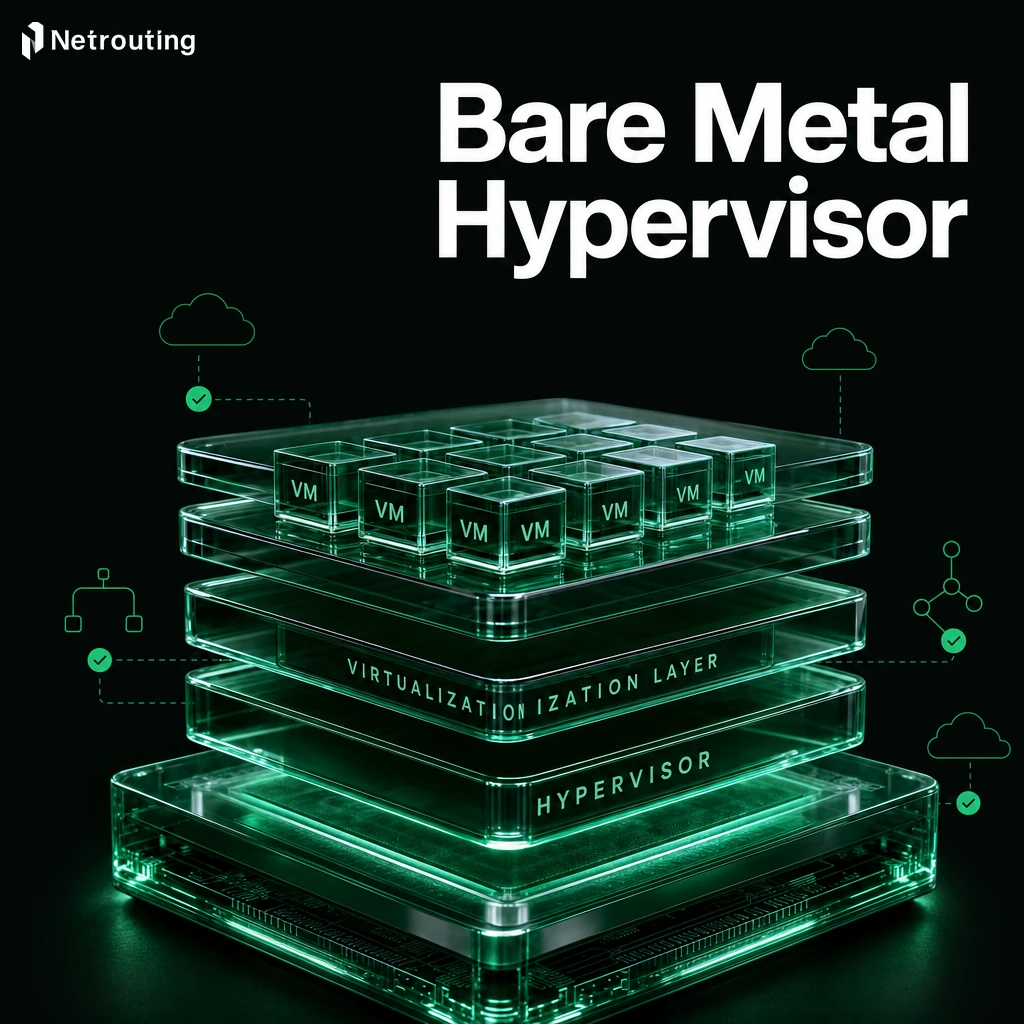
With bare metal hosting, you get a whole server and the metal hypervisor sits directly on the bare metal hardware as the topmost layer of software, with no intermediate OS layers.
Blog contents
This guide explains how bare metal hypervisors work, how Type 1 and Type 2 hypervisor architectures compare, and who should run what types of workloads on a bare metal server. Additionally, What to look for when picking a bare metal provider.
What Is a Bare Metal Hypervisor on Dedicated Servers?
At the core of modern server virtualization is the bare metal hypervisor. Unlike other virtualization solutions, a bare metal hypervisor installs directly on the physical hardware of a machine. It is intermediary software, virtual machines, operating systems, and applications including those managed under microsoft hyper v, that typically resides between the virtualization solution and the physical machine. For more context, see Hypervisor.
Bare Metal Hypervisor Type: How It Works
A bare metal hypervisor (also called Type 1 or metal hypervisor) is a type of virtualization software that is installed directly on the host computer’s hardware (bare metal). Instead of installing a host operating system on the computer first, the bare metal hypervisor is the first software layer that is installed on the computer’s hardware. The bare metal hypervisor creates and virtualizes virtual machines, each of which can be allocated its own virtual hardware such as CPU, RAM, and storage.
Each virtualized environment can run different guest operating systems independently, allowing organizations to consolidate diverse workloads on a single hardware platform. This capability enables IT teams to run multiple operating systems concurrently on a single hardware platform, maximizing infrastructure utilization while maintaining workload isolation. Each guest environment operates with its own operating system, completely isolated from other virtual machines sharing the same hardware platform.
This architecture is often referred to in the industry as a virtual machine monitor (VMM). The VMM runs directly on the hardware and enables direct hardware access without going through a general-purpose OS kernel.
Bare Metal Virtualization vs. Hosted Hypervisors
There is also Type 2 hosted metal hypervisor that is running on top of existing operating system. Bare metal virtualization on the other hand eliminates this extra layer. Type 2 architectures introduce the host os layer between hardware and hypervisor, creating additional overhead that impacts performance and resource efficiency.
In contrast, hosted hypervisors run as applications within the host operating system, requiring the OS to mediate all hardware interactions and introducing latency that bare metal architectures avoid. Direct hardware access in bare metal architectures ensures minimal latency for time-critical applications that cannot tolerate the overhead of OS-mediated resource allocation.
- Type 1 (bare metal): runs directly on hardware, no OS in between.
- Type 2 (hosted): runs as an application inside an existing OS.
Where a Bare Metal Hypervisor Fits
When production workloads like databases, latency-sensitive applications, or multi-tenant cloud environments require top performance, a bare metal hypervisor like Proxmox VE is the right choice. Our Managed Proxmox VE solution provides a flexible bare metal hypervisor on dedicated servers across all our worldwide locations. You manage your VMs and containers as usual while we handle hypervisor management. Development teams also leverage bare metal hypervisors for software testing, creating isolated environments to validate applications across different configurations without impacting production systems.
Understanding where bare metal hypervisors are used is half the story. The bigger story is around the differences between Type 1 and the hosted hypervisor model of Type 2 virtualization, and the real differences in how architectures, management tools, and platforms are built out to support high performance production workloads that often handle sensitive data.
Benefits of Running a Bare Metal Hypervisor
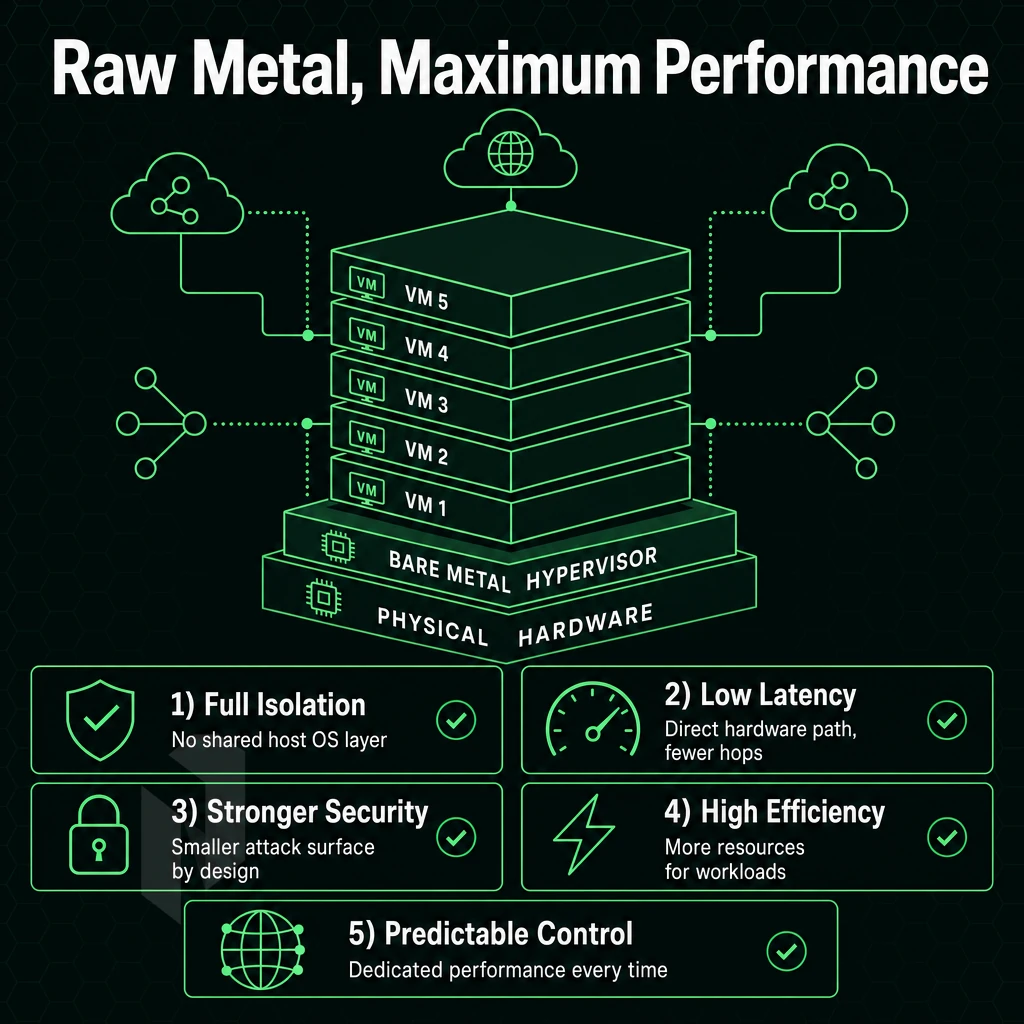
A bare metal hypervisor is installed directly on physical host hardware and runs on top of that without a host operating system present. This single fact accounts for all of the listed advantages, from high throughput to enhanced security.
Near-Native High Performance
Because there is no host Operating System running on bare metal based server, the Virtualization Layer sits on top of server hardware straight away. Therefore, the overhead of running a hosted (Type 2) Virtualization solution is dramatically less than normal. Because Virtual Machines are able to access hardware natively such as CPU, Memory and I/O (input/output), they can provide high levels of performance that normally cannot be gained from a hosted hypervisor Virtualization solution.
This direct hardware access is crucial for delivering high performance in enterprise environments where milliseconds matter and resource efficiency directly impacts operational costs. Type 1 hypervisors achieve minimal overhead compared to hosted solutions by eliminating the OS abstraction layer that would otherwise mediate every hardware interaction.

Enhanced Security Through Isolation
Removing the host OS eliminates an entire attack surface. Unlike a hosted hypervisor that sits atop a general-purpose OS, introducing patching, misconfiguration, and exploitation risks, each VM resides in its own fully-isolated partition. High performance workloads like financial data, healthcare data, and highly-regulated archives, where losing even a single bit carries severe penalties, benefit greatly from that additional isolation.
Efficient Resource Management and High Availability
The Type 1 hypervisor design efficient resource management for applications. The Type 1 design, used by platforms such as microsoft hyper v, controls hardware scheduling directly from the hypervisor, enabling the VM to dynamically manage the CPU and memory from within the VM to best run applications. This is critical in large data center and enterprise bare metal server infrastructure to provide constant optimal performance during varying levels of activity.
Modern bare metal hypervisors excel at dynamic resource allocation, automatically adjusting compute resources based on real-time workload demands to maximize efficiency across the infrastructure. Organizations deploying enterprise infrastructure benefit from these capabilities when consolidating workloads across hundreds of virtual environments while maintaining strict performance guarantees. Achieving maximum efficiency requires careful tuning of resource pools and workload placement strategies that align VM requirements with available hardware capabilities.
Here is a comparison of the leading platforms.
Top Bare Metal Hypervisor Options: VMware ESXi, Hyper-V, KVM, Xen, and Proxmox
When choosing a bare metal hypervisor as the foundation of your infrastructure, the choice of metal hypervisor has significant implications for licensing and ecosystem fit.
VMware ESXi, Hyper-V, and Windows Server on the Same Physical Server
VMware ESXi is the enterprise standard virtual machine monitor with the deepest ecosystem integrations.
Microsoft Hyper-V is a virtual machine monitor that ships as part of Windows Server, making it a natural choice for Windows-centric environments. Hyper-V also includes robust management tools already familiar to IT professionals who manage Windows Server environments.
Kernel Based Virtual Machine vs Xen Project
KVM as a kernel module runs with near native performance without any licensing costs. The Xen hypervisor is used in many large cloud platforms and supports both paravirtualization and hardware-assisted virtualization. For provider environments with thousands of virtual servers, Xen is clearly the better choice.
Proxmox, Citrix Hypervisor, and Oracle VM as Bare Metal Options
Proxmox Virtual Environment is a powerful self-managed bare metal solution that combines KVM and LXC containers under one browser-based interface. Citrix Hypervisor is a solution for enterprise desktop virtualization. Oracle VM is a solid solution primarily used for running Oracle workloads. Organizations seeking advanced features like live migration, high availability clustering, and automated failover often evaluate these platforms based on their specific operational requirements.
Evaluating the key features of each platform helps organizations match their technical requirements with the capabilities that best support their virtualization strategy. These platforms also provide compatibility layers that enable organizations to maintain legacy systems while gradually modernizing their infrastructure through virtualization.
This includes the underlying computing hardware such as servers and networking infrastructure, which should run with minimal overhead, and is just as important as the choice of hypervisor. Proper allocation of hardware resources ensures that virtualized workloads maintain consistent performance levels even during peak demand periods across the infrastructure.
Effective capacity planning requires understanding how the hypervisor will distribute physical resources across virtualized workloads to prevent contention and maintain service levels. Selecting appropriate server hardware with sufficient CPU cores, memory capacity, and storage throughput directly impacts the hypervisor's ability to support demanding virtualized environments.
Frequently Asked Questions About Cloud Computing
Which Metal Hypervisor Runs Multiple VMs Without a Host OS Layer?
Type 1 hypervisors run directly on bare metal hardware with no underlying OS required. The most widely deployed options are VMware vSphere Hypervisor, Microsoft Hyper-V Server, KVM (built into the Linux kernel), and Proxmox VE. Each installs directly onto the bare-metal host and manages virtual machines at the hardware level, giving you full control over CPU, RAM, and storage without an intermediary operating system consuming resources.
Is ESXi a bare metal hypervisor rather than a hosted hypervisor?
ESXi is a Type 1 bare metal hypervisor. ESXi runs its own micro-kernel, exposing hardware resources directly to guest VMs.
What Is a Free Bare Metal Hypervisor?
Proxmox VE is the most capable free bare metal hypervisor for production use. It combines the kernel based virtual machine technology, which acts as a bare metal hypervisor, for full virtualization and LXC for container workloads in a single open-source platform, complete with a web-based management interface, clustering, and built-in backup tools.
Netrouting offers fully managed Proxmox VE on dedicated hardware, handling cluster setup, patching, and monitoring so you can run multiple virtual machines without operating the hypervisor layer yourself.
How does a bare metal hypervisor differ from a Type 2 hypervisor?
A Type 1 hypervisor installs directly on bare metal hardware and manages guest VMs without a host OS underneath it. A Type 2 hypervisor runs as an application on top of an existing native OS, making it common in cloud platforms and desktop tools like VirtualBox and VMware Workstation.
Type 2 is suited to developer workstations and testing environments where convenience matters more than raw performance.
Bare metal hypervisors run directly on the server hardware without a host platform in between.
The choice will depend on a number of different criteria including the average number of high performance virtualized workloads per server, whether platforms like Microsoft Hyper V align with existing licensing priorities, and even the organization's operational model.
One factor that shapes every deployment is the underlying hardware. Netrouting's dedicated raw hardware servers, built on the latest Intel Xeon and AMD EPYC platforms, give you full hardware access, robust management tools, unmetered 10 Gbps connectivity, and no noisy-neighbour risk.
Talk to the team to spec the right configuration.