-
Products
- Compute
- Network
- Platform
- Add-ons
-
Solutions
- By Industry
- By Use Case
- Featured
-
Developers
- Docs
- Tools
- Resources
- Pricing
- Login

Virtual machines, instant provisioning
Leverage the full power of cloud computing with our Next-Generation Virtual Machines (VMs). They enable you to instantly provision applications with high-performance cloud VMs based on the latest Intel CPUs and feature storage based on high-speed NVMe/SSD which is distributed across a robust storage architecture.
High-speed premium network connectivity is included for all of our customers at 10G/40G network speeds for their applications. We have preconfigured templates to quickly provision a new server. We also support custom ISO images for complete flexibility. Firewall rules can be easily created and modified for security. We also provide our customers with completely free internal networking to easily connect together their various applications and services.
Instant deploy · 10G/40G uplinks · NVMe storage
Servers ready to deploy now
| Plan | vCPU | Memory | Storage | Transfer | Availability | Per month | Order |
|---|---|---|---|---|---|---|---|
| FLEXFlex Cloud 1G | 1 shared | 1 GB | 25GB SSD | 1 TB | Created on order | €5or €4.50 billed yearly | Deploy |
| FLEXFlex Cloud 2G | 1 shared | 2 GB | 50GB SSD | 2 TB | Created on order | €10or €9 billed yearly | Deploy |
| FLEXFlex Cloud 2G+ | 2 shared | 2 GB | 50GB SSD | 2 TB | Created on order | €15or €13.50 billed yearly | Deploy |
| FLEXFlex Cloud 4G | 2 shared | 4 GB | 80GB SSD | 3 TB | Created on order | €23or €20.70 billed yearly | Deploy |
| FLEXFlex Cloud 8G | 4 shared | 8 GB | 120GB SSD | 4 TB | Created on order | €36or €32.40 billed yearly | Deploy |
| FLEXFlex Cloud 16G | 8 shared | 16 GB | 160GB SSD | 5 TB | Created on order | €70or €63 billed yearly | Deploy |
6 plans · Monthly prices. Yearly billing takes 10% off. Need a custom build? Talk to engineering →
Cloud essentials
 Instant Provisioning
Activate your cloud VMs instantly with our provisioning system, accessible directly through our control panel for immediate service deployment. This feature not only allows for rapid scaling up or down according to your operational demands but also ensures that you can adapt to changing project requirements with agility and minimal delay.
Instant Provisioning
Activate your cloud VMs instantly with our provisioning system, accessible directly through our control panel for immediate service deployment. This feature not only allows for rapid scaling up or down according to your operational demands but also ensures that you can adapt to changing project requirements with agility and minimal delay.
 Web Based Firewall
Set firewall rules with a few clicks through our intuitive control panel, no command-line expertise required. Inbound and outbound rules apply instantly, keeping your VMs secure without slowing your team down.
Web Based Firewall
Set firewall rules with a few clicks through our intuitive control panel, no command-line expertise required. Inbound and outbound rules apply instantly, keeping your VMs secure without slowing your team down.
 Free Internal Networking
Leverage our free internal networking to connect your cloud VMs within a secure, private network, all manageable via our user-friendly control panel. This functionality allows for the seamless integration of your services, facilitating encrypted and high-speed communication between VMs without exposing data to the public internet.
Free Internal Networking
Leverage our free internal networking to connect your cloud VMs within a secure, private network, all manageable via our user-friendly control panel. This functionality allows for the seamless integration of your services, facilitating encrypted and high-speed communication between VMs without exposing data to the public internet.
 Operating System Flexibility
Customize your VM to perfection with our broad selection of pre-configured templates and the option to deploy custom ISOs, all through a straightforward control panel interface. This flexibility ensures that you can quickly set up your preferred operating system, whether it's for a standard web server or a complex, custom application environment.
Operating System Flexibility
Customize your VM to perfection with our broad selection of pre-configured templates and the option to deploy custom ISOs, all through a straightforward control panel interface. This flexibility ensures that you can quickly set up your preferred operating system, whether it's for a standard web server or a complex, custom application environment.
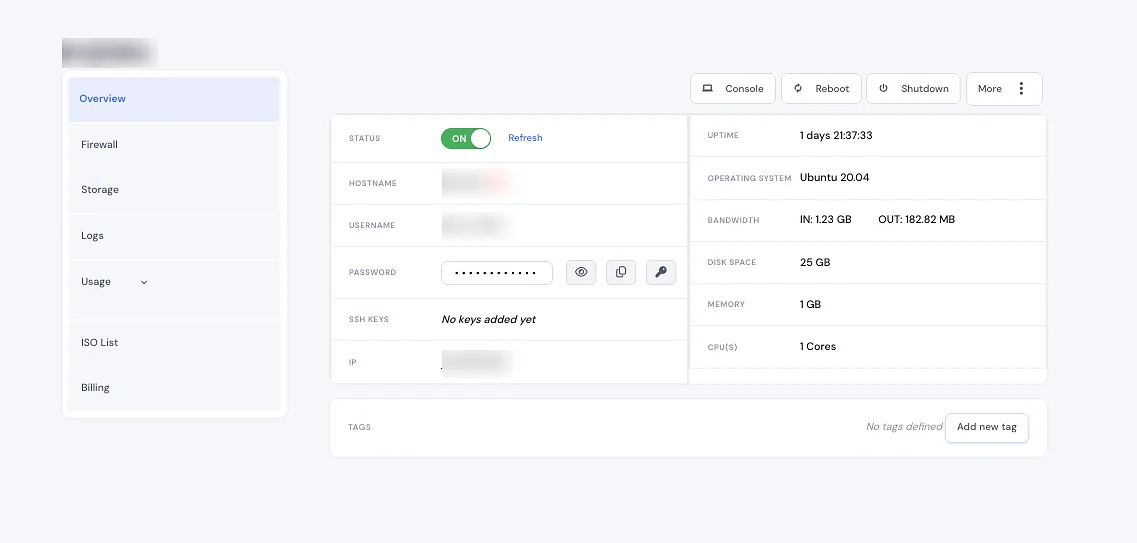
Control panel
Kickstart your cloud journey with immediate operating system setup on your VM. Our platform supports a wide array of popular operating systems, catering to diverse computing needs and preferences.
Improve Your Cloud Experience with our Control Panel Features, Experience unparalleled control and convenience with our state-of-the-art control panel, designed to streamline every aspect of your cloud VM management. From turnkey OS installations to comprehensive IP management, our control panel puts the power at your fingertips. Effortlessly manage reboots, backups, network settings, and firewall configurations, all within a user-friendly interface.
Why Netrouting Cloud
 Secure Data Centers
Hosted in secure, state-of-the-art data centers, our VMs benefit from advanced physical and infrastructure security measures, keeping your data safe.
Secure Data Centers
Hosted in secure, state-of-the-art data centers, our VMs benefit from advanced physical and infrastructure security measures, keeping your data safe.
 Low Latency Network
Experience our high-performance, low latency network, optimized to deliver your data at lightning speeds, ensuring an exceptional user experience.
Low Latency Network
Experience our high-performance, low latency network, optimized to deliver your data at lightning speeds, ensuring an exceptional user experience.
 Best-in-class Intel CPUs
Our VMs are powered by the latest Intel CPUs, offering top-tier performance for computing-intensive applications, from web hosting to data analysis.
Best-in-class Intel CPUs
Our VMs are powered by the latest Intel CPUs, offering top-tier performance for computing-intensive applications, from web hosting to data analysis.
 Automated Backups
Protect your valuable data with automated backup options, allowing for easy restoration and peace of mind in the face of data loss.
Automated Backups
Protect your valuable data with automated backup options, allowing for easy restoration and peace of mind in the face of data loss.
 Root/Administrator Access
Gain complete control over your VM with root (Linux) or administrator (Windows) access, allowing for full command over your server environment.
Root/Administrator Access
Gain complete control over your VM with root (Linux) or administrator (Windows) access, allowing for full command over your server environment.
 IPv6 Support
Future-proof your projects with full IPv6 support, ensuring your VM is ready for the next generation of internet protocol, enhancing connectivity and security.
IPv6 Support
Future-proof your projects with full IPv6 support, ensuring your VM is ready for the next generation of internet protocol, enhancing connectivity and security.
 Scalable Resources
Effortlessly scale your VM's resources to match your current needs, from RAM and CPU to storage, ensuring your infrastructure grows with you.
Scalable Resources
Effortlessly scale your VM's resources to match your current needs, from RAM and CPU to storage, ensuring your infrastructure grows with you.
 Custom ISOs
Tailor your VM to your exact needs with custom ISO uploads, providing the flexibility to install a wide range of operating systems or applications.
Custom ISOs
Tailor your VM to your exact needs with custom ISO uploads, providing the flexibility to install a wide range of operating systems or applications.
Built for production
We connect you to the Internet using network engineers (and not order takers) and hardware and infrastructure that is built to last, so we can pick up where you left off when you need us.
Common questions
Volumetric floods (e.g. UDP, ICMP and TCP floods) as well as reflection/amplification attacks (e.g. DNS, NTP, memcached etc.) and protocol based attacks (e.g. SYN floods, ACK floods etc. as well as fragmentation and malformed packet attacks). We also absorb multi-vector attacks.
In case the incoming traffic load (DDoS attack) is bigger than the traffic that can be filtered by us, then the targeted IP will be black-holed.
Dedicated DDoS Protection is automatically enabled for all relevant services such as Cloud Compute, Colocation, Bare Metal servers and GPU servers. No activation is required. The protection starts as soon as the related resource goes online.
No, Netrouting DDoS Protection is a network-layer attack mitigation service, it is designed to protect against volumetric traffic attacks (so called floods) at network-layer (so called Layer 3/4). For application-layer attacks (so called Layer 7 attacks) like HTTP floods, slowloris, etc. you would use a Web Application Firewall (WAF) or layer 7 packet processing, edge caching services like Cloudflare or Akamai.
Flex Cloud is an shared-CPU pool (oversubscribed by reasonable ratios, not like those super cheap providers that want to sell you super cheap and then make up for it in other ways). It's very cost efficient for vCPUs. Flex Cloud is meant for general workloads, dev / test, web tier, etc. while Dedicated Cloud is meant for very specific workloads, like database, real-time services, etc. where p99 latency matters and the customer doesn't want to manage physical servers.
Our cloud runs KVM directly on our own bare metal servers. We do not use any form of nested virtualization, co-hosted shared-tenant kernels or other hypervisor layers on top of other providers' kernels. The VMs on our cloud are managed through our own control plane (the same that our API talks to), which enables us to have VMs up and running within sub-1 minute and to perform live migration of VMs to other hosts should we need to perform maintenance on the underlying hypervisor.
No. All cloud plans include a fixed transfer quota for the uplink speed of your choice (1G or 10G) up to 100 TB per month. Thereafter we bill on a per-TB basis at the same low rate. This means no surprise egress charges, no charges for inter-AZ traffic, no charges for inter-region traffic within Europe and many other "hidden" charges that can turn a cheap €200/mo cloud work load into a €2,000/mo work load on AWS. Use our cloud for an egress-heavy CDN origin or video streamer and you will see the savings on your first month bill.
Yes - the cloud control plane is multi-region by design and the same image / template you launch in Amsterdam will launch unchanged in Frankfurt, Miami or Singapore. Snapshot in one region, restore in another. Inter-region private networking rides our backbone (AS6206) at backbone speed; you do not need to spin up site-to-site VPNs to mesh your VMs across PoPs.
Gaming / DDoS | Netrouting DDoS Protection - free, always-on service protecting all Netrouting infrastructure (Cloud Compute, Colocation, Bare Metal servers, GPU servers) from network-layer (L3/L4) DDoS attacks. No setup required.
While we don't have managed Kubernetes yet (it's on our roadmap though), the vast majority of our customers are running their own K8s clusters - on our bare metal servers or in our cloud (flex or dedicated). Often 3 node clusters for k3s or larger for full blown kubeadm controlled clusters (where we also provide Cluster API for KVM to run against our control plane to manage those for them).
Every city page now includes the public test IP address for that location, as well as a link to 100 MB, 1 GB and 10 GB test files. You can download these files from the location nearest to you with curl or wget, or download them from your browser.
Compare and learn
200+ teams rely on Netrouting for bare metal, cloud, GPU servers and colocation. Easy to order servers within minutes. We also love to design custom servers for you and your business, with our experienced engineers.
We need a few cookies for the site to work at all. Those are always on. Everything else, remembering your preferences, counting how pages are used, and seeing which campaign brought you here, happens only if you allow it. You can change your mind at any time through Cookie settings at the bottom of any page. What we store, exactly
Before you go
We hold massive hardware in stock and build everything fully custom to your spec, at sharp, competitive pricing. We deliver almost anywhere, even beyond our own data centers, and we take on any challenge. Tell us what you need.