Choosing a dedicated GPU server means balancing raw compute, memory bandwidth.
Netrouting has been designing and operating dedicated servers for over 10 years. Our own AS6206 backbone is spread across 10 locations in Europe, North America and Asia . Here at Netrouting, our GPU server hosting is provided alongside our full range of bare metal dedicated servers , colocation and IP transit services. For more context, see Graphics processing unit.
Each dedicated server in our infrastructure is provisioned with enterprise-grade components and direct access to our global network fabric, ensuring consistent performance for GPU-accelerated workloads. Each server includes high-performance ssd storage to ensure rapid data access for GPU workloads that depend on fast I/O during training and inference operations.
Blog contents
Our 2.4 Tbps+ network is specifically engineered to support gpu dedicated servers handling everything from graphics rendering to high performance computing infrastructure, and we can provide real insight into how GPU compute servers operate at a low level.
The Criteria That Really Matter For Choosing A Dedicated GPU Server: Learn how to choose a dedicated GPU server by reading through a list of criteria that really matter to get the right list of potential servers for your use cases. Data sovereignty and compliance, support, provisioning and other issues that matter when choosing servers for GPU computing workloads.
What Are GPU Dedicated Servers?
A dedicated GPU server is a physical bare metal server, which has one or more GPUs installed, alongside the CPU(s). This server is then dedicated to a single tenant, and is not shared with anyone else. There are no shared resources (e.g. disks) and no noisy neighbors to compete with for compute resources. The central processing unit handles sequential operations and system orchestration, while the GPU accelerates massively parallel workloads that would otherwise bottleneck on traditional CPU architectures.
This single-tenant architecture grants you full control over hardware configuration, driver versions, and resource allocation without interference from other users. Exclusive allocation of gpu resources eliminates contention at the hardware level, ensuring predictable performance for time-sensitive workloads like real-time inference or large-scale model training. Pairing high-core-count processors like intel xeon with professional GPUs ensures the CPU can feed data to the accelerator without creating upstream bottlenecks during preprocessing or I/O operations.
GPU Servers vs CPU: Two Different Architectures
CPUs are designed to handle sequential, complex logic. They contain a small number of powerful cores to execute single-threaded tasks. GPUs, on the other hand, are composed of thousands of small cores which are able to execute a large number of simple operations. For community perspectives, see Looking for a dedicated server with an NVDIA GPU for $80 ....
A dedicated CPU does tasks one at a time, whereas a GPU does thousands simultaneously.
What Are GPU Servers Used For?
What a GPU server depends on: The workload. Common use cases include: Selecting gpu servers that align with your specific workload profile prevents costly over-provisioning while ensuring you have adequate compute headroom for peak demand scenarios. Understanding whether your application involves batch processing, real-time inference, or continuous training helps determine the optimal GPU architecture and memory configuration for specialized workloads.
- AI model training and inference.
- Large language model (LLM) deployment.
- Scientific simulation and data analytics.
- Video transcoding and real-time rendering.
A dedicated RTX Pro NVIDIA GPUs instance provides you with consistent, uncontended access to all cores and all VRAM on the card, which is critical given the long hours that training can consume.
Are GPU Servers Suitable for Video Transcoding and Rendering?
Yes, we're really good at this too. Transcoding 4K streams and rendering complex scenes involves millions of parallel operations per frame. They're worked on by a dedicated GPU server as opposed to being shared instances where throughput cannot be guaranteed. Netrouting's GPU servers are configured to handle high-throughput, latency sensitive work. Studios and production teams rely on 3d rendering pipelines that demand consistent GPU performance to meet tight deadlines without frame drops or unexpected slowdowns.
Dedicated GPU Servers: A Primer.
GPU Servers vs CPU Servers: Key Differences
| Provider / Option | GPU Acceleration | Performance vs CPU Servers | Uptime SLA | Network | Best For |
|---|---|---|---|---|---|
| Netrouting GPU Servers | NVIDIA RTX 6000, A10, A40, A100, four tiers covering entry level GPU servers through high-end inference | Dedicated hardware; no shared-tenant contention across multiple servers | 99.9% SLA; 24/7 NOC; 1-hour ticket guarantee | 2.4 Tbps+ backbone; unmetered 10 Gbps; 10 PoPs across EU, NA, APAC | Deep learning, AI/ML inference, self-hosted LLMs requiring EU data sovereignty |
| Hyperscaler GPU Cloud | Broad GPU SKU catalog; shared and dedicated options | Strong raw throughput; CPU only systems also available for mixed workloads | Varies by tier; higher SLAs require premium commitments | Global reach; egress fees apply | Teams already embedded in a hyperscaler ecosystem |
| Bare Metal GPU Specialist | Single-GPU to multi-GPU; limited operating systems support compared to full IaaS | Good for isolated GPU acceleration; weaker when combining CPU servers and GPU nodes | Typically 99.9%; support hours vary | Constrained PoP count; limited peering | Single-region deep learning projects with no multi-site requirement |
Most buyers running deep learning, inference, or self-hosted LLMs benefit from dedicated GPU servers on bare metal over CPUs or shared cloud GPUs.
The entry-level GPU server is the RTX 6000 tier, scaling up without having to change providers.
Determining the right server for your applications is a good starting point, but whether your data intensive workloads require dedicated GPU hardware is a separate issue addressed in the following section.
High Performance Workloads That Demand GPU Servers
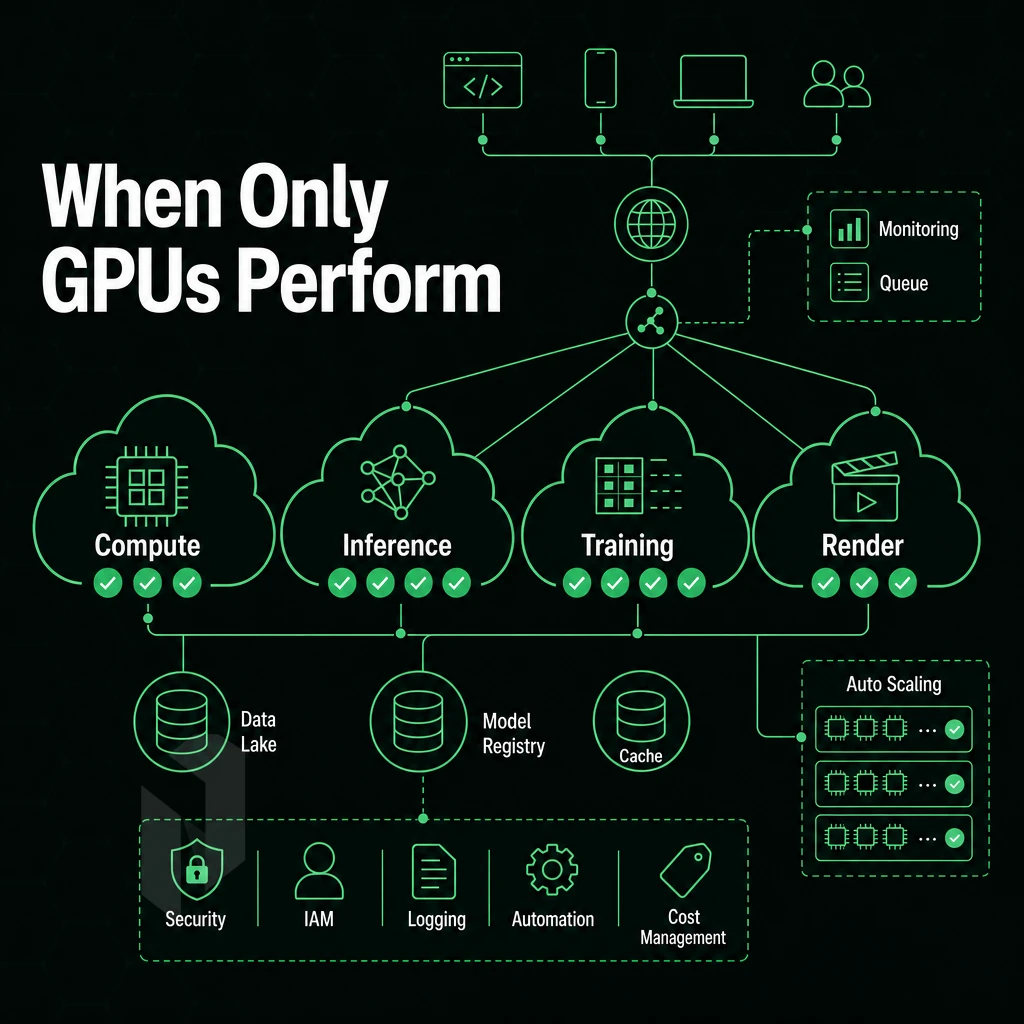
Workloads don't need to be dedicated to GPU hardware to take advantage of it.
Compute-Intensive AI Workloads and Inference
- AI training large neural networks. Thousands of simultaneous floating-point operations are required for AI training. Large neural networks are trained using a GPU to deliver massive parallelism for floating-point operations, much faster than a CPU can deliver for any practical number of operations.
- We’ve been running AI inference and large language models. Our goal for running LLMs in production is to get very low-latency token generation. By running AI inference on dedicated GPU hardware, we’re able to keep response time constant under load. Running this on CPU would quickly degrade as concurrency goes up.
Note: Shared GPU instances introduce noisy-neighbour latency. For production inference, dedicated hardware is the only reliable option.
Media, Rendering, and Visualisation
- Video transcoding and video rendering. Video transcoding at high resolutions quickly saturates CPU pipelines. GPU-accelerated encoders enable processing of multiple streams in parallel, reducing required job time from hours to minutes.
- 3D rendering. The workloads of ray-tracing and path-tracing are embarrassingly parallel. Offloading these workloads to a GPU server leads to orders of magnitude of performance improvements in frame rendering over CPU-based rendering.
Scientific Computing, HPC, and Data Analytics
- Scientific computing and HPC workloads. In genomic studies, in climate studies and in fluid dynamics simulations the information can be mapped to GPU thread architectures so that instead of days on a CPU cluster, hours of computation can be achieved.
- Data analytics and predictive modeling. Large data sets, such as are used in matrix operations, feature engineering and real-time scoring are performed better using the memory bandwidth of the GPU than the memory buses of CPUs.
Which NVIDIA L4 and GPU Servers Are Best for AI Training Workloads?
The A100 is the flagship for really deep learning. It has lots of high bandwidth memory and NVLink to connect multiple GPUs for large workloads. The A40 is for general workloads, a mix of training and inference on a single GPU.
Netrouting's gpu dedicated servers offer the full range of NVIDIA GPUs, including the RTX 6000 A10, A40 and A100, configured to match your actual workload and not sold based on artificially inflated defaults. For smaller projects or proof-of-concept deployments, one gpu may suffice before scaling to multi-accelerator configurations as model complexity grows.
Once you've verified your workload needs dedicated GPU hardware, the next decision is which configuration suits your AI and machine learning tasks.
AI Machine Learning and Inference: Choosing the Right GPU Server
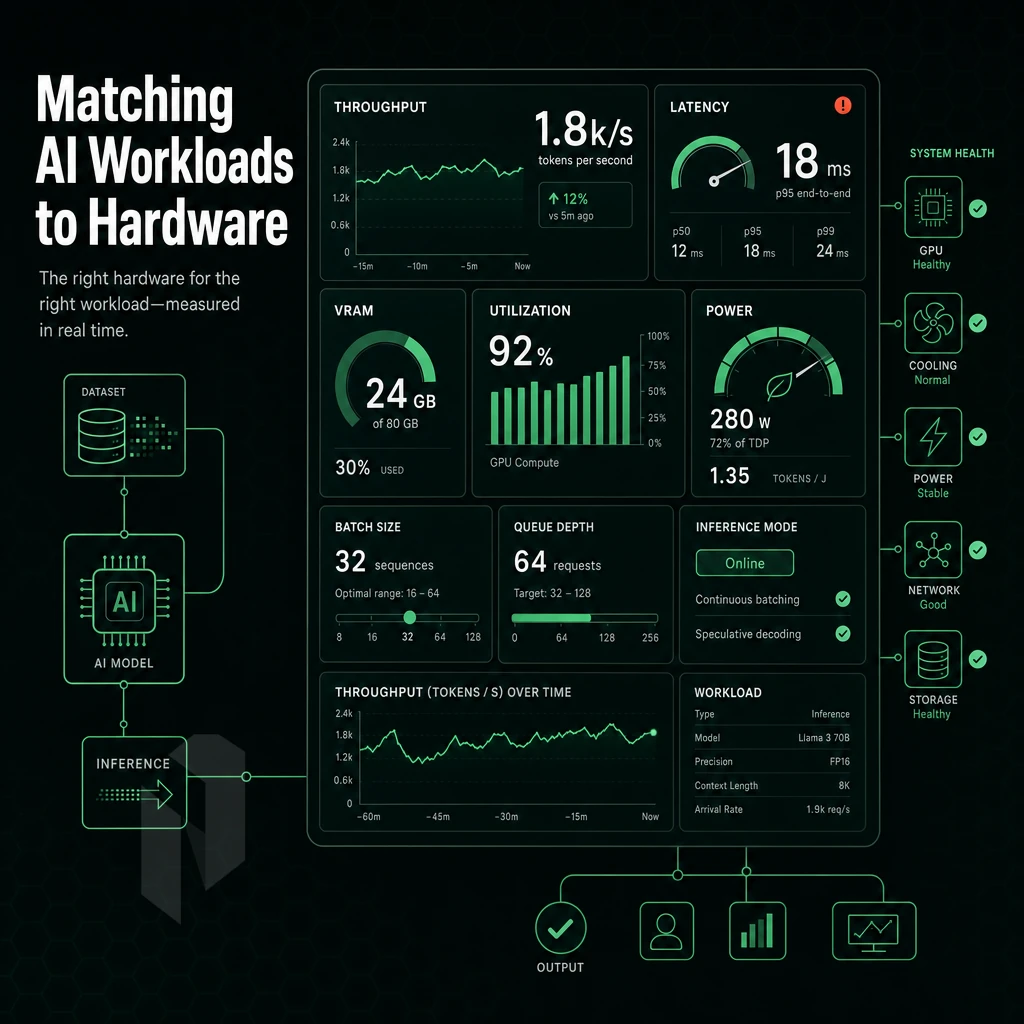
Choosing a dedicated GPU server for your AI work is more than just picking the most powerful machine to crunch numbers. Training and inference have different hardware needs and you need to pick a GPU server to match. Choose wrong and your deployment dies on the spot. Achieving maximum computational power requires matching GPU architecture to workload characteristics, ensuring tensor cores and memory bandwidth align with your specific training or inference demands.
AI Model Training vs. Machine Learning Inference
Large language models are compute intensive and require a lot of memory for training. This means that large scale ai training with millions of parameters, whether on consumer hardware or an rtx pro setup, requires a lot of sustained throughput as well as high amounts of VRAM and fast interconnects between GPUs. In fact, a single large language model can require over 40 GB of VRAM on graphics processing units for training on a dedicated server, which makes memory a hard constraint rather than a soft preference. Organizations running compute intensive work at this scale must provision servers with sufficient thermal headroom and power delivery to sustain peak utilization across extended training runs.
These intensive computations demand not only high VRAM capacity but also consistent memory bandwidth to prevent bottlenecks during backpropagation and weight updates across distributed training sessions. Enterprises implementing large scale data processing pipelines for transformer architectures must account for the cumulative memory footprint of activation checkpoints, optimizer states, and gradient accumulations that scale linearly with model depth. Leveraging predictive analytics on these models requires not only sufficient VRAM but also the ability to process inference requests at scale without performance degradation under production loads.
Inference is different from training. Inference requires low latency and good (consistent) performance under high volumes of concurrent requests. Using shared cloud instances for inference causes cold starts and request contention. Using dedicated hardware (e.g. dedicated GPUs on a dedicated server (rather than shared cloud instances) eliminates these issues even under demanding workloads, as every request is processed by a warm, reserved GPU for that request.
Do I Need Multiple GPUs for Large Language Model Training?
In models above roughly 7 billion parameters, a single GPU does not have enough VRAM to hold the full model. This is why in production of demanding AI workloads, models are distributed across multi-GPU setups. In these setups, layers of the model are distributed across cards using either tensor or pipeline parallelism.
Match the number of GPUs to your model's size, don't overspec for maximum potential.
Natural Language Processing and Production Environments
Workloads such as Natural Language Processing have the typical characteristics of demanding production workloads.
Our GPU servers are all set up on bare-metal infrastructure, and thus do not pose any noisy-neighbour issues. Our AI workloads run on dedicated server infrastructure within our own AS6206 backbone, ensuring the lowest latency possible directly from your closest datacenter. We have 10 datacenters globally.
Once we know the workloads we can choose the specific GPU model(s) and configuration(s) to match.
GPU Models and Specs: How to Pick the Right GPU Servers
NVIDIA offers a wide range of GPU models, not all equally suited for every task.
GPU Servers Sorted by Workload Tier
The RTX Pro 6000 is designed for professional visualization and AI inference workloads. On gpu dedicated servers, the GPU is equipped with high amounts of VRAM and features strong single-precision floating point computation for applications such as video rendering and real-time inference.
The A40 is better suited for larger model fine-tuning.
Match GPU to task:
| GPU | VRAM | Best For | NVLink |
|---|---|---|---|
| RTX Pro / RTX Pro 6000 | Up to 96 GB | Inference, visualization | No |
| A10 | 24 GB | Inference, light fine-tuning | No |
| A40 | 48 GB | Fine-tuning, rendering | No |
| A100 | 80 GB | Large-model training | Yes |
Specs That Actually Matter
First, there's VRAM, the amount of memory available to the GPU.
In dense GPU dedicated servers configurations, having dual power supplies with redundant power is mandatory to prevent a single PSU failure from crashing an entire training run.
What Operating Systems Are Supported on Dedicated GPU Servers?
Our Dedicated GPU Server supports Ubuntu, Debian and Rocky Linux distributions. Windows Server is available on request. We set up and provision your dedicated server with your chosen Operating System, correct Drivers and full CUDA Stack for instant use and productivity.
While choosing the right GPU for your applications is half the decision. Choosing where to run that GPU for machine learning, whether on a dedicated server via bare metal or through cloud GPU instances, and understanding the implications for performance, control, and cost over time is the other half.
GPU Hosting: Bare Metal vs Cloud GPU Servers
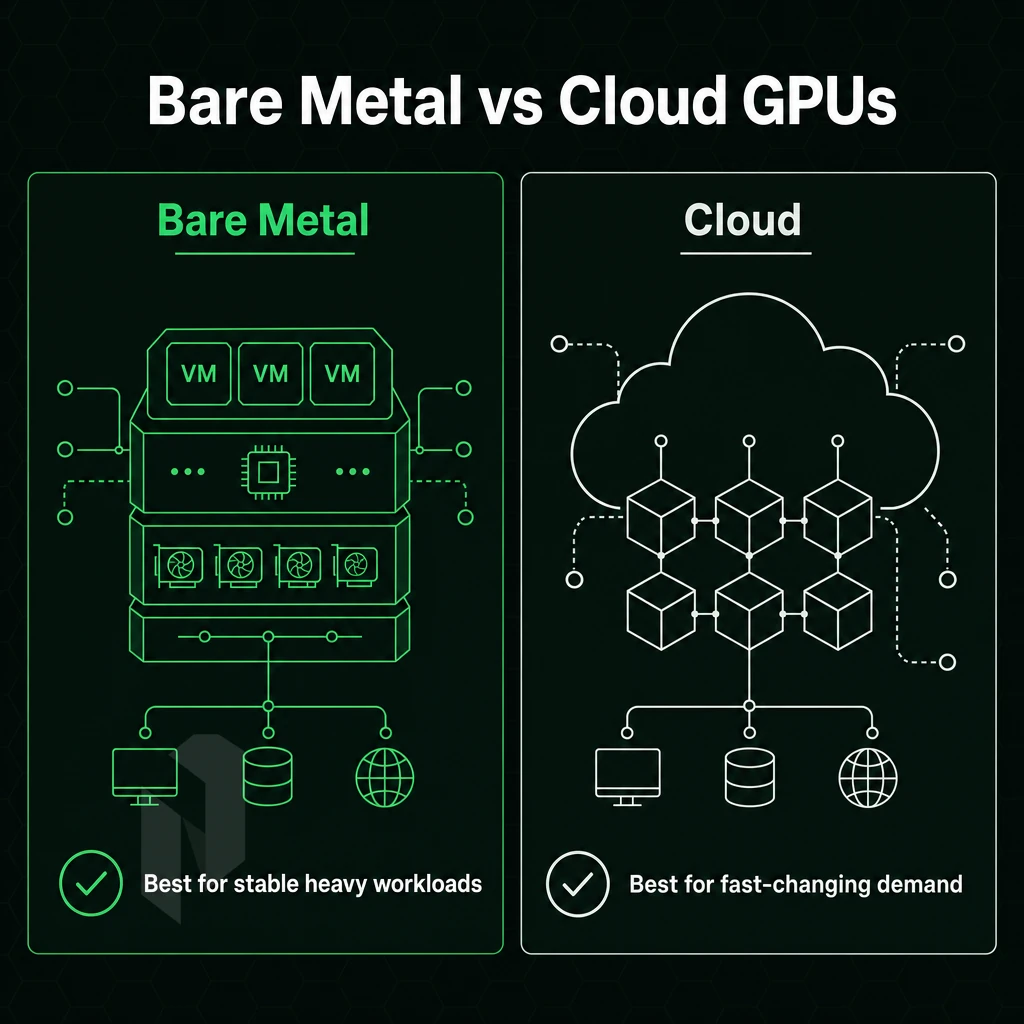
Bare-metal vs. cloud GPU: When you need consistent, isolated compute vs. occasional burst capacity. Both models are meant for real workloads. But they behave very differently under sustained load.
Performance and Control
Bare-metal GPU server hosting gives you the full card, no hypervisor overhead, no noisy neighbors, and a completely dedicated memory bus.
Cloud GPU slices are well-suited for short, bursty workloads. However, GPU infrastructure is typically shared and therefore introduces contention at the level of memory and down to the PCIe bus. For workloads that consist of sustained parallel processing (LLM training, rendering, HPC), this overhead adds up.
GPU Servers Hosting TCO and Billing Predictability
Cloud GPU billing is variable by design.
Our dedicated GPU servers are charged on a fixed monthly basis. No per hour charges, no egress charges and no penalties for using shared resources.
How Quickly Can a Dedicated GPU Server Be Provisioned?
We at Netrouting provide you with the bare-metal GPU servers in under 60 minutes. This way you can get the fastest servers on the market within a few minutes, with full root access, right from the first boot. You get complete control over OS, drivers, CUDA stack and networking. No waiting for a cloud to process your queue.
For extreme performance workloads bare metal is the best choice. Cloud GPU, rather than a dedicated server, is still an option for very irregular jobs where the unpredictable billing is less of an issue than the flexibility to start and stop GPU at will. For longer than a few hours GPU in dedicated server hosting is cheaper and delivers better performance.
If bare metal is the right model for your workload, you then have to choose a provider to run it on. What makes a good GPU hosting provider different from a general hardware hoster?
Why Choose Netrouting for Dedicated GPU Servers
Netrouting operates dedicated GPU servers across six strategic data center locations, Amsterdam, Frankfurt, Miami, New York, Singapore, and Hong Kong, putting high-performance GPU infrastructure close to your users and data sources. Every deployment runs on dedicated resources with full root access and your choice of operating systems.
- Four GPU tiers: NVIDIA RTX Pro 6000, A10, A40, and A100 options cover everything from AI inference and deep learning workloads to large-scale video transcoding and 3D rendering.
- EU data sovereignty: Amsterdam and Frankfurt deployments keep sensitive AI training data within European jurisdiction, ISO 27001 and SOC 2 certified.
- Bare metal in under 60 minutes: GPU dedicated servers provisioned fast, with no hypervisor overhead and consistent performance for demanding AI workloads.
- 2.4 Tbps+ network: Tier 1 upstreams and dense IX peering deliver low-latency connectivity for data-intensive workloads and distributed GPU server hosting.
- Always-on DDoS protection: L3/L4 mitigation included on every dedicated GPU server, no extra configuration required.
- 24/7 NOC, 1-hour ticket guarantee: Round-the-clock support keeps production GPU hardware online.
Speak with our team to find the right GPU server for your workload.
The Core Advantages of GPU Servers Dedicated to Performance
Dedicated GPU servers provide the maximum amount of computational power for tasks such as AI inference and video transcoding. With our entry-level GPU server, you can tackle smaller AI inference workloads and more.
Our multi-GPU servers are designed to handle the most intense workloads of AI, and deep learning, as well as other data processing tasks, such as video and audio transcodes and large-scale data processing. With a dedicated GPU server, all of your computationally intensive workloads run on the resources dedicated to your server, and not shared with other tenants.
Full root access to your remote servers means you have full control over the operating system, drivers and the full software stack. For sustained, compute intensive data analytics work, the total cost of ownership (TCO) of these high performance remote servers for dedicated GPU work undercuts hyperscaler GPU instances significantly. Just choose the right GPU server for once, configure it to your needs and then it runs at maximum performance for every run.
Dedicated GPU servers exist to serve one purpose: raw parallel compute power that typical CPU-based servers can’t deliver. To train large language models, run real-time inference. Alternatively, to power high-volume deep learning data pipelines, you need gpu servers with the right GPU, matched to the right amount of memory and a suitable memory bandwidth and interconnect, to get your work done in hours, not days.
Selecting a GPU is as important as selecting a server.
Netrouting offers dedicated GPU servers across European, North American, and Asian locations, backed by a 2.4 Tbps+ network, always-on DDoS protection, and bare metal provisioned in under 60 minutes. Explore Netrouting's GPU server options or contact the sales team to spec the right configuration for your workload.