
Everyone knows the drill by now. You spin up a handful of staging environments on AWS or Azure. Next thing you know, the monthly invoice drops and you are staring at a bill for a thousand euros. The worst part? That is before those sneaky egress charges hit you for every single image push or dependency pull. It gets expensive fast.
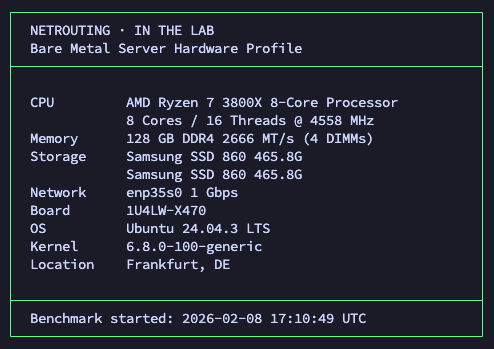
Curiosity finally got the better of us. We wanted to see exactly what a single, beefy bare metal server could handle if we tossed actual development workloads its way. So we grabbed an AMD Ryzen 7 3800X from our Frankfurt data center. We gave it 8 cores, 128GB of DDR4 memory, two solid state drives, and a completely unmetered gigabit pipe. After loading a fresh copy of Ubuntu, we put it through the wringer. We ran PostgreSQL databases, Docker staging stacks, Redis caches, CI/CD builds, and basic web serving.
We skipped the synthetic fluff. No cherry picked data either. Just real tools delivering real results.
Blog contents
This marks the first entry in our In The Lab series. The goal is simple. We benchmark our own hardware so you know exactly what the box can do before you spend a dime.
The Hardware
8 Cores / 16 Threads @ 3.9 GHz
DDR4 UDIMM
SSD (SATA/NVMe)
Dedicated & Unmetered
Look, this is a Zen 2 chip. It isn't the absolute newest silicon on the market today, and honestly, that is the whole point. Mature hardware gives you an incredible price point for infrastructure that needs to run around the clock. The 3800X easily hits 4.5 GHz boost clocks and handles instructions like a champ. When you pair that processing power with 128GB of RAM, you get a machine that punches way above its weight class. Finding a cloud VM with that much memory usually costs an absolute fortune. We also toss in gigabit connectivity and DDoS protection for free.
You can spin one of these up in Frankfurt, Amsterdam, or Miami. Pick whichever location sits closest to your users.
CPU Performance: The Foundation
Let's start with the baseline numbers. We fired up Geekbench 6 and sysbench. These scores give you a solid reference point to compare against your current cloud instances.
| Test | Result | What It Means |
|---|---|---|
| Sysbench Single-Thread | 821 events/sec | Database queries, single-process tools |
| Sysbench Multi-Thread (16T) | 6,547 events/sec | Compilation, Docker builds, parallel CI jobs |
| Geekbench 6 Single-Core | 1,673 | Industry-standard reference (full results) |
| Geekbench 6 Multi-Core | 8,584 | Industry-standard reference (full results) |
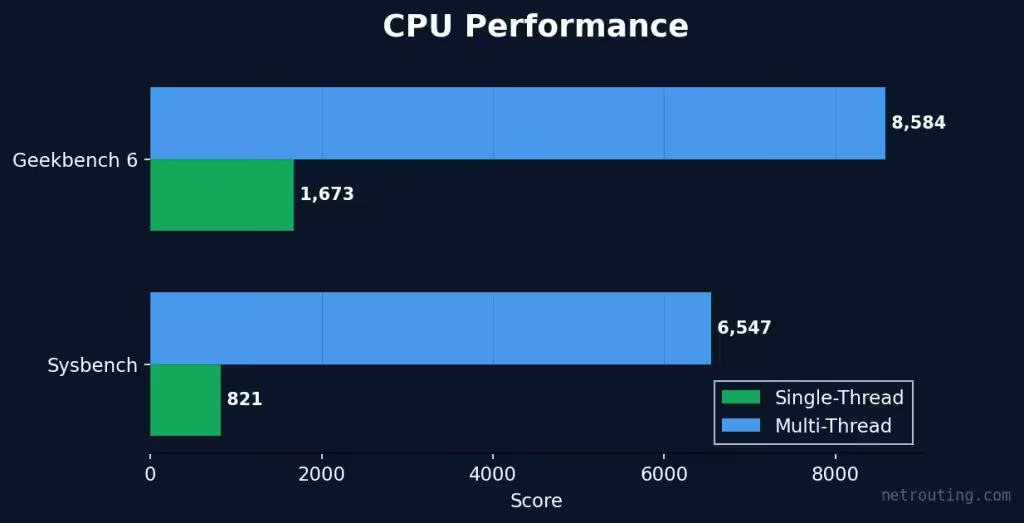
Having 8 cores and 16 threads gives you serious breathing room. You can confidently run a web server, a database, a caching layer, and several CI runners at the exact same time. They coexist beautifully without fighting for resources.
Storage: How Fast Can It Move Data?
Storage speed is everything. It impacts Docker layer builds and database commits heavily. To mimic actual usage, we ran fio using a blend of random and sequential I/O patterns.
| Test | Result |
|---|---|
| Sequential Read (1M blocks) | 495 MB/s |
| Sequential Write (1M blocks) | 330 MB/s |
| Random 4K Read (IOPS) | 144,328 IOPS |
| Random 4K Write (IOPS) | 77,077 IOPS |
| Mixed 70/30 R/W | R: 65,963 / W: 28,333 IOPS |
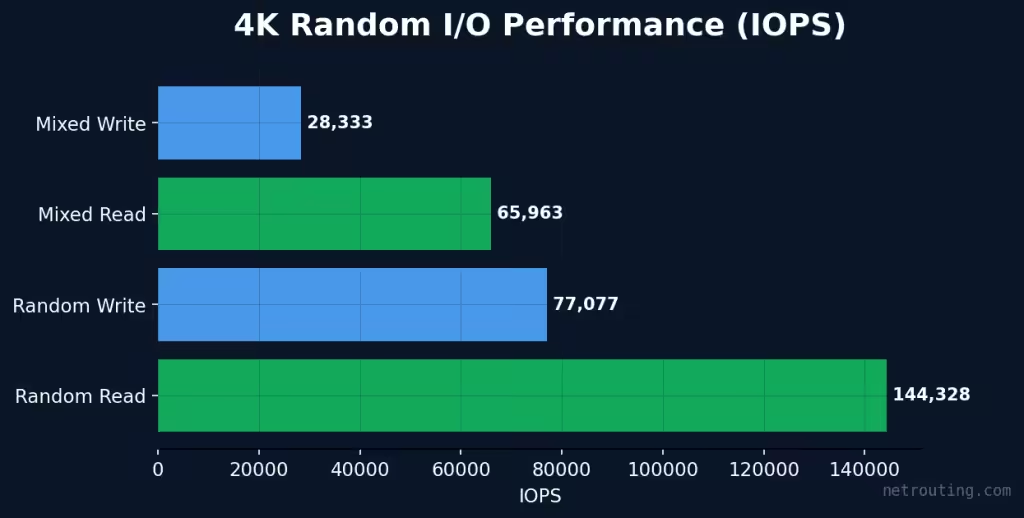
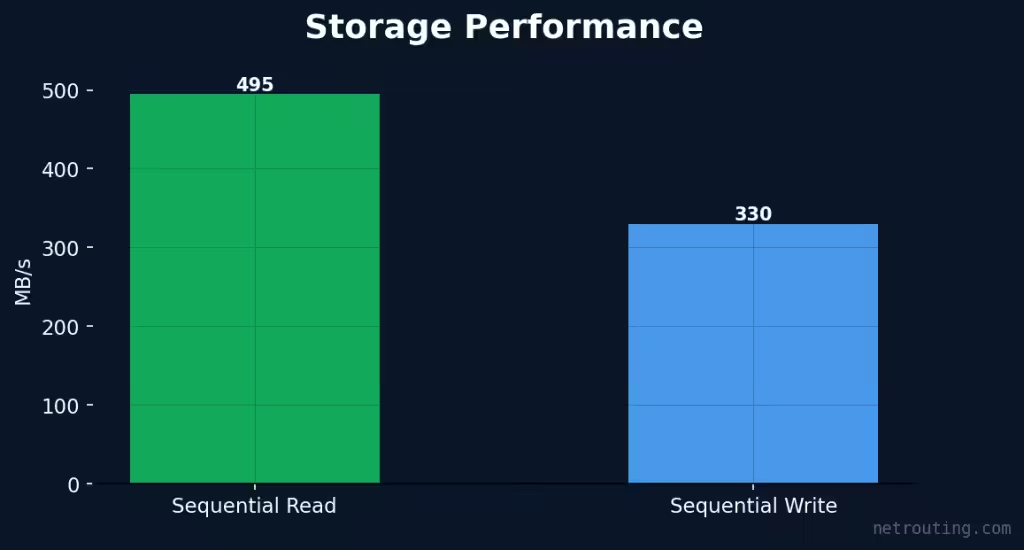
Our test chassis holds two SSDs. We configured them in RAID-1 for some redundancy, but you could easily keep them separate to isolate your OS from your data. If you run heavy databases, you really only care about the random IOPS numbers. They are extremely solid here.
Network: Frankfurt at the Heart of Europe
We parked this server in our Frankfurt data center because it is arguably one of the most connected cities in Europe. But paper specs do not mean a thing until you measure the actual latency your team will feel. We sent pings out to major European ISPs to get the real story.
Latency to European ISPs
| Provider | Country | Latency (avg) |
|---|---|---|
| Deutsche Telekom | Germany | 0.61 ms |
| Vodafone Deutschland | Germany | 1.13 ms |
| 1&1 IONOS | Germany | 4.52 ms |
| KPN | Netherlands | 6.66 ms |
| Proximus | Belgium | 12.39 ms |
| Swisscom | Switzerland | 5.44 ms |
| A1 Telekom | Austria | 11.38 ms |
| Orange | France | 12.11 ms |
| Telefónica | Spain | 32.68 ms |
| COSMOTE | Greece | 43.75 ms |
| Fastweb | Italy | 21.89 ms |
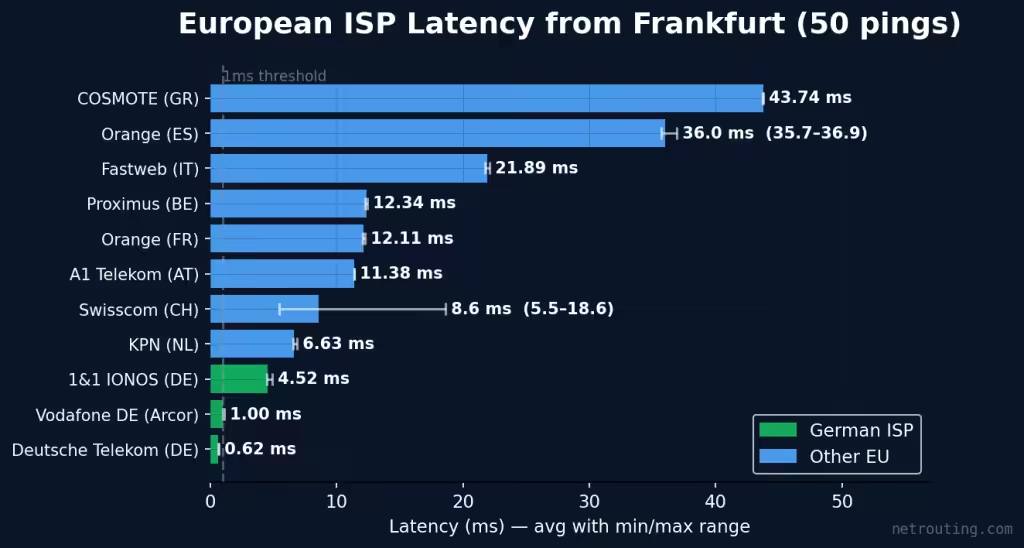
As the data shows, we hit sub-millisecond responses to Deutsche Telekom. Throughout the DACH region, latency remained in the single digits. Even reaching down into Southern Europe, it stayed well under 45ms. Your staging environments will feel incredibly responsive whether your team is sitting in Amsterdam or Athens. Webhooks fire instantly, and APIs answer right away. Developers working out of Madrid or Milan get a completely smooth experience.
Throughput to European Mirrors
Latency is only part of the puzzle. What about raw bandwidth? We verified the 1Gbps link by running iperf3 against mirrors located in Amsterdam and Frankfurt.
| Test | Throughput |
|---|---|
| iperf3 → Frankfurt (Leaseweb) | 941 Mbps |
| iperf3 → Amsterdam (Worldstream) | 938 Mbps |
The connection completely saturates the link across Western Europe. You are getting the full gigabit you paid for. It does not matter if you are cloning massive repos or syncing database backups.
Why "Unmetered" Changes the Economics
Cloud providers love taxing you for data movement. Want to pull a Docker image? Pay an egress fee. Pushing build artifacts? Pay an egress fee. Need to download a 50GB database backup? Get your credit card out. A busy dev team can easily generate hundreds of euros in hidden transfer fees every month. At Netrouting, unmetered actually means unmetered. You can push and pull files at line rate 24/7 without ever seeing a surprise overage charge. For pipelines moving gigabytes of artifacts daily, this is a massive financial win.
PostgreSQL: Real Database Performance
Databases are the heart of any staging environment. We installed PostgreSQL and cranked up the pressure using pgbench to see how the server handles real transactional patterns.
| Test Scenario | Clients | Result (TPS) | What It Simulates |
|---|---|---|---|
| Read-only (SELECT) | 10 | 149,926 TPS | Cache lookups, API read endpoints |
| Read-write (OLTP) | 10 | 1,667 TPS | Typical app workload |
| Heavy concurrent | 50 | 3,063 TPS | Connection pool stress |
| Burst (max load) | 100 | 3,484 TPS | Peak traffic simulation |
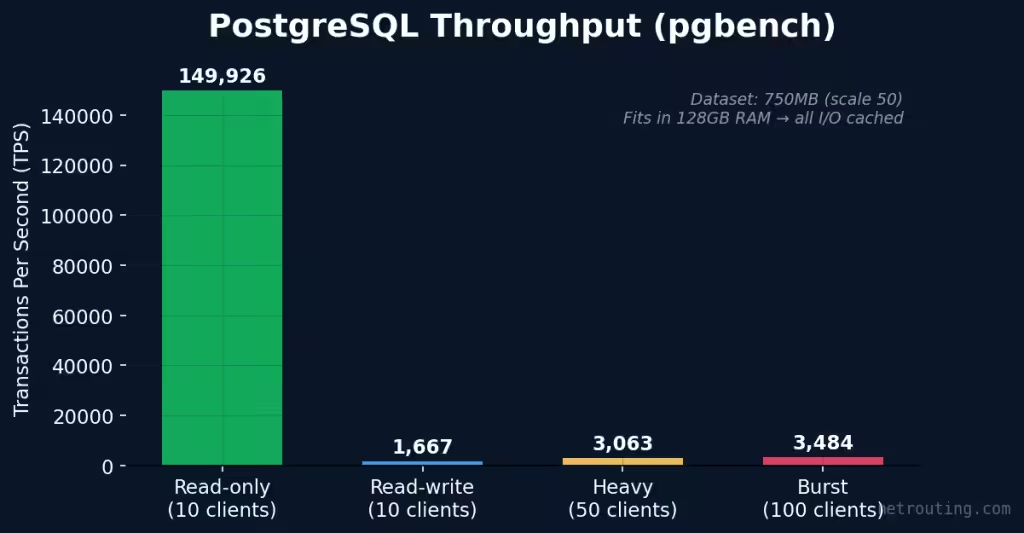
We used a test dataset of about 750MB. Because the server has 128GB of RAM, the entire dataset fit easily into memory. All I/O was perfectly cached. This is exactly what happens in the real world when your staging database is smaller than your available memory. You can stack multiple staging databases on this single server without them stepping on each other's toes.
Redis: In-Memory Speed for Your Cache Layer
Modern apps demand a caching layer. Redis handles everything from job queues to session storage. We tested the hardware using pipelined operations, since that is how your app will actually communicate with it.
| Operation | Throughput | Use Case |
|---|---|---|
| SET (1M ops, pipeline 16) | 1.1M ops/sec | Bulk writes, session storage |
| GET (1M ops, pipeline 16) | 1.3M ops/sec | Cache reads, API response cache |
| LPUSH (500K ops, pipeline 16) | 1.1M ops/sec | Job queues, message queues |
| LRANGE 100 (100K ops) | 69K ops/sec | Leaderboards, feed pagination |
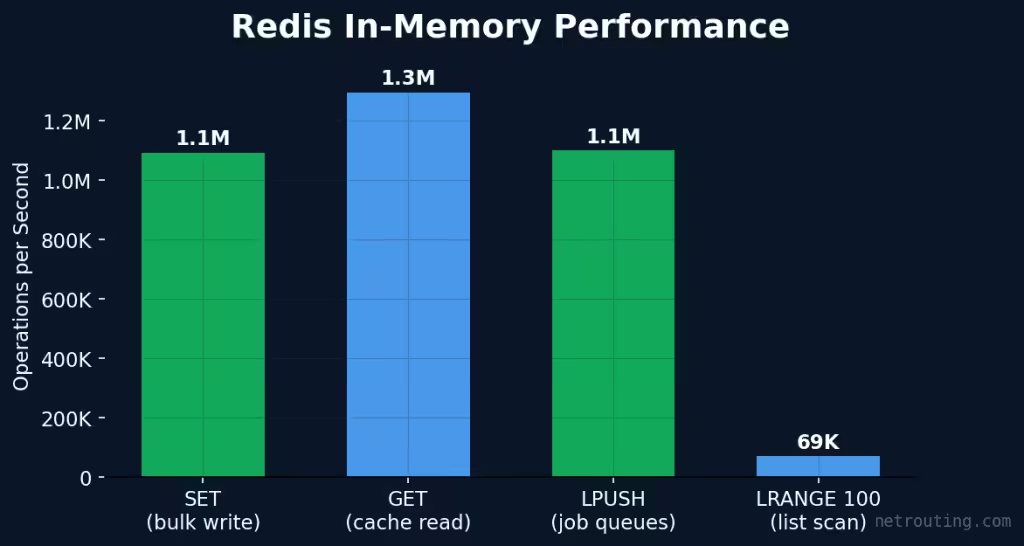
Thanks to the massive 128GB RAM pool, Redis can hold enormous datasets. You do not have to shrink your cache size just to fit into a tiny 4GB cloud VM anymore. You can mirror your production cache behavior perfectly, which means way fewer surprises on deployment day.
Docker Staging Stacks: How Many Environments Can You Run?
This is the big question. We deployed a complete SaaS staging stack featuring Nginx, Redis, and PostgreSQL containers. After measuring the idle footprint, we calculated a realistic capacity based on active connections and cache data.
| Metric | Result |
|---|---|
| Stack startup time | 1275 ms |
| Memory per stack (with working data) | ~384 MiB |
| Available RAM (after OS + Docker) | ~120 GB |
| Estimated staging environments | ~320 |
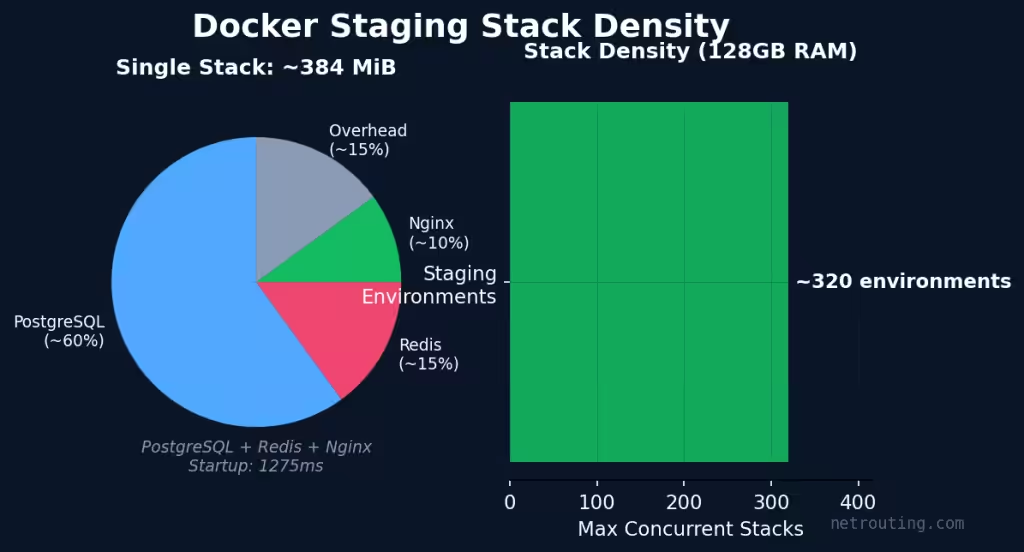
Every single environment gets its own isolated database and web server. You get zero contention between team members or pull requests. You can literally spin up a fresh environment for a new feature branch and delete it when the code merges. Even if your data requirements are heavy, you will run far more environments here than on a comparably priced cloud setup.
The Math: Bare Metal vs. Cloud Staging
Let's talk money. A standard three container staging stack on AWS costs roughly 80 to 120 euros a month. If you have ten developers running their own staging setups, you are burning around a thousand euros monthly.
Put those exact same ten environments on this bare metal box. You simply split the 129 euro flat rate. That drops your cost to under 13 euros per environment. You still have plenty of room left over for CI runners. You could scale up to 30 environments and still never pay more than 129 euros.
CI/CD Build Performance: Ship Faster
Developers hate waiting around for builds to finish. We tested this server as a self-hosted build machine using three real world CI/CD operations.
| Operation | Result | Context |
|---|---|---|
| Docker image build | 47.5s | Node.js app with 15 real npm dependencies |
| Compilation throughput | 50K bogo-ops/sec | All 16 threads, sustained 30s |
| Git clone (shallow) | 0.5s | Via 1Gbps unmetered connection |
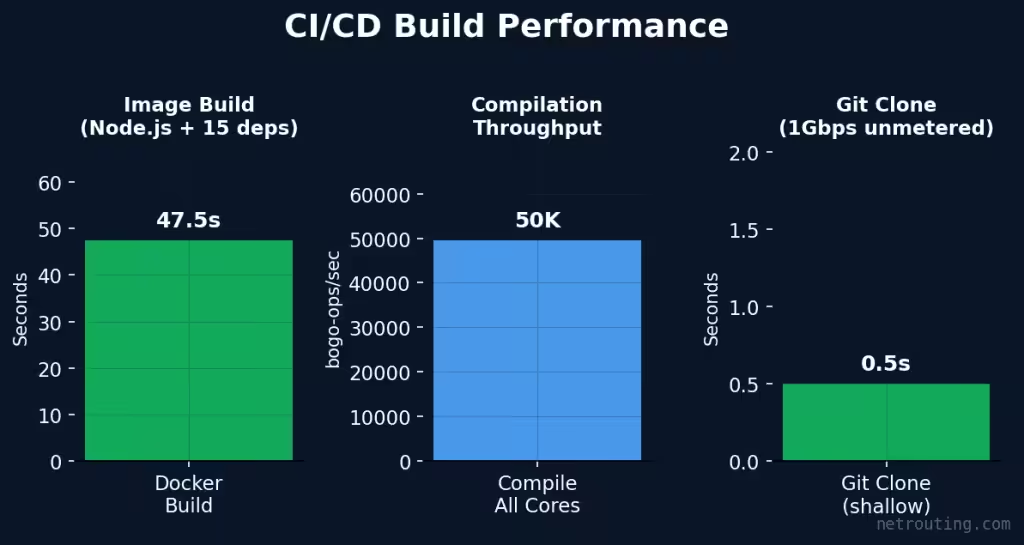
Having 8 cores and 128GB of RAM means you can run multiple runners in parallel easily. Think three or four concurrent builds happening without the CPU breaking a sweat. And since bandwidth is unmetered, downloading dependencies and pushing artifacts never adds to your monthly bill.
Self-Hosted GitHub Actions, GitLab CI, or Jenkins
This hardware is an absolute dream for self-hosted CI runners. Jenkins agents and GitHub Actions run beautifully on bare metal when you throw this much memory at them. You get total control over the environment. No more waiting in shared runner queues. Best of all, you get predictable performance for a flat monthly rate without any per-minute billing nonsense.
Web Serving: Nginx Out of the Box
This server handles traffic effortlessly. We tested Nginx using wrk with 50 concurrent connections sustained for thirty seconds. It served a realistic staging dashboard right over the public IP.
| Metric | Result |
|---|---|
| Throughput (50 connections, 30s) | 273,634 req/sec |
| Average Latency | 0.1ms |
These numbers reflect actual server side processing capacity. We routed the traffic through the real network interface rather than using a loopback shortcut. The hardware has plenty of headroom left over for TLS termination and reverse proxying.
Why Netrouting? What You Get Beyond the Hardware
Anyone can rent you a processor. Here is what you actually get when you deploy with us.
DDoS Shield Complimentary on Every Server
Every bare metal box we sell includes our DDoS Shield at no extra cost. We do not do premium security tiers or surprise invoices when an attack happens. Your infrastructure stays online.
24/7 Expert Support
You talk to real humans, not frustrating chatbots. Our team provides round the clock assistance. We even guarantee a one hour ticket response time. Network issues or OS configuration questions? We have you covered.
One-Click OS Deploy
You can install your operating system right from the control panel. Pick Ubuntu, Debian, Windows Server, or CentOS. You can even bring your own custom ISO using virtual media.
Enterprise-Grade Hardware
This isn't cheap consumer hardware shoved onto a shelf. Every server uses components rated for continuous 24/7 operation. You get purpose-built infrastructure complete with full remote management.
Three Locations
Deploy in Amsterdam, Miami, or Frankfurt. Pick the location closest to your team. You get the exact same hardware and pricing regardless of where you spin it up.
What Should You Run on This?
Based on our benchmark runs, these are the use cases where this server delivers the best return on investment:
| Use Case | Why This Server | Sweet Spot |
|---|---|---|
| Primary Dev/Staging Infrastructure | 128GB RAM fits dozens of Docker staging stacks, unmetered bandwidth for CI/CD | 10-50 person teams replacing cloud staging VMs |
| Primary Self-Hosted CI/CD | 8 cores for parallel builds, SSD for fast I/O, flat-rate pricing vs per-minute billing | GitHub Actions, GitLab CI, Jenkins runners |
| Strong Docker / K3s Platform | Run your entire dev platform on one box with 128GB of headroom | Internal tools, databases, caches, monitoring, all containerized |
| Strong Web Hosting Node | Unmetered bandwidth, fast SSDs, DDoS Shield for peace of mind | Agency hosting, SaaS apps, WordPress multisite |
| Strong Database Server | 128GB RAM means your working set fits in memory, 8 cores for parallel queries | PostgreSQL, MySQL, MongoDB, staging or production |
Honestly, this server is perfectly comfortable running production workloads. The benchmarks we ran reflect sustained real world loads. The economics are just incredibly compelling for teams trying to escape per-VM cloud pricing for their staging environments.
The Verdict
Think of this Ryzen 7 3800X setup as a total cheat code for your infrastructure. Cloud providers nickel and dime you for every gigabyte and every minute. This server gives you a fixed cost platform that can comfortably run dozens of staging environments and databases at the same time.
If your team is spending a thousand euros a month on cloud staging, this box pays for itself almost immediately. It does not disappear when you stop paying an hourly meter. It is dedicated hardware with consistent performance and support from actual human beings.
We have plenty of these configurations in stock right now. Order today and you could be moving your staging stacks over by tomorrow.
Ready to cut your cloud development costs?
View This Server at Netrouting →
AMD Ryzen 7 3800X · 128GB DDR4 · 2×500GB SSD · 1Gbps Unmetered · DDoS Shield Included · From €129/mo
Methodology
We ran all these benchmarks on a freshly provisioned Ubuntu server over in our Frankfurt data center. No extra background services were running. We used industry standard tools like sysbench, fio, Geekbench 6, and pgbench. We used real Docker containers for the density testing and actual Docker builds for the CI/CD test. ISP latency was measured by pinging provider IPs across Germany, Switzerland, Italy, Spain, and France.
We actually put the full benchmark script on our GitHub. Feel free to grab it, run it on your own Netrouting server and compare notes.
