Picking a good dedicated GPU server host to train models on requires a number of trade-offs. Firstly raw compute power, then bandwidth to get data in and out, then where data is actually stored. Additionally, Finally how much the whole thing costs to run, all before the first model trains or inference request is made.
Netrouting offers Dedicated Server infrastructure designed and engineered by our own team since 2007.
dedicated GPU server solutions : a guide to what really matters. This guide covers the real criteria to evaluate gpu dedicated servers for hosting: the GPU, memory bandwidth, host-to-network, data residency and compliance, managed vs. unmanaged, provisioning time and support.
Blog contents
By the end of this guide, you will have a clear framework to match your workload requirements (e.g. AI training, inference, self-hosted LLMs) with the right hardware and hosting provider. For now, a few words on what dedicated graphics processing server hosting actually is and how it compares to shared hosting. Organizations deploying artificial intelligence workloads must carefully evaluate how GPU architecture, memory capacity, and network throughput align with their specific model sizes and inference latency requirements.
What Is Dedicated GPU Hosting for Servers?
bare-metal GPU hosting is a physical hosting solution that provides a user with a single server containing 1+ physical GPUs, as well as the corresponding CPU, memory, storage and network connectivity. The gpu servers hosting is dedicated, meaning no sharing with other users (tenants) to prevent resource contention and ensure the most consistent performance possible.
What Is Dedicated GPU Server Hosting and How GPU Servers Work
The typical CPU handles sequential tasks using a few high-power cores that tackle work one at a time.

This leads to a large number of orders of magnitude of difference in throughput.
GPU Servers: Dedicated vs. Shared Cloud GPU Instances
Shared cloud GPU instances are shared on a pool of instances per tenant. This leads to so called "noisy neighbors" where a neighbor's machine learning workload will suddenly peak and your training or inference will slow down dramatically. Dedicated servers on the other hand remove this variable entirely.
GPU dedicated server s deliver fixed clock speeds, VRAM and PCIe bandwidth in production. Such predictable performance is essential for heavy use in production of AI inference as well as in longer lasting training processes.
Why Dedicated GPU Servers Matter for High Performance Computing
High performance GPU hosting depends on resource isolation. Large language model inference deployments experience VRAM contention that creates request queuing and timeout failures at scale.
Our GPU servers are provisioned on dedicated hardware (no hypervisor overhead, no shared memory pools etc.).
GPU Servers vs. CPU for Natural Language Processing and Parallel Tasks
| Provider / Option | GPU Hardware | Performance | Network | Support & SLA | Best For |
|---|---|---|---|---|---|
| Netrouting | NVIDIA RTX 6000, A10, A40, A100, multiple GPUs per node; high GPU memory configurations | Bare-metal GPU acceleration with no hypervisor overhead. Parallel processing and complex calculations run at full hardware speed. | 2.4 Tbps+ backbone (AS6206); unmetered 10 Gbps; up to 40 Gbps; dense IX peering across 10 locations | 24/7 NOC; 1-hour ticket guarantee; 99.9% SLA; ISO 27001 & SOC 2 | AI/ML training, inference, self-hosted LLMs, EU data-sovereign workloads requiring massive parallel processing |
| Hyperscaler GPU Cloud | Wide GPU catalog; shared or dedicated instances; variable GPU memory per tier | Virtualised GPU acceleration; complex tasks may compete for resources on shared nodes; central processing unit allocation varies | High-bandwidth internal fabric; egress-heavy workloads incur variable costs | Managed SLAs per service; enterprise support tiers available at added cost | Teams already invested in a hyperscaler ecosystem needing on-demand GPU bursting |
| Specialist GPU Cloud Provider | Consumer and data-centre GPUs; multiple GPUs per instance; GPU memory varies by tier | Good parallel processing throughput; complex calculations benefit from bare-metal options where offered | Commodity uplinks; limited global peering; latency to EU/APAC can be inconsistent | Basic ticket support; SLA terms vary; limited NOC coverage | Cost-sensitive GPU acceleration experiments and short-burst complex tasks |
Production AI/ML work requires full GPU acceleration, large GPU memory, and constant parallel processing for complex math. Bare metal Dedicated Servers outperform virtualized alternatives. Netrouting's GPU Servers (NVIDIA A10, A100) support large-scale parallel processing without noisy-neighbor risk. Pairing NVIDIA accelerators with high-core-count AMD EPYC processors keeps data preprocessing and model serving pipelines from creating CPU-side bottlenecks.
The massive network of 2.4 Tbps+ is optimized for data intensive demanding workloads and multiple GPU’s. For EU data-sovereignty required work or latency sensitive inference work Netrouting is the preferred choice. Next to outlining the hardware landscape we now also outline which workloads benefit from which GPU type and match those to the corresponding GPU tier on Netrouting’s GPU Servers.
Key Use Cases for Dedicated GPU Servers

Graphics processing units (GPUs) deliver massive amounts of parallel computation to tackle very large workloads. Here are some examples of the types of workloads, including data analytics, AI training, and rendering, that require gpu servers with such raw throughput, and the significant problems encountered with lesser GPU memory and computation. Organizations running data intensive workloads benefit from GPUs that can sustain high memory bandwidth alongside computational throughput to avoid bottlenecks during processing. Processing large datasets efficiently requires GPUs with sufficient memory bandwidth to stream terabytes of information without stalling compute pipelines during training epochs.
Modern machine learning pipelines depend on large scale data processing capabilities that can handle petabyte-scale datasets across distributed GPU clusters without introducing memory transfer bottlenecks. The raw power of modern GPUs enables organizations to process billions of parameters in neural networks while maintaining throughput levels unattainable with traditional CPU architectures. Advances in artificial intelligence have made GPU acceleration indispensable for organizations deploying deep learning models that process unstructured data at scale.
AI Training, Inference, and Machine Learning
- AI model training and deep learning algorithms. Training a modern neural network on CPU alone can take weeks. GPUs compress that to hours by running thousands of matrix operations simultaneously. Here is where AI training delivers its clearest ROI.
- This work uses AI inference and natural language processing. To serve a large language model at production latency, we need to sustain a high rate of tensor throughput. Here, without a dedicated GPU, response time and throughput plummet as the number of concurrent requests increases.
Note: Shared cloud GPU instances introduce noisy-neighbor variance. For latency-sensitive inference, dedicated hardware is the only reliable baseline.
How Much GPU Memory Do GPU Servers Need for LLM Training?
A 7B-parameter model in FP16 requires around 14 GB of VRAM before optimizer states and gradients; a 70B-parameter model needs 140 GB or more. Models exceeding 13B parameters use multi-GPU setups with high-bandwidth interconnects.
Our GPU Servers are powered by NVIDIA A100 for maximum performance. Our EU GPU Servers are designed for sensitive projects requiring data sovereignty, backed by Netrouting's own data center infrastructure in the EU to guarantee physical security and regulatory compliance.
Scientific Computing Power for Data Analytics and Rendering
- Scientific simulations: Fluid dynamics, molecular modeling and climate modeling are all examples of work that is embarrassingly parallel. Performing scientific computing on a GPU can cut days of simulation time down to hours, which is very important for research where the speed of iteration is key.
- Big data and data analytics. GPU-accelerated query engines are able to process large datasets in memory far faster than their CPU-based counterparts. Without GPU acceleration, large analytical workloads would be able to run in parallel, and thus in much less time.
- Video and graphics rendering, real-time graphics and high-definition video encoding. All of these tasks can immediately saturate CPU cores, but a dedicated GPU handles the entire rendering pipeline and cuts rendering time in half.
Identifying your workloads and selecting the right GPU servers to deliver unparalleled performance for them are equally critical steps. Evaluating gpu memory, multi-GPU support, storage, and network together prevents bottlenecks that throttle training pipelines or spike inference latency. Proper server configuration aligns GPU memory bandwidth, PCIe lanes, and network interfaces to ensure gpu resources aren't contested during peak workloads.
How to Choose the Right GPU Servers for Your Workload
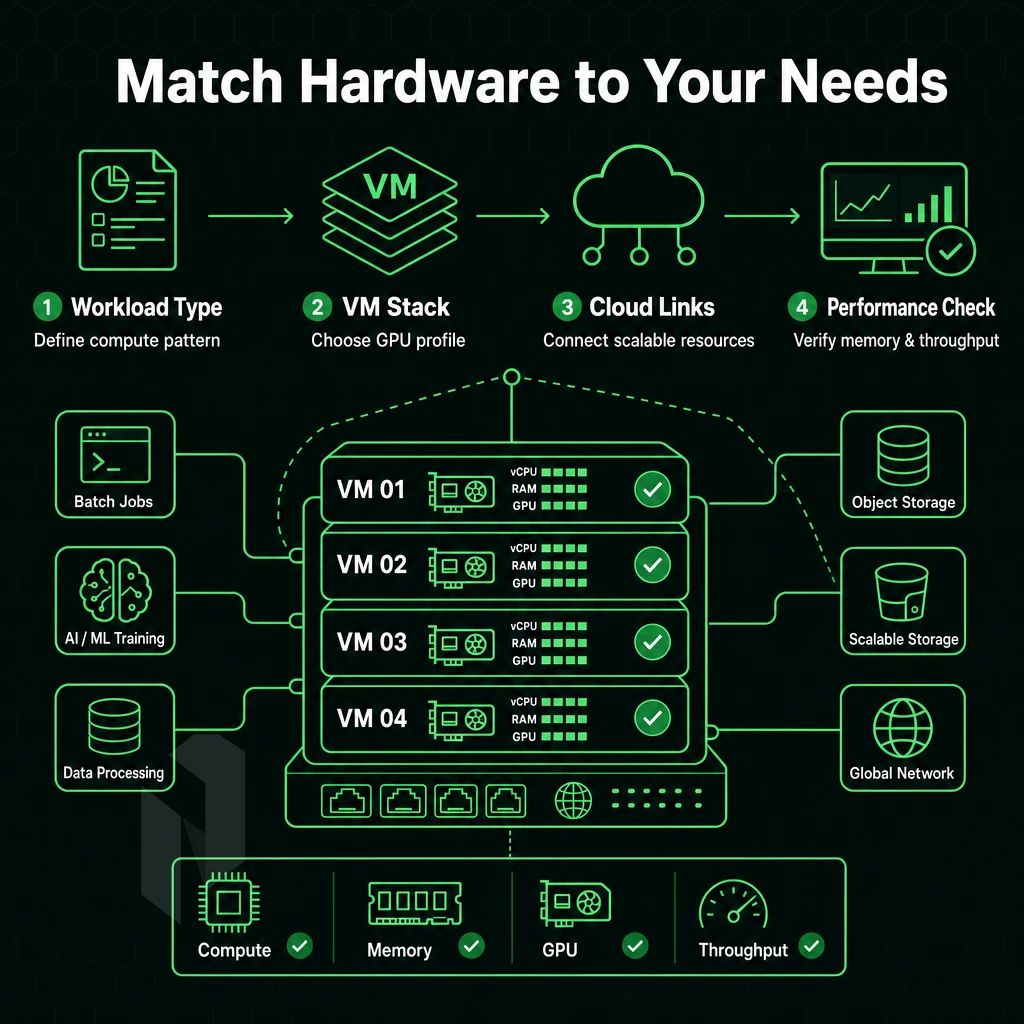
The right GPU server for your needs depends on matching hardware to your specific workload.
GPU Servers Model and Memory Selection
NVIDIA offers a range of GPUs that vary significantly in performance. While the RTX Pro graphics processing units are highly optimized for GPU-based rendering and visualization, models like the A10, A40, and A100 are highly suitable for inference and moderate training on gpu servers. The A40 offers significantly more VRAM than the A10, which makes it an attractive option for larger AI models.
The A100 serves as a benchmark for gpu dedicated servers handling extremely data-intensive workloads like large-scale training, HPC and multi-tenant inference at very large scales. Research institutions and enterprises deploying high performance computing clusters often standardize on A100 configurations to ensure consistent throughput across distributed training jobs and simulation workloads.
GPU memory is the hard constraint. A 7B parameter model in FP16 requires about 14 GB of VRAM with some compression applied. Larger models (40, 80 GB) need an A100 or a multi-GPU setup.
Can I Run Multiple GPUs on a Single Dedicated Server?
Yes. Configuring multi-GPU cards on a single dedicated server is common for distributed training. Memory is shared between all cards in the pool. Thus, a configuration of multiple NVIDIA cards is connected to an AMD EPYC or Intel Xeon host CPU. Both dedicated gpu hosting platforms provide enough PCIe lanes and sufficient memory bandwidth to handle large amounts of parallel data in GPU workloads without a bottleneck.
AMD EPYC Storage, Network, and OS Compatibility
NVMe SSD storage is a must for fast data set loading. Slow storage can starve the GPU pipeline. Seek to achieve sequential read speeds of 3,000 MB/s or higher for training loops.
Network bandwidth determines data transfer between storage servers and compute nodes. Large environments need a minimum of 10 Gbps, and at Netrouting, you get unmetered 10 Gbps on dedicated servers.

The two operating systems with the broadest support for NVIDIA drivers and the CUDA toolkit are Ubuntu LTS and Rocky Linux. Check the driver version available for whichever CUDA version you need.
Additionally, Then provisioning the appropriate hardware as you choose from the offerings of bare metal or of cloud-based GPU instances. Additionally, deciding based on your use case, including central processing unit and GPU resource needs, whether bare metal instances or cloud-based GPU servers are more suitable is an important consideration.
Dedicated GPU Servers vs. Cloud GPU: Side-by-Side Comparison
Dedicated GPU hardware hosting and cloud GPU instances both suit AI and data-intensive workloads, but GPU bare-metal server hosting delivers significantly better performance, more control, and a lower total cost of ownership than cloud GPU instances. This makes dedicated hosting, including gpu servers, ideal for high performance computing tasks requiring longer runtimes, compliance adherence, and predictable billing.
Side-by-Side: GPU Dedicated Servers vs. Cloud GPU
| Dimension | Dedicated GPU Server | Cloud GPU (hyperscaler) |
|---|---|---|
| Performance Consistency | Consistent performance, no shared contention | Variable; noisy-neighbor risk on shared hosts |
| GPU Memory Access | Full VRAM dedicated to your workload | Partitioned; VRAM shared across tenants |
| Pricing Model | Flat monthly, predictable TCO | Per-second billing; costs spike under sustained load |
| Data Sovereignty | Full control; EU-resident options available | Data may traverse multiple jurisdictions |
| Customization | Hardware-level, BIOS, drivers, RAID, networking | Limited to instance type and attached storage |
| Provisioning Speed | Under 60 minutes at Netrouting | Minutes, but GPU availability fluctuates |
| Noisy-Neighbor Risk | None, dedicated resources throughout | Present on shared GPU VPS tiers |
| Compliance | ISO 27001, SOC 2, clear audit trail | Varies; shared infrastructure complicates audits |
TCO: Why Dedicated Wins for Demanding AI Workloads
Per-second billing by hyperscalers may seem cheap for occasional burst jobs. However, for continuously running demanding AI workloads such as LLM training, scientific computations, and AI inference pipelines, costs across various gpu server hosting options will add up quickly. Here, dedicated bare metal delivers lower TCO than running on AWS, Azure or IBM Cloud, as soon as the utilization is sustained.
Our Dedicated GPU resources don't have noisy-neighbor problems. Shared GPU VPS offerings from other providers partition available VRAM among tenants, which can deteriorate performance in unpredictable ways under load.
GPU Servers vs Standard Dedicated Server Hosting
Traditional dedicated servers are primarily CPU-focused for hosting high-end web, database and other high-end computing applications. Dedicated Servers with GPU (Graphic Process Unit) serve massively parallel processing capabilities to perform specialized computational tasks such as matrix algebra, 3D rendering and AI inference that a single CPU cannot accomplish efficiently enough.
When running high performance computing at scale, you need both the hardware and the infrastructure. Netrouting offers NVIDIA GPUs paired with our AS6206 backbone, deployed across 10 global locations with low latency for data-intensive work.
Network and Infrastructure Requirements for GPU Servers

When the size of models increases, GPU performance alone is not enough to measure the success of workloads. Inference endpoints face real-world traffic.
Bandwidth, Latency, and Distributed Training
Distributed training between multiple nodes requires low latency high bandwidth interconnects and private high bandwidth networking. Even GPU nodes can become a bottleneck when their interconnect bandwidth to other nodes is not sufficient. The free private network of Netrouting delivers up to 40 Gbps between all nodes, allowing graphics processing units gpus to synchronize gradients without the congestion of shared fabrics.
High-bandwidth data ingestion is just as important. Very large datasets for Natural Language Processing or Video Rendering require sustained NVMe SSD storage throughput to keep the GPUs supplied with data. Slow storage causes idle GPU cycles, which equal wasted computing power, regardless of the server configuration.
Why Do AI Workloads Demand DDoS Protection?
Public facing production ai inference endpoints are high value targets. A volumetric attack on an inference API can take down revenue critical services and disrupt business. Netrouting’s always-on L3/L4 DDoS protection is included with every service. Our 2.4 Tbps+ network capacity can absorb volumetric attacks before they even reach your infrastructure.
Why Does EU Data Sovereignty Matter for AI Workloads?
The training data of AI systems contains a lot of personal information or even regulated information. Therefore, EU-based GPU hosting keeps such data within the jurisdiction of the GDPR. Healthcare, financial as well as legal AI applications can be deployed on Netrouting’s servers in the European locations. Windows Server as well as Linux deployments qualify here. For teams working under strict frameworks of regulation, the requirements of compliance with regard to the EU data residency are worth a closer look.
EU Data Sovereignty and Compliance for AI Workloads

Organizations across Europe are facing increasing pressure to keep their workloads, machine learning pipelines, and their corresponding data within EU geographical boundaries. For organizations operating within highly regulated industries, hosting dedicated gpu servers infrastructure within the European Union is not a choice, it's a requirement in order to remain in compliance.
Assess Your Data Residency Requirements
- Map sensitive data to jurisdictions. Determine which datasets, gpu model weights, and corresponding ai model outputs are subject to GDPR or other sector rules. Such data that is personal in nature must remain within the EU for the entirety of the corresponding ai model training process.
- Select a compliant EU facility. We run high performance gpu servers in locations such as Amsterdam, Frankfurt, The Hague, Stockholm, Rotterdam and Bucharest. All locations are within the EU and are operated by Netrouting. Each location is ISO 27001 / SOC 2 compliant, providing proper audit documentation within the controls.
Note: Hosting gpu model weights outside the EU, even temporarily, can trigger GDPR transfer obligations. Confirm your provider's physical location before signing.
Deploy and Verify Compliance Controls
- Enabling private networking. By utilizing Netrouting’s free private interconnect, big data analysis workloads can be isolated from public traffic. This will help limit exposure during large AI workloads with sensitive inputs.
- Certify scope of certification (ISO 27001: Information Security Management; SOC 2: Operational Controls). Prior to go-live, obtain relevant attestation letters (Enterprise and Audit/Regulatory requirements satisfied).
EU data sovereignty is a differentiator that Netrouting is highlighting for their GPU offering. Even the entry-level GPU servers in their European locations are offered with the same certified infrastructure as the rest of their GPU servers. As a result, Data sovereignty compliance scales with your work load and not with your budget.
How Quickly Can Dedicated GPU Servers Be Provisioned?
For all the tasks of data analysis that cannot wait, we at Netrouting provision Bare Metal servers, including GPUs, within 60 minutes. By submitting an order for deployment of hardware, networking.
Additionally, once OS setup is complete within that time frame, you get root access and the maximum possible performance of your gpu dedicated servers resources, provided there is no queue for new server provisioning, which is rarely the case. In summary, a complete set of services is provided for every GPU server deployment procedure.
Why Choose Netrouting for Dedicated GPU Server Hosting
Netrouting delivers high performance GPU hosting on dedicated bare metal, no shared resources, no noisy neighbours. Our GPU dedicated servers run NVIDIA RTX 6000, A10, A40, and A100 options across four tiers, hosted on AMD EPYC platforms built for AI workloads, deep learning, AI model training, and scientific simulations. Every server is provisioned in under 60 minutes.
- Four NVIDIA GPU tiers: RTX 6000, A10, A40, and A100, match the right GPU server to your workload, from AI inference to large-scale deep learning model training.
- AMD EPYC host platforms: High core counts and large memory bandwidth feed GPU acceleration without CPU bottlenecks.
- EU data sovereignty: Deploy across Amsterdam, Frankfurt, The Hague, Stockholm, Rotterdam, or Bucharest. North American and APAC options in Miami, New York, Hong Kong, and Singapore.
- Always-on DDoS protection: L3/L4 mitigation included on every dedicated GPU server, no add-on required.
- 24/7 NOC, 1-hour ticket SLA: ISO 9001, ISO 27001, and SOC 2 certified infrastructure backed by round-the-clock monitoring.
- Lower TCO than hyperscaler GPU compute: Predictable monthly billing with unmetered bandwidth options, no egress surprises.
Contact our sales team for GPU dedicated hosting pricing and configuration options, or explore our GPU server range to find the right fit for your workload.
dedicated GPU compute hosting delivers something cloud GPU instances fundamentally cannot: guaranteed, unshared hardware with predictable performance and no noisy-neighbor interference. For AI training, inference, video rendering, and HPC workloads, that consistency isn't a luxury, it's a requirement. The choice between dedicated gpu servers and cloud GPU ultimately comes down to workload duration and control: long-running, resource-intensive jobs almost always favor dedicated hardware on a total-cost basis.
Choosing the right gpu hosting provider means matching GPU architecture, memory bandwidth, and interconnect speed to your specific pipeline, not just picking the highest core count available. Get that fit right and the performance gains are substantial.
Netrouting operates dedicated GPU servers across Europe, North America, and Asia-Pacific, with EU-based options for teams with data sovereignty requirements. Explore Netrouting's GPU server configurations or contact the sales team to spec a deployment around your workload.