Picking the cheapest dedicated server vendor often costs more long-term than you saved on that cheap offer. Bandwidth overages, slow provision times, low-end servers, and unresponsive support that disappears for a limited time when you need them most add up fast. You'll end up rebuilding your entire infrastructure in 6 months.
Netrouting has been engineering dedicated infrastructure solutions since 2007. Our AS6206 powered backbone connects users across 10 locations worldwide: Europe, North America, and Asia. This is what makes our guide so reliable, we know where companies cut corners on things like storage and where they don't. Each datacenter location is strategically selected to minimize latency and maximize uptime for regional traffic patterns.
In researching the dedicated server market for this guide we evaluated providers across several key criteria which together form the total cost of ownership: the range of available hardware, server management capabilities, and the ability to customize a configuration. The quality of a provider’s network including peering; the time taken to provision a server; DDoS protection and mitigations.
Blog contents
The support offered by a provider and its responsiveness, and finally the terms and conditions of a contract. Price matters but always in context, what appears cheap at first may prove poor value against key metrics. Here we explore what cheap really means.
What Makes a Dedicated Server Truly Cheap?
“Cheap” dedicated hosting is more than just a low price tag. The true cost of the server is reflected in the total cost of ownership (TCO), i.e. the price for the bandwidth in excess, the protection fees, the time needed for the setup. Additionally, The generation of hardware that is running your application.
Sticker Price vs. True Monthly Hosting Cost
It’s common for hosting providers to list a low base rate but charge separately for items like bandwidth, DDoS protection, and provisioning. So what may look like an affordable entry-point server could really cost a lot more once you've factored in all the additional server management charges that show up on your bill. For community perspectives, see Cheap dedicated server advise : r/selfhosted.
This is a more realistic example of older generation servers with limited bandwidth, storage, and no protection included. With unmetered bandwidth, generous storage, and always-on protection included from the word go, all that math goes out of the window.
What Are the Cheapest Dedicated Server Plans Available?
The cheapest capable dedicated server balances four factors:
- Server hardware generation: newer servers deliver more performance per watt and per core.
- Unmetered 10 Gbps bandwidth on 1 server included in the price. This typically would be an additional charge on cheaper hosted servers that offer to sell you bandwidth at fixed caps.
- DDoS mitigation: Always-on L3/L4-mitigation should be standard, not an additional service.
- Support quality. The support team is responding to queries and issues in a timely manner, and 24/7 technical support is guaranteed to ensure that no downtime will occur.
At Netrouting we start with the dedicated hosting servers. Our hosting services come equipped with the latest enterprise hardware like Dell and Supermicro servers, unmetered 10 Gbps connectivity, and always-on protection. We do not charge any hidden fees and there are no surprises with any overages.
Cheap-but-Capable Hosting vs. Cheap-and-Limiting Hosting
A cost-effective server is one that delivers consistent performance and billing. Cheap hosting can look attractive at first but can end up costing more in the long run if it limits bandwidth and does not provide adequate redundancy. Look at the total cost of the package and not just the low price. Once you understand the real cost, you need to determine whether dedicated hardware is even suitable for your use case.
Whether you run a growing business or manage enterprise applications, understanding these cost dynamics helps you avoid budget surprises and maintain predictable operational expenses. Planning for future growth means selecting a provider that allows you to upgrade server specifications without migrating to entirely new infrastructure.
Dedicated Server vs. VPS: Which Is the Better Deal?
| Provider | Performance | Support | Uptime SLA | Network | Best For |
|---|---|---|---|---|---|
| Netrouting | Entire server dedicated to you. Intel Xeon and AMD EPYC CPU cores. Up to 2 TB RAM. Blazing fast performance on high traffic workloads. | 24/7 NOC. 1-hour ticket guarantee. | 99.9% SLA. Same-day hardware replacement. | 2.4 Tbps+ backbone. Unmetered 10 Gbps. Always-on DDoS protection. | Online stores, gaming, AI/ML, and high-density workloads needing a good deal on a physical server with global reach. |
| Budget bare-metal providers | Shared or older-gen CPU cores. Computing power varies by tier. Limited custom configs. | Ticket-only. Business hours typical. | 99.9% or lower. Replacement SLAs vary. | Single uplink. Basic DDoS optional or absent. | Low-traffic sites and dev environments where cost is the only driver. |
| Hyperscaler bare-metal tiers | Modern physical server options. Good computing power but rigid configs. | Tiered paid support. Response times vary by plan. | 99.9%-99.95% depending on tier. | High-bandwidth egress available but metered. No free private network. | Teams already locked into a cloud ecosystem needing occasional bare metal. |
The value proposition for customers who require a full server with extreme performance and low variable costs is Netrouting. They offer dedicated CPU cores, unlimited 10 Gbps connectivity and 24/7 attack mitigation as standard. Most customers find that predictable monthly billing without usage overages simplifies budgeting for long-term projects and eliminates unexpected invoice surprises.
This makes for an extremely good deal for online shops, very high traffic web sites and other applications that require the full processing power of a physical server. Contact Netrouting sales to select the correct specifications for your needs. Once you have zeroed in on one machine tier that fits your needs, it is time to examine the specific options available to you within that tier. Their team helps you configure each server to match your workload requirements, ensuring optimal resource allocation from day one. Each machine is deployed with redundant power supplies and enterprise-grade components to ensure maximum uptime for mission-critical workloads.
Whether your project involves real-time data processing or serves thousands of concurrent users, having dedicated resources eliminates the performance variability common in shared environments. Proper resource allocation ensures your applications maintain consistent response times even during traffic spikes or intensive batch processing operations. Sales engineers work closely with customers to forecast capacity needs and recommend upgrade paths that align with business growth timelines. Customers who manage multiple production environments benefit from the ability to replicate configurations across servers, ensuring consistency in deployment pipelines and reducing troubleshooting time.
Key Specs to Compare When Choosing a Cheap Dedicated Server

Dedicated server plans are not equal.
Hardware Specs and Operating System
- Compare CPU cores and clock speed for Intel Xeon vs AMD EPYC server CPUs. Find out how more cores and higher clock speed can improve your server performance. Choose the right CPU architecture for your application.
- RAM capacity vs. DDR generation. DDR4 and DDR5 have significantly faster transfer rates than the outdated DDR3. Be aware that many very cheap servers come with old RAM and check the generation before you place your order.
- Storage type and disk space. The type of storage (NVMe SSDs, HDDs etc.) will have a large impact on latency. Make sure to check how many drives are available and if RAID is available for the drives. Also the amount of bays (drive trays) is important since this will determine how much you can scale in the future without having to move servers to larger units.
Note: Modern hardware costs less over time. A newer-generation CPU draws less power and handles more requests per watt than an older budget box, lowering TCO. Every physical machine in a datacenter carries ongoing electricity costs, so efficient processors directly impact your monthly operational budget.
Network and Operating System Software
- We take note of bandwidth allocation for you. Unmetered ports are unaffected by surprise overage charges. Note the speed of the port(s) you order (1Gbps ports vs 10Gbps ports for very bandwidth intensive services).
- volumetric attack protection. This should include always-on L3/L4 mitigation by default and not be sold as an additional service. Netrouting already includes a basic form of protection with every deployment.
- Control panel and root access. Check which control panels are supported. As a standard we offer DirectAdmin and cPanel. Full root access allows you to install any OS or application stack you need without any restrictions.
What Are the Cheapest Web Hosting Services?
Don’t get confused and think that the cheapest dedicated server hosting is VPS hosting. The cheap VPS hosting costs only slightly more for the dedicated server, but you have to pay for the used resources in both cases. The cheapest dedicated hosting is offered with older server generations for a base rate, but these servers also consume more power, offer less disk space, and may deliver lower per-core performance compared to newer generations. Many providers offer popular Linux distributions like CentOS, Ubuntu, and Debian as no-cost operating system options, which can reduce licensing expenses compared to Windows Server editions.
Some hosts also provide a free trial period or money-back guarantee, allowing you to test server performance before committing to a long-term contract. Operators running applications on Windows Server should factor in licensing costs when comparing total monthly expenses across different hosting tiers. Control panel software like Plesk or cPanel simplifies server administration tasks, though these tools typically require separate licensing fees that add to your monthly expenses. When evaluating long-term costs, consider whether your chosen plan allows you to upgrade server specifications without migrating data or incurring additional provisioning fees.
Netrouting offers bare metal servers in 10 locations worldwide. They are all equipped with unmetered 10 Gbps and protect users from DDoS attacks around the clock. Good value is being offered here, without any compromise in terms of network. However, knowing what you need and how the market charges for it is worth so much more. Each datacenter location is strategically positioned to minimize latency for regional users while maintaining consistent infrastructure standards across all facilities.
Dedicated Server Pricing: What the Market Actually Charges

The advertised price for dedicated server hosting does not always reflect the real monthly cost. The main advertised rate for hosting services needs to be compared against the various market tiers and additional hidden charges to assess the true cost of the server and ensure there are no surprises when the bill is due.
Budget, Mid-Range, and Performance Tiers
Entry-level servers often come with older CPU generations, low RAM, and classic hard disks, making them mainly of interest for dedicated servers offered at low prices.
Yes, there are good deals at the budget end of the market.
Hidden Costs That Inflate the Real Price
Many cheap dedicated servers charge extra for setup, bandwidth overages, DDoS protection, and control panel licenses such as cPanel or DirectAdmin. These additional services can easily add hundreds of dollars to the initial advertised price of a server.
Advertised price is rarely the cheapest price for the month. You need to include the setup fees, the bandwidth they charge and any software licensing fees. Then you can compare providers on total monthly spend.
Which Web Hosting Services Are Best for Dedicated Hosting?
The best provider for you is influenced by several criteria: your workload, your location, and the level of support you require.
Use Cases That Demand Dedicated Hardware
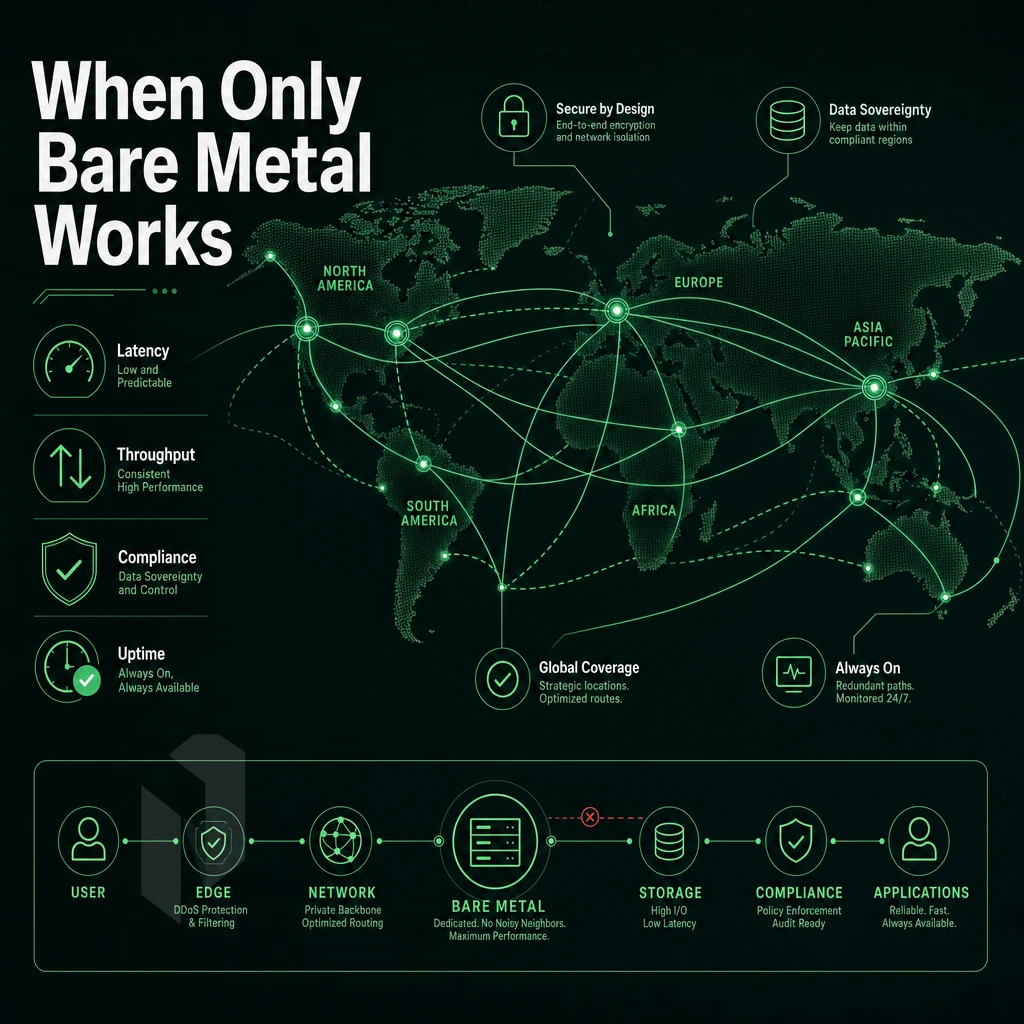
Shared and virtualized infrastructure can be great, but it has its breaking points.
Gaming, Streaming, and Latency-Sensitive Workloads
For a game server, tick rate and ping are everything. A noisy neighbor on a shared hypervisor can spike latency by tens of milliseconds, with dedicated CPU cores, that problem disappears.
Streaming video requires constant bandwidth. A single 4K stream requires the same amount of bandwidth to play smoothly without bursts. Our network delivers up to 10 Gbps of unmetered bandwidth on dedicated hardware to deliver constant throughput under load.
E-Commerce and High-Traffic Web Applications
E-commerce companies serving users face two hard constraints: PCI DSS compliance and traffic surges. Despite a longer setup time than shared hosting, dedicated servers keep cardholder data isolated and provide the compute capacity needed to handle great deals and flash sales without slowdown.
cPanel is a powerful tool that store operators can use to manage their servers. It provides reliable control over the server without requiring the operator to have in-depth knowledge of Linux. When combined with a server’s hardware RAID and daily backups, cPanel can help create a defensible compliance position.
VPN Providers and AI/ML Workloads
Virtual Private Network (VPN) services require IP flexibility, such as BYOIP support and full BGP routing. To deliver optimal performance, VPN services require physical instances, which cannot be replicated in virtual form.
For AI and ML inference workloads, our NVIDIA A10, A40, and A100 products are provisioned with large amounts of RAM and dedicated GPU compute. These workloads run on isolated hardware, and are not sharing tenancy or memory bandwidth. The network must also perform as advertised by the provider, an area where many fail.
Network Quality: Why It Matters More Than Raw Price
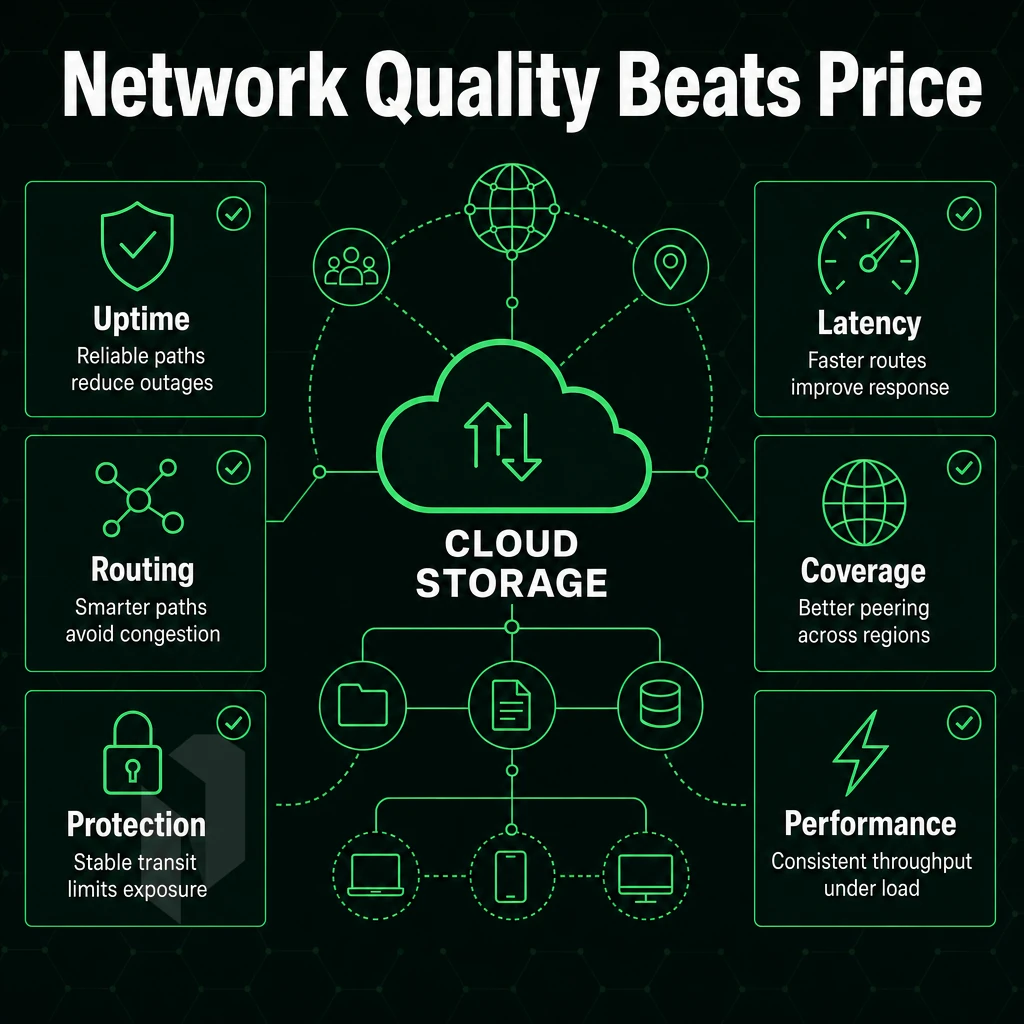
Don’t use raw price as a proxy for dedicated server quality. The underlying network for your servers determines latency, reliability and resiliency. Low cost providers will frequently cut corners here. You need to know what distinguishes a Tier 1 network from re-sold transit, beyond just setup time, in order to make an informed purchase decision. For more context, see Web hosting service.
Hosting Backbone, Peering, and Latency
By operating your own Autonomous System (AS), you get to peer at the major Internet Exchanges.
Netrouting is operating the AS6206 backbone with 2.4 Tbps+ capacity. 100 Gbps+ connections are standard and Port Utilization is always kept below 40% to ensure sufficient headroom for any performance needs before congestion can occur. Dense IX presence includes AMS-IX, DE-CIX, NetNod, FL-IX and many more.
Port Speed, DDoS Protection, and Private Networking
Unmetered 10 Gbps connectivity is standard fit on all our dedicated servers.
Get a free private network between customer resources up to 40 Gbps, available for a limited time, to communicate between servers without going through the public internet. This is especially powerful for multi-server architectures, running Debian clusters as well as Windows servers.
Carrier-Neutral Colocation Hosting and Redundancy
Carrier-neutral data centers host multiple upstream providers at the same location. Thus, no single provider failure can isolate a datacenter entirely. Combined with a (core-)network provider that owns its backbone, however, such a datacenter architecture offers the required redundancy, not provided by low prices alone.
When evaluating a dedicated server provider, map their network facts out before they map out the promotional rates for you to consider. The facts about a provider’s backbone ownership, peering density, DDoS capacity, and private interconnects matter so much more than the marketing numbers behind the advertised price for a server.
A provider's network quality is inseparable from where their data centers actually sit, and performance numbers mean nothing until you know where the server will reside.
Server Locations Across Europe, North America, and Asia
The region where your dedicated server is located influences latency, exposure to non-compliant configurations, and failover options. Netrouting has servers in 10 locations around the world. Choosing the wrong location will cost you in milliseconds and potential SLA breaches.
Europe's Operating System Landscape
- Amsterdam, Our primary European interconnection hub. Amsterdam has a dense IX peering environment allowing for low latency interconnects across Europe. The location is ideal for any provider servicing EU audiences at scale.
- The Hague, Primary EU headquarters and our largest dedicated datacenter footprint. Supports high-density with N+1 power and cooling.
- Rotterdam, A network edge site designed to function primarily as a high connection capacity / disaster recovery site. Can be paired with The Hague as a secondary failover resource.
- Frankfurt, Central European gateway with DE-CIX peering, strong reach to DACH and Central Eastern Europe.
- Stockholm, Nordic edge site with NetNod peering. Good for low-latency connectivity to the rest of Scandinavia or as a disaster recovery site.
- Bucharest, Our Southeast European hub for dedicated servers in the Balkans and Eastern Europe.
Note: Hosting in the EU requires GDPR compliance. Confirm your data residency requirements before selecting a site outside your jurisdiction.
North America Operating System Landscape
- Miami, Global headquarters for us and a direct gateway to Latin America. Peering on FL-IX as well as proximity to submarine cables makes this a natural fit for workloads focused on serving LATAM.
- New York, East Coast presence at a leading carrier hotel. DE-CIX New York peering access to the dense NY/NJ metro area.
Asia-Pacific Hosting
- A purpose-built data center in Hong Kong, the APAC financial gateway, with direct submarine cable connectivity, designed specifically for low-latency trading and high-bandwidth streaming applications.
- Singapore, Southeast Asian hub with premium Tier 1 upstreams. Preferred location for dedicated compute in APAC, serving broader regions from within.
We have 10 locations world wide, 1 seamless network and 1 team of experts to support you. For budget conscious customers who refuse to sacrifice quality for price, Netrouting is the obvious choice.
Why Choose Netrouting for Cheap Dedicated Server Hosting
Finding a cheapest dedicated server provider that doesn't cut corners on infrastructure or support is harder than it looks. Netrouting delivers cheap dedicated server hosting on modern hardware, Dell and Supermicro platforms running Intel Xeon and AMD EPYC, with blazing fast performance and a reliable support team behind every deployment.
- Bare metal in under 60 minutes. Dedicated server provisioning completes in under an hour. No queue, no delays.
- Unmetered 10 Gbps included. Every dedicated server ships with unmetered 10 Gbps data transfer. High traffic workloads, game servers, and online stores get the network traffic they need without surprise fees.
- Always-on distributed denial-of-service protection. L3/L4 traffic scrubbing is included on every server at no extra cost. Your data and users stay online.
- 10 global data center locations. Servers available across Stockholm, Amsterdam, Frankfurt, Miami, New York, Hong Kong, Singapore, and more, low-latency reach for your customers worldwide.
- ISO 9001, ISO 27001, and SOC 2 certified. Enterprise-grade compliance without enterprise-grade pricing.
- 24/7 NOC with 1-hour ticket guarantee. Our technical support team responds fast. Real engineers, around the clock.
Netrouting's dedicated hosting delivers lower TCO than hyperscaler compute, predictable monthly costs, full root access, and no egress surprises. Compare dedicated server plans or contact sales for a tailored quote, and use the decision framework below to confirm you're ordering the right configuration from a hosting provider before you reach out.
How to Choose the Right Dedicated Server Plan
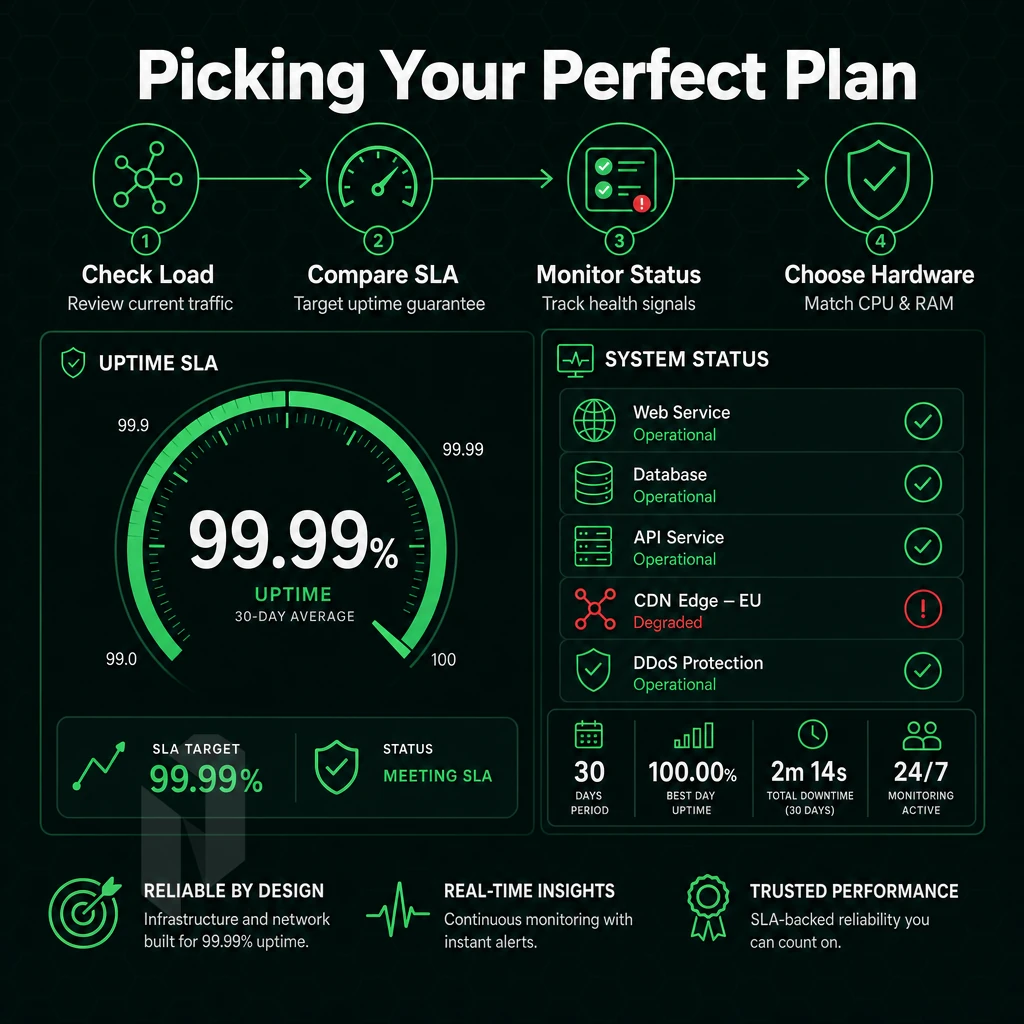
When choosing a right dedicated server offer, first you have to check your current workload. Then you have to choose the right hardware hosting for your current projects and not for the ones you will need in a few months. In most cases, these four decisions are sufficient.
Match Processing Power and Memory to Your Workload
Light on CPU for web hosting, but scale poorly with high concurrency. A mid-range processor with 32-64 GB RAM is typically enough to run most production web stacks.
High core count servers such as AMD EPYC and Intel Xeon with 128 GB RAM or above are required for database servers and game servers to maintain low query latency under load. For AI inference workloads, however, a GPU server is required. We offer a range of NVIDIA A10, A40, and A100 GPU servers.
Hosting Storage, Region, and SLA
SSD storage is best for IOPS-intensive applications like databases, high-transactional apps, and busy web hosting control panels. HDD is for bulk data storage, backups, and other large data stores where capacity is more important than performance.
Region follows your audience. If you have an online business serving Southeast Asia then Singapore or Hong Kong would be a good place to host it. If you have traffic coming from Europe then hosting your server in Amsterdam, Frankfurt or The Hague are good locations for European traffic. Users on the East Coast of the US will see better performance from New York.
Check that your SLA guarantees 99.9% uptime with same business day hardware replacement. How quickly a serious provider vs. low cost provider responds to a failure to hardware is a key point to investigate prior to purchasing the service.
Managed vs. Unmanaged: Who Handles the OS
Unmanaged hosting is running your server unmanaged, you have root access and full control, but that’s your responsibility. Managed Hosting includes OS patching, hardening and monitoring, Managed Proxmox VE lets you manage your VMs, but someone else is operating the hypervisor layer for you.
Both paths are designed to support growth later on. Choose a level of support that your team can handle and not just your current workload. Below is the real difference between a ‘cheap’ provider and one that looks ‘cheap’ on paper when you’ve worked out your required configuration.
The Bottom Line on Finding the Cheapest Dedicated Server Provider
Priced low does not necessarily mean the cheapest dedicated server provider. Cheap dedicated hosting must be evaluated in terms of Total Cost of Ownership (TCO), including connectivity quality, server provisioning time, included anti-DDoS, and around-the-clock tech support. A seemingly affordable dedicated server can actually cost you far more in the long run if it's subjected to an attack and goes down. Alternatively, If it's left unprovisioned for hours or days rather than minutes.
Choose a dedicated hosting provider whose performance holds under high traffic, whose support team responds fast, and whose data center fabric doesn't become a bottleneck. Explore Netrouting's dedicated server plans and see what genuinely competitive dedicated hosting looks like.
When shopping for a cheap dedicated server, remember that the lowest initial price tag does not necessarily translate into the best deal. Instead, look for the lowest Total Cost of Ownership (TCO) by considering the server’s hardware generation, included data throughput, support, and high backbone performance. Unlike a VPS, a bare metal server outperforms in CPU-intensive, high-traffic and latency-sensitive scenarios, with a growing margin under sustained load.
Even more important than the monthly price for a server are the specs. Not just the price, but also the generation of the processor, how much RAM is in it, what kind of storage it has, and what speed the uplink has. Six months into an application’s life, it can start to slow down from bad server specs.
Netrouting offers dedicated bare metal across ten locations in Europe, North America, and Asia, provisioned in under 60 minutes, with a control panel, unmetered 10 Gbps connectivity, and always-on DDoS filtering included. Browse current configurations or contact the sales team to spec a server that fits your workload.