Selecting the right NVMe dedicated server requires a delicate balance between high I/O performance and network bandwidth, good support and affordable total cost of ownership. There's nothing worse than overpaying for headroom that you never actually use, only to have database queries bottleneck on your storage because a slow drive that isn't an nvme ssd can't keep up with your workloads.
Netrouting has been fine tuning dedicated server infrastructure for over 10 years and runs its own AS6206 IP backbone with 10 locations across Europe, North America and Asia.
The above guide goes through the key evaluation criteria when assessing NVMe. Including looking past the headline numbers for the NVMe specifications and evaluating the impact of server configuration on performance of real applications, assessing the network capacity and the DDoS protection of the underlying infrastructure.
Blog contents
Additionally, Determining which workloads actually need NVMe over SATA SSDs. You will have a clear framework for choosing between different server alternatives, whether Intel Xeon or otherwise, and a set of simple questions to test any potential provider.
What Is an NVMe Dedicated Server Operating System?
The NVMe dedicated server combines two innovative hardware technologies: a storage interface optimized for flash memory and a single-tenant bare metal server with no shared resources.
The NVMe Protocol and Your Operating System Explained
Non volatile memory express or storage express is a storage protocol for flash memory. As opposed to other storage interfaces, NVMe uses the PCIe bus directly to express storage I/Os as high performance, randomly accessible IOs. It achieves low latency and high bandwidth as a result.
This new technology has fundamentally changed how modern servers handle I/O operations, replacing legacy protocols designed for spinning disks with an architecture built specifically for solid-state media. Understanding nvme technology is essential when evaluating whether your workload justifies the investment in this protocol versus traditional interfaces.
SSDs using traditional SSD storage are typically connected via the interface for hard disk drives, SATA, which restricts the queue depth to 32 commands. In contrast, NVMe storage supports up to 65,535 queues, each with up to 65,535 commands, allowing for greater performance when multiple databases or applications are running concurrently.
What a Dedicated Server Actually Means
A single-tenant dedicated server is offered as bare metal, meaning every CPU cycle, RAM megabyte, and PCI Express slot is at your complete disposal.
Shared virtualised environments throttle storage I/O across all tenants.
Why the Combination Drives Dedicated Server Performance
Latency sensitive workloads such as high frequency databases, real time analytics and large caching areas benefit from NVMe storage on dedicated hardware. A 24 core AMD EPYC server with a transactional database for example benefits from NVMe SSD read latency of under 100 µs versus several ms on SATA. This ensures consistent query times at scale.
These performance advantages make NVMe dedicated servers essential for many industries that depend on instant data access and minimal response times. A significant portion of modern web applications now rely on sub-millisecond response times to maintain competitive user experiences and meet strict service-level agreements. Geographic location of the server relative to end users can further amplify or diminish these latency advantages, making regional data center selection a critical factor in deployment planning.
When considering storage options for a team, NVMe-based server architecture removes two variables from the equation: the overhead of a storage protocol and the contend for resources of other storage.
RAID Configurations for Your Dedicated NVMe Server
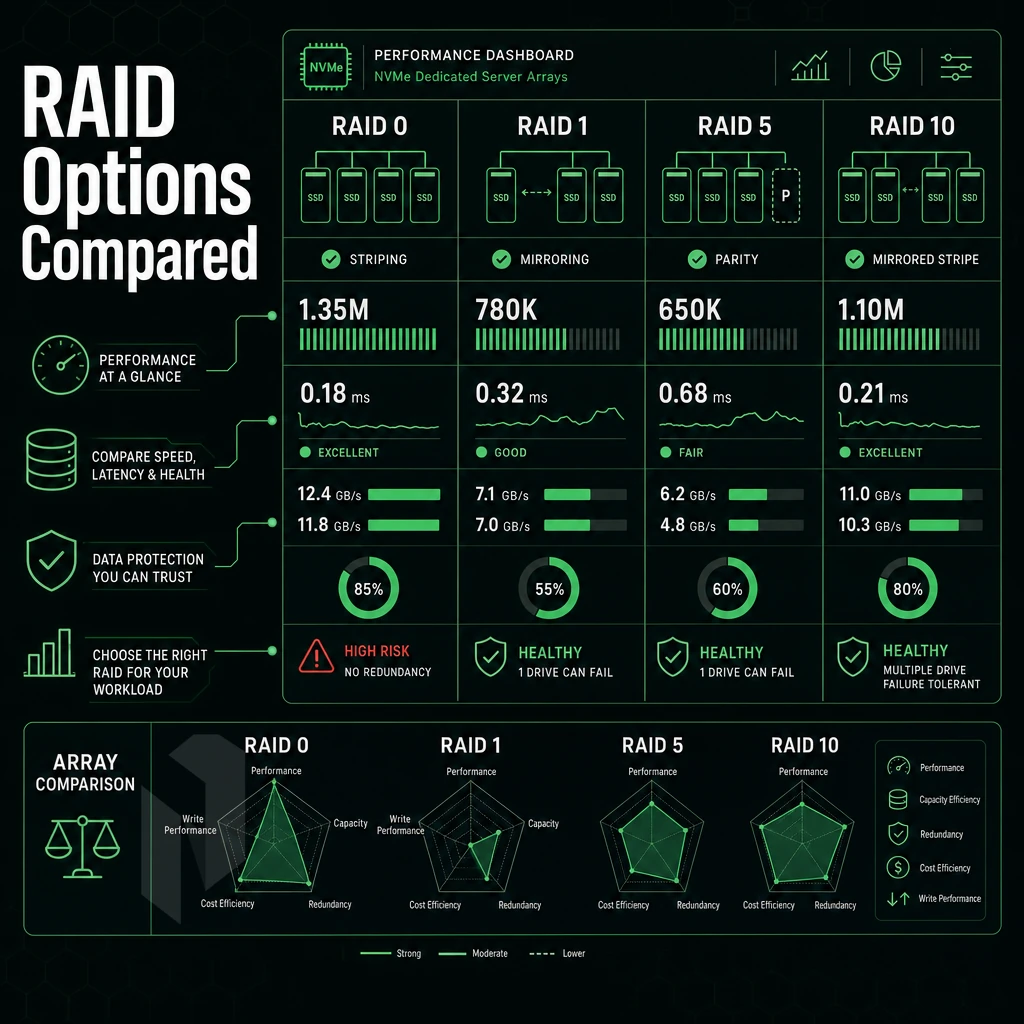
Determining the optimal RAID setup for your dedicated server equipped with NVMe storage units depends on the total number of drives in your array, the desired tradeoff between fault tolerance and performance.
RAID 0 and RAID 1 With NVMe SSD Drives and the Redundancy Trade-off
Striped data accross all disks in a RAID 0 setup, which is ideal for maximizing data transfer rates and total storage space on a group of disks. But be warned, with RAID 0 one disk failure can wipe all data.
The use of RAID 0 with an nvme ssd is therefore with absolute priority on high data rates over data survival on temporary data such as for scratch files, for render caches, for short-lived data etc.. When a single drive fails in this configuration, the entire array becomes unreadable and all information is lost immediately.
In a RAID 1 array, two drives are mirrored. Writes perform at half the write speed of a single drive. Use boot volumes and databases where data loss is unacceptable. This configuration is particularly valuable when one customer requires guaranteed data availability for mission-critical applications where even brief downtime is unacceptable.
Note: RAID is not a backup. A mirrored volume replicates corruption and accidental deletes in real time.
RAID 10 Balanced NVMe Dedicated Server Performance
RAID 10 uses striping and mirroring across 4+ disks. The result is that your server gets the near-RAID-0 read performance of RAID-10 combined with the fault-tolerance of RAID-1. So, RAID 10 is typically the default for production databases and high-volume sites running on a dedicated server with lots of NVMe disks.
Our bare metal configurations support up to 24 drives. Hardware RAID is available, so RAID 10 can scale as needed, without constraint. Expanding beyond four drives in a RAID 10 configuration provides more room for both capacity growth and improved parallel I/O operations across the array.
Software RAID on NVMe for Quick Data Access
Software raid on bare metal NVMe servers is very common because the host CPU performs parity computation, without the need for a separate card. The low-latency nature of NVMe over the PCIe bus generally means that CPU overhead is not a concern. However, the time it takes to rebuild a degraded array on an nvme server under load does affect service-level-latency as the rebuild is performed live while serving traffic.
A dedicated hardware raid controller is critical where fast rebuilds and consistent I/O under failure matter.
- Check the drive count and workload for the drives in your server. Many drives will perform best with RAID 10 setup. If you have only two drives in a server, they should be setup as a RAID 1 array.
- Determine the type of controller to choose (e.g. Software RAID vs. hardware RAID for faster rebuilds).
- Set a hot spare. A spare disk is set up in advance to take over immediately when a disk fails and starts rebuilding right away.
- Monitor the health of your arrays after each kernel update. Silently degrading your arrays is what module changes can do.
- Test failover in test environment before you roll it out to production. Pull a disk from staging environment and verify that the array continues to operate in a degraded state and alerts properly.
Once you have decided on the storage architecture for your needs, the question remains whether your workload really needs NVMe at all. Additionally, if so, whether the server workload is latency-sensitive or high throughput in nature.
Workloads That Demand NVMe Drives on Bare Metal
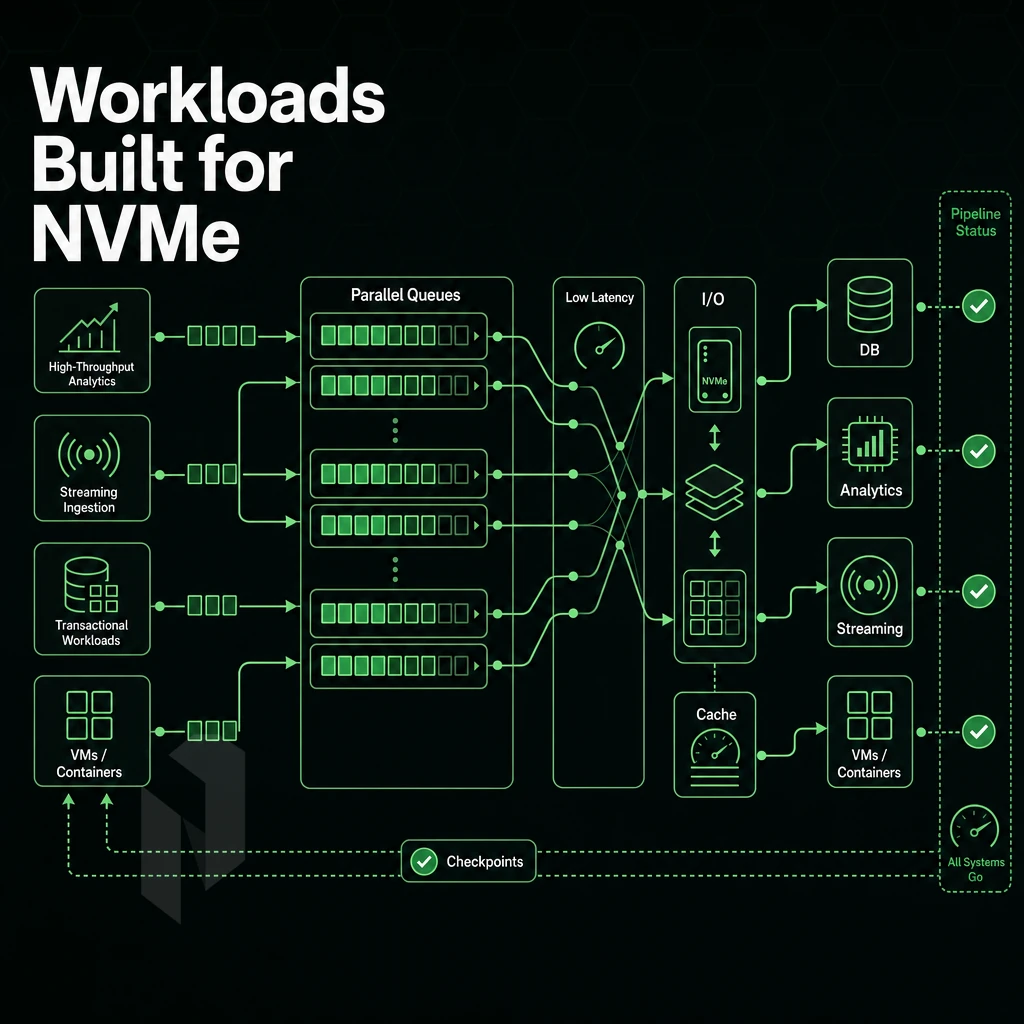
NVMe storage is not just faster than disk using SATA or HDD interfaces. Because of lower latency per queue, higher parallelism. Additionally, The direct connection to the PCIe host interface, there are several categories of workloads that are measurably improved by using NVMe drive instead of SATA or HDD data store.
Databases and High-IOPS Transactional Workloads
For relational databases and NoSQL databases, random read/write latency is the lifeblood of performance.
Note also that fault tolerance is also kept during a drive rebuild, a process that causes huge performance degradation on mechanical disk arrays. NVMe RAID arrays maintain IOPS levels during this time.
Big Data, Machine Learning, and Data Transmission Speed
Sequential I/O within large training pipelines and big data ingestion workloads can be dramatically improved by NVMe drive’s sequential read speeds which can exceed 7 GB/s using today’s high-end data store devices. For machine learning workloads, faster memory still translates into higher GPU or CPU busy-time between batches, resulting in higher average training-throughput throughout the entire run.
Latency-Sensitive and High-Throughput Applications
Game servers require sub-millisecond data repository latency to persist world state and stream assets. Content Delivery Networks also benefit from NVMe in edge nodes that serve large digital assets (video segments, software packages) and require high throughput to serve cache hits as quickly as possible.
Financial platforms running real-time order books need storage with fixed latency, not storage with varying latency spikes. While high peak I/O throughput is important for financial platforms, consistent server latency is far more important.
Our bare metal server hardware has been specifically designed to meet the needs of these types of workloads. Use the following server configuration checklist to make sure you get the right server before speaking with a Netrouting sales person.
Key Specs to Evaluate Before You Buy

Not all NVMe dedicated servers are made equal. Review this list to determine whether you're running a true datacenter-grade server or just fast storage bolted to inferior hardware.
Intel Xeon and AMD EPYC: Choosing the Right CPU for High Performance Workloads
CPU generations affect single thread score, core count, and memory bandwidth.
Our enterprise hardware range covers both processor architectures: The AMD EPYC 7402p processor provides 24 cores / 48 threads on a single socket and is therefore extremely well-suited for high throughput applications such as databases and virtualization.
Data Storage, RAM, RAID Configuration, and Data Redundancy
We now offer NVMe solid state drives with very low latency compared to spinning disk and SATA SSD solutions. Look at drive count, raw capacity, and hardware RAID support on your server. We can support up to 24 drives per server with hardware RAID included.
- Drive count: more bays mean easier capacity expansion without migration.
- RAM: up to 2 TB supported, critical for in-memory databases and hypervisors.
- RAID: hardware RAID protects against drive failure without CPU overhead.
Network, 1 Gbps DDoS Protection, and SLA
A 1 Gbps port is the minimum we would consider a “baseline” offering. Unmetered 10 Gbps (for example) is where the bandwidth of a server becomes no longer a significant concern for typical use cases. We include always-on L3/L4 DDoS protection on all our server deployments, no add-on required.
When shopping for a bare metal host with Intel Xeon processors built to handle large datasets, make sure to check the provisioning time as well as the available operating systems. At Netrouting we deploy bare metal within 60 minutes. Our hosting is protected by a 99.9% uptime SLA and is monitored 24/7 by our NOC. The hosting options we provide are what Netrouting is all about. Below is an example case where bare metal hosting is the best solution.
Why Choose Netrouting for NVMe Dedicated Servers
NVMe dedicated server throughput lives or dies on the hardware beneath it and the network around it.
- Enterprise NVMe hardware. Every NVMe server ships on Dell or Supermicro chassis with Intel Xeon or AMD EPYC processors. Configure up to 24 NVMe drives with a hardware RAID controller for data redundancy, or run software RAID configurations for flexibility. The result is faster data access, high-bandwidth, and storage capacity that scales with your workload.
- Unmetered bandwidth, no surprises. Dedicated NVMe servers include unmetered 10 Gbps bandwidth, upgradeable to 40 Gbps for high-performance use cases like big data pipelines, game servers, and content delivery networks. Low latency is guaranteed by our 2.4 Tbps+ backbone on AS6206 with Tier 1 upstreams and dense IX peering.
- Always-on DDoS protection. L3/L4 DDoS protection is included on every dedicated server at no extra cost. No configuration required.
- Ten global data center locations. Deploy NVMe storage where your users are: Amsterdam, Frankfurt, The Hague, Stockholm, Rotterdam, Bucharest, Miami, New York, Hong Kong, or Singapore.
- Bare metal in under 60 minutes. Rapid provisioning means your NVMe dedicated server is live fast. Our 24/7 NOC and one-hour ticket guarantee keep it running reliably.
ISO 27001 and SOC 2 certified operations back every deployment. Speak with our sales team to find the right NVMe server configuration for your workload.
NVMe SSD Dedicated Server Performance: Key Takeaways
NVMe dedicated server deployments eliminate two compounding bottlenecks at once. NVMe drives discard the SATA interface entirely, pushing data across PCIe lanes at speeds no SATA SSD can match. Dedicated bare metal removes noisy-neighbour contention. The result is consistent, low-latency, high-IOPS performance, not burst performance that degrades under shared load.
That combination matters for demanding workloads: game servers, big data pipelines, machine learning inference, and content delivery networks all depend on fast, reliable data access at scale. An NVMe server with properly configured software RAID delivers both speed and data redundancy. For workloads where storage is the bottleneck, upgrading to a dedicated NVMe server is the highest-leverage infrastructure decision available.
NVMe bare metal closes the gap between storage and compute. Random I/O that once bottlenecked databases, real-time analytics, and high-frequency trading workloads on Intel Xeon server systems simply stops being a constraint. The performance difference over SATA SSD, and especially spinning disk, isn't marginal; it's architectural.
Two takeaways matter most. First, raw NVMe speed only translates into production gains when the rest of the stack matches it: CPU core count, RAM capacity, and network throughput all need to scale together. Second, your RAID strategy determines whether you're optimizing for speed, redundancy, or both, get that decision wrong and you're leaving either performance or data protection on the table.
If your workload demands low-latency storage on dedicated hardware, explore Netrouting's bare metal configurations, or contact the sales team to spec a custom NVMe build across any of our ten global locations.