

Selecting the best web hosting for your small business or project is crucial and spans far beyond merely choosing the cheapest package to stay within your budget.
The market is divided into two areas: simple, consumer-grade shared hosting and robust bare-metal or cloud hosting solutions. In the middle ground of small businesses and their demanding requirements, not quite suited for shared hosting and often not yet ready for an enterprise’s procurement processes. A well-considered decision with regard to the respective infrastructure can have a major impact.
Our guide to choosing a hosting provider for small business workloads covers the key things that matter: hardware, network, support, scalability and when managed hosting makes sense vs building your own server. Each of these sections outlines the key trade-offs for the technical buyer and provides a solid grounding to make decisions about hosting services quickly. Evaluating top web hosting providers requires understanding how their infrastructure choices align with your specific technical requirements and growth trajectory.
Blog contents
What Web Hosting for Growing Businesses Actually Means
Your website’s website hosting is the foundation of your live website. So when someone types your website's URL into their browser, it's the server provided by the best web hosting plan you've chosen that's sending the files that make up your website to their browser.
And without website hosting, there is no website! The server infrastructure ensures your site online remains accessible whenever visitors navigate to your domain. Building a wordpress website requires selecting infrastructure that can handle both the platform's resource requirements and your expected visitor load.
What Website Hosting for Small Businesses Actually Involves
A hosting account is rented space on a server. The server could be a large computer in a data center running 24/7. All of your website files, images and databases live on the server. The server processes all requests from visitors to your website in real time.

Domain registration and hosting are two separate services. Your domain name is your website’s address on the internet. Your hosting is where your website actually resides. While some providers offer a free domain name with a hosting service, the domain name and hosting are two separate products that have different renewal dates. Many hosting packages bundle a free domain registration for the first year, simplifying the initial setup process for new businesses launching their online presence.
The Four Core Web Hosting Types
Knowing what your options are makes the decision to buy easier as each type is best suited for different stages of a business’s growth. Each hosting plan tier addresses specific technical requirements and resource constraints that align with particular business maturity levels.
- Shared hosting, Many websites are hosted on one server and use its resources. Cheap to host, but limited control over the server. Suitable for very new or low traffic websites.
- VPS hosting, Virtual Private Server hosting. VPS hosting is a virtual private server, running on shared servers but with allocated resources and more control and higher performance.
- Cloud hosting is used to run workloads on a number of servers. This type of hosting can deal with large amounts of unexpected traffic. Suitable for fluctuating traffic levels.
- Dedicated hosting is a service where we reserve an entire physical server for your business. In terms of performance and security, there is nothing better.
How Much Does It Cost to Get a Business Website Made?
Costs for development and hosting are separate. Even a very simple website made with a template would cost more to have custom code written for it than the website itself. The cost for hosting depends on the type of hosting, with shared hosting being on the lower end, and dedicated hosting on the higher end, with the higher monthly cost for the dedicated hardware.
A shared hosting plan typically represents the most economical entry point, making it ideal for startups and small projects with limited budgets and modest resource needs. Some shared plans allow hosting unlimited websites under a single account, which can reduce costs for businesses managing multiple domains or client sites. Many shared hosting packages also bundle a free domain registration for the first year, reducing initial setup costs for businesses launching their first site.
Cloud hosting or a VPS is often the best option for growing businesses expecting to get traffic to their site. Our sales team would be happy to advise on the best option for your requirements. Once you've got the basic principles of each hosting type under your belt, you can match each to your current growth stage.
Many providers offer free trials to help businesses evaluate whether cloud hosting or VPS infrastructure meets their performance requirements before committing to a paid plan. Evaluating vps plans alongside cloud alternatives helps businesses identify the infrastructure model that best balances performance requirements with budget constraints.
Shared, VPS, Cloud Hosting, and Dedicated Options Compared
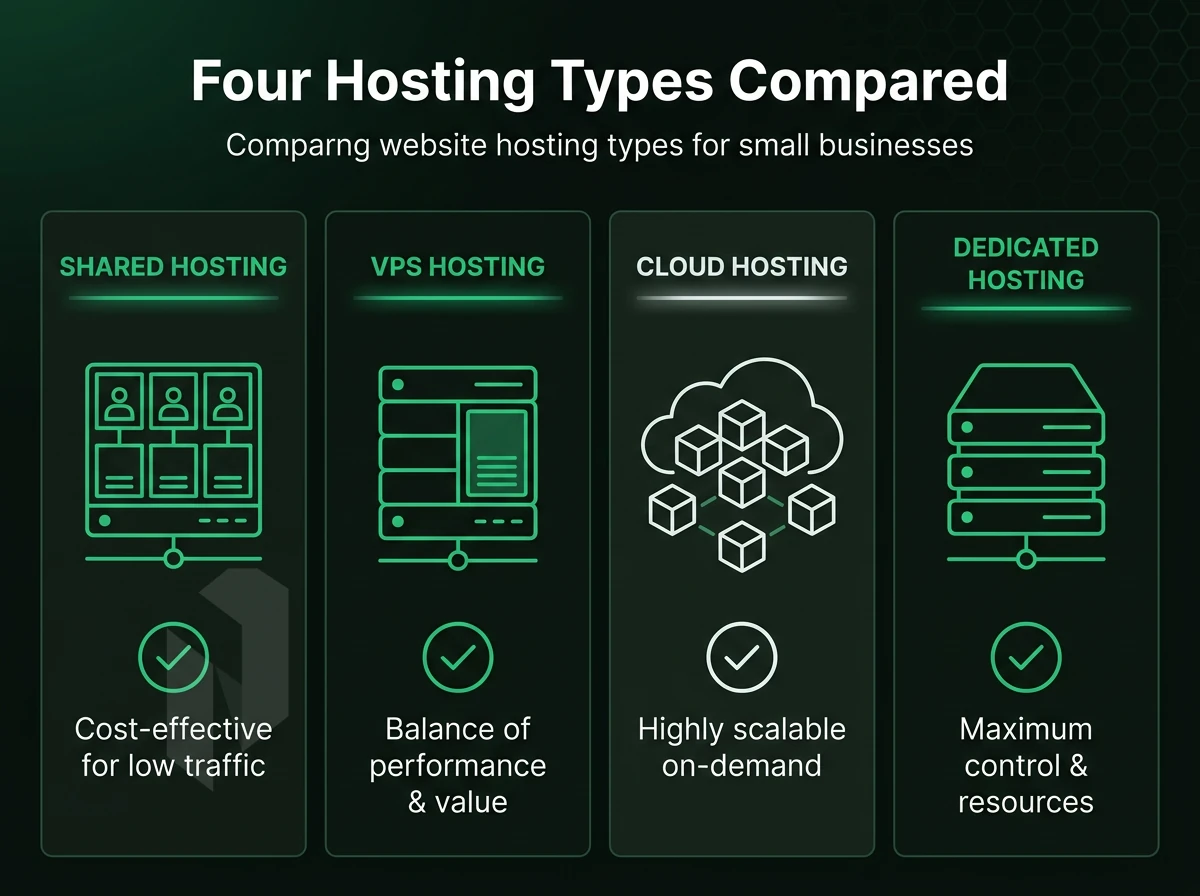
Every hosting plan is optimized for a different load. Knowing at what point your web hosting company's plan reaches its limits helps you avoid paying for features you don't need and scale before you hit the limit with a sudden increase in traffic. Sites experiencing high traffic volumes need plans with sufficient headroom to maintain performance without degradation. Businesses often find that premium plans deliver the necessary headroom and consistent resource allocation to handle growth without service interruptions.
Understanding resource usage patterns across different plan tiers enables businesses to right-size their infrastructure investments and avoid both over-provisioning and performance bottlenecks. Plans with adequate server resources prevent performance degradation as traffic patterns evolve and business requirements expand. Selecting the appropriate web hosting plan requires careful analysis of current resource consumption and projected growth to ensure the infrastructure can support business objectives.
The Four Tiers at a Glance
Shared hosting involves many users sharing the resources of a server and therefore has low costs. However, a sudden surge in traffic by another user on the same server can negatively impact the performance of other users on the same server. Therefore, it is ideal for websites with static content and low traffic, including the odd low traffic blog. In addition, it allows users to host many websites from one account.
The shared hosting plan remains the most cost-effective entry point for businesses testing their online presence before committing to more resource-intensive infrastructure. The ability to host unlimited websites makes shared hosting particularly attractive for agencies, freelancers, and entrepreneurs managing multiple client projects or personal ventures from a single account.
A virtualized server (VPS) offers isolated CPU and RAM to each tenant. Upgrading from shared servers is often the next step. Businesses evaluating VPS plans should assess their current resource consumption patterns and anticipated growth to determine the appropriate allocation of isolated CPU and RAM for their workloads.
Cloud hosting is typically distributed across multiple nodes, and scaled horizontally to increase capacity as needed. So sudden spikes in traffic do not cause problems. The only problem is that performance can vary if the underlying cluster is heavily over-subscribed.
Our dedicated plans provide you with your very own physical server. No other users are hosted on your server and thus you do not have to worry about noisy neighbors or bottlenecks due to shared resources. High-demand applications, compliance-bound data and other workloads that require constant, high-performance delivery of bare metal servers are best hosted on a dedicated server plan.
| Type | Isolation | Scalability | Best For | Uptime SLA |
|---|---|---|---|---|
| Shared | None | Low | Starter sites, unlimited websites on one plan | Varies |
| VPS | Partial | Medium | Growing SMBs, dev environments | Varies |
| Cloud | Partial | High | Variable-traffic apps, SaaS | Varies |
| Dedicated | Full | Vertical | High-throughput, compliance workloads | 99.9%+ |
Who Is the Web Hosting Provider for a Website?
A hosting provider is the company that owns or leases the physical part of the web hosting (servers, network, datacenter etc) and sells you access to it. As a web hosting provider they are responsible for the uptime, connectivity and the hardware.
Netrouting is the web hosting infrastructure layer on which you can place your domain(s) and application(s). We operate our own AS6206 powered interconnected networks in ten datacenters across Europe, North America and Asia. The 99.9 uptime guarantee reflects the provider's commitment to keeping your infrastructure accessible and operational around the clock.
Which Tier Fits Your Stage?
You should start on a shared hosting environment if you have just launched a website and it doesn’t get much traffic yet. As the number of monthly visitors to your website increases, you will start to notice the response time of your website. As your wordpress hosting setup starts to demand more in terms of performance consistency, raw computing power and other factors, you will need to upgrade to a Cloud or VPS hosting environment.
The transition to cloud hosting typically happens when consistent uptime and resource allocation become business priorities rather than nice-to-have features. Many providers offer free trials to help businesses evaluate performance and compatibility before committing to a paid plan. Building and maintaining a wordpress website on shared hosting allows you to test your online presence before investing in more robust infrastructure as your technical requirements evolve.
A dedicated server is required when data sovereignty or other factors become critical. Netrouting’s bare-metal servers can be provisioned in under 60 minutes, so you can upgrade as needed. The first part of choosing the right web hosting services environment is determining which to target, and the second part is making sure the environment you choose has all the features you need from the start.
Key Features Every Small Business Hosting Plan Should Include
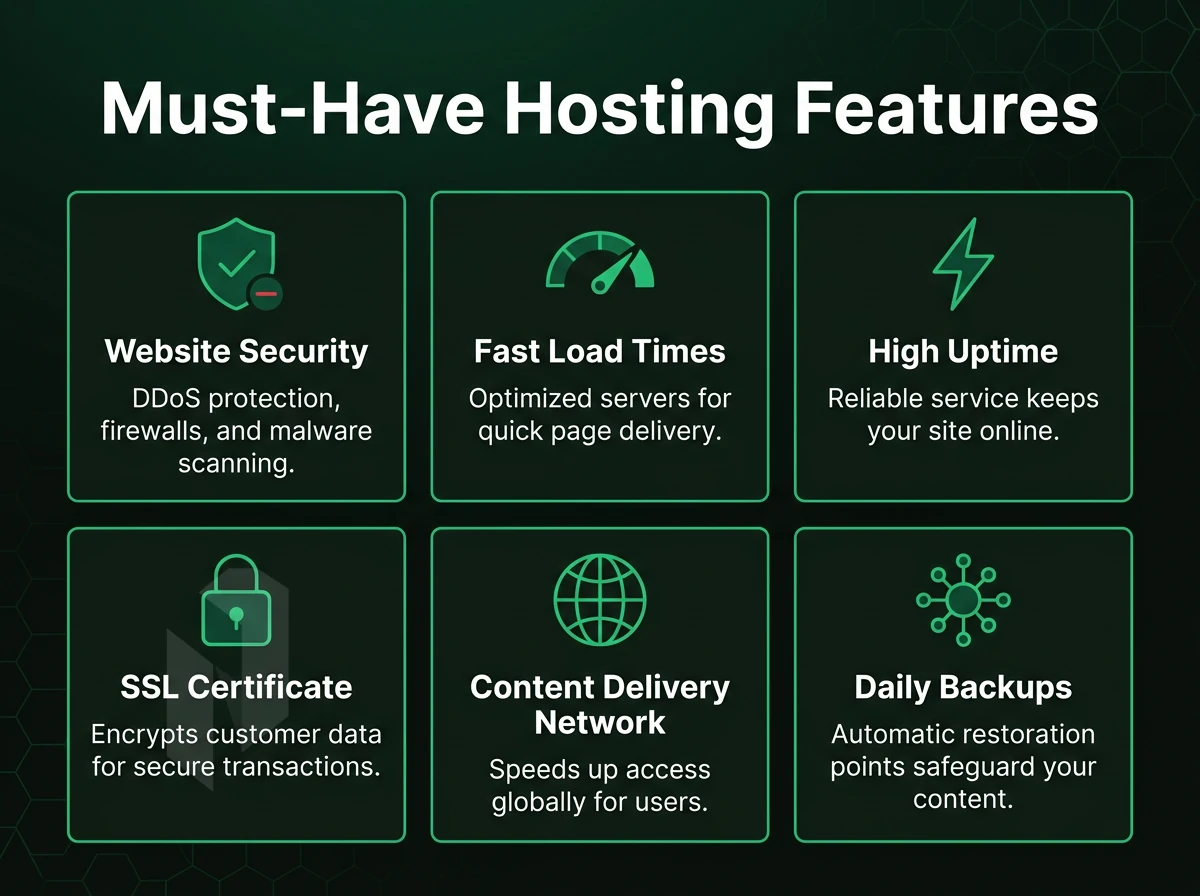
Keep in mind that not all hosting plans are created equal. Make sure your host offers these non-negotiables, or risk losing customers, search rankings, and data. Security essentials like free SSL certificates protect customer data and signal trustworthiness to both visitors and search engines. Robust security measures keep your site safe from threats while maintaining visitor confidence and protecting business continuity.
Reliable uptime commitments such as a 99.9 uptime guarantee ensure your site remains accessible to customers and search engines around the clock. Responsive customer support ensures technical issues are resolved quickly, minimizing downtime and maintaining business operations during critical moments.
Security and Reliability Essentials
- Free SSL certificates, Confirm the plan includes free SSL at no extra charge. A valid certificate encrypts visitor data and is required for browser trust signals. Note: Some providers charge separately for SSL renewal; verify the renewal policy upfront.
- 99.9% Uptime Guarantee. Demand a written SLA. Anything less than 99.9% equals lost revenue during outages that you can measure.
- Automatic backups, Daily backups and a proven way to restore your files in case of accidental deletion or in case of ransomware attack. How many backup copies are stored and how long does it take to restore files?
- Security features: Look for inclusion of malware scanning, a firewall, and protection against brute force attacks as standard features which are active by default and not additional features which you have to pay for.
Performance and Control
- SSD storage. Solid-state drives load pages faster than traditional spinning hard disks. Pages loading faster improves user experience and thus search engine rankings.
- cPanel access, Allows you to manage domains, databases and files via a familiar control panel instead of by submitting a ticket for each change.
- Free CDN, This is a content delivery network that caches your assets on edge servers all over the world and can significantly decrease load times for people viewing your site from outside of your primary data center.
Can You Host Email and Website Separately?
Yes. Many businesses use email hosting and web hosting as separate services. Your domain’s MX records can be set up to point to a specialist mail provider while your website is hosted on a separate server. Some businesses require more advanced mailbox features than their web host can provide.
Make sure business email accounts are included in your plan if you want to have everything under one roof. While bundled email can be very convenient, make sure to find out about the deliverability and the storage limits first. Some plans also bundle a free domain registration for the first year, simplifying the initial setup process for new businesses.
Customer Support Quality
Support at 2am when your site has crashed is crucial and need to be able to speak to someone live 24/7, not put into the back of a ticket queue. Responsive customer support becomes the difference between minutes of downtime and hours of lost revenue when critical issues arise outside business hours.
Note: A free SSL, daily backups, SSD storage, and a solid uptime SLA are the floor. If a plan is missing any of these, keep looking. With the right features confirmed, the next practical question is how to get your existing site onto better infrastructure without disrupting visitors.
Choose how the site is hosted.
Start with website hosting, move to a virtual server, or let us run the servers for you.
Host the site without running a server.
For websites and WordPress, compare website hosting plans before you move to a machine of your own.
Start the conversation with
- Sites
- Number and traffic
- Platform
- WordPress or other
- Mailboxes needed
Start with a VM. Scale it when needed.
Use cloud compute for workloads that do not need a full machine. Compare vCPU, memory and storage per plan.
Start the conversation with
- Compute
- vCPU and memory
- Storage
- Disk size
- Location
- Preferred region
We run it. You ship product.
Choose managed hosting when your team should focus on the application. Agree on what we manage and what stays with you.
Start the conversation with
- Servers
- Number and roles
- Scope
- What we manage
- Access
- What stays with you
How to Move Your Existing Website to a New Web Hosting Provider
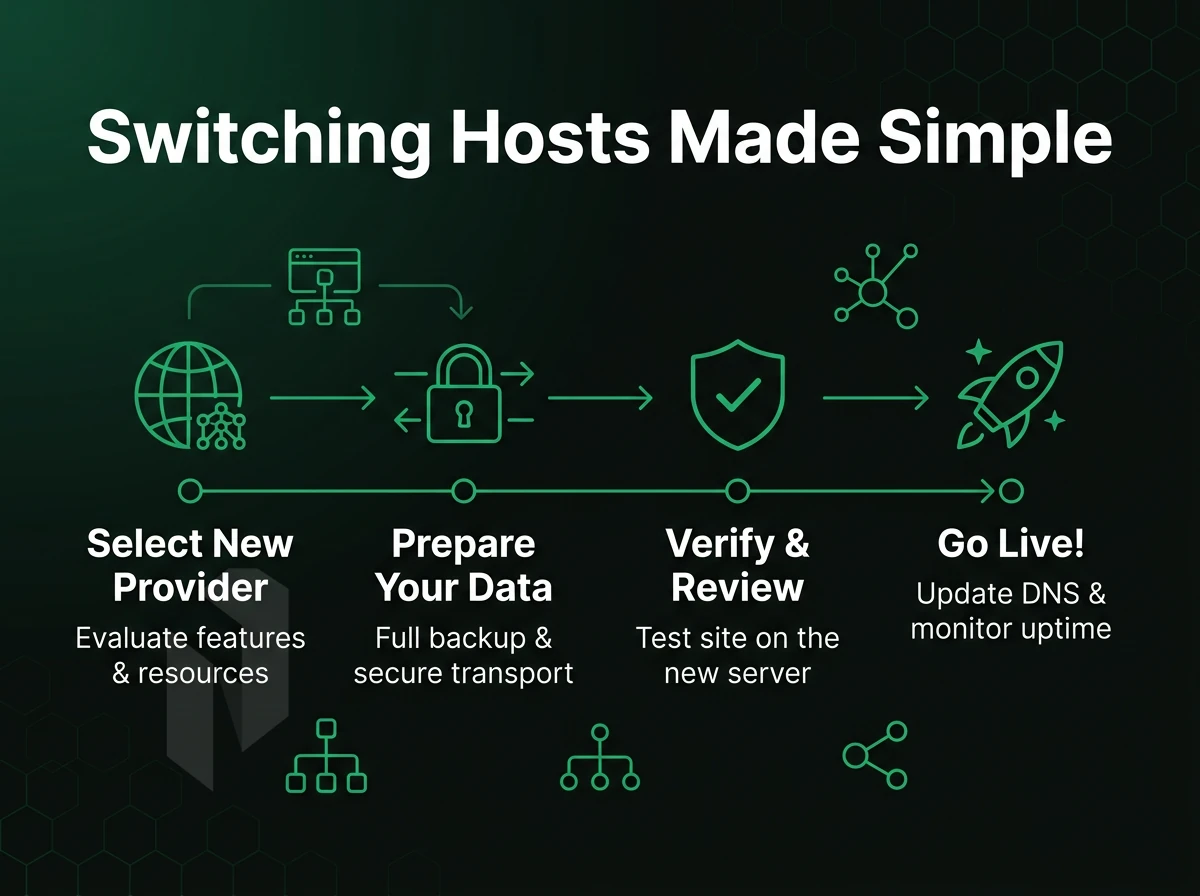
Don’t let a switch to a new hosting provider bring down time with an unstructured migration. With a proper data protection, SEO ranking protection and visitor unawareness, the following steps can be applied to a switch from a shared environment to a VPS.
Auditing Your Existing Website Before You Migrate
Start by cataloguing every asset: files, databases, email accounts, SSL certificates, and third-party integrations. Note your current PHP version, server-side dependencies, and any custom .htaccess rules. Gaps found here are far cheaper to fix before the move than after.
Export your database via mysqldump or your control panel's export tool. Download all site files over SFTP. Keep a local backup even if your destination host offers free migration assistance, redundancy is non-negotiable.
Choosing Web Hosting Services and Configuring DNS
When choosing a new plan, match it to your resource profile: your traffic peaks, your storage I/O, and your RAM requirements. Check the server specs for top web hosting providers, they typically list these in clear bullet points. Look for the CPU generation, RAM, and network port(s), and make sure they match your needs before locking yourself into a contract.
Once files and databases are live on the new server, update your DNS A record to point to the new IP. TTL values typically range from 300 to 86,400 seconds. Lower your TTL 24-48 hours before migration to speed propagation. Test the new environment using a local hosts file override before flipping DNS publicly.
What Is a Better Web Hosting Service Than GoDaddy?
Whether your site has outgrown what most web hosting providers offer on shared plans and you need bare metal or cloud compute with real bandwidth and real Service Level Agreements, Netrouting provides dedicated hardware. Unlimited 10 Gbps network bandwidth, 24/7 DDoS protection and a variety of additional security tools make this one of the best web hosting setups, all running on our own AS6206 network with 10 locations worldwide.
Managed Web Hosting Simplifies the Entire Process
Your hosting provider typically assigns a migration engineer to perform the transfer of your files, databases and the switch over of your DNS. He performs the necessary steps to get you up and running on your new hosting environment and you can avoid all the hassle of having to perform these steps manually.
Also make sure to verify the scope of work, as some hosting providers only transfer files and databases while others also transfer email accounts and SSL certificates. After you have set up your new hosting environment, you also have to decide how much of the operational work you want to hand over to your hosting provider.
Managed Hosting vs Self-Managed: What Small Business Owners Need to Know
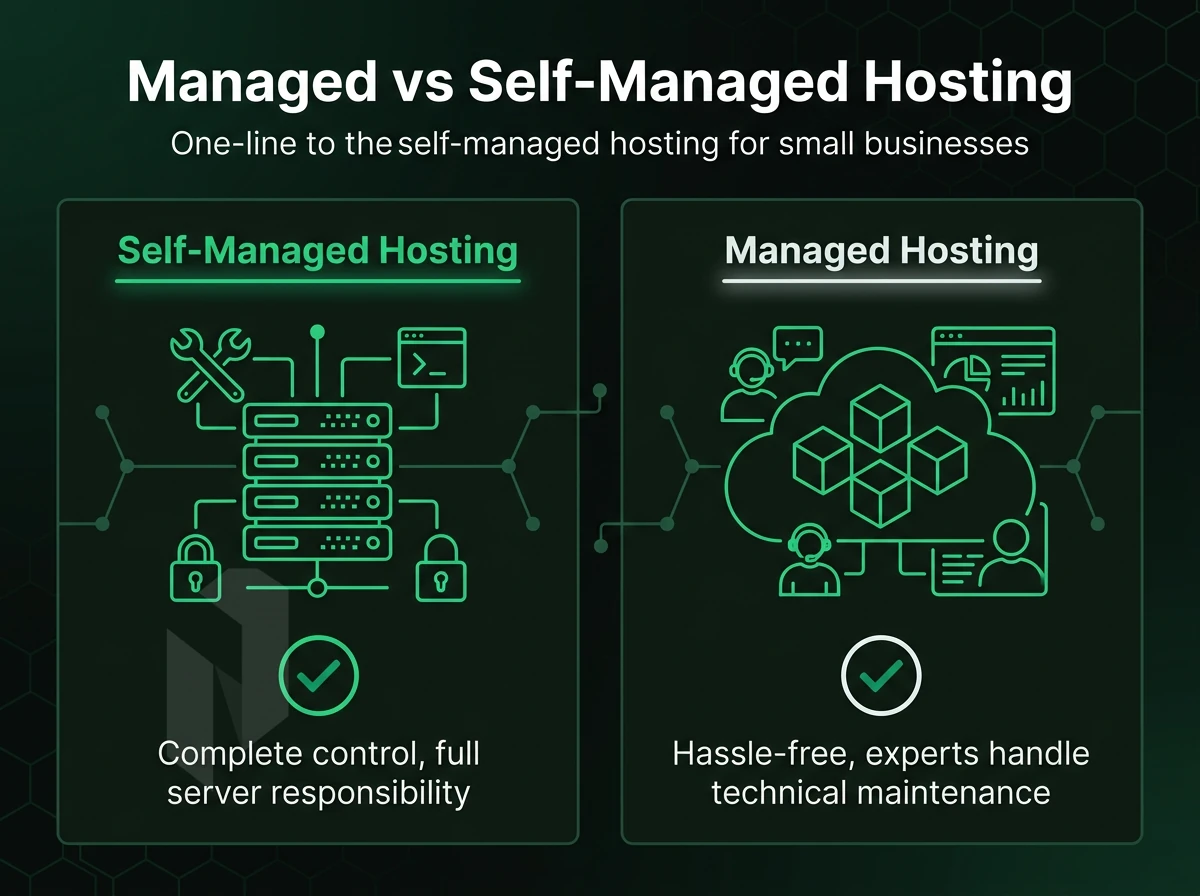
Deciding between managed and self-managed hosting is one of the first real hosting infrastructure decisions a small business owner has to make. Get this wrong and you could end up paying too much for too much management or spending all your time repairing the server rather than running your business.
What Managed Web Hosting Actually Covers
Managed hosting is similar to dedicated hosting in that you have root access to your servers and control over your applications and data. The difference is that your hosting provider, as part of your hosting plan, handles the operational aspects of the servers (OS upgrades, security hardening, etc.) and monitors them proactively for problems.
This model is suited for teams without a dedicated sysadmin. A small business website that hosts e-commerce or customer portals can’t afford unpatched vulnerabilities and unmonitored downtime. Managed hosting fills this gap for them without them needing to set up an in-house ops team.

Our managed web hosting includes full OS-level patching, hardening and 24/7 proactive monitoring of servers and associated infrastructure (be it bare metal, cloud or colocation hosted).
Managed WordPress: A Popular Option for Content-Driven Sites
Many hosting providers offer managed wordpress hosting for sites built with WordPress. In addition to the standard OS management offered by most hosting providers, managed wordpress hosting includes WordPress core updates, plugin management and even staging environments.
If you run a WordPress website and you want to do nothing with updates / security, then managed wordpress from specialized providers might be something you want to look into. Managed wordpress hosting is typically sufficient as a single piece of infrastructure if all your website is running on WordPress and you need nothing else.
Netrouting’s managed server hosting serves a different layer, that of the infrastructure and OS. Therefore, it’s ideal for business owners with custom applications, with multiple services online or with workloads that consist of more than just CMSes.
Shared vs Dedicated Hosting What Is the Difference
Shared hosting involves many customers on a single server. Resources like CPU, RAM and disk space are divided up among all the accounts hosted on that server. The main benefit of shared hosting is that it’s easy to use, requiring no technical knowledge to setup and manage. But performance is unknown and there are weak security boundaries between accounts.
Dedicated hosting is provided from a physical server. All hosting is done on a single, quiet server with 100% use of all resources. In addition to having complete hardware isolation, you can have the server set up exactly as needed. Note that with dedicated hosting, you will have more responsibilities, but also greater capabilities.
- Shared: low barrier to entry, shared resources, limited control.
- Dedicated: full hardware allocation, isolated environment, configurable at every layer.
Dedicated infrastructure is often a more stable long-term solution for larger growing businesses with high volumes of traffic or compliance issues. Where the infrastructure is actually located is also important to serving up your users.
Server Location and Why It Affects Your Small Business Website
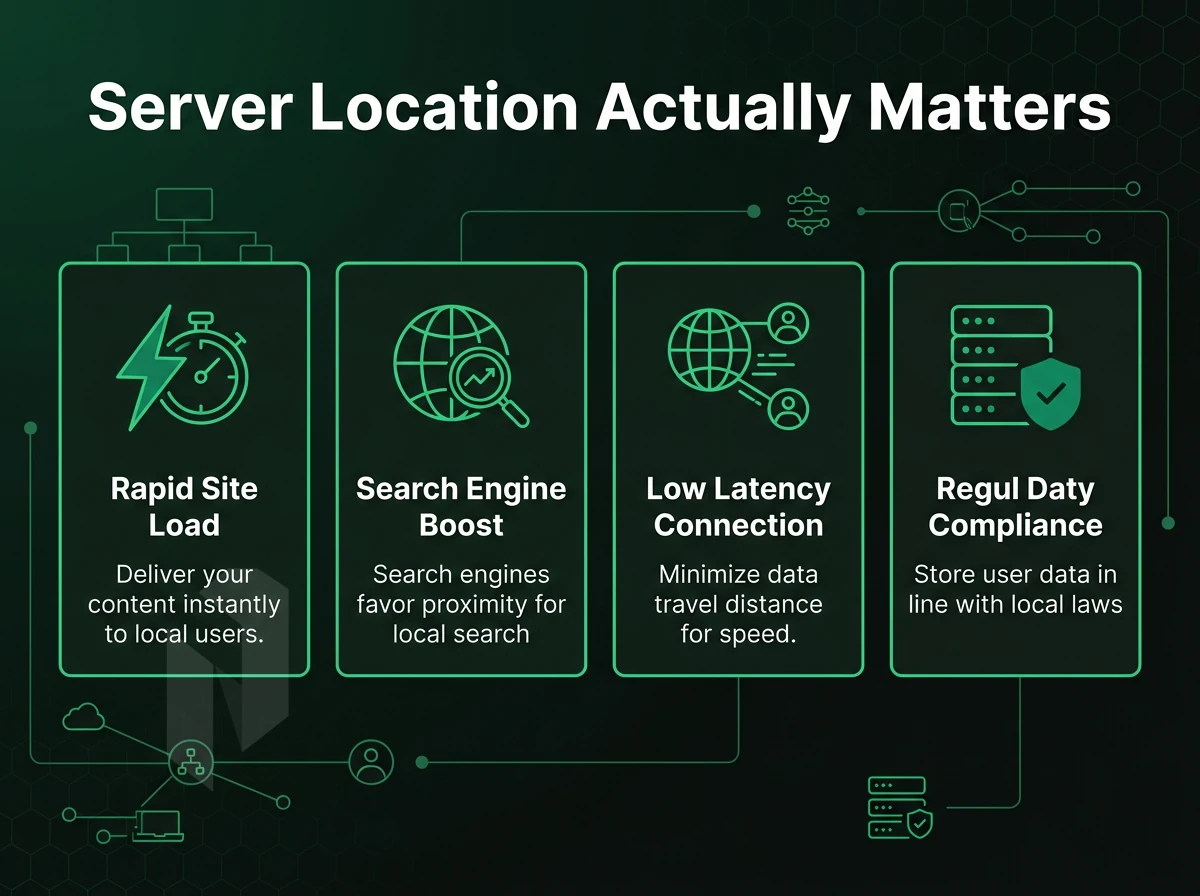
The location where your website's files are physically stored can greatly affect the user experience. When setting up wordpress hosting, most web hosting providers recommend choosing a data center close to your target audience to reduce the distance the data has to travel, which will reduce latency and improve page load times. This can affect how search engines rank your website as well. Choosing the right location for your small business's website hosting is one of the highest-leverage decisions you can make.
How Server Location Affects Speed and SEO
For search engines page speed is a factor when ranking websites. A small business website targeting European customers benefits from hosting the website in a European data center. Visitors from Germany or the Netherlands will get the website data much faster from a nearby node than from a server in a foreign continent.
We have datacenter locations in Amsterdam, Frankfurt, The Hague, Rotterdam, Stockholm and Bucharest.
Resilience Through Multiple Servers
To guarantee that your website will still be online in case of hardware failures, you will need redundancy. By distributing your web hosting loads across multiple servers or running a secondary location as a failover, you can prevent a single point of failure from bringing your online business offline. Netrouting’s 99.9% SLA for uptime and our N+1 power and cooling at our main locations guarantee this for you.
We provide free migration assistance for existing websites migrated to our hosting platform. There are many technical issues that prevent web site owners from moving to better located and managed infrastructure hosting.
Do Small Businesses Need Managed Web Hosting?
Small business owners are not systems administrators. The best web hosting plans take care of all the work of keeping your server up to date (OS patching etc), securing it (security hardening), and even monitoring it for problems. You still have full root access on your servers so your developers can work as they please.
Control Panel and Day-to-Day Management
Most control panel s are familiar to users today. Work with your DirectAdmin or cPanel control panel as you are used to. Add domains, create email accounts and keep an eye on your server’s resources. Our managed servers include the panel licensing in the price so you don’t have to worry about any hidden add-on costs.
Decision guide
First, match the geographical location of your primary audience to the closest datacenter location of Netrouting.
Scaling Up: When Small Businesses Outgrow Shared Hosting
Shared hosting is perfect for small websites but as your site grows quickly, so does the pressure. Spikes in traffic, resource limits and the need to manage multiple websites are all indications that you need to upgrade to a more suitable hosting package.
Recognising the Warning Signs
Here are some indicators that your current plan may be holding you back.
- Downtime during traffic spikes happens often in shared environments where all tenants get throttled when one site has a surge.
- Slow load times. The pool of CPUs and RAM across all players is dedicated, so players with very heavy neighbors will see poor performance.
- Typically, an entry-level host has strict resource limits, to cap the amount of CPU, memory and storage you can utilize.
- Most agencies are managing multiple client sites, and therefore need to run each of them in complete isolation from the others, not in a shared queue.
The Upgrade Path
- Upgrade to a VPS hosting plan. A VPS provides a virtual server with a dedicated CPU and amount of RAM. Performance is predictable on a VPS and it is a natural step up from shared hosting.
- Move up to cloud computing. Horizontal scaling of cloud computing instances is possible. Thus, required computing power can be added before a campaign and afterwards again reduced. There is no binding contract for hardware.
- Deploy a dedicated server. If you have a growing business with consistent high traffic then dedicated server hosting is usually the best option. Unmetered bandwidth and 100% CPU guarantee means no bottle necks from shared accounts. In addition to the usual features of our server hosting, our premium plans on this tier receive more personal service from our support team.
How Do I Move My Existing Website to a New Hosting Provider?
- Backup everything first. This means export your database, all files, and the full configuration. Verify that a full restore of the above works for you before you even touch your DNS.
- Provision the new environment and set up a mirror of your current stack (PHP version, PHP extensions, etc ). Use a hosts file edit to test out the new site on the new server before making it live.
- Reduce your DNS TTL to 300 seconds or less, 24 hours plus before the cutover time, to minimize the propagation time during the switch.
- Cut over DNS and monitor. Update your nameservers or A record. Watch error logs and uptime alerts for the first hour.
Note: Don't cancel your old plan immediately. Keep it active for 48-72 hours as a fallback while DNS propagates globally. Confirm phone support availability with your new provider before the cutover window. With the upgrade path clear, here's why Netrouting is a natural destination for that next step.
Why Choose Netrouting for Small Business Website Hosting
Small businesses need web hosting services that stay online, scale when traffic spikes, and don't require a dedicated IT team to manage. Netrouting delivers exactly that, enterprise-grade infrastructure with the simplicity growing businesses actually need.
- 99.9% uptime guarantee. Our network SLA keeps your business website online. Always-on L3/L4 DDoS protection is included on every hosting plan, no add-ons required.
- Bare metal provisioned fast. Dedicated server plans go live in under 60 minutes. No waiting days for your site to come online.
- managed server hosting with real oversight. We handle OS patching, security features, and proactive monitoring. You keep full root access and focus on your business.
- 10 global data centers. Amsterdam, Frankfurt, Miami, Singapore, Hong Kong, New York, The Hague, Stockholm, Rotterdam, and Bucharest. Choose the server location closest to your customers.
- 24/7 customer support with a 1-hour ticket guarantee. Our support team responds around the clock, not just during business hours.
- ISO 9001, ISO 27001, and SOC 2 certified. Your website data is protected by independently verified security standards.
Netrouting is a strong fit for small businesses that need reliable hosting services without hyperscaler complexity. Contact sales to discuss which hosting package fits your workload. Before you do, use the checklist below to confirm you've covered every decision point.
Choosing the Best Web Hosting Plan: A Quick Checklist for Small Businesses

When selecting a web hosting plan for your website, refer to this short checklist. First verify the necessary traffic and storage space are included. Make sure the hosting plan includes a valid SSL certificate, automatic backups, and adequate security tools. On top of that, your chosen hosting companies should guarantee 99.9% uptime and offer a money-back guarantee. With free trials for web hosting, you can test the performance of the small business hosting provider first!
Customer support is important as well as all the specs. Check if the phone support is available and what are the hours of operation of the support team. Make sure the server where your website is located is close to your audience.
And, finally, find out how you can upgrade your account if needed. These are all the steps you need to take to choose a web hosting service for your small business. Below is the glossary of terms that you can find in this article.
The Core Hosting Terms Every Small Business Owner Should Know
When evaluating a web hosting service. You start with the same terminology: your web hosting service stores the files for your personal website/s on its servers and makes sure that your business website is available 24/7/365. There are several types of hosting services, like shared hosting, virtual private servers, cloud hosting and dedicated hosting.
Your control panel is where you manage files, email accounts and more. An SSL certificate is included to protect your site and visitors. A Content Delivery Network (CDN) is used to distribute your website’s content across the globe in order to handle high amounts of traffic. Automatic backups of all your website data are also included. A 99.9% uptime guarantee is the minimum that any serious hosting product should guarantee in terms of uptime.
There are three critical factors to consider when choosing a hosting plan. Firstly, you need to ensure that the hosting plan’s resources are suitable for the actual volume of work that your website generates. Secondly, you must ensure that you understand what you are responsible for and what your hosting provider is responsible for.
Lastly, you must select hosting infrastructure that will scale to meet your growing needs. Early-stage sites generally function optimally in a shared hosting environment. However, as soon as issues of performance, security or even compliance become relevant, dedicated or cloud-based web hosting services are far better as they afford you the necessary level of control.
Most migrations are not as hard as they look, most providers can keep downtime to a minimum and supply lots of documentation. managed web hosting means you don’t have to deal with the operational bits of your server at all, letting you get on with the rest of your business.
If you're ready to move beyond entry-level hosting, Netrouting offers bare metal servers, cloud compute. Additionally, Fully managed hosting across ten locations in Europe, North America, and Asia, with 24/7 support and a one-hour ticket guarantee. Contact sales to find the right fit.
Find the right home for the site.
Tell us about the site, the traffic and the platform. We help you pick a hosting plan.