
Proxmox VE 8.2 is finally out. People using this open source virtualization platform are finding a lot to love this time around. Instead of just patching random bugs, the developers threw in some genuinely useful stuff. We are talking tools that make daily IT management suck a little less. Let's dig into the details.
Updated Foundation
After so long the whole system has now been updated to run from Debian 12.5 Bookworm. Very stable base for us to be starting from. All the code has also been updated to run from the newer Linux kernel 6.8 allowing all newer processors to actually work.
Component Updates
The engines driving the platform got noticeable upgrades.
- QEMU 8.1.5: Enhances virtual machine performance and adds new features.
- LXC 6.0.0: Provides better container management capabilities.
- OpenZFS 2.2.3: Resolves previous issues, notably the “block cloning bug.”
Migration Wizard
A standout feature of Proxmox VE 8.2 is the introduction of an import wizard to facilitate the migration of VMware ESXi guests to Proxmox VE. This wizard enables users to efficiently migrate their virtual machines from other hypervisors, easing the transition process and expanding the reach of Proxmox VE.
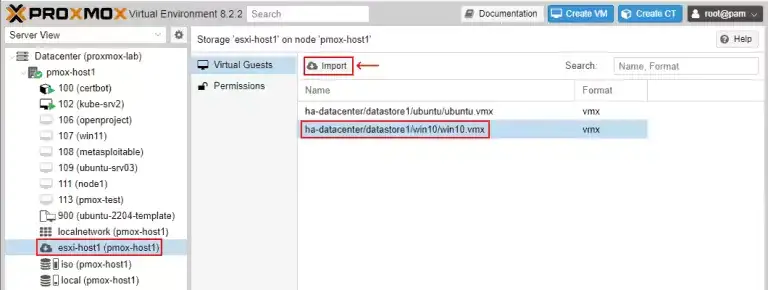
Transfer VMware ESXi virtual machines (VMs) to Proxmox Virtual Environment (VE) effortlessly using the import wizard.
Automated Installation Tool
Proxmox VE 8.2 introduces a new tool for automated installation from ISO to bare-metal servers. This tool streamlines the setup process by automating the installation of Proxmox VE, reducing manual intervention, and accelerating deployment workflows.
Netrouting provides Proxmox VE 8.2 available through our Bare Metal Deployment Tool, allowing hands-off remote installation via our customer control panel.
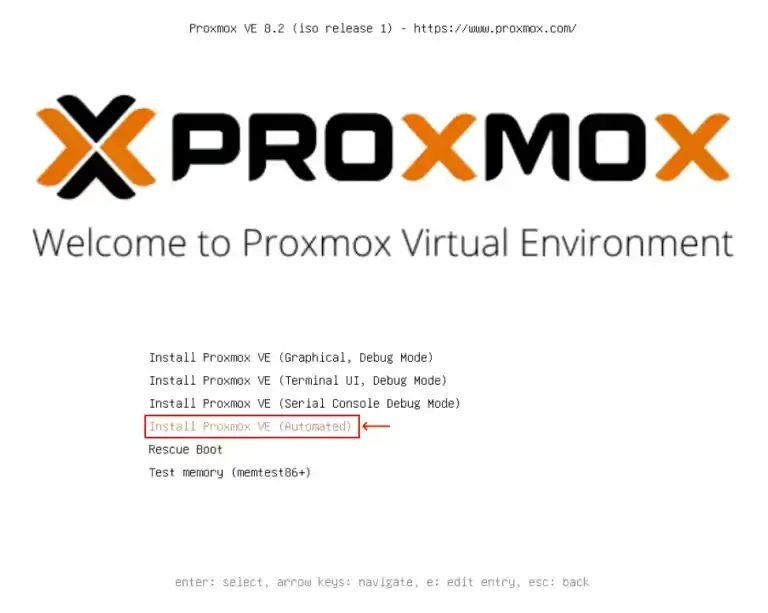
Explore the automated installation feature in Proxmox Virtual Environment (VE)
Backup Fleecing Feature
Typically, running backups decreases VM performance catastrophically. Not so with fleecing’s new backing store feature. It cleverly uses the fast local storage as a cache, isolating the slow, massive backup storage from the storage for the VMs you’re running now. As a result, VMs remain responsive during regular operation, while backups happen in the background, consuming as much data as needed without interfering with your live environments.
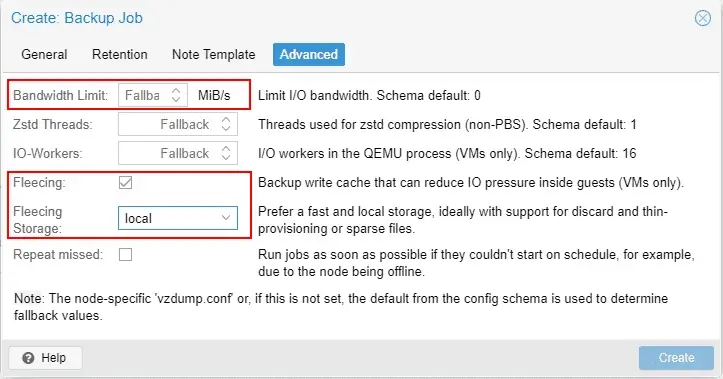
Define advanced backup settings for backup jobs.
Firewall Modernization with nftables
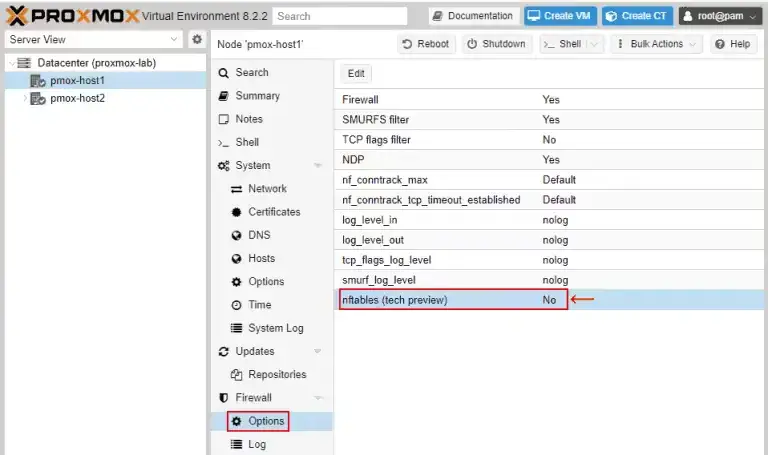
Enable the modern firewall directly on your Proxmox Virtual Environment host.
The old iptables stuff is gone. Proxmox VE 8.2 is moving over to nftables. It handles network security much better and runs faster. Right now it is an opt in tech preview. You have to turn it on yourself. But honestly, it paves the way for better security down the line.
LXC device passthrough
Configuring hardware in a container used to be a command line-intensive task for developers. With Docker Datacenter, you can configure hardware directly from the Docker UI. Perhaps you’re running a machine learning container that could really use a GPU to complete computations faster. Now, with just a few clicks in the UI, you can assign a graphics card to a container and that container can access it directly to complete workloads faster.
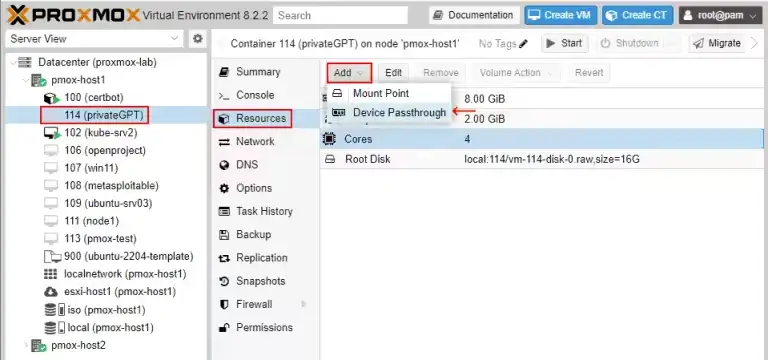
Use device passthrough for an LXC container on a Proxmox Virtual Environment server.
GUI and API Improvements
There are tons of tiny UI and API updates hidden everywhere. Menus make more sense. Workflows feel a bit less clunky. These small quality of life updates really add up when you manage a big setup.
Proxmox Backup Server 3.2
The Backup Server has now reached version 3.2 alongside the main release today. Unattended installations are now supported. There have been improvements to the alert system. There is a new filter which allows you to exclude specific files and parts of files from the backup process. You now have much tighter control over your storage requirements on the backup server.
Conclusion
Proxmox VE 8.2 takes things to the next level. If you need better migration tools, faster backups, or automated setups, this update has you covered. It makes running virtual infrastructure a lot easier.
Check out the release notes to see the full list of tweaks. Both Proxmox VE 8.2 and Proxmox Backup Server 3.2 remain open source and totally free to use. Big companies can still buy professional support if they want.
Need some raw power for all this? Think about using our Proxmox Powered Optimized Cloud Compute solutions. We use dedicated CPU cores built for heavy loads. They run Proxmox VE 8.2 perfectly, giving you a secure and scalable setup.
Browse our Optimized Cloud Compute packages to find the perfect match for your needs. We give you dedicated CPUs and fast NVMe/SSD storage. Give your cloud setup a real upgrade.
Leverage Your Bare Metal Resources: Grab full control of your homelab or infrastructure with our Bare Metal Servers. If you want total freedom over your hardware, bare metal is the best path. Check out our bare metal servers and run Proxmox VE 8.2 exactly how you want.
Links:
RELEASE NOTES & ROADMAP
https://pve.proxmox.com/wiki/Roadmap
FORUM ANNOUNCEMENT
https://forum.proxmox.com/threads/proxmox-ve-8-2-released.145723/
DOWNLOAD
https://www.proxmox.com/en/downloads
JOIN THE COMMUNITY
GET TECHNICAL SUPPORT