Stretched thin, your infrastructure team battles with the tasks of patching servers and completing security audits, while every hardware failure at 2 a.m.
Dedicated hardware means no noisy neighbors, no shared CPU contention, and no unexpected performance spikes. Add a managed layer on top of your hosting plan and you get the best of both worlds, with your web host handling all the operational overhead while you retain full access to dedicated server resources that make bare metal different from virtualized cloud instances. Provisioning adequate disk space upfront ensures your databases and application logs can grow without triggering emergency capacity planning sessions down the line.
Many providers also include unmetered bandwidth in their dedicated plans, eliminating overage charges and simplifying cost forecasting for high-traffic applications. Configuring your web server software stack, whether Apache, Nginx, or IIS, remains under your control, allowing you to optimize request handling and caching strategies for your specific application requirements.
Blog contents
While many providers of managed dedicated hosting offer more or less the same service, big differences can exist with respect to response times and the quality of networks and hardware. In addition, the scope of services offered under the term ‘managed’ can vary greatly. In this guide we will go into detail about what you can expect from a managed dedicated hosting provider and what to look for. Comparing service level agreements and technical specifications across multiple vendors helps you understand how one provider stacks up against other hosting providers in the market.
Understanding these distinctions early in your evaluation process can significantly improve your overall web hosting experience and prevent costly migrations later. Evaluating whether a provider's infrastructure scales with your growth trajectory ensures the hosting solution remains viable as traffic and data volumes increase over time. Requesting detailed documentation about incident response procedures and escalation paths reveals how each service provider handles critical outages and emergency situations.
We describe the SLA and support offered by web hosting providers, but also the network and hardware offered and how these differ from provider to provider. Evaluating each service provider requires examining their incident response times, escalation procedures, and the technical expertise of their support engineers.
What Is Fully Managed Dedicated Server Management and Hosting?
Fully managed dedicated server hosting gives you an entire physical server for your own use while we manage everything. Our dedicated hosting offers full root access so you use the server as you like, while we handle OS patching, security hardening, software updates, monitoring, and emergency reboots.

What Dedicated Hosting Providers Actually Cover
The managed dedicated server hosting provider handles day-to-day management of the server, including kernel updates, firewall hardening, vulnerability scanning and scheduled maintenance. These proactive measures deliver enhanced security by closing attack vectors before they can be exploited in production environments. Configuring the web server software itself, such as Apache or Nginx, remains your responsibility while the provider ensures the underlying operating system remains secure and stable.
A Fully Managed Dedicated Server is very different from Unmanaged Dedicated Hosting. With Unmanaged Dedicated Hosting you are given a raw server, to configure, patch and to deal with any incidents that occur.
- OS patching and security updates applied on schedule.
- Proactive monitoring with 24/7 alerting.
- Automated and on-demand reboots.
- Security hardening against common attack vectors.
How Dedicated Server Management Differs From Shared and VPS
Shared hosting is one server for dozens of tenants, a VPS is a virtual slice of shared hardware, and a dedicated server is the whole physical machine, no noisy neighbors and no resource contention. When you lease a dedicated server, you control the entire server stack from the bootloader to the application layer, making it ideal for workloads that demand predictable performance.
Unlike shared hosting where multiple websites compete for resources on the same server, dedicated hosting eliminates resource contention entirely by allocating all CPU, RAM, and disk I/O to a single tenant. Organizations evaluating on premises hosting against dedicated server options often find that dedicated hosting delivers similar control and isolation without the capital expenditure and facility management overhead.
Managed dedicated hosting adds the operational layer on top.
Who Benefits From Fully Managed Dedicated Hosting
For teams without a sysadmin, managed dedicated hosting is the best option. Instead of having to deal with kernel-level CVEs while trying to write application code, you can leave the sysadmin work to the hosting company and just write code. Our managed dedicated hosting includes root access, so you have full control over the server, but all the operational work is taken care of for you.
This analysis starts with the decision to manage or not to manage.
Managed vs Unmanaged Dedicated Servers: Key Differences
Managed vs. Unmanaged Dedicated Servers. The only real question is: how much of the infrastructure layer do you want to own? Both Managed and Unmanaged Dedicated Servers are offered as Dedicated Server options. In both cases, you have the option of a completely physical server for your use.
The only difference is who manages the work to keep the server up and running. Organizations migrating from on premises hosting often choose managed dedicated servers to retain the isolation and performance characteristics of physical infrastructure while offloading operational burdens to specialists.
What Each Model Covers
With fully managed dedicated server hosting.
Unmanaged Dedicated Hosting Providers
No hand holding, no safety net.
Technical Requirements and Control
Unmanaged dedicated servers
We demand real technical knowledge.
With managed hosting, you can give up some control and get better coverage of your site's operations.
Side-by-Side Enhanced Security Comparison
| Capability | Managed | Unmanaged |
|---|---|---|
| OS updates | Provider-handled | Your responsibility |
| Security patches | Provider-handled | Your responsibility |
| Monitoring | 24/7 proactive | Self-configured |
| Backups | Automated, off-site | Self-managed |
| Control panel | Configured and supported | Self-installed |
| Administrative access | Full | Full |
| Support level | Hands-on, 24/7 | Break-fix only |
Experienced sysadmins looking for full stack control are going to want to opt for unmanaged. However, teams looking for dedicated server power without the additional operational overhead and are able to rest with a 99.9% uptime SLA and 24/7 NOC are going to be the perfect candidates for Netrouting’s managed dedicated hosting. Once you have decided that managed is for you, the next question is what features you will need from your provider.
Choosing the best dedicated server for your workload depends on balancing performance requirements, budget constraints, and the level of operational support your team actually needs. Scaling infrastructure to support business growth becomes significantly easier when operational burdens are handled by specialists rather than diverting engineering resources from core product development. Selecting the right hosting solution requires careful evaluation of your technical team's capabilities and the specific demands of your application stack.
Core Features of a Fully Managed Dedicated Hosting Service
Fully managed dedicated hosting includes the server hardware, software and 24/7 support as a single service. Knowing the main features of a fully managed dedicated hosting service allows you to compare offers and hold a hosting company to account for the main features of their service.
Web Hosting Companies: OS and Dedicated Hosting Features
- Operating system provisioning. Provision the Linux distribution or Windows Operating System of your choice. Manage security patches, kernel updates and version changes to ensure the Operating System is running securely and stably without your involvement.
- Security hardening includes configuring of firewall rules, enforcing of SSH keys, closing of unused ports and limiting of privileges. Hardening on an ongoing basis ensures that vulnerabilities are closed before they can become incidents.
- Control panel setup. The setup of a control panel like cPanel or DirectAdmin for a fully managed hosting service, the setup of DNS zones and updates of the panel software in order to keep it up to date. Netrouting supports both panels with the necessary licenses.
Note: Skipping control panel licensing is a common cost-cutting move. Confirm it is included, unlicensed panels stop functioning without warning.
Server Monitoring and Protection
- Continuously monitor server CPU, RAM, disk, and network metrics to identify potential problems before they affect your work. Activate alerts and have the provider’s NOC handle them before resources are depleted.
- DDoS protection. We provide always-on L3/L4 mitigation for every service we offer. This is included as standard with every deployment of services that we offer. Netrouting include this as standard with all of their services on all of their deployments.
Dedicated IP Addresses, Backups, and SLA
- Dedicated IP addresses. We assign a dedicated IP address for your use in your account for the server. This is a requirement to get an SSL certificate, to improve mail delivery to improve your mail reputation, and to do BGP announcements.
- Automatic Backups, Daily incremental and Weekly Full Backups are stored for 30 days. Verify the restore time frame before signing up (Netrouting reports 15-45 minutes based on the data size).
- SLA for Network uptime. Request for a written commitment. Netrouting’s standard SLA is 99.9% uptime with a one-hour ticket response guarantee. This is the minimum required for serious server management at a large enterprise scale.
These are managed services on paper.
Complete Control With Full Root Access: What It Actually Means
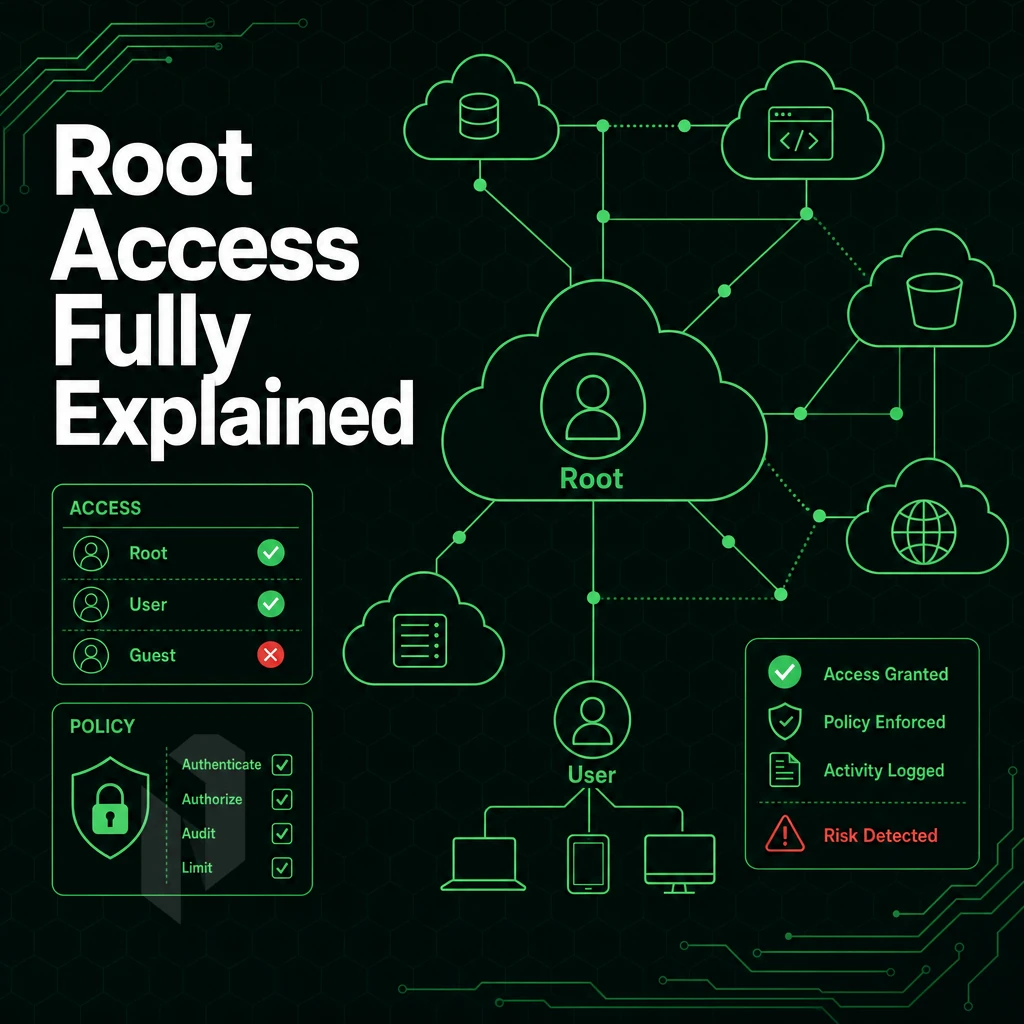
"Managed" doesn't mean we take the keys from you. A lot of people seem to think that fully managed dedicated server solutions means that we take complete control of your server and you can't do anything with it. However, Actually it's just the reverse, a clear division of labor.
The Division of Responsibility
This means that you are responsible for the application deployment, database configuration, custom software etc. as well as the server configuration.
The distinction between managed hosting services and your online business’s development team is crucial. Among dedicated server hosting options, managed services handle the operational load, kernel updates, vulnerability scanning, and more, that consumes engineering time without adding value to your online business. Your team is freed to focus on the development of your business using the relevant stack.
What Full Root Access Actually Preserves
Unrestricted root SSH access to the server(s). Installing packages, modifying config files, running processes and anything else that may be required to ensure that the server(s) and hosting environment are being managed correctly. Your hosting environment will be fully under your control.
Full root access on a managed server means the provider patches the OS; you still own
/etc, your application binaries, and every runtime decision.
A dedicated server plan with managed services is not a shared environment or a locked-down environment. Dedicated hosting is the same as unmanaged bare metal hosting, the management layer is alongside your stack, not between you and your stack.
Netrouting's Model Across Deployment Types
With every dedicated hosting plan you get bare metal servers, cloud compute, and colocation, all with full root access. We run the hosting platform; you run your workloads and projects.
Here we’ll go into some details regarding the evaluation of the hardware, network and support.
Decide who runs the servers.
Hand over the operations, run a dedicated server yourself, or start with a virtual one.
We run it. You ship product.
Choose managed hosting when your team should focus on the application. Agree on what we manage and what stays with you.
Start the conversation with
- Servers
- Number and roles
- Scope
- What we manage
- Access
- What stays with you
Compare configurations, not just rack space.
Start with a dedicated server when provider-owned hardware is the better fit. Compare CPU, memory, storage and network needs.
Start the conversation with
- Compute
- CPU and memory
- Storage
- Capacity and workload
- Network
- Port and traffic needs
Start with a VM. Scale it when needed.
Use cloud compute for workloads that do not need a full machine. Compare vCPU, memory and storage per plan.
Start the conversation with
- Compute
- vCPU and memory
- Storage
- Disk size
- Location
- Preferred region
How to Choose Dedicated Server Hosting Providers With the Right Server Resources
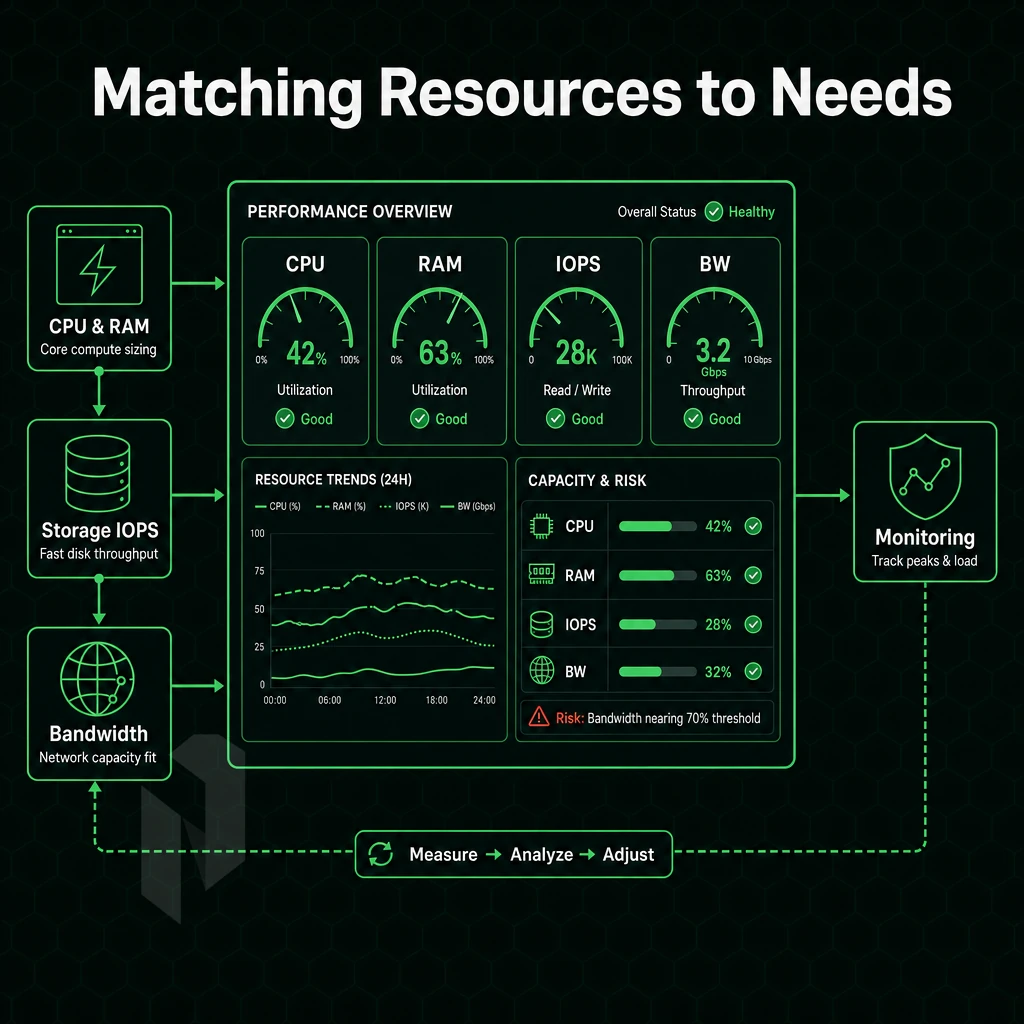
fully managed bare-metal hosting is not created equal.
Hardware and Platform
The server hardware generation is the limiting factor to raw performance.
Is a Linux operating system provided? What software licenses, e.g., control panel software like DirectAdmin/cPanel, are included, and when are they billed separately? Does a regular account include full server access, or is that reserved for managed accounts?
Network Quality and Protection
Serious hosting infrastructure is provided by Tier 1 upstreams, with dense IX peering and high port capacity to distinguish it from mere commodity providers.
DDoS protection should always be enabled, never offered as an add-on.
Support, SLA, and Provisioning
So check the hosting company’s NOC coverage hours, ticket response time guarantees and the time taken to ship replacement hardware.
Ask about the technical support scope in the managed hosting offer. Will OS patching and security hardening be included in the monitoring or not? “Best effort” for hardware replacement as described in the SLA is not good enough. It has to be same-business-day replacement at a minimum.
Knowing what to look for in a host provider is only half the battle. The other half is determining whether your needs would be better suited with managed dedicated hosting in the first place.
Who Needs Fully Managed Dedicated Hosting? Common Use Cases

This type of hosting isn't suitable for all workloads, but for the following types of businesses it is often the only option. We can help you understand where fully managed physical server hosting excels to avoid paying for unnecessary management or for a system that hasn't been powered with enough resources to meet your requirements.

Workloads That Demand Dedicated Hosting Providers
High-traffic e-commerce, HD video streaming, and online gaming all require consistent, low-latency performance under load.
For VPN providers, the top priority typically is the availability of IPv4 addresses and basic connectivity.
Teams Without In-House Sysadmin Capacity
Web hosting typically comes in unmanaged bare metal form, and companies without a sysadmin cannot afford to manage an OS like Microsoft Windows Server, hardening, patching, and monitoring it consistently. Managed hosting thus bridges the gap. While your team keeps superuser access to their servers, Netrouting manages the operational part for you on bare metal as well as on cloud servers. OS patching, security hardening and proactive monitoring form the core of Netrouting’s managed hosting services.
Migrating From Shared or VPS Environments, Dedicated Server Hosting Providers
Running managed dedicated hardware makes transitioning to larger, more powerful hardware smooth.
| Profile | Key Requirement | Best Fit |
|---|---|---|
| E-commerce / high-traffic site | Consistent uptime, isolated compute | Managed dedicated |
| Video streaming | Multi-gigabit throughput, low latency | Managed dedicated |
| Online gaming | Sub-20ms ping, high CPU clock | Managed dedicated |
| VPN provider | BGP, IPv4, IX peering | Managed dedicated + IP transit |
| No in-house sysadmin | Managed OS, patching, monitoring | Managed dedicated |
| Scaling beyond VPS | Dedicated hardware, fast provisioning | Managed dedicated |
But the same confusion in terminology is afflicting all of these buyers, and resolving the terminology for ‘bare metal’ vs. ‘managed’ is worth doing directly.
Bare Metal Servers vs Managed Dedicated Servers: Clearing Up the Confusion
To most buyers ‘bare metal’ and ‘managed’ dedicated servers are two mutually exclusive alternatives.
Understanding the Hardware Layer
- What bare metal means to us. The best server is a dedicated server, a bare metal server, a dedicated server, a server, not shared resources, not virtualization. A physical server, your server, your server, a server, dedicated server, a server, your server, your server, your server, your server, your server. Your server, your server, your server, your server, your server, your server, your server, your server, your server, your server, your server. Your server, your server, your server, your server, your server, your server, your server, your server, your server, your server, your server, your.
- Familiarize yourself with the server hardware options we offer for dedicated hosting. Our servers are powered by Dell and Supermicro hardware, such as Intel Xeon and AMD EPYC processors, up to 2 TB of RAM, up to 24 drives, and a variety of hardware RAID options. In short, raw performance is our starting point.
Choosing Among Dedicated Hosting Providers
- How much do you want to manage? Unmanaged bare metal servers give you complete control of the server. A managed dedicated server is a halfway house. You get OS patching, security hardening, monitoring etc. but the user still has administrator access. This is the core of any managed dedicated hosting offering.
- Choose a service tier that matches your team. Managed dedicated hosting is available on bare metal, cloud compute and colocation. The service layer for dedicated hosting is identical regardless of the hosting infrastructure that we provide.
Note: Confusing these two layers leads to under-buying. Teams that need ops support but select unmanaged bare metal end up building an internal NOC. Evaluate both dimensions, hardware and management, before choosing managed dedicated server plans.
Confirming the Right Fit
- Verify the service scope. A good dedicated server hosting service will cover OS management, security configuration and monitoring. Verify what is included in the services prior to signing up.
- First off, you’ll need to check where you can actually set up your servers and what your compliance requirements are. Netrouting has data center locations in Europe, North America and in Asia-Pacific. Depending on your needs the closest location to your users with the best latency and appropriate data-residency is the best choice.
Location is more than just another requirement to check off the list.
Why Choose Netrouting for Fully Managed Dedicated Server Hosting
Netrouting delivers fully managed dedicated hardware hosting on enterprise-grade bare metal, provisioned in under 60 minutes, backed by a 24/7 NOC and a 1-hour ticket guarantee. Our managed dedicated hosting covers OS patching, security hardening, and proactive server monitoring, while you retain full system access.
- Always-on DDoS protection. L3/L4 mitigation is included on every service, no configuration required.
- Latest-gen hardware. Dell and Supermicro servers on Intel Xeon and AMD EPYC, with unmetered 10 Gbps (up to 40 Gbps available).
- Control panel options. cPanel and DirectAdmin included; Managed Proxmox VE available for teams running their own VMs and containers.
- Global footprint. Ten data center cities across Europe, North America, and Asia, Stockholm, Amsterdam, Frankfurt, Miami, New York, Hong Kong, and more.
- Certified infrastructure. ISO 9001, ISO 27001, and SOC 2, the compliance baseline most dedicated hosting providers charge extra for.
Whether you're migrating from unmanaged dedicated servers or consolidating on-premises hosting, our managed hosting services scale with your workload. Contact our sales team to discuss a dedicated server hosting plan that fits your requirements.
Before you do, use the checklist below to confirm every critical detail is in the contract.
The Essential Checklist Before Signing a Fully Managed Dedicated Hosting Plan
Here are the non-negotiables to go through for any managed dedicated server plan you’re considering to commit to. Run through what server management covers under each dedicated hosting plan, OS patching, backups, monitoring, DDoS protection, and more, making sure everything is explicitly listed in the contract and not left to interpretation. Also verify what hardware generation the server runs on.
Whether you can customize the config to fit your specific needs and check the hosting provider's SLA for component failure (and how quickly they'll replace them for you). Also, verify that privileged access is granted in full. Check the network uptime and overall quality of your hosting environment, Tier 1 uplinks, Internet Exchange peering, and available port bandwidth are just as important as the actual server resources and specs.
Next, choose a dedicated hosting plan and check where your audience is located. Review support hours, ticket response times, and available control panels. A fully managed dedicated server is only as good as the service terms behind it, so read them carefully before signing up.
Frequently Asked Questions
What does a web host actually include in a fully managed dedicated server plan?
Fully managed dedicated hosting covers OS patching, security hardening, and proactive 24/7 monitoring, so the provider handles the operational layer while you focus on your application. At Netrouting, managed plans are available across bare metal, cloud, and colocation. For control-panel workloads, managed options include cPanel/WHM or DirectAdmin with licensing, updates, and security handled end to end. For virtualization, Managed Proxmox VE covers cluster setup, patching, monitoring, and backup configuration on dedicated hardware.
Does a web host let me keep root access on a fully managed dedicated server?
The provider handles the operational overhead, patching, hardening, monitoring, but you retain complete control over your environment.
How does a web host differ between managed and unmanaged dedicated server hosting?
Managed hosting shifts that operational burden to the provider.
How Quickly Can You Provision Your Own Server?
Netrouting provisions bare metal servers in under 60 minutes.
Is DDoS Protection Included With Fully Managed Dedicated Hosting?
Always-on L3/L4 DDoS mitigation is included at no extra cost on every Netrouting service, including managed dedicated servers. It detects and blocks volumetric and network-layer attacks automatically, no configuration required. For high-risk or mission-critical workloads, the advanced protection that dedicated hosting offers includes application-layer (L7) mitigation, custom policies, and higher scrubbing capacity on top of the included baseline.
What Operating System Options Are Supported on Managed Dedicated Servers?
Managed dedicated servers support the major Linux distributions, including CentOS, Debian, and Ubuntu, as the standard base for server deployments.
How does managed dedicated server hosting compare to VPS or cloud hosting?
That means consistent, predictable performance that shared VPS environments cannot guarantee under load.
Managed dedicated hosting is the right choice when your workload demands raw, sustained performance, data isolation, or compliance requirements that shared infrastructure cannot meet. Netrouting offers both managed bare metal and cloud compute across ten locations, so you can match the right model to each workload.
Managed Dedicated Server Hosting. Top hosts provide the best of both worlds: fully managed Dedicated Servers (including Operating System hardening, monitoring and patching) and full administrative access on fully dedicated servers with guaranteed resources (memory and CPU in particular). Managed Dedicated Servers are provided by hosts with real depth of management and a performance oriented network, including carrier-grade connectivity, DDoS protection and rapid provisioning of new hardware.
Most infrastructure teams are better to spend their time writing application logic than kernel updates.
Netrouting's fully managed dedicated servers run on enterprise Dell and Supermicro hardware across ten locations, from Amsterdam and Frankfurt to Miami, New York, Hong Kong. Additionally, Singapore, backed by a 2.4 Tbps+ network, 24/7 NOC, and a one-hour ticket response guarantee. Explore configurations and contact the sales team to find the right fit for your workload.
Hand over the day-to-day.
Tell us what runs on the servers and what your team keeps. We propose the managed scope.