Managing a large number of dedicated servers typically means every unplanned outage, every missed patch, and every misconfigured firewall becomes your problem to fix. managed dedicated server hosting takes the operational load off your back by providing you with the raw power of bare metal servers. Additionally, Letting a team of engineers handle the day to day server administration for you.
There is a trade off between having control of a server and having convenience. The unmanaged physical server model gives you maximum flexibility over the hardware, but leaves you responsible for hardening, updating the kernel, monitoring for security issues, and dealing with incidents 24/7. Choosing this approach grants more flexibility to customize every aspect of the environment, from kernel parameters to custom firewall rules tailored to your specific requirements.
Shared or Virtual servers can remove a lot of work but, unlike dedicated servers, they carry the potential for Noisy Neighbors and provide no guarantee of service levels. Managed Dedicated servers can provide Isolated Hardware, Predictable Resources and a 24/7 manned team to keep the servers and the stack (applications, os, etc) up to date and monitored for security. Organizations requiring elastic scalability may find cloud servers more suitable, though they sacrifice the predictable resource allocation and physical isolation that dedicated infrastructure provides.
Blog contents
This guide explains in detail what managed dedicated hosting covers, how it compares to other hosting solutions. What to look for in a managed hosting provider and which workloads are best suited to be migrated to managed dedicated hosting.
Understanding the distinctions between web hosting models helps organizations select the infrastructure that aligns with their operational capabilities and business objectives. Whether you're launching a high-traffic e-commerce platform or migrating a complex enterprise application, selecting the right hosting model ensures your website remains responsive and secure under varying load conditions.
What Is Dedicated Hosting for Managed Servers?
In Dedicated managed hosting you lease a complete physical server. This means that there are no shared resources and thus no noisy neighbors. Leasing an entire physical server ensures that CPU cycles, memory bandwidth, and disk I/O are never contested by other tenants. When you lease an entire server, you eliminate the performance variability that comes from sharing infrastructure with unknown workloads. Dedicated infrastructure guarantees that all server resources remain exclusively allocated to your workloads, preventing contention and ensuring consistent throughput.
On the other hand the administration of the server is entirely handled by the hosting company. This enables your team to focus entirely on your application instead of worrying about the operation of the server.
What Dedicated Managed Server Hosting Actually Covers
Under a managed server arrangement, we take care of all server administration tasks that your sysadmin team would normally have to attend to. This includes OS patching, security hardening, software updates and 24/7 monitoring. For community perspectives, see What provider do you recommend for Dedicated Server ....
A typical scope looks like this:
- Updates for the operating system environment (OSE): Updates for Linux distributions and for Windows operating system environments.
- Security patch deployment and vulnerability remediation.
- Performance monitoring with 24/7 NOC oversight.
- Hardware fault response and same-business-day replacement.
Managed vs. Unmanaged Dedicated Server Hosting
Unmanaged dedicated hosting provides you with superuser access, and that is all. Every kernel update, firewall rule, and service restart is your problem. Managed server hosting turns that model on its head. We own the operational base line, you own the application.
One of the key differences between a managed dedicated server and a typical shared web hosting environment is that in a multi-tenant hosting environment multiple tenants share both the server hardware as well as the overhead of server management. In contrast a dedicated managed server has both resources and responsibility separated and ‘mananged’ for you.
Who It's Built For
Also, organizations running compliance bound workloads (e.g. documented patch cycles, etc. for server management) as well as developers that need a production-grade data platform but don't want the operational overhead are also a great fit.
How Managed Dedicated Servers Work
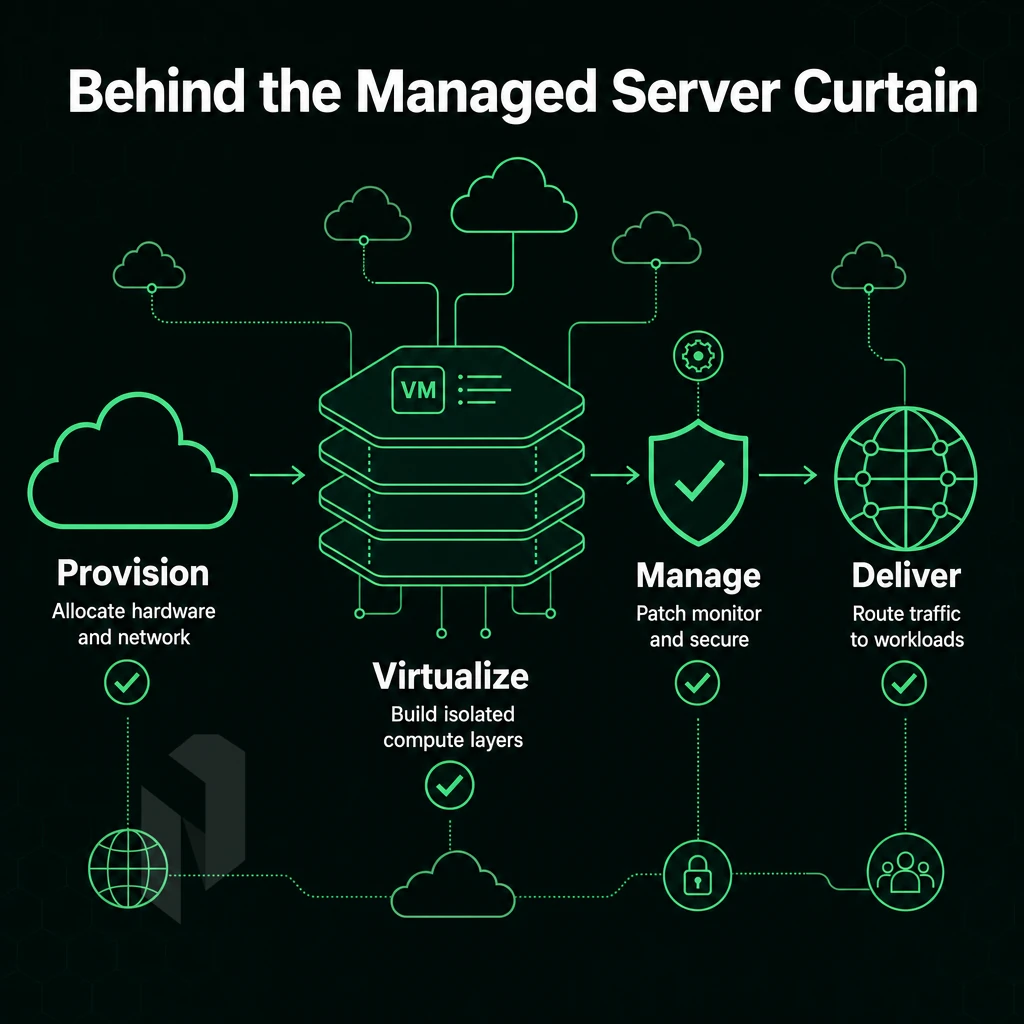
Managed dedicated server hosting separates the clients ownership of the servers hardware from the operational responsibility of the servers. The provider manages the infrastructure layer of the server and handles technical support for it, while the client manages the applications and business logic that run on the server.
Determining exactly where this boundary will fall is an important consideration when choosing to host your servers on a managed dedicated server hosting platform. This division of responsibilities allows businesses to maintain full control over their applications while delegating the complexity of it infrastructure management to specialists.
From Operating System Provisioning to Live Environment
Deployment of our servers starts with choosing the right hardware. Typically we go for powerful servers with multiple cores, such as Intel Xeon or AMD EPYC processors, lots of RAM and raid storage. After choosing the hardware, the server is installed, the operating system is configured and some basic security hardening is applied.
After that the server is connected to the network. Here at Netrouting we can provision bare metal servers within 60 minutes. Selecting the appropriate physical hardware ensures that the server can handle your workload efficiently while providing room for future growth.
Control panel setup is followed by a walkthrough of how to configure DirectAdmin and cPanel on dedicated servers to give your clients a graphical interface for managing their domains. This is sitting on top of the operating system that your provider manages for you. Many providers offer a choice of control panels, allowing clients to select the interface that best matches their team's workflow and existing infrastructure.
What Managed Hosting Services Cover
Once the solution is live, managed hosting is a low cost way to keep your environment secure, with the provider handling operating system updates, security patches, performance tuning, and proactive monitoring. A dedicated system administrator from the provider’s team will respond to alerts raised by the solution, investigate issues and apply fixes as required, often before the client is even aware a problem existed.
Most providers include these core management tasks in the base service fee, though specialized configurations or custom integrations may incur an additional charge. This proactive approach ensures your infrastructure remains highly secure while minimizing downtime and reducing the risk of vulnerabilities being exploited. Regular performance enhancements are implemented by the provider's team to optimize resource utilization and ensure your applications continue to run efficiently as workloads evolve.
This is what managed services are all about. Providing a solution built on dedicated servers that continues to operate on a day to day basis without the need for the client to employ their own staff to manage it.
Netrouting’s 24/7 NOC team continuously monitors your infrastructure. The support team is available around the clock to address any infrastructure issues that arise, ensuring rapid response times when critical situations occur.
What Computing Power the Client Retains
Our clients have full administrative access to their servers, control over the application, custom software stack, databases and code. We do not manage the application unless specifically requested by the client. We manage the platform and the client manages the product running on it.
If your team does not have dedicated ops people but you need full hardware performance and isolation, managed dedicated hosting is a great alternative. It is ideal for growing businesses, for agencies that host sites and applications for their clients, and for any site that requires high uptime and does not require a team to run ops. A managed solution ensures your website remains online and responsive without requiring you to hire specialized infrastructure staff.
As with any hosting option, it is wise to compare it to other options (in this case, shared server hosting and cloud servers) to determine if it is the best fit for your particular needs. When evaluating dedicated server hosting against alternatives, consider not only cost but also the level of isolation, performance predictability, and administrative overhead each option introduces.
Evaluating dedicated server hosting options requires careful consideration of your application's resource requirements, expected traffic patterns, and the level of administrative support your team can realistically provide. Organizations migrating from cloud servers often discover that dedicated infrastructure delivers more consistent latency and eliminates the unpredictable billing spikes associated with elastic scaling.
Evaluating Your Dedicated Server Hosting Options

Don’t compare server specifications to choose the right dedicated server hosting option. Instead, use this checklist to go through a series of critical evaluation criteria to help you choose from the hardware, network, management and support features offered by dedicated server hosting providers. By using this checklist, you will be able to deploy your new dedicated server hosting package with confidence.
Hardware and Storage for Dedicated Servers
For a server processor, a modern system needs to have multiple cores for handling many threads concurrently. For the RAM, check the amount of memory available and the upgrade possibilities. For production environments, 256 GB or more of RAM is typically needed. Workloads involving machine learning, large databases, or real-time analytics often require substantial computing power to maintain acceptable response times under load.
Applications processing massive amounts of data in memory benefit significantly from configurations that prioritize both high core counts and expandable memory architectures. Workloads that compile code, run containerized microservices, or execute scripts in multiple programming languages simultaneously benefit from processors with high thread counts and fast clock speeds. Properly sizing compute resources from the outset prevents costly migrations and ensures your server can scale alongside your application's growth trajectory.
Storage is as important as the compute. List out the number of storage drives, the amount of disk space per drive, and whether or not the system uses hardware RAID. NVMe SSDs significantly lower latency, while SATA drives are better for large amounts of storage. A good hardware configurations checklist will outline the specs for the 3 main layers: CPU, RAM, and storage.
Network Quality and Bandwidth
Just because a server has a high raw port speed doesn’t mean it has unlimited bandwidth. Be sure to check if your dedicated server plan comes with “unmetered” (i.e. unlimited) bandwidth or if it’s capped at a certain amount per month. Capped bandwidth can lead to very unpredictable costs as your server usage increases.
Another important factor to consider is the network architecture of a provider. A dedicated servers provider with its own autonomous system (AS) with Tier 1 upstreams and a broad IX (Internet Exchange) peering network is able to provide lower latency and better redundancy than a provider that just resells a transit network.
Netrouting for example operates under AS6206 and has a backbone of over 2.4 Tbps+ where your traffic is never put in a situation of competing with other customers on the same pipe.
Managed Services, SLA, and Support
The managed scope for server management can vary. It is therefore important to confirm the scope of managed services offered, including whether services such as OS patching, security hardening, monitoring and access to control panels are included as standard. Performance management, such as increasing performance through kernel tuning or storage performance optimization may be charged as extra.
With these evaluation criteria in mind it is useful to have a look at the single workloads where managed dedicated hosting is especially useful.
Decide who runs the servers.
Hand over the operations, run a dedicated server yourself, or start with a virtual one.
We run it. You ship product.
Choose managed hosting when your team should focus on the application. Agree on what we manage and what stays with you.
Start the conversation with
- Servers
- Number and roles
- Scope
- What we manage
- Access
- What stays with you
Compare configurations, not just rack space.
Start with a dedicated server when provider-owned hardware is the better fit. Compare CPU, memory, storage and network needs.
Start the conversation with
- Compute
- CPU and memory
- Storage
- Capacity and workload
- Network
- Port and traffic needs
Start with a VM. Scale it when needed.
Use cloud compute for workloads that do not need a full machine. Compare vCPU, memory and storage per plan.
Start the conversation with
- Compute
- vCPU and memory
- Storage
- Disk size
- Location
- Preferred region
Key Benefits of Managed Hosting Services for IT Teams
By transferring the server administration to a specialist provider managed hosting services take the operational burden from your staff. This leads to a huge number of benefits for dedicated servers and broader infrastructure alike, including reducing the number of fire-fighting exercises, solving problems much faster and keeping everything up-to-date and compliant without using up your engineering staff.
Reduced Technical Knowledge Burden
Managing bare metal servers in-house requires significant expertise to manage to harden an OS, manage through the patch cycle, and handle a server failure. Managed services take this off your hands. Security patches and software updates are released on time by experienced engineers who do this on a daily basis as opposed to a generalist trying to manage this against 5 other things.
This lowers the floor of in-house expertise that we require on staff. Junior admins can handle day-to-day operations on dedicated servers without needing to wait for Senior engineers to free up from product development, building out architecture or running other strategic initiatives that drive business value.
Faster Incident Response and IT Infrastructure Stability
Time lost due to server failures or other errors is quickly increasing in value. 24/7 support with a 1 hour ticket guarantee is one way to prevent outages from happening in the first place.
Rather than sending out alerts for physical server problems, or additional servers added to your infrastructure, that need to be resolved by your IT staff, Netrouting's hosting company monitoring team proactively watches everything for you around the clock.
This ensures that we meet the 99.9% uptime SLA as security updates are released without delay and are not left to be applied in a quarterly maintenance window. The IT Infrastructure is continuously hardened as opposed to on an occasional basis.
Predictable Costs vs. Variable Billing
Managed dedicated server hosting makes for a very cost effective alternative. Because there are no egress charges and no cheap entry level server that will cost a lot once you’ve added a few GB of data transfer, you’ll know exactly what you’re paying for every month.
We recommend managed hosting if your team is not experienced enough in Linux or Windows Server administration.
If you run online stores or other regulated workloads and need to document patch cycles on every one physical server in your fleet, or if you need fixed response times without setting up an expensive on-call rota for your internal team. Behind all these decision factors there is the network of the hosting provider. It is important to check the network quality before signing a contract.
Network Quality and Connectivity for Dedicated Servers
While the hardware specifications of a dedicated server are crucial in determining the server’s performance. The network that connects the server to the internet is equally important in determining the server’s latency, reliability and overall resilience. Here we outline key factors to consider when assessing and deploying network quality for your hosting.
Assess Backbone and Peering
- For Dedicated Hosting we also verify that the provider is running its own Autonomous System (AS). As an example, Netrouting is running its own AS (AS6206) for all its customers, this means they are in full control of how traffic is being routed to their servers. This results in less hops, less latency and no dependency of other carriers which can cause congestion.
- Check IX peering density at interconnects such as Amsterdam, Frankfurt, Miami, New York, Hong Kong and Singapore. A dense peering position reduces your transit costs and provides more diversity in your available paths to reach destinations than relying on a single upstream carrier. The more interconnects you have around the world the better your organization will be to reach destinations across the globe.
- Also please make sure to check the total amount of network capacity that is being used. Our 2.4 Tbps+ backbone is able to handle huge loads of traffic all at the same time. Even at peak times, the port(s) of your website or application will not run out of bandwidth because the total port(s) utilization is below 40% at those times.
Evaluate Bandwidth and Customization Options
- Unmetered bandwidth on dedicated ports. The last thing I want is a host of unpredictable costs associated with metered services, as well as potential throttling. Unmetered 10 Gbps on dedicated servers for me, thanks. Also: BGP support / BYOIP.
- Assess network connectivity for private networks. Your free private interconnect (up to 40 Gbps) enables you to keep inter-server traffic off the public internet for replication, backup and multi-node setups.
Note: Unmetered bandwidth at a higher cost tier is still preferable to metered plans that cap throughput during traffic surges, always read the fair-use policy.
Confirm DDoS Protection and Security
- Require always-on L3/L4 mitigation. Netrouting includes always-on L3/L4 DDoS protection on every service. No configuration required. Netrouting detects and blocks attacks automatically before they hit your infrastructure.
- Advanced Mitigation Features: For high-risk workloads, verify that application-layer (L7) mitigation as well as custom scrubbing policies are available as an upgrade. A provider with 1 Tbps+ of mitigation capacity can absorb volumetric attacks of almost any size without impacting real traffic.
Now that we have a basis for how to benchmark network quality and know that DDoS protection and operating system updates are included with dedicated servers, we can look at the providers that bundle all of these into a single managed service.
Frequently Asked Questions
How do managed and unmanaged dedicated servers differ in technical support?
With unmanaged dedicated hosting, you own the full stack, OS installation, patching, security hardening, and monitoring are entirely your responsibility. Managed dedicated hosting transfers those operational tasks to the provider. You get the same raw hardware and full system access, but the provider handles the day-to-day administration. The result is dedicated performance without the staffing overhead of a full-time sysadmin.
Do managed dedicated servers still provide root access to users?
Yes, full administrator-level access is standard. You can deploy applications, modify configurations, and manage services exactly as you would on an unmanaged server.
What does a managed hosting provider handle for my dedicated servers?
A managed provider typically covers OS patching, security hardening, proactive monitoring, and incident response. Many also include technical support for control panel management, cPanel/WHM or DirectAdmin, plus backup configuration and hardware-level troubleshooting. At Netrouting, managed hosting across dedicated servers extends to Proxmox VE cluster setup, patching, and backup orchestration for clients running their own virtualization layer.
Are Dedicated Servers More Secure Than Shared Hosting?
Unlike dedicated servers, traditional communal hosting means a compromised neighbor can affect your environment, since you share the OS, network stack, and sometimes file paths. A dedicated server isolates you completely: your kernel, your firewall rules, your security policies. For any workload handling confidential data, dedicated is the baseline, not an upgrade.
How Quickly Can Managed Dedicated Servers Be Provisioned?
Managed services, OS hardening, control panel setup, monitoring agents, are layered on top and typically completed the same day.
Can I Run Windows or Linux on Managed Dedicated Servers?
Windows Server is available with technical support for workloads that require it, such as .NET applications or Active Directory integration.
When Should I Upgrade From a VPS to Dedicated Servers?
Three signals make the case for dedicated servers clearly: your VPS is consistently hitting CPU or RAM ceilings, noisy-neighbor I/O is affecting application performance, or your compliance requirements demand physical isolation. A managed dedicated server eliminates shared-resource contention and gives you predictable, hardware-guaranteed performance. If you're running production databases, high-traffic applications, or latency-sensitive workloads, a VPS is the wrong foundation, and dedicated servers built on dedicated hardware are the right one.
full-service dedicated server hosting gives you the power of bare metal servers, but someone else manages the day-to-day operation of the servers for you. You have full control to your environment and we manage the infrastructure for you such as the hardware, the network, security patching and monitoring.
When it comes to deciding between managed shared web hosting platform, cloud hosting and managed dedicated servers, the decision really comes down to the load requirements of your work and the internal capacity of your IT department. High traffic sites, low latency sites and sites subject to strict compliance requirements often grow beyond shared and cloud hosting platforms, pushing teams toward dedicated hosting providers instead. A managed dedicated server on the other hand can grow with your work without growing your IT operations staff.
Netrouting deploys dedicated servers on bare metal with your chosen operating system in under 60 minutes across ten locations in Europe, North America, and Asia, backed by a 2.4 Tbps+ network, always-on DDoS protection, and a 24/7 NOC with a one-hour ticket guarantee. If your workload demands predictable performance and hands-on infrastructure support, talk to the Netrouting team about a configuration built around your requirements.
Hand over the day-to-day.
Tell us what runs on the servers and what your team keeps. We propose the managed scope.