As you scale out a Kubernetes cluster on shared or virtualized infrastructure, you will eventually hit a ceiling.
Additionally, Multi-tenant networking will add significant complexity to achieve the isolation your security team requires.
Bare metal deployments require more forward planning around nodes, storage, and networking than managed cloud services.
Blog contents
This guide will explore how bare metal Kubernetes clusters function, and will provide a look at where they outperform their virtualized counterparts, an in-depth look at the typical architecture of a bare metal Kubernetes cluster. Additionally, Will provide a number of criteria by which to evaluate a potential workload’s appropriateness for deployment on bare metal as well as an in-depth examination of the key infrastructure decisions which must be made in order to realize performance gains on bare metal Kubernetes.
What Is a Bare Metal Deployment of Kubernetes?
Kubernetes on bare metal means you run your Kubernetes cluster on physical servers directly without a hypervisor, no virtual machines, no abstraction layer between your workloads and your servers’ hardware. Every CPU cycle, every byte of RAM, every packet on the network reaches your containers directly without any detour.
What a Bare Metal Kubernetes Cluster Actually Is
Typically in cloud-based environments, the nodes that run your Kubernetes applications are hosted in virtual machines on shared servers.
Three components form the foundation:
- Control Plane: The control plane of a Kubernetes cluster manages cluster state, schedules workloads and exposes the API server of the cluster.
- Worker nodes, bare metal servers that run your pods and container runtime (containerd or CRI-O).
- Container runtime, The low-level runtime responsible for pulling images and running containers on nodes within a cluster.
Bare Metal Servers vs. VM-Based Nodes
Managed cloud Kubernetes is a layer of abstraction on top of the hypervisor layer that your cloud provider abstracts for you. While convenient, it does not provide the same level of performance headroom or cost predictability as running on bare metal.
Example: A high frequency data pipeline that generates 10 Gbps of data and saturates the input on a VM-based node will typically run at or below the bandwidth allocated to it when you deploy Kubernetes on bare metal due to NICs not being multi-tenanted.
When Bare Metal Kubernetes Deployments Make Sense
This model is best for workloads that need high performance, data storage within local geo boundaries and a fixed cost. We see many AI inference, low-latency API providers and companies in highly regulated industries benefit from our dedicated servers.
Netrouting’s dedicated servers are designed for bare metal and come with unmetered 10 Gbps connectivity and are hosted in noise-free facilities. Organizations that adopt this infrastructure model often gain a competitive edge through predictable performance and lower total cost of ownership. Selecting the right server hardware configuration upfront ensures that your bare metal infrastructure can handle peak workloads without requiring costly mid-cycle upgrades.
Just knowing when bare metal is appropriate is not enough.
How a Bare Metal Kubernetes Distribution Works
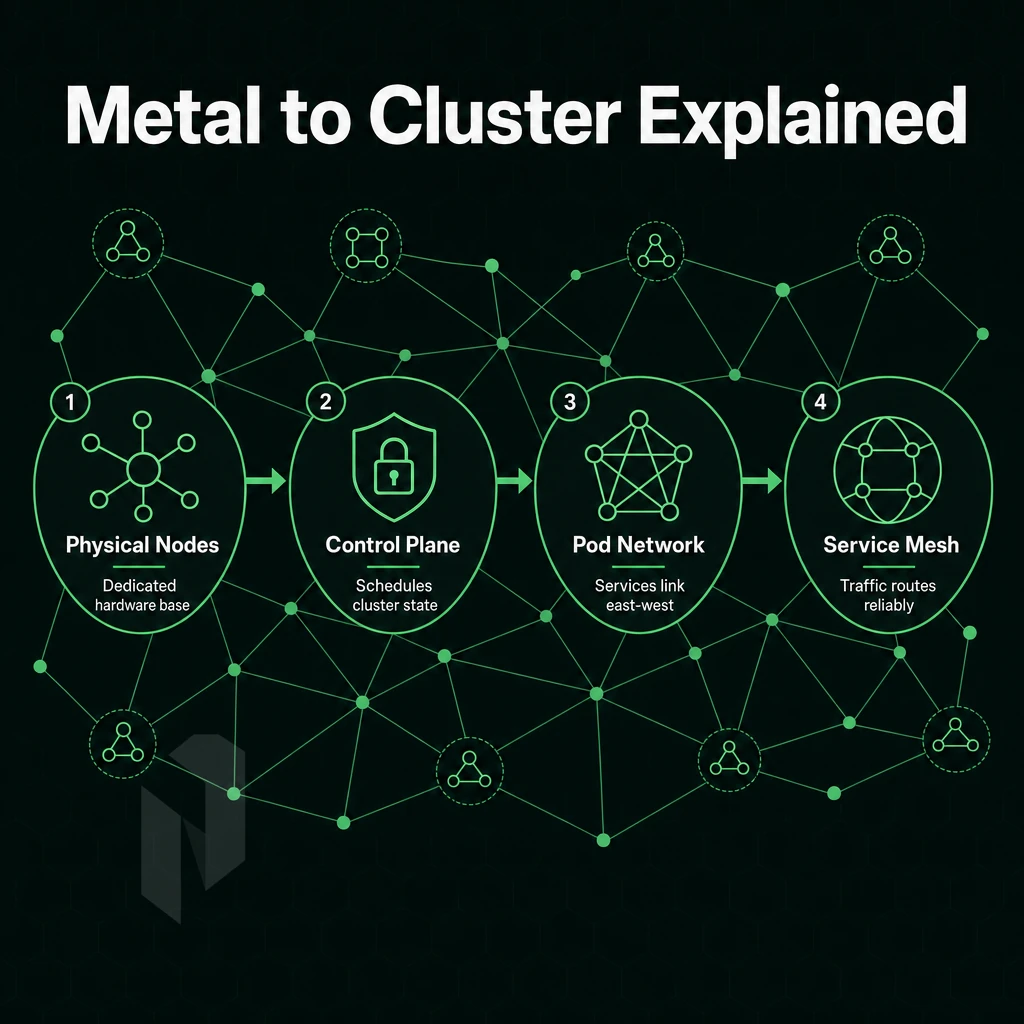
Bare metal Kubernetes is running all components of a cluster on physical servers, without any virtual machines in between.
Control Plane Nodes and the API Server
The API server, etcd, scheduler and controller manager components of the control plane run on control plane nodes as containerized applications on the server’s hard ware. Each master node in this architecture typically requires dedicated resources to ensure the cluster remains responsive under heavy workload scheduling and state management operations.
Kubelet and container runtime (containerd or CRI-O) run directly on OS of worker nodes. API server in the master talks to workers across the cluster network to schedule pods and monitor health of the nodes in real time. The scheduler uses real-time node metrics to manage resources efficiently across the cluster, ensuring optimal pod placement based on available capacity.
Each master node in the cluster runs these critical components redundantly to ensure the cluster remains operational even if one node fails. This direct communication model ensures that the kubelet can report node status and resource availability to the control plane without delays introduced by virtualization layers on underlying servers.
No Hypervisor Layer: What Changes
Removing the hypervisor layer collapses the software stack around the container. This enables the container to talk directly to NVMe storage and network interfaces at the operating system level, typically reducing latency between pods in a kubernetes deployment to sub-millisecond levels on well-configured CNIs (container network interfaces) such as Cilium or Calico.
Proper configuration of the container network interface ensures that pod-to-pod communication bypasses unnecessary software layers and achieves maximum throughput. This architecture excels at providing direct access to hardware resources, which becomes critical when workloads demand consistent microsecond-level response times across distributed systems.
Persistent storage needs to be explicitly planned by teams without a dynamic provisioner from their cloud provider.
Bare Metal Networking and Load Balancing in Cloud Environments
Bare metal cloud servers lack a native cloud load balancer.
Bare metal Kubernetes is better for workloads that need low latency, high core count and direct access to hardware. Managed virtual clusters on the other hand are better when simplicity over performance is more important to your organization. We can elaborate on these differences by laying out two models. Bare metal deployments give engineering teams more control over hardware configuration, kernel tuning, and network topology decisions that directly impact application performance.
Bare Metal vs. Virtual Machines: Key Differences
This article explores 5 key dimensions to consider when evaluating production clusters.
Operating System Performance and Resource Efficiency
- No hypervisor layer. Virtual machines run on top of a hypervisor, which in turn consumes CPU cycles and RAM before your workloads even get a chance to use the resources on the host server. On bare metal, your workloads run directly on the host’s cores and gigabytes of RAM.
- Reclaim your VM overhead budget. The overhead that your Hypervisor was consuming in your total capacity can now be directed to your pods to further increase throughput for latency sensitive or computationally intensive workloads on bare metal.
Bare Metal Setup vs. Managed Kubernetes Distribution
- Higher initial complexity to be accepted. Provisions of a bare metal host, selection of CNI and the control plane for a cluster can be done for you by managed Kubernetes services of cloud providers. So you trade off control of host hardware against ease of use of operations.
- Weigh the cost model carefully. Managed Kubernetes offloads ops burden but introduces per-node markups and unpredictable egress fees. Self-managed bare metal delivers predictable billing with no hyperscaler margin baked in. Note: Factor in engineer time for cluster maintenance, that cost is real even if it doesn't appear on an invoice.
Security and Hardware Resources Control
- Minimize shared-tenancy attack surface. By running your managed service nodes on shared physical infrastructure (as opposed to a managed service running on shared hypervisor-based infrastructure). You get to run your workload on bare metal, a dedicated host, minimizing noisy-neighbor risk and ensuring tighter compliance boundaries for regulated workloads.
| Dimension | Bare Metal Kubernetes | VM-Based / Managed |
|---|---|---|
| Hypervisor layer | None | Present |
| Resource utilization | Full hardware capacity | Reduced by VM overhead |
| Performance ceiling | Hardware maximum | Capped by virtualization |
| Cost model | Predictable, no egress surprises | Variable, markup included |
| Setup complexity | Higher, manual provisioning | Lower, abstracted away |
| Hardware control | Full | Limited |
The table above is a clear summary of the performance and cost case for bare metal. What is needed next is some description of the benefits of bare metal in operational terms. Bare metal infrastructure simplifies operational tasks by eliminating the need to manage hypervisor updates, virtual machine sprawl, and the complex licensing requirements that come with virtualized environments.
Advantages of Running Kubernetes on Bare Metal
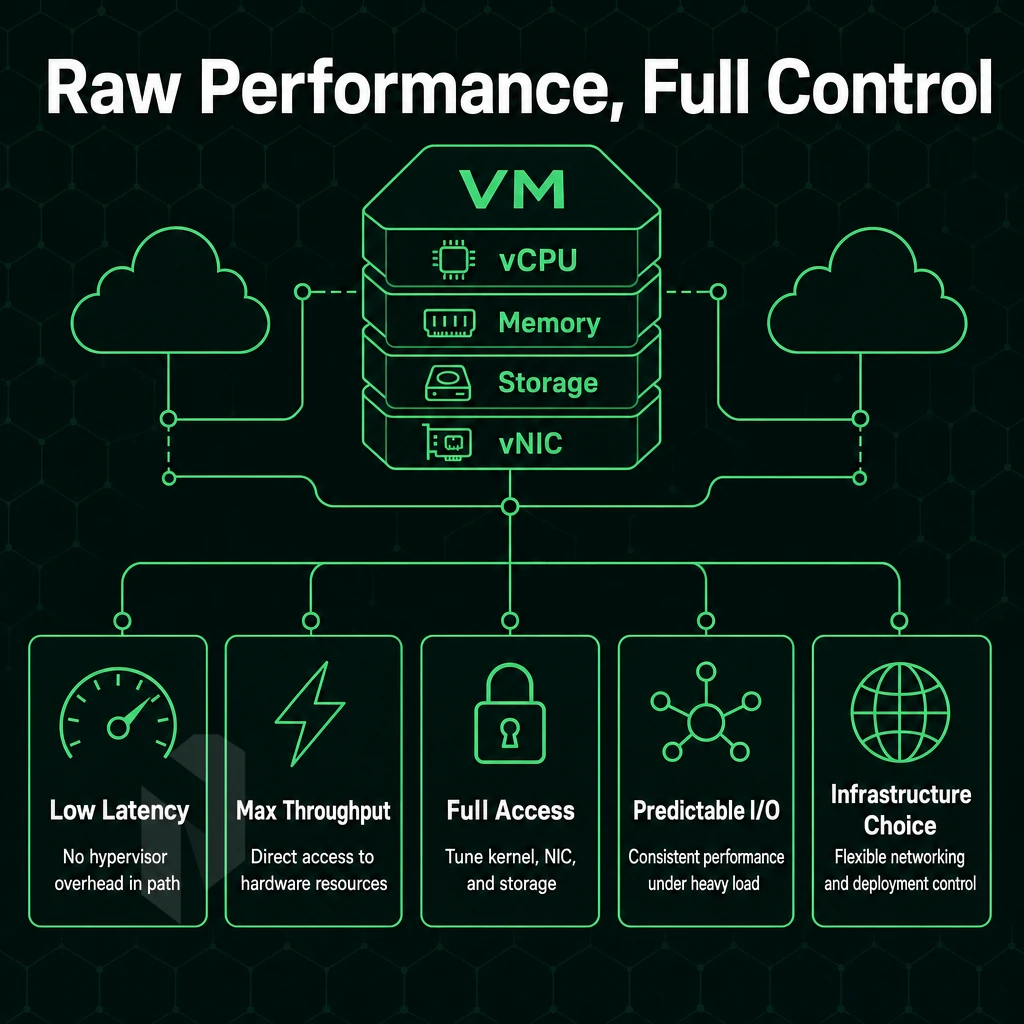
Running Kubernetes on bare metal takes the virtualization layer out of the equation entirely. In a bare metal deployment, all of your workloads run on the physical server's CPU cycles, use all of its physical RAM, and receive all of its I/O directly, with no hypervisor in the middle. This can make a huge difference for extremely latency sensitive applications and very performance intensive applications. Direct hardware access allows organizations to improve application workload performance by eliminating virtualization overhead and maximizing resource utilization across compute, memory, and network layers.
Organizations running performance sensitive applications often see measurable improvements in response times and throughput when migrating from virtualized infrastructure to bare metal deployments. When applications communicate across pods, the absence of virtualization means packets traverse the underlying servers' network stack with minimal processing delay, often achieving wire-speed throughput on modern NICs.
Performance, Resource, and Cost Efficiency
Run Kubernetes on bare metal to eliminate the hypervisor tax. Since all workloads are containerized, CPU scheduling, memory and other I/O can be done directly on physical hardware without the extra layer of abstraction.
Resource efficiency is a natural byproduct of how workloads run on bare metal infrastructure versus virtualized systems.
Control Over Underlying Infrastructure
Bare metal Kubernetes is the most contiguous way to run Kubernetes on top of bare metal servers. It allows for full control of the underlying infrastructure: kernel version, CPU governor, NUMA topology, network and storage parameters (e.g. I/O scheduler). Such control is critical for certain workloads that require custom kernel modules, SR-IOV networking or even hugepages with specific configuration. Teams can tune underlying servers at the BIOS level to optimize power states, disable unnecessary features, and configure hardware RAID controllers for maximum IOPS.
Isolation. A single tenant runs on a physical server with no shared hypervisor surface area, containing the impact of any security incident and making compliance audits far easier.
High Availability and Redundancy in Container Runtime
A multi-node control plane, redundant NICs, and hardware RAID all provide high availability without relying on the cloud provider’s abstraction layer for failover.
Our bare metal Kubernetes clusters run on dedicated Dell and Supermicro servers in 10 datacenters worldwide. With unmetered 10 Gbps network connectivity and free private networking between nodes, low inter-pod latency and off-internet cluster networking is assured.
Managed platforms offer many advantages.
Challenges of Bare Metal Kubernetes Deployments
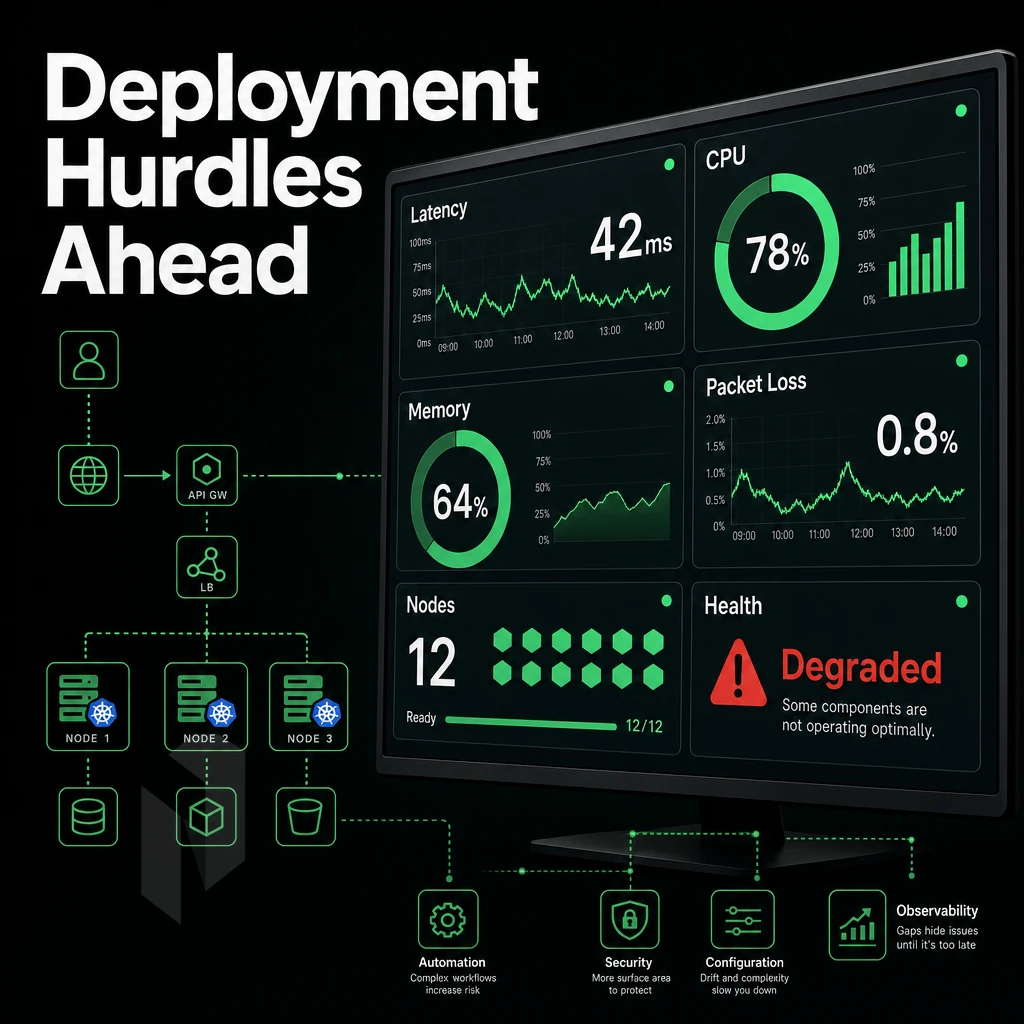
Running bare metal Kubernetes does give you some performance gains. But then you’re removing the safety net of managed cloud services. Every burden of operation that a cloud provider would take care of for you (load balancing, storage provisioning, hardware failure) now rests on your shoulders.
No Cloud Providers: Load Balancing and Persistent Storage
On bare metal, you’ll need to set up a software load balancer like MetalLB and point it at your physical IP addresses.
Persistent storage, like compute storage, is also manual.
Hardware Failures and the Absent Virtualization Layer
Virtual machines can live-migrate from a host that has failed within seconds. Unlike virtual machines, bare metal compute nodes do not have a virtualization layer to abstract the underlying hardware.
In a bare metal deployment, fault tolerance must be designed into the overall cluster architecture via node redundancy and pod anti-affinity rules, and not left to the virtualization layer to resolve.
How to Deploy Kubernetes Without Drowning in Operational Overhead
The configuration management for OS patches, CNI plugins and kubeadm upgrades can compound quickly on a multi-node cluster.
- The CNI selection of Cilium, Flannel or Calico must match your physical network topology.
- Management of IP addresses needs to start with a structured IPAM plan from day one.
- Better security is a benefit (no shared-tenant hypervisor). But OS and network hardening is up to your team.
Managed bare metal providers reduce the hassle of getting up and running.
Knowing the challenges allows you to determine which workloads are best to run on bare metal.
Common Use Cases for Bare Metal Kubernetes
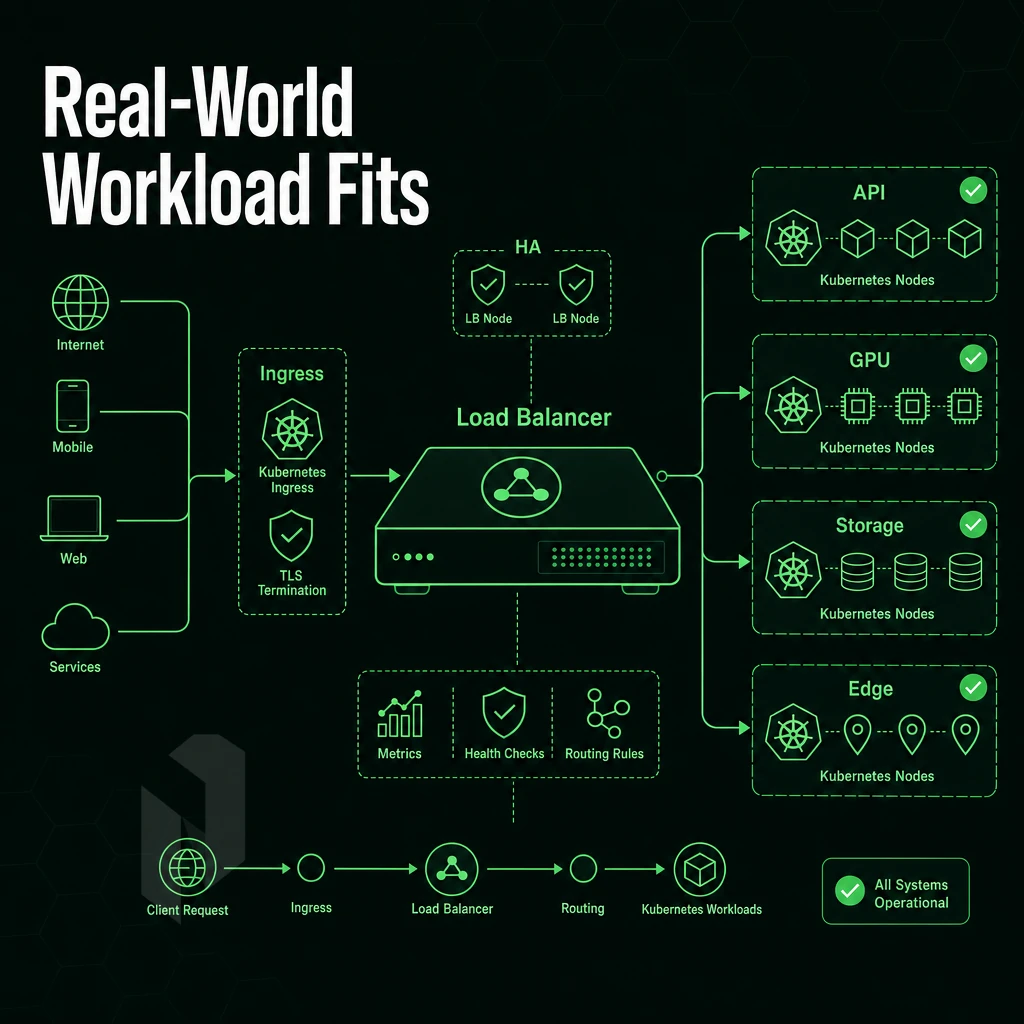
Workloads don’t all belong in virtualized cloud environments. Some workloads simply run better in bare metal environments. In these cases, direct hardware access to compute, storage capacity, and network outstrips the marginal benefits of virtualization, plus it eliminates the overhead of the hypervisor and the interference caused by noisy neighbors. The following examples describe in more detail the various workloads that can benefit from bare metal environments.
Performance-Critical and Data-Intensive Workloads
Applications such as financial trading platforms and online gaming backends require sub-millisecond response times, which are not guaranteed in a shared infrastructure of physical machines where the servers operating system resources are contested, even with a Kubernetes environment.
Utilization of resources remains constant and does not fluctuate as with other tenants competing for the same NIC and memory bus.
Bare Metal Clusters for Isolation and Sovereignty
To properly isolate the resources of different customer accounts in multi-tenant SaaS applications, hard boundaries between workloads are required. Bare metal clusters achieve this isolation at the hardware level, i.e. without any hypervisor scheduling decisions. Additional constraints are imposed by EU data sovereignty requirements: all workloads must run in data centers within certain geographic jurisdictions, on known servers with given operating system versions and appropriate access controls.
Choosing the Right Fit
Applications with unpredictable resource spikes benefit from cloud environments to handle bursts, but constant, latency-sensitive, or regulated workloads are better suited to bare metal servers.
In the preceding section, you found that bare metal was the best option for your case.
Setting Up a Bare Metal Kubernetes Cluster: Core Steps
Deploying Kubernetes on bare metal servers eliminates the need for a hypervisor, but requires careful sequencing.
Preparation: Hardware Resources and OS
- Select and provision hardware: servers with sufficient CPU, memory and local storage (e.g. SSD). Bare metal servers, as opposed to virtualized servers, let you run Kubernetes without the overhead of the virtualization software. Aim to have three or more servers for high availability.
- Install a supported OS. Ubuntu LTS, Debian, or RHEL are the most tested bases. Disable swap, configure static IPs, and ensure all nodes resolve each other by hostname. Note: Skipping swap disablement is the most common early mistake, Kubernetes will refuse to start.
- Install a container runtime, like containerd or CRI-O. Check the socket path for the runtime, before proceeding.
Execution: Cluster Initialization and Networking
- Choose a distribution for your Kubernetes environment. For upstream control, kubeadm is a good choice. For reduced operational overhead on small clusters, consider k3s. For the hardened production environments, RKE2 and Talos are two good options.
- Initialize the control plane. Run
kubeadm initon your master node, passing your pod CIDR. Save the join token, you cannot retrieve it later. - Join worker nodes. Run the printed join command on each worker. Verify with
kubectl get nodes. - Deploy a CNI plugin. Calico, Flannel, and Cilium are proven options. No CNI means nodes stay in NotReady state.
- Configure persistent storage and traffic distribution for your bare metal environment. Since there are no APIs for cloud-based storage and request routing, provision a storage class manually and then deploy MetalLB to assign an external IP to your LoadBalancer services. This is where cost efficiency over managed cloud really pays off: you control all layers.
Direct Access Verification
- Validate the cluster. Run
kubectl get nodesandkubectl get pods -A. All system pods should show Running. Deploy a test workload across multiple nodes to confirm scheduling and networking work end to end.
With your running cluster in place, it’s natural to ask yourself whether going with the bare metal route was the best decision, or whether a managed service would have made more sense.
Bare Metal Kubernetes vs. Managed Kubernetes: When to Choose Each
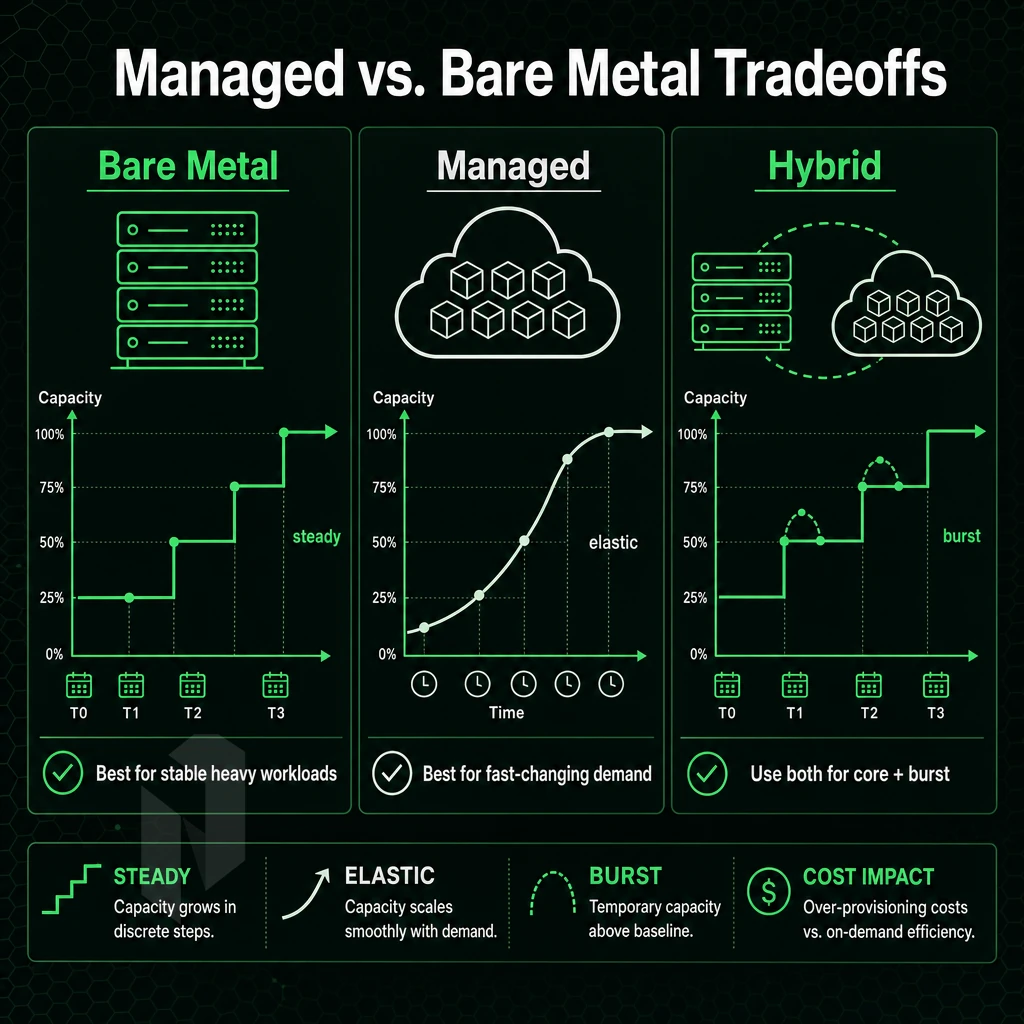
Choosing between managed and bare metal Kubernetes depends on five key factors: team, workloads, compliance, scaling, and cost.
Where Managed Kubernetes Deployment Wins
With a Managed services approach, control-plane operations are fully offloaded and your API server, etcd and scheduler are managed for you by your provider.
The tradeoff here is you give up to hypervisor overhead, black box networking, and limited hardware control. And at scale, the cost of each additional node times the number of nodes soon outstrips the predictable cost per node of running bare metal.
Where Bare Metal Kubernetes Wins
Kubernetes on dedicated servers runs without a virtualization layer, giving you direct access to the CPU, RAM, and NVMe storage. Your bare metal deployment achieves higher throughput at lower costs than virtualized environments.
This is especially relevant for financial services, healthcare and other regulated SaaS offerings.
Bridging the Gap Between Bare Metal Cloud Providers
The operational overhead argument against bare metal servers has lost a lot of weight lately. Many dedicated server providers now offer their bare metal servers within 60 minutes or less, similar to managed services.
This way, teams and companies can finally get physical hardware as fast as cloud servers.
When you have outgrown hyperscaler pricing but are not yet ready to build your own private cloud, bare metal Kubernetes on a provider like Netrouting is the practical middle ground.
The bottom line is that bare metal clusters deliver on their promises only when the underlying infrastructure has been designed for fault tolerance. So, first and foremost, you need fault tolerance architecture.
Achieving High Availability in Bare Metal Kubernetes
Building redundancy into a bare metal Kubernetes cluster is a multi-layered effort that requires careful architecture at each level. Since we're not using a managed cloud with automatic zone failover when we deploy Kubernetes on upgraded clusters, the design of the network, the choice of hardware and the physical infrastructure itself must include sufficient fault tolerance.
Control Plane Redundancy
To run etcd in quorum, deploy either three control plane nodes (3Master) or five control plane nodes (5Master).
Spread control plane nodes across multiple physical servers.
Worker Node and Network Redundancy
Distribute workloads across multiple nodes on different physical hosts.
This ensures that no single link can cause a failure and allows for much easier maintenance of links, key components of a resilient setup, much like when you deploy kubernetes and spread workloads across an operating system, as traffic will be distributed across both links while the other link is down for maintenance.
A keepalived active-passive load balancer pair handles control plane traffic, and api server access should be restricted to management subnets via network security policies.
Physical Infrastructure as the Foundation
Software HA is not a substitute for a bad power feed. Look for carrier-neutral colocation with N+1 power and cooling, and let the facility handle physical HA while you choose your own hardware.
Our colocation suites provide a solid foundation of redundant power paths. N+1 air conditioning and a 99.9% uptime SLA to ensure your bare metal Kubernetes cluster has the best possible start in life before you even schedule your first pod.
The architecture decisions made here are dependent on the underlying hardware.
Why Choose Netrouting for Bare Metal Kubernetes
Bare metal Kubernetes deployments demand hardware you fully control, no hypervisor layer, no shared resources, no virtualization overhead. Our dedicated bare metal servers give you exactly that: physical servers provisioned in under 60 minutes, ready to bootstrap a production Kubernetes cluster fast.
- Raw compute for every node role. Latest-gen Dell and Supermicro hardware on Intel Xeon and AMD EPYC platforms handles both control plane servers and high-density worker nodes without compromise. GPU options (NVIDIA A10, A40, A100) extend bare metal Kubernetes to AI/ML inference workloads.
- Network built for inter-node traffic. Unmetered 10 Gbps per server, scalable to 40 Gbps, keeps pod networking fast. A free private network up to 40 Gbps between your resources handles cluster-internal traffic without touching the public interface.
- Always-on DDoS protection. L3/L4 mitigation is included on every server. Bare metal Kubernetes deployments stay online even under volumetric attack.
- 10 data center locations. Deploy Kubernetes across Stockholm, Amsterdam, Frankfurt, Miami, New York, Hong Kong, and Singapore. Multi-region bare metal clusters with genuine geographic distribution.
- Compliance-ready bare metal infrastructure. ISO 27001 and SOC 2 certification covers regulated workloads. Our 24/7 NOC backs every deployment with a one-hour ticket guarantee.
Running Kubernetes on bare metal at scale starts with the right physical servers. Contact our team to discuss your cluster architecture and bare metal infrastructure requirements.
Key Takeaways: Bare Metal Kubernetes at a Glance
Bare metal Kubernetes means deploying Kubernetes directly onto physical servers, no hypervisor layer, no virtualization overhead between your workloads and the underlying server hardware. That direct access delivers superior performance and tighter resource utilization than VM-based deployments, making bare metal Kubernetes clusters the right call for performance-sensitive applications, high-throughput data pipelines. Additionally, Workloads where complete control over the infrastructure matters.
The trade-offs are real. A bare metal Kubernetes deployment demands hands-on configuration management, network load distribution, durable storage, and resilience all require explicit planning. Worker nodes and orchestration nodes won't self-heal the way hosted Kubernetes services abstract away. Plan for that operational overhead, and running Kubernetes on bare metal gives you a solid foundation that cloud environments simply can't match on raw performance.
Frequently Asked Questions
What does bare metal Kubernetes mean when deployed directly on an operating system?
Bare metal Kubernetes means running the Kubernetes control plane and worker nodes directly on physical servers, no hypervisor layer in between. You own the full hardware stack: CPU, RAM, NVMe, and network. There is no cloud provider managing node provisioning or load balancers for you. Every component, from the container runtime to the CNI plugin, is your responsibility to deploy and maintain.
Does the choice of operating system environment affect running Kubernetes on bare metal vs a VM?
Bare metal wins on raw performance and predictability. VMs introduce hypervisor overhead, noisy-neighbor risk, and an extra abstraction layer that can obscure latency spikes. For latency-sensitive workloads, high-frequency trading, real-time inference, or high-throughput databases, bare metal is the clear choice.
Is Kubernetes Deployment Becoming Obsolete?
No.
Why are people moving away from Kubernetes?
The most common reason is operational overhead: Kubernetes requires significant expertise to run safely in production. Small teams often find the control plane, RBAC, networking model, and upgrade cycle consume more engineering time than the workload justifies. Some organizations consolidate onto managed cloud Kubernetes services to offload that burden. Others with simple, stateless workloads move to lighter runtimes. The move is usually about team capacity, not a technical flaw in Kubernetes itself.
What networking components are needed for a bare metal Kubernetes cluster?
A load balancer solution is required for exposing services externally, MetalLB is the standard choice on bare metal since there is no cloud provider load balancer.
How many nodes do you need for a production bare metal Kubernetes cluster?
The minimum viable production cluster is three control-plane nodes and two worker nodes, five servers total. Two worker nodes provide basic workload redundancy. In practice, most production deployments run three control-plane nodes and at least three worker nodes to allow rolling upgrades without taking workloads offline. Single-node clusters are fine for development but offer no fault tolerance.
Bare metal Kubernetes provides a layer of performance, control and predictability that virtualized environments are unable to deliver. While it is true that there is additional operational complexity around networking, storage, and managing kubernetes components throughout the overall lifecycle of your cluster, the cost of hypervisor overhead for some workloads is simply not justified. Workloads such as latency sensitive applications and high-throughput data processing pipelines are examples where bare metal is the optimal choice.
The infrastructure underneath your cluster matters as much as the cluster itself. Netrouting's dedicated bare metal servers, built on Intel Xeon and AMD EPYC platforms, provisioned in under 60 minutes. Additionally, Backed by a 2.4 Tbps+ network with unmetered 10 Gbps, give you a solid foundation for production Kubernetes. Explore Netrouting's dedicated server options and configure the hardware your cluster actually needs.