Most dedicated server hosting review s promise similar benefits such as increased performance, full control of servers and large scale reliability. But then there is the fine print. Separating fact from marketing hype can mean the difference between a perfectly running website and a poorly performing one. A misconfigured or underpowered server can cost you traffic and revenue, and negatively impact your online credibility quickly.
This review examines key differentiators between bare metal providers: hardware generations, network architectures, SLAs, support, and cost of ownership. We detail scenarios where dedicated servers beat cloud hosting and vice versa, using Netrouting's bare metal offerings as a reference. Choosing the right hosting company means evaluating not just hardware specs but also operational track record and transparency.
Complete with actual specifications and a 2.4 Tbps+ network spanning multiple data centers in Europe, North America and Asia. By the end of this review you’ll have a solid framework for evaluating potential providers, rather than just a list of names.
Blog contents
What Is Dedicated Server Hosting and How Does It Work?
Dedicated servers are rented out as single physical machines to one customer only. No shared users, no competing load. You rent the hardware and your applications run on it.

What Is Dedicated Server Hosting Review and Overview
Dedicated server hosting means renting an entire physical server, CPU, RAM, storage, and all, from a hosting provider as a single dedicated server node, with 100% access to every resource.
Shared hosting puts dozens of accounts on one server; VPS hosting carves that server into virtual slices. Dedicated hosting removes these compromises so you're not fighting other accounts for the physical server.
How Bare Metal Web Hosting Works
A dedicated bare metal server hosting plan gives a single customer exclusive access to a server that is provisioned without a hypervisor layer on top of the hardware. Performance sensitive applications care about this distinction. Bare metal configurations are particularly well-suited for resource intensive applications that demand consistent CPU cycles and memory bandwidth without virtualization overhead.
Deploying on bare metal servers means you get to fully control the environment.
Root access is enabled from the moment of provisioning, so your server works exactly like a colocation rental with full root access.
Do You Need Your Own Dedicated Server
The right workloads for dedicated hosting share key traits.
- High and constant CPU or RAM usage which would exceed the capacity of a virtual instance.
- Latency-sensitive applications where hypervisor overhead is unacceptable.
- Compliance requirements that prohibit multi-tenant infrastructure.
- Databases or storage workloads that need predictable, uncontested I/O.
As a hosting solution provider, we offer a reliable server environment with bare metal servers in 10 locations around the world: Amsterdam, Frankfurt and 8 locations in North and South America and Asia, including Miami, New York, Hong Kong and Singapore. Most servers are online within 60 minutes. Your workload needs it this way.
Dedicated Server vs Shared or VPS Hosting: Key Differences
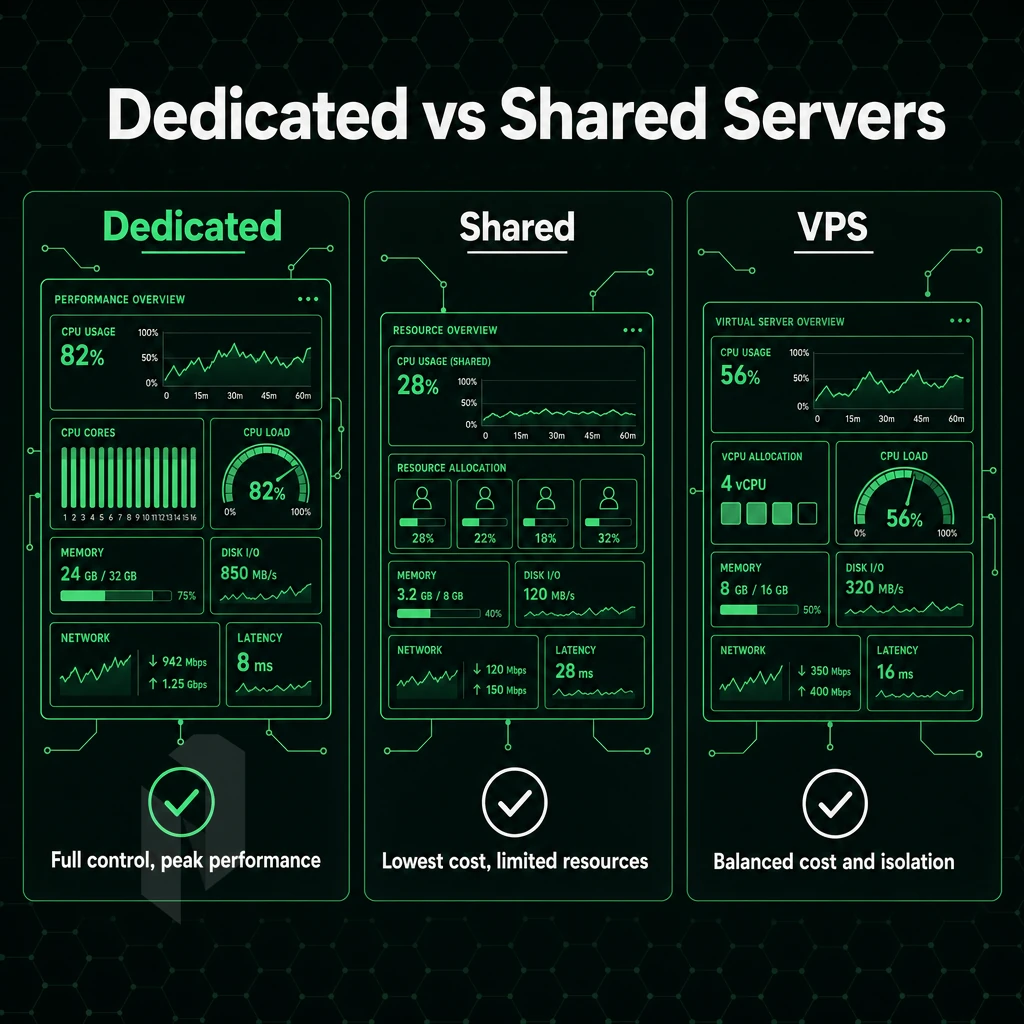
Not every web application needs the same server infrastructure. The performance and isolation levels of shared hosting, VPS hosting, and dedicated servers differ dramatically, and using the wrong type can cost you in reliability, security, or wasted resources.
Resource Model and Performance
Shared hosting typically packs dozens of websites onto one server and then splits the server’s CPU power, memory and I/O input/output interaction among them. Therefore, a neighbor’s surge in traffic instantly affects your site’s load time. Virtual Private Servers (VPS), on the other hand, divide a physical server into virtual private servers. While VPS hosting is better than shared hosting, resources are still contended at the hypervisor level.
In Dedicated Hosting plans you get 100% of the server’s resources, i.e. all of the server’s cores, all of the RAM and all of the server’s network ports. Under load a Dedicated Server remains rock solid with sub-5 ms intra-datacenter latency and constant throughput, in contrast to Shared or VPS hosting where under load things can deteriorate in an unpredictable manner.
| Dimension | Shared Hosting | VPS Hosting | Dedicated Server |
|---|---|---|---|
| Resource model | Fully shared pool | Virtualised slice | 100% isolated hardware |
| Root access | None | Yes (guest OS) | Full root / IPMI |
| Performance ceiling | Low, shared I/O | Medium, hypervisor overhead | High, bare metal, up to 40 Gbps |
| Security posture | Weak, shared kernel | Moderate, OS isolation | Strong, hardware-level isolation |
| Typical workloads | Brochure sites, low-traffic blogs | Dev environments, small apps | High-traffic apps, gaming, streaming, AI/ML |
| Cost tier | Lowest | Mid-range | Higher, reflects exclusive hardware |
Dedicated Server Web Hosting Services
This tier is physical and you interact directly with the hardware. You have full IPMI access, can set up custom RAID configurations and even have hardware level DDoS protection enabled. On top of that, the hosting company gives you a choice of control panels (DirectAdmin or cPanel), and how you use them to manage your server is limited by the restrictions of the shared environment only as far as software installs and kernel modules are concerned.
The control panel interface streamlines server administration tasks like domain management, email configuration, and SSL certificate installation without requiring command-line expertise. Modern bare metal providers layer additional security features such as network-level firewalls, intrusion detection systems, and encrypted storage options to protect sensitive workloads from external threats.
Our isolation model ensures that no other tenant can share your kernel, your memory or network stack. This makes our solution ideal for PCI-DSS, HIPAA-adjacent or even ISO 27001 compliant workloads. All our plans come with a 99.9% SLA.
Bare metal isolation also provides enhanced security by eliminating hypervisor vulnerabilities that could expose multiple tenants to shared attack surfaces. Modern bare metal providers implement multiple layers of security features including hardware firewalls, intrusion detection systems, and encrypted storage options to protect sensitive data at rest and in transit.
When to Upgrade, and What to Look For
For static sites, or early stage projects with low, predictable traffic, shared hosting is fine. For small to medium size apps where you need to control the OS but have relatively modest traffic, a VPS is the way to go. Bare metal is required for sub-10 ms response time, greater than 8 vCPUs, and/or compliance grade isolation.
When choosing a dedicated server for a specific load, one needs to pick CPU architecture that matches task at hand. Intel Xeon for latency critical databases, AMD EPYC for high core count workloads that run parallel. Good dedicated hosting also means same business day hardware replacement and 24/7/365 NOC, not just fast setup. Evaluating bare metal hosting providers also requires examining their network backbone capacity, as insufficient bandwidth can bottleneck even the most powerful hardware configurations during traffic spikes.
A reputable dedicated server provider will transparently publish their hardware specifications and network topology, allowing you to verify compatibility with your workload before deployment. Transparent server hardware specifications enable informed decisions about processor generations, memory types, and storage configurations that directly impact application performance.
Netrouting can provision bare metal within 60 minutes at 10 locations worldwide (Europe, North America and Asia). For those who have the best dedicated server hosting and want a VPS that approximates this for their growing team, the speed, global reach and hardware isolation of bare metal is the natural step up. Providers like InMotion Hosting also compete in this space, though Netrouting's global footprint and provisioning speed set a high bar for comparison.
What Dedicated Server Hosting Offers to Look for in a Provider
Evaluating a dedicated server hosting provider is one of the key decisions that an IT department has to make and can have severe consequences if they make the wrong choice. The wrong hardware, a suboptimal network and bad support can cause problems at the worst possible time. So use the following criteria to judge potential providers before you make a decision.
When comparing dedicated hosting providers, examine their hardware refresh cycles and whether they offer current-generation processors, as outdated equipment can limit scalability regardless of support quality. Businesses evaluating dedicated server hosting services should request detailed SLA documentation and verify the provider's track record with uptime guarantees before committing to long-term contracts.
Assess Hardware and Network Fundamentals
-
Audit the hardware generation.
Confirm the provider offers current-generation Intel Xeon or AMD EPYC processors, DDR4 or DDR5 RAM, and NVMe or SSD storage. Older hardware on the same server tier as newer configurations signals slow refresh cycles and future performance ceilings. Providers should transparently disclose server hardware specifications, chipset models, memory speeds, and storage controller types, to enable accurate performance forecasting.
Ask specifically whether RAID is hardware- or software-based. Hardware RAID protects the entire server's storage stack without taxing the CPU, and enterprise-grade controllers often include battery-backed cache and security features that safeguard data integrity during power events or disk failures.
-
Evaluate network quality end to end.
Look for unmetered bandwidth on 10 Gbps+ ports, a provider-owned backbone, and dense IX peering. Netrouting operates on AS6206 with a 2.4 Tbps+ network and peering at AMS-IX, DE-CIX, and FL-IX across ten locations.
-
Verify DDoS protection is always-on.
Baseline L3/L4 mitigation should be included at no extra cost. Confirm scrubbing capacity and whether advanced L7 protection is available for high-risk workloads.
Evaluate Compliance, SLAs, and Support
-
Check data center certifications.
ISO 27001 and SOC 2 are the minimum bar for enterprise and regulated workloads. Reading dedicated server reviews without checking the underlying certification status is a common shortcut that leads to compliance failures later.
-
Scrutinize the service level agreement.
A 99.9% uptime SLA with a defined hardware replacement window matters more than marketing copy. Confirm same-day hardware replacement is written into the contract, not just promised verbally.
- Test technical support before you buy. Submit a pre-sales ticket and measure the response time. A 24/7 NOC with a one-hour ticket guarantee and continuous server monitoring is the standard you should hold every provider to.
Confirm Operational Flexibility
-
Decide between managed and unmanaged.
An unmanaged dedicated server gives you full root access and maximum control, ideal for teams with in-house sysadmins. Managed support adds OS patching, security hardening, and proactive alerting for teams that prefer to focus on application work.
-
Check control panel options.
cPanel and DirectAdmin are the industry standards. Be cautious of providers pushing a custom control panel, lock-in risk is real.
-
Confirm BYOIP and BGP support.
Network-heavy workloads, VPN infrastructure, gaming backends, streaming platforms, require the ability to announce your own IP space. Verify full BGP support and IPv4/IPv6 dual-stack before signing.
Managed vs Unmanaged Dedicated Hosting: Which Is Right for You?
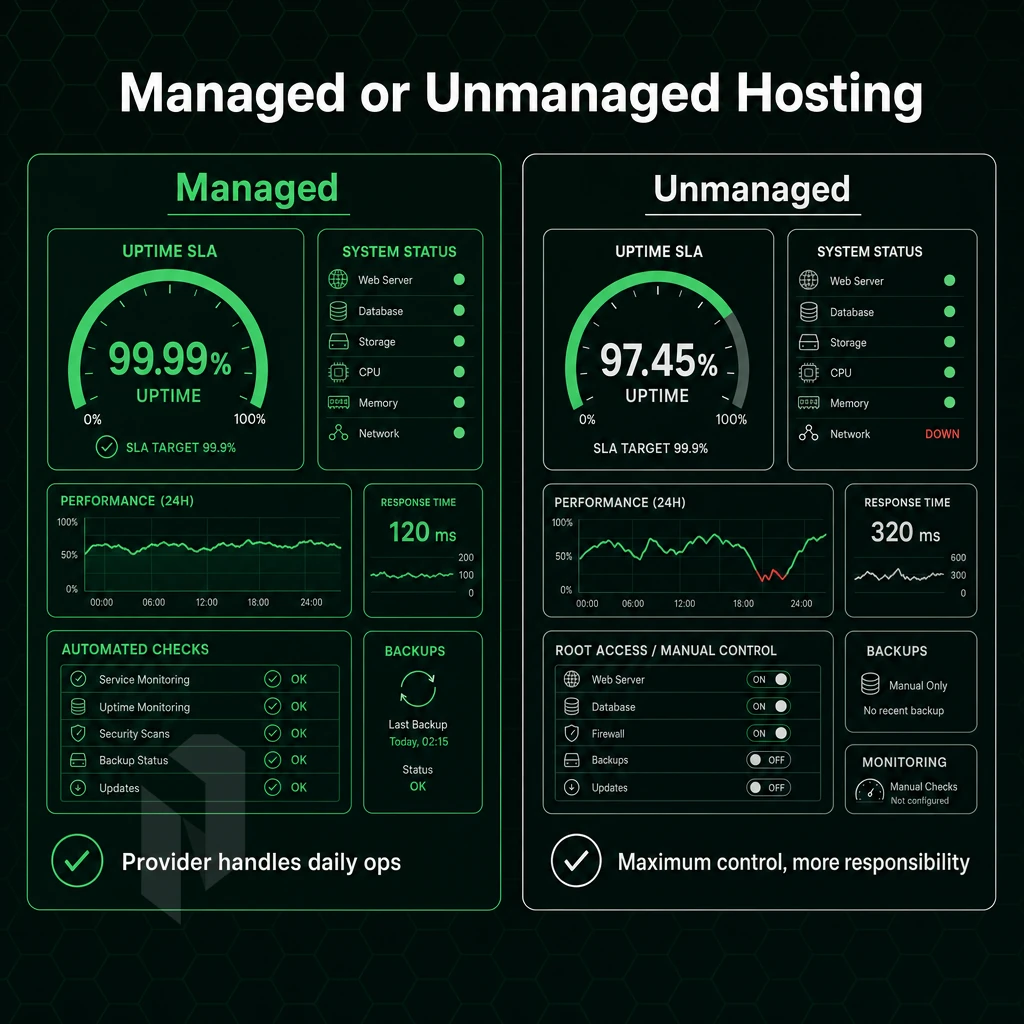
Dedicated hosting services span a broad operational spectrum. At one end, you can lease fully unmanaged dedicated servers with root access and no additional management or hosting services.
On the other end of the spectrum some dedicated hosting services are fully managed. Thus relieving customers from all server management and enabling them to focus on their work while the hosting provider takes care of the necessary tasks to keep the dedicated servers up and running.
The Unmanaged Dedicated Server: Full Control, Full Responsibility
Unmanaged dedicated servers are ideal for experienced system administrators that require complete control over their server. You choose the OS and can configure the network stack to your liking. You can also apply patches as and when they are released, harden the kernel and set up the firewall as required. The server will not be changed without your intervention.
For custom kernel builds, niche software distributions, or other environments where complete configuration audibility within your organization is required, dedicated bare metal servers offer dedicated resources and are the right fit. All the operational freedom you need comes with the need for corresponding operational capacity.
With unmanaged servers, you get the server, power and networking connectivity from your host provider. What happens above the Hypervisor or bare metal OS though is your responsibility. This includes the initial setup, through to securing out later changes.
Choosing the Right Provider for Dedicated Hosting Plans
Not every team has a dedicated ops engineer on call 24/7 to handle systems alerting. That gap is filled by managed hosting services. We take care of the mundane but critical OS patching, security hardening and proactive monitoring that consumes hours of your time as a developer or part-time admin.
Critically, managed does not mean surrendering control. Clients retain full root access throughout. The distinction is between who performs routine operations and who owns the workload, those are separate concerns.
Best Dedicated Hosting Services With Managed Services Tiers
Netrouting offers two structured managed tiers to manage your dedicated hosting servers on different levels of abstraction.
Managed Control-Panel Servers
For the web hosting operators & agencies with clients on their servers, we will handle the Operating System as well as the Control Panel (DirectAdmin or cPanel) including the corresponding licenses. With this hosting solution, updates and all security configurations for the server environment will be handled by us, while the client can manage his sites and accounts as usual, without having to worry about the underlying stack.
Managed Proxmox VE
Teams that currently run their own virtual machines and containers can have the hypervisor layer taken off their hands with Managed Proxmox VE. The cluster, updates, monitoring and also the configuration of backup solutions for all instances are taken care of by our team of experts.
Your dedicated server provider should offer both unmanaged and managed tiers to allow your team to grow to the appropriate level of service for their needs. Start unmanaged if you have the appropriate expertise, then add managed services as needed as your team grows or your priorities change, without having to move you to a different server.
Hardware, Network, and Performance: What the Specs Actually Mean

A list of raw specs on a dedicated server for sale can be very misleading. Understanding the architecture of a server’s CPU, the type of RAM it’s equipped with, the type of storage, and the network capacity. Additionally, How this will translate to your specific use case is key to making a smart purchase versus throwing your money away.
CPU, RAM, and Storage: Reading the Hardware Stack
For dedicated bare metal servers we offer Intel Xeon and AMD EPYC processors. Xeon is well suited for single-threaded applications and legacy software, while EPYC's high core counts and memory bandwidth make it ideal for databases, video encoding, and parallel computation.
Core count doesn’t matter that much without context. A 24-core EPYC at 2.8 GHz can outperform a 16-core Xeon for heavily parallelized workloads. For latency sensitive work, MHz matters more.
For physical servers, ECC RAM is a non-negotiable option as it silently fixes single-bit memory errors. Databases and other applications where memory corruption leads to data loss need ECC RAM. We support up to 2 TB of RAM on our dedicated servers, which are built on Dell and Supermicro hardware.
Storage configuration shapes I/O performance. Key options:
- NVMe SSD, lowest latency and highest throughput on the market, ideal for databases and caching layers.
- SATA SSD, solid performance, cost-effective for general workloads.
- HDD, High-capacity bulk storage for backups & archives.
Redundancy using RAID.
Full Control Over Network Performance
Network specifications determine real server power and use cases. We provide unmetered 10 Gbps channels on dedicated servers, with up to 40 Gbps available for maximum throughput.
Unmetered 10 Gbps, all server resources (compute + connectivity) are fully yours with no bandwidth meter, no burst charges, and no throttling at month's end.
You get a free private network interconnect up to 40 Gbps that connects your resources internally. All traffic between your servers is kept off the public network.
Enhanced Security Features and Protection Layers
All our services come with always-on L3/L4 DDoS protection, enabled by default. Volumetric attacks are automatically detected and blocked, giving you full control over your infrastructure and no need for manual intervention during a attack.
Advanced protection for mission-critical environments, often managed through a specialized hosting company offering dedicated server plans, includes L7 application-layer mitigation, customized filtering rules, and increased scrubbing capacity to counter sophisticated attacks targeting specific application stack layers.
We have a Service Level Agreement in place for all of our deployments. The standard terms are 99.9% uptime with same business day hardware replacement. You also have access to control panel to manage your servers from the word go.
Choose the right kind of server.
Not every workload needs the same machine. Pick the starting point that fits yours.
Compare configurations, not just rack space.
Start with a dedicated server when provider-owned hardware is the better fit. Compare CPU, memory, storage and network needs.
Start the conversation with
- Compute
- CPU and memory
- Storage
- Capacity and workload
- Network
- Port and traffic needs
Start with a VM. Scale it when needed.
Use cloud compute for workloads that do not need a full machine. Compare vCPU, memory and storage per plan.
Start the conversation with
- Compute
- vCPU and memory
- Storage
- Disk size
- Location
- Preferred region
Bring the servers. Choose the location.
Compare colocation for the equipment you already own. Start with footprint, power and the markets you need to reach.
Start the conversation with
- Equipment
- Rack footprint
- Power
- Expected draw
- Network
- Port and traffic needs
Common Use Cases for Choosing a Dedicated Server Hosting Provider
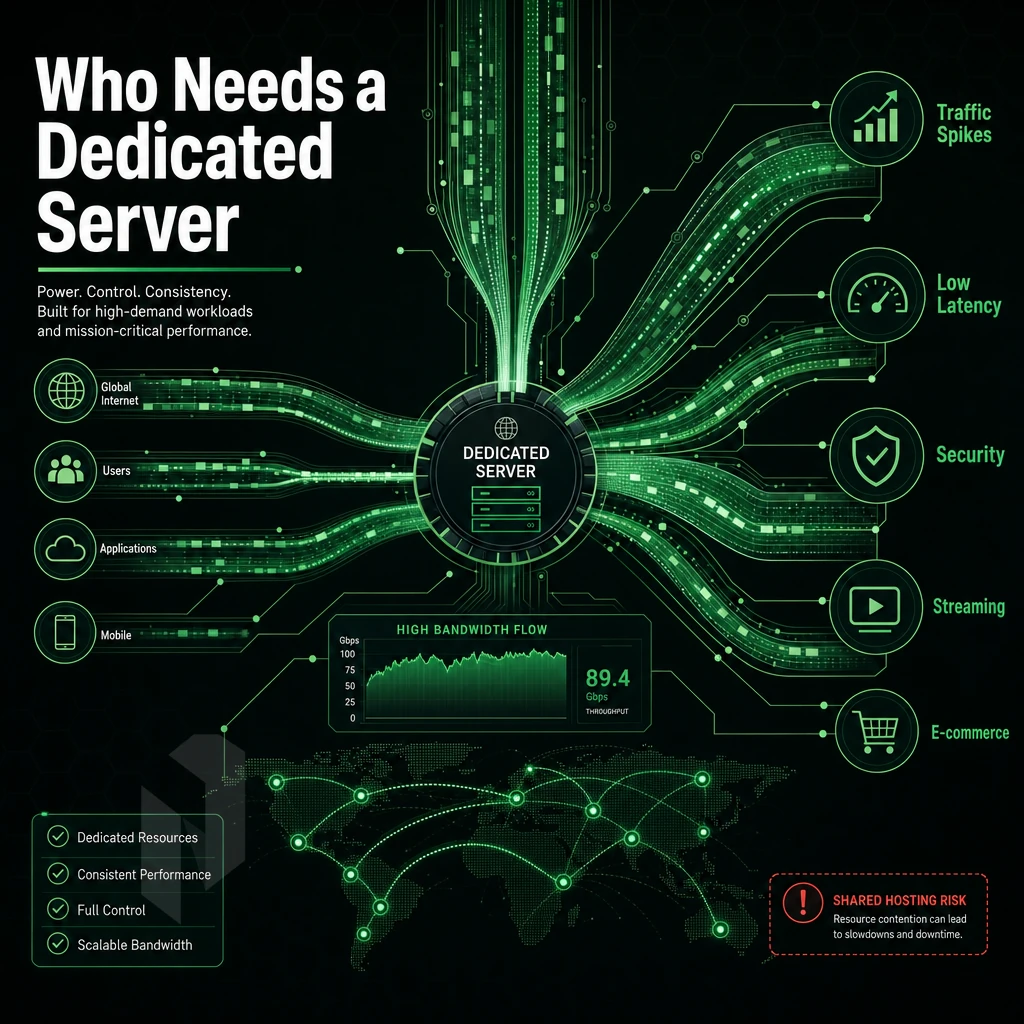
Not every workload should run on shared infrastructure. With large traffic spikes, latency issues, and serious security concerns, dedicated server hosting is the only way to guarantee consistent, isolated high performance. Below we explore scenarios where shared hosting and VPS fall short and dedicated hosting is the best choice.
Dedicated Web Hosting Services for High-Traffic Websites
Shared web hosting services allow hundreds of other web site “tenants” to use the same server resources. As traffic on a neighboring web site increases dramatically, your web site will decrease in performance. Unlike shared web hosting services, dedicated web site resources are not affected by other web site activity. A single dedicated server can support millions of monthly page views and never throttle or slow down other web site traffic. This is not possible with shared web site hosting.
Even though a VPS adds a layer of isolation to shared hosting, it’s still running on the same physical host. High loads can cause CPU steal and I/O contention. With dedicated hardware you don’t have to worry about these issues and your response time will stay below 50 ms even under peak loads.
Video Streaming, Gaming, and High-Bandwidth Workloads
High-definition video streaming is a matter of sustained bandwidth, not brief bursts. With unmetered 10 Gbps ports on your server, scalable to 40 Gbps, you have the bandwidth to serve all your viewers simultaneously without any buffering. This is beyond the capacity of shared and VPS servers.
Online gaming servers have different needs, like raw CPU clock speed and less than 20ms latency. For Palworld dedicated server deployments and Minecraft server hosting, high single-thread performance and low I/O latency are key. A VPS with shared CPU cores introduces jitter, whereas dedicated hardware does not.
Note that the IPv4 address space density and BGP routing complexity of a VPN provider is such that even running a handful of servers across multiple geographically distributed nodes (providing exclusive access to a server near you) as BYOIP announcement with full BGP support is best done on dedicated hosting.
AI/ML, GPU Compute, and Managed Hosting Provider
NVIDIA A10, A40, A100 cards on GPU dedicated servers require bare metal access. Hypervisor overhead impacts the inference throughput. Dedicated GPU servers provide direct hardware access to AI/ML teams without noisy neighbor impact.
For the IT manager who wants concierge-style management of his/her servers, evaluate dedicated hosting providers that offer managed tiers of service. For example, Netrouting’s managed hosting offers OS patching, security hardening and monitoring. The user has full root access to his/her servers, but someone else handles the operational overhead of keeping them running.
| Workload | Why Shared/VPS Falls Short | Dedicated Server Advantage | Key Spec |
|---|---|---|---|
| High-traffic websites | Resource contention, CPU steal | Isolated CPU, RAM, and I/O | Up to 2 TB RAM, 99.9% uptime SLA |
| Video streaming | Burst limits, shared bandwidth | Unmetered 10-40 Gbps throughput | 40 Gbps port, 2.4 Tbps+ backbone |
| Online gaming (Palworld, Minecraft) | Shared CPU jitter, high latency | Dedicated cores, sub-20 ms latency | Latest Intel Xeon / AMD EPYC |
| VPN providers | No BGP control, limited IPv4 | BYOIP, full BGP, IPv4/IPv6 | AS6206, 10 global locations |
| AI/ML inference | Hypervisor overhead, no GPU passthrough | Bare-metal GPU access | NVIDIA A10, A40, A100 |
| Managed hosting | No concierge support on shared tiers | OS, security, monitoring handled | Root access retained, 1-hr ticket SLA |
When choosing a dedicated server hosting service, match the required constraints of your workload with the corresponding hosting service. A latency sensitive application would benefit from a hosting service that prioritizes location and CPU. A high bandwidth application would benefit from a hosting service that prioritizes port speed.
A compliant oriented company would benefit from a hosting service that prioritizes their ISO 27001 and SOC 2 certification. Netrouting offers all three types of hosting services at ten locations in Europe, North America and Asia.
Data Center Locations and Network Quality: Why It Matters
Server specs are only half the story. Where your server will be and how it will be connected to the Internet to service your site can have huge implications for issues such as latency. Additionally, Indeed ensuring that your hosting is in compliance with any laws and regulations relevant to your use of the server. Look for these points in every dedicated server hosting review.
Assess Location Against Your Audience and Compliance Needs
-
Map your users to a region.
A European user base needs servers in Europe. A hosting provider with nodes in Amsterdam, Frankfurt, The Hague, and Stockholm covers Western, Central, and Nordic audiences from a single provider relationship.
-
Check data-residency requirements.
GDPR and sector-specific rules often mandate EU-based processing. Bucharest extends that coverage into Southeast Europe. Miami and New York serve North American compliance frameworks. Hong Kong and Singapore anchor APAC deployments.
Note: A web host promises "EU hosting" but runs a single facility, no regional failover and potential single-jurisdiction risk.
-
Dedicated Server Hosting Services vs Shared Hosting
Shared hosting services and reseller hosting pack many tenants onto one machine. Dedicated server hosting gives you isolated resources, critical when latency consistency and compliance isolation matter.
Evaluate Network Quality and Peering
-
Look for carrier-neutral facilities.
Carrier-neutral colocation lets a provider connect to multiple upstreams without lock-in. This is the foundation of resilient web hosting infrastructure.
-
Verify IX peering.
Internet exchange peering at AMS-IX in Amsterdam, DE-CIX in Frankfurt, FL-IX in Miami, and NetNod in Stockholm shortens the path to major networks, reducing hops for lower latency and better throughput.
-
Confirm Tier 1 backbone access.
A provider running its own autonomous system with Tier 1 upstreams avoids the transit bottlenecks that cloud hosting and software as a service platforms often abstract away, at the cost of control.
Note: WordPress hosting and consumer-grade hosting environment plans rarely disclose peering or backbone details. For dedicated workloads, demand specifics.
Plan for Redundancy Across Regions
-
Use multi-region presence for DR.
Netrouting's 10 locations, spanning Europe, North America, and Asia-Pacific, let you architect active-passive or active-active failover across continents without switching providers.
-
Pair primary and DR sites strategically.
Rotterdam serves as a DR complement to The Hague. Stockholm backs up Nordic and Northern European deployments. New York and Miami provide East Coast redundancy for North American workloads.
Dedicated Server Hosting Pricing: What Drives the Cost?
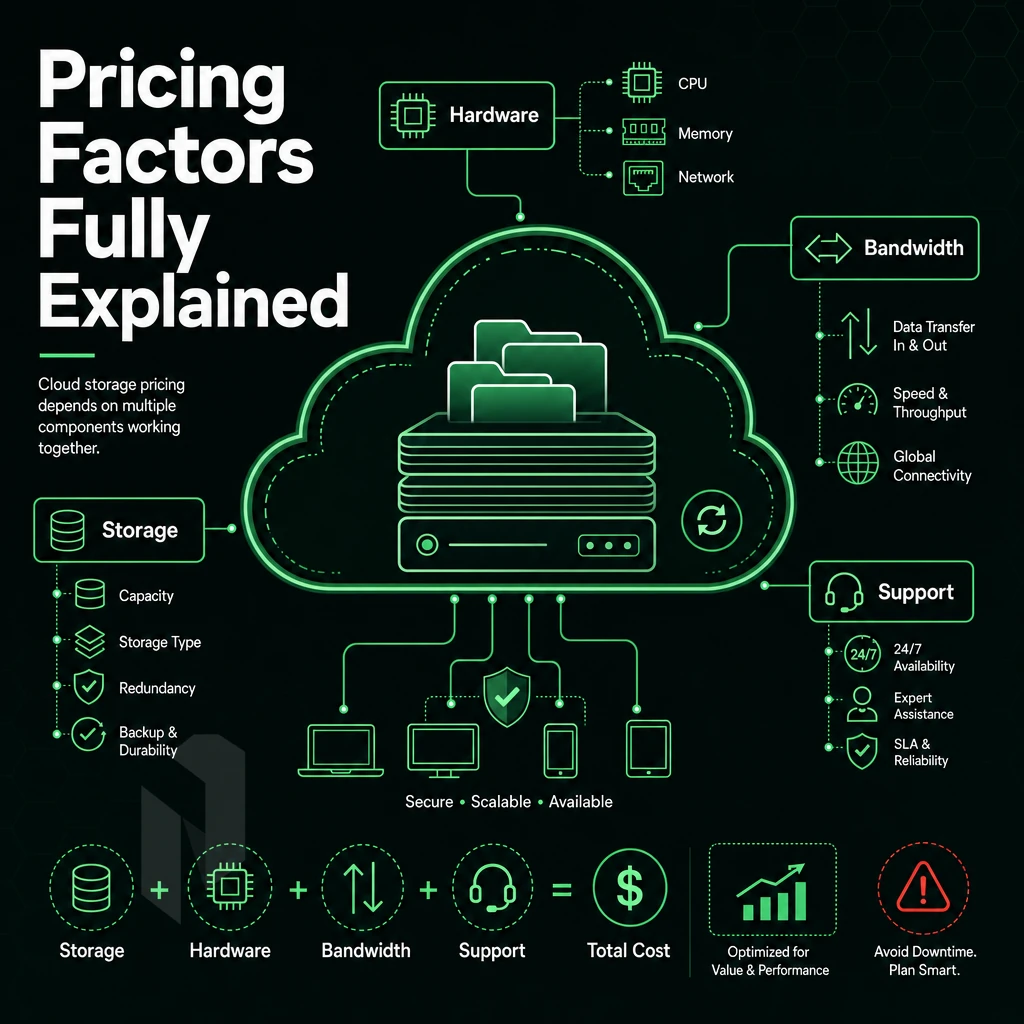
Dedicated server hosting costs are not random numbers. They are based on a variety of factors, including the type of hardware to use, the bandwidth model, the level of management, and the contract length. By understanding each of these factors, you can better evaluate dedicated server hosting plans and develop a realistic total-cost-of-ownership (TCO) to help you make a more informed purchasing decision.
Hardware Tier and Configuration Depth
Entry-level servers are typically configured with a single mid-generation processor and a moderate amount of memory, accompanied by two SATA drives. They are suitable for low traffic sites and for development environments.
Mid-range builds are often built with dual-socket systems based on Intel Xeon processors or AMD EPYC processors. These systems are equipped with NVMe storage and ECC enabled DDR4 or DDR5 memory. They are used for production databases, game servers, and highly visited websites.
Dedicated servers in high-density configurations are composed of dual high-core-count CPUs, up to 2TB of RAM, 24 drive bays and hardware RAID. The price for these servers consists of the cost for the individual components plus the cost for the engineering to integrate them in a custom rack.
GPU Dedicated Servers for High-Performance Hosting
Beyond the hardware cost of NVIDIA A10, A40, and A100 GPUs, there is the ongoing cost of GPU compute, licensing CUDA code and managing GPU drivers.
InMotion Hosting vs. Bare-Metal TCO: Bandwidth, Management, and Contract Length
The bandwidth model is a major cost driver. If you’re on a metered bandwidth model then typically you’re charged per gigabyte over and above an initial committed allowance. We charge nothing for the first 10Gbps of bandwidth on our bare-metal hosting services, it’s completely unmetered. So the only variable is the cost of the servers themselves and you can forecast your monthly spend with complete accuracy.
Unmanaged hosting plan: you get root access, full stop. Managed hosting services add OS patching, security hardening, and monitoring, but the service fees typically exceed what you'd save in headcount.
Contract length impacts unit costs. Month-to-month arrangements command a premium over annual or multi-year fixed-term contracts, which typically earn lower rates from serious hosting companies.
For stable and resource intensive workloads bare metal delivers lower and more predictable TCO than equivalent amounts of capacity run in the major hyperscalers. While the space of cloud hosting trades off flexibility for cost efficiency, with dedicated hardware you flip that equation when utilization is persistently high.
For additional services, such as advanced DDoS protection, hardware RAID, and remote-hands SLAs, add them on top. Prices start from the listed configurations, contact sales for prices of Enterprise configurations and for multiple servers.
Why Choose Netrouting for Dedicated Server Hosting
Choosing the right dedicated server hosting provider shapes every downstream decision, hardware headroom, network quality, support response, and long-term cost. Here's why Netrouting stands out as a best dedicated server hosting option for teams that need reliable dedicated hosting without compromise.
- Bare metal provisioned in under 60 minutes. Our dedicated bare metal servers run on latest-gen Dell and Supermicro hardware, Intel Xeon and AMD EPYC platforms, up to 2 TB RAM, up to 24 drives. You get exclusive access to all the server's resources from the moment it's live.
- Unmetered 10 Gbps included, up to 40 Gbps available. Every dedicated server ships with unmetered 10 Gbps on our own AS6206 Tier 1 backbone. Our 2.4 Tbps+ network spans 10 locations across Stockholm, Amsterdam, Frankfurt, Miami, New York, Hong Kong, Singapore, and more.
- Always-on DDoS protection at no extra cost. L3/L4 mitigation is included on every service. Resource-intensive applications stay online without additional configuration or hidden fees.
- Full managed hosting solutions when you need them. From Managed Proxmox VE to Managed Control-Panel Servers, our managed support covers OS patching, security hardening, and server monitoring, while you retain full root access and complete control.
- Enterprise-grade compliance and 24/7 NOC. ISO 9001, ISO 27001, and SOC 2 certified. Our 24/7 Network Operations Center backs every hosting plan with a 1-hour ticket guarantee.
BYOIP and BGP support, a free private network between your resources, and GPU dedicated servers for AI/ML workloads round out the offering. If you're evaluating dedicated server hosting options, explore our dedicated servers page or contact our sales team to discuss a configuration matched to your workload.
Dedicated Server Hosting FAQ
Here are the most common questions buyers have before signing up for a dedicated server. Each is answered directly with all relevant specs to help pick the best server for your needs.
What is dedicated server hosting and how does it differ from shared options?
Dedicated servers offer you a single physical server where you have the complete usage of CPU, RAM and storage without sharing with others. Shared hosting servers have hundreds of websites hosted on them and VPS hosting splits the physical server into virtual servers. With a dedicated server you get complete isolation from other users, top performance and no chance of other users on the same server causing any problems (noises).
A dedicated hosting service typically hosts one tenant on a single server. It enables predictable latency, full control of the server’s hardware and can power very high-demand applications that wouldn’t be able to run effectively on a shared environment.
Who should choose dedicated hosting over cloud or VPS?
Dedicated hosting gives businesses their own dedicated server designed for high performance workloads like high-traffic databases, game servers, video streaming, and other latency-sensitive applications and services such as financial applications. If your application is maxing out a virtual instance or requires a particular OS install, dedicated (a.k.a. bare metal) hosting is the better option.
Dedicated server hosting provides the ultimate in hardware control. Choose your CPU, your RAM, your storage and your Operating System. With dedicated server hosting you have Root access, unrestricted. No Hypervisor overhead. No shared kernel.
What specs should I look for in a dedicated server?
When selecting specs, consider CPU cores for parallel processing and RAM for in-memory databases. Our dedicated servers run Intel Xeon and AMD EPYC processors, with up to 2 TB RAM, up to 24 drives, and unmetered 10 Gbps uplink.
We also monitor uptime for you and guarantee 99.9% availability. We guarantee same business day replacement of hardware components. We perform physical swap of parts within 4 hours if they are available on site. Provisioning of servers happens within 60 minutes.
How does server management work on a dedicated server?
Our Open VPS servers are provided with full superuser access by default.
The Core Differences: Dedicated Hosting vs Other Hosting Solutions
Dedicated hosting offers a bare-metal server with complete control over computing resources, no sharing with other users. Unlike shared hosting or VPS hosting where server resources are split between multiple users, a dedicated server gives you the entire server. Enjoy full administrator access, manage the operating system as you see fit, and get the performance demanding applications require.
Finally, consider management depth. Unmanaged dedicated server hosting suits experienced system administrators who want to configure software and manage every stack layer, while managed hosting shifts that burden to your hosting provider.
However, the actual dedicated hosting service remains the same: high quality isolated hardware, guaranteed server resources, and a hosting solution that handles workloads shared hosting or VPS hosting cannot reliably manage.
Key Advantages of Dedicated Server Hosting for Serious Workloads
Dedicated server hosting is another category of hosting. Unlike shared hosting or VPS hosting, dedicated hosting gives a dedicated machine’s full complement of resources to your programs. It’s ideal for very demanding programs, large sites that get lots of traffic, and security-critical hosts.
When you have a dedicated hosting service, you have full control of the server’s operating system, the server’s hardware, and all of the server’s network configurations.
The best dedicated server deployments scale beyond single-node configurations into GPU dedicated servers and high-density bare metal hosting without changing providers. Netrouting's dedicated bare metal servers combine optimal performance with a 2.4 Tbps+ backbone, unmetered 10 Gbps ports, and 24/7 support backed by a one-hour ticket guarantee. Ready to move beyond shared infrastructure? Explore dedicated server hosting options at netrouting.com/dedicated-servers.
Frequently Asked Questions
What services and technical support are included in a dedicated server hosting plan?
Dedicated server hosting gives you an entire physical machine, no shared CPU, RAM, or storage with other tenants.
How does technical support differ between a dedicated server and VPS hosting?
A VPS carves a physical host into multiple virtual machines, sharing CPU, RAM, and disk with other customers. A dedicated server is yours alone: no hypervisor overhead, no noisy neighbours, no shared resource pools. Dedicated hardware delivers higher, more consistent performance under sustained CPU or disk load.
Is dedicated server hosting worth it compared to cloud hosting?
For steady, predictable workloads, dedicated servers consistently deliver lower total cost of ownership than equivalent cloud compute. Major cloud hosting space platforms charge per-resource with variable egress fees that compound quickly at scale, while dedicated hosting offers a flat, predictable monthly cost with no egress surprises. You also get bare-metal performance without virtualisation overhead, which matters for CPU-intensive or latency-sensitive applications. If your utilisation is consistent rather than spiky, dedicated hosting is almost always the more cost-effective and higher-performance option.
What does managed dedicated hosting include?
Managed dedicated hosting transfers day-to-day server administration to the provider while you retain full root access and control over your applications. Core inclusions typically cover OS patching, security hardening, proactive monitoring, and hardware fault response.
As a managed hosting company, Netrouting covers bare metal, cloud, and colocation across every managed hosting plan, extending to fully managed control-panel servers running cPanel/WHM or DirectAdmin, and managed Proxmox VE for teams running their own virtualisation layer. It is the right model when your team has strong application expertise but limited infrastructure operations capacity.
How do I choose the best dedicated server hosting provider?
Evaluate five factors: network quality, hardware generation, support responsiveness, data centre location, and pricing transparency. Network quality means owned backbone capacity, Tier 1 upstreams, and dense IX peering, not just resold bandwidth. Hardware should be current-generation Intel Xeon or AMD EPYC from enterprise vendors.
Support must include a guaranteed response time and 24/7 coverage, not just business-hours tickets. Netrouting combines a 2.4 Tbps+ network on AS6206, latest-gen Dell and Supermicro hardware, a 1-hour ticket guarantee, and ten locations across Europe, North America, and Asia into every hosting plan, making it a strong fit for teams that need global reach without hyperscaler complexity.
What hardware specs should I look for in a dedicated server?
Start with the CPU: AMD EPYC and Intel Xeon Scalable processors offer the core counts and memory bandwidth that demanding workloads require.
Storage choices matter: NVMe SSDs for latency-critical databases, SATA SSDs for general workloads, and large spinning drives for bulk storage or backup targets. Finally, confirm the network port speed and whether bandwidth is metered or unmetered, as dedicated server plans from Netrouting include unmetered 10 Gbps, with up to 40 Gbps available for high-throughput deployments.
How quickly can a dedicated server be provisioned?
Provisioning time varies widely across providers, some require 24 to 72 hours for hardware configuration and OS deployment.
Dedicated hosting provides the guaranteed resources, complete hardware control and predictable performance that shared and virtualized hosting cannot deliver. While price is a consideration when selecting between managed and unmanaged dedicated hosting, the key factor is the operational capacity of your staff, not your budget. Meanwhile, the specs of the hardware are irrelevant unless accompanied by a capable network.
Rate your potential hosts’ networks as high as you rate their servers. Look for carrier-neutral space, a Tier 1 backbone, and DDoS protection that is always on, not an afterthought. The difference between reliable and surprise is usually these details.
Netrouting runs dedicated bare metal across ten locations in Europe, North America, and Asia, with a dedicated server cost structure backed by a 2.4 Tbps+ network on AS6206, unmetered 10 Gbps ports, and a 24/7 NOC with a one-hour ticket guarantee. Explore Netrouting's dedicated server configurations and find the right fit for your workload.
Find the right dedicated server.
Share the workload, the location and the network needs. We help you match a configuration.