Selecting the best bare metal backup software includes a number of competing factors, including backup/restore speed, storage utilization, server/hardware types, and administrative burden to name four. Mis Choose and your worst infrastructure weakness will be revealed in your inability to restore servers in critical situations. Choose correctly and you can recover physical servers in minutes.
Netrouting has been managing bare metal servers and virtual machines, compatible with tools like EaseUS Todo Backup Free, in 10 locations around the globe (Amsterdam, Frankfurt, Dallas, Miami, New York, Hong Kong, Singapore, etc.) since 2007. Our in-depth knowledge of bare metal hosting has been used to select the best backup tools, and to test them in real recovery scenarios.
We know which tools will work and which will fail due to unusual disk geometry, RAID setup or even a different firmware version. Our testing protocols extend beyond traditional server configurations to include virtual machine environments, ensuring compatibility across diverse infrastructure deployments.
Blog contents
In evaluating the leading bare metal backup solutions, this guide considers several key criteria relevant to infrastructure teams: reliability of bare metal restore. Portability of backup images; ability to restore virtual machines to dissimilar hardware; efficiency of incremental backups; flexibility in scheduling backups; and quality of enterprise-level support. This framework will guide you to choose the right solution to protect your single dedicated server or physical fleet across multiple sites.
What Is Bare Metal Backup Software and Why It Matters
Bare metal backup includes the operating system, drivers, applications, and even the partitioning of the data on a server. Unlike file-level backups which only back up the files of interest to you, a bare metal backup of a server creates a complete disk image of the server. This complete disk image can then be restored to ANY hardware and the server will boot up to an exact duplicate of the original server. This approach gives administrators complete control over every aspect of system recovery, from partition layouts to firmware configurations.
Modern image based backups capture not only the file system structure but also boot sectors and system reserved partitions essential for recovery. Disk imaging technology captures every byte of storage, including hidden system areas that traditional backup methods often overlook. While file history captures changes to individual documents over time, bare metal imaging preserves the entire system state at a specific point, enabling complete infrastructure recovery rather than selective file restoration.
What Bare Metal Backup Solutions Actually Recover
A full disk image backup contains information that is not contained in a file-level backup. Organizations rely on disk imaging to capture the complete state of storage devices, including partition tables, boot sectors, and system files that enable full system recovery.
- OS installation and kernel configuration.
- Device drivers and firmware settings.
- Installed applications and their registry or config entries.
- Partition table and volume layout.
- All user and system data.
Note that restoring from an image of a previously healthy server will result in a fully functional server being rebuilt from the image. As opposed to simply recovering files from a corrupted server that has been rendered unbootable by OS corruption or ransomware attack.
Why Hardware Failure Makes Operating System and Data Backup Non-Negotiable
The cause of the server crash (hardware failure, ransomware, OS corruption) doesn’t matter. File-level data recovery will get your documents back, but it won’t get your production environment up and running in an hour.
Yes. A bare metal restore can be performed using tools like EaseUS Todo Backup Free to restore a Windows workstation from an image, to like new hardware, without having to manually reinstall the system.
For production servers, the margin for error is zero. At this point, bare metal backup software and a good disaster recovery plan are essentially one and the same.
How Do You Back Up a Bare Metal Server for Disaster Recovery?
This can be a 3-step process. First, make a full disk image using bare metal backup software that supports your Operating System and file system. Next, send the image off-server, preferably off-site or even to another geographical location. Finally, test the restoration of the image to real hardware on a regular basis.
Organizations should establish automated schedules to perform backups during off-peak hours, minimizing impact on production workloads while ensuring consistent protection of critical systems. Many organizations now leverage cloud storage as their off-site destination, providing geographic redundancy without the overhead of maintaining secondary physical infrastructure.
We host dedicated bare metal servers on private inter-site networks within several datacenters across Europe, North America and Asia. This dedicated infrastructure is used to host geographically distributed image storage and we will go into more detail on how the backup program and recovery actually work for you behind the scenes. Backup images can be stored locally on dedicated infrastructure or replicated to cloud storage for geographic redundancy and off-site protection.
How Bare Metal Backup and Recovery Works With EaseUS Todo Backup Free
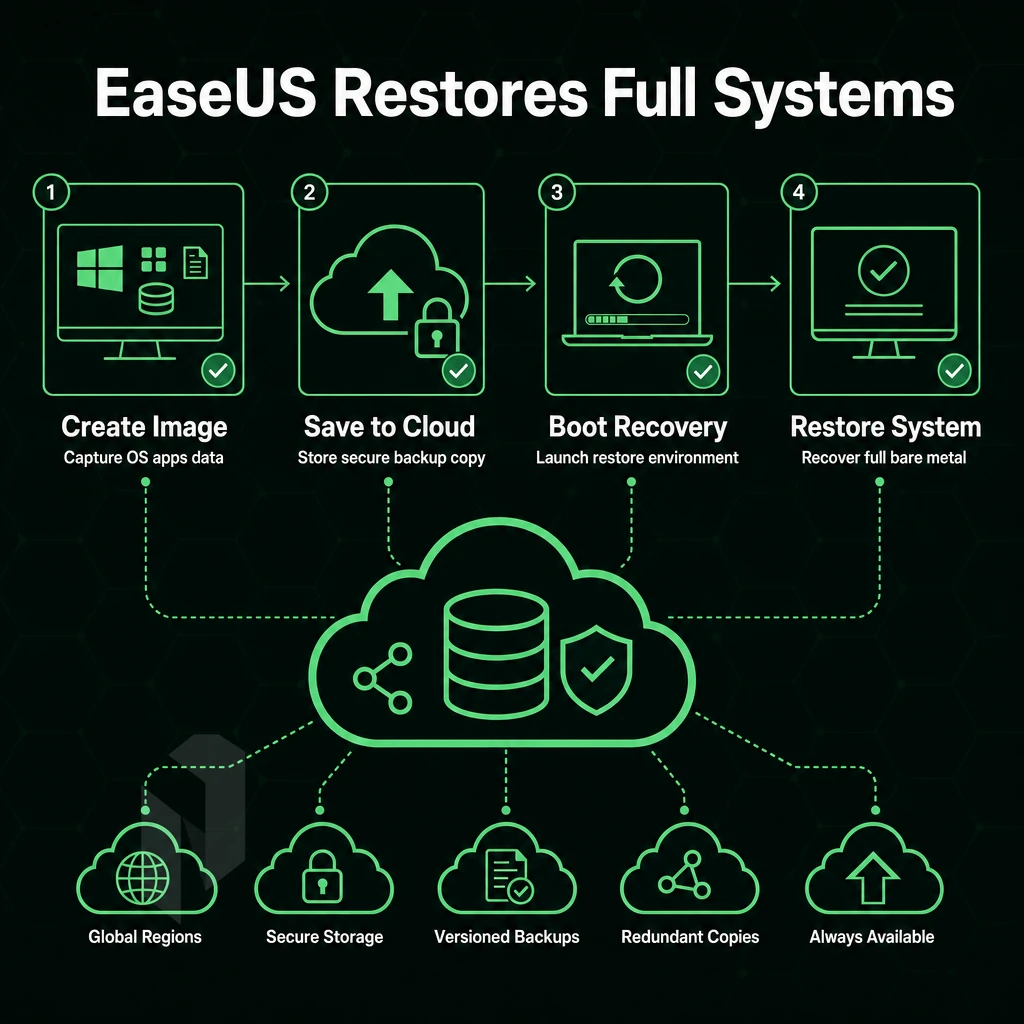
Bare metal backup refers to a complete backup of a system, including the Operating System, applications, configuration and data. Knowing the different phases of a backup can help you choose the correct software as well as the right recovery method before a hardware failure occurs.
Phase 1: The Initial Full Backup Process
The Bare Metal Recovery Strategy begins with a full Disk Image Backup of the Server. All recovery software reads the server’s disks at the sector level and writes this information to a file on the chosen backup destination. The initial full backup is used as the recovery point for all subsequent backups. Choosing reliable recovery software at this stage is critical, as it determines both the speed and success rate of your entire restoration workflow.
Incremental vs. Differential Backups
After a full backup only changed data is backed up on a daily basis by the daily jobs. A table below summarizes the main differences between incremental and differential backups for recovery planning purposes.
| Dimension | Incremental Backups | Differential Backups |
|---|---|---|
| What it captures | Changes since the last job (full or incremental) | Changes since the last full backup |
| Backup window | Shortest, smallest daily delta | Grows each day until next full |
| Restore complexity | Full + every incremental in chain | Full + latest differential only |
| Storage use | Lowest | Moderate |
What Is the 3-2-1 Rule for Backing Up Data?
Store 3 copies of critical data, with 2 on different media types. Have 1 copy stored offsite. In this scenario, storing 1 copy on your local disks, 1 on your NAS and 1 at a remote location meets this rule. This way a single failure (e.g. disk failure, site failure, ransomware) will never wipe all your possible recovery points.
Implementing this redundancy strategy ensures robust data security by protecting against multiple failure scenarios simultaneously. Organizations can leverage cloud storage as the offsite component, providing geographic redundancy without maintaining physical infrastructure at secondary locations.
Acronis Cyber Protect and the Bare Metal Restore Workflow
The process of Recovery begins with bootable media (e.g. USB, ISO) created by your backup software. Boot the system to be recovered from the media created, connect to the backup repository and select the backup image to be restored. In addition to Recovery, Acronis Cyber Protect automates the process of driver injection into the restored system, enabling Recovery to dissimilar hardware. The restored system boots directly into the recovered OS, no manual configuration of drivers required. Organizations leveraging acronis cloud can benefit from centralized management of recovery operations across distributed infrastructure environments.
For smaller deployments or home-based infrastructure, solutions like Acronis cyber protect home office deliver enterprise-grade recovery capabilities with simplified management interfaces designed for individual users. The recovery media ensures that even systems with corrupted boot loaders can be restored by providing a clean, independent boot environment separate from the compromised installation. Centralized orchestration of recovery operations becomes particularly valuable when managing multiple server instances across geographically distributed sites, where consistent procedures reduce mean time to recovery.
Production workloads should be hosted on dedicated infrastructure to ensure that the backup repository is available 24/7. Our bare metal servers can be provisioned with your chosen operating system in less than 60 minutes at 10 data centers worldwide and offer the necessary low latency and 99.9% uptime guarantee for backup and recovery workflows.
Knowing how to do backups is one thing, choosing the right software to actually do the work is a different story. These infrastructure capabilities directly support time-sensitive recovery operations that demand immediate access to backup repositories without network bottlenecks or availability gaps.
Key Criteria for Choosing the Best Bare Metal Backup Software
| Option | Performance | Support | Reliability | Network | Best For |
|---|---|---|---|---|---|
| Veeam Backup & Replication | Fast incremental file backups; image-level and agent-based | Enterprise support tiers; large partner ecosystem | Reliable backup software with proven restore SLAs | Cloud backups to S3-compatible targets; WAN-optimized transfer | Enterprise Windows backup software and VMware environments |
| Acronis Cyber Protect | Disk-image and file backups; integrated anti-malware scanning | 24/7 support; MSP-focused portal | Reliable backup software with ransomware protection built in | Cloud backups to Acronis-hosted or custom storage | SMBs needing all-in-one backup solutions with security |
| Bacula Enterprise | High-throughput file backups; parallel streams; tape and disk | Subscription support; community edition available as free backup software | Open architecture; no vendor lock-in | LAN and cloud backups; pluggable storage backends | Linux-heavy shops and large heterogeneous environments |
| Restic + rclone | Deduplicated file backups; fast incremental snapshots | Community-only; free backup software with no paid tier | Cryptographically verified restores; open source | Cloud backups to any S3, SFTP, or object store | DevOps teams comfortable with CLI tooling |
| Netrouting Bare Metal + Managed Hosting | Dell/Supermicro hardware; daily incremental file backups; full image restore in 15-45 min | 24/7 NOC; 1-hour ticket guarantee | 99.9% uptime SLA; daily + weekly full images retained 30 days | 2.4 Tbps+ backbone; free private network up to 40 Gbps; 10 global locations | Teams needing reliable backup software managed at the infrastructure layer, no DIY |
For teams requiring robust backup solutions but do not wish to manage software stacks, our managed bare metal at Netrouting is the most suitable option. Daily incremental file backups, weekly full backups as images, and a 15-45 minutes restore target are all handled for you at the infrastructure level. This managed service provides flexible backup options that can be customized to match your recovery time objectives and retention requirements.
Establishing frequent backups ensures minimal data loss windows while maintaining system availability during the backup window itself. The managed service architecture supports multiple devices across your infrastructure, enabling centralized backup orchestration without requiring dedicated administrative resources for each endpoint. The service also maintains comprehensive file history tracking, allowing administrators to recover specific versions of files from any point within the retention window.
If you already have tools in place for backups such as Veeam or Restic.
The Best Bare Metal Backup Software: Top Picks Compared
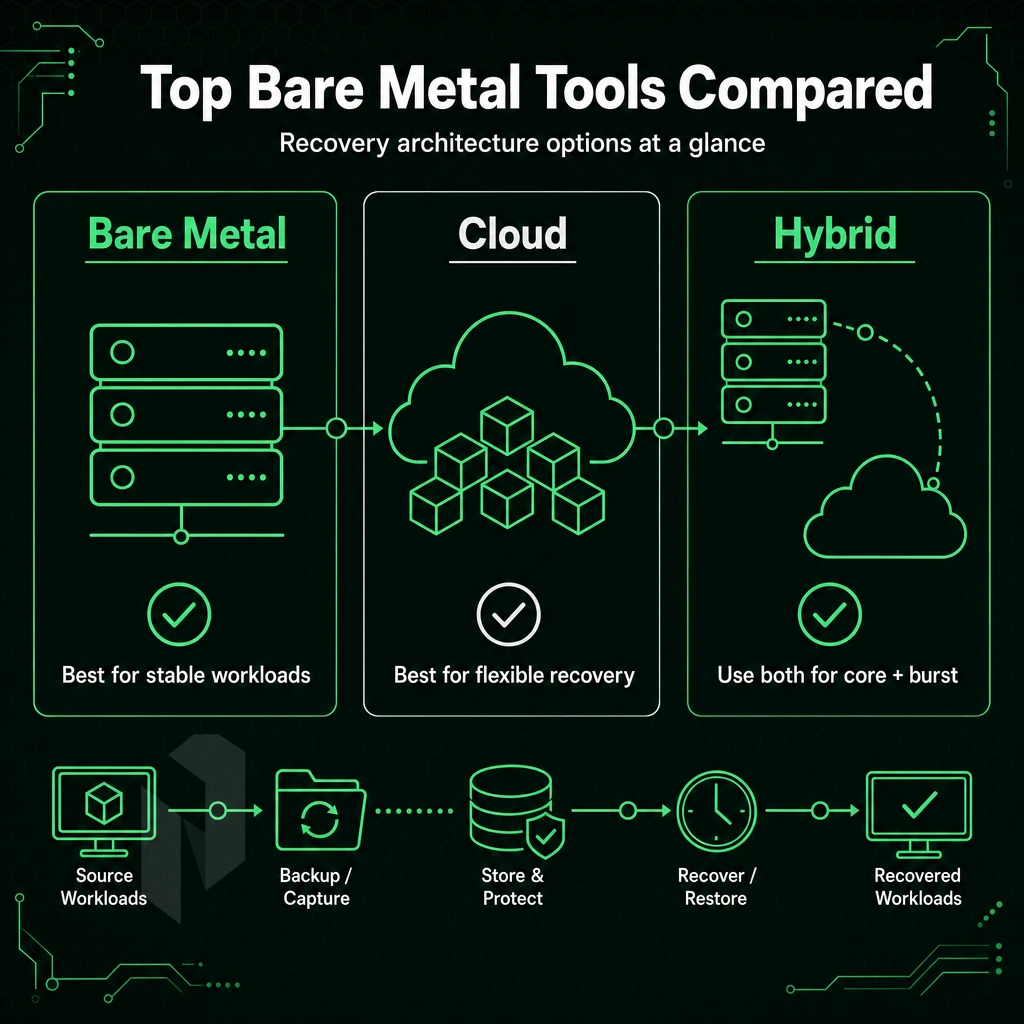
Selecting the top physical server backup software requires choosing the right recovery architecture for your specific environment. The majority of popular tools fall into several primary categories, each suited for different types of server backup, disk imaging, and full bare metal restore.
Agent-Based Enterprise Platforms
Each protected server runs a very light-weight backup agent that performs backups at the block-level. They support Full, Incremental and Differential backups. For Bare metal recovery, a complete disk image is restored to essentially any hardware and Bare Metal recovered. No OS needs to be pre-installed on the recovery servers.
Integration with cloud object storage is typical, as well as the ability to backup VM guest instances as well as physical servers. Many enterprise deployments leverage cloud storage as the primary backup destination, enabling off-site protection without maintaining dedicated backup infrastructure at secondary locations.
The initial full backup contains the whole disk and subsequent incrementals only contain the changed blocks. A capable backup program will offer advanced features such as application-aware quiescing (VSS on Windows and scripts on Linux) as well as granular file-recovery. Also all backups are managed from one place and are policy-compliant for hundreds of servers.
Open-Source Linux-Focused Tools
Open-source backup programs for Linux use bootable rescue environments (e.g. a minimal Linux live image) to restore data to bare metal. They also do full and incremental image backups natively. File sync capabilities, which allow you to replicate changed files between backup jobs without having to do a full image backup, are also very common.
Unfortunately most of these are command line tools, which may not have the most user friendly GUI, but are very easy to script and cost effective. VM support can vary from tool to tool, and some may integrate with libvirt or KVM snapshots.
Is Acronis Free to Use for Bare Metal Recovery?
Bare metal recovery software from this category is not available for commercial use free of charge for production. Even though there might be a free version for personal use on endpoints, a license is required for enterprise bare metal recovery, servers, management and cloud storage. Compare the costs with your recovery time objectives.
Windows-Centric Image Backup and All-in-One DR Appliance Software
The Windows-focused image backup tools are deeply integrated with VSS in order to create a consistent snapshot of a running system. All-in-one data backup and DR appliance software provides a complete backup solution that is deeply integrated with the failover, replication, and runbook automation. Such software helps deliver business continuity with RTO of minutes or less.
Our bare metal servers are optimized to deliver low latency and high performance, making them ideal for running scheduled backups, serving as secondary restore targets, and acting as a backup repository. Now that we have created the mapping of available tools for recovery we can now move on to the comparison table of leading options in the market.
Bare Metal Backup Software Comparison Table
When choosing a backup tool the one question to ask is: will it restore a dead server to bare metal in a hurry? The following table maps out the leading backup tools to help you choose for disaster recovery.
Comparison Table: Full Backup Process Capabilities
| Software | OS Support | Backup Types | Bare Metal Recovery | Cloud Storage Target | VM Support | Open Source |
|---|---|---|---|---|---|---|
| Veeam Backup & Replication | Windows, Linux | Full, incremental, differential | Yes | Yes | Yes | No |
| Acronis Cyber Protect | Windows, Linux, macOS | Full, incremental, differential | Yes | Yes | Yes | No |
| EaseUS Todo Backup | Windows, Linux | Full, incremental, differential | Yes | Yes | Limited | No |
| Clonezilla | Linux, Windows (image) | Full, incremental | Yes | Via SSH/SMB | Limited | Yes |
| Bacula | Linux, Windows, macOS | Full, incremental, differential | Yes | Via plugins | Yes | Yes |
| Macrium Reflect | Windows | Full, incremental, differential | Yes | Yes | Limited | No |
Image-Based Backups vs. File-Level File Backups
Image based backups are complete backups of an entire disk including partitions, boot records, operating system, and data. They allow for complete restores of entire systems to entirely dissimilar hardware. File-level backups are generally faster for smaller restores, but are unable to complete a full bare metal restore from scratch.
For servers running virtual environments, a backup program using image-based solutions with hypervisor-aware agents can create application-consistent snapshots without downtime.
What to Look for Beyond the Table
For Windows-focused teams, EaseUS Todo Backup offers a simple user interface. Open-source alternatives such as Clonezilla and Bacula are suitable for Linux-based organizations with a low budget and a lot of time to set up. Virtual machines typically require support for agents or hypervisor integration, so check in advance whether a specific solution will work.
Our bare metal servers are available immediately and are protected by daily incremental backups stored at a secondary location, hundreds of kilometers away from our main site. After you’ve shortlisted a few tools, these advanced features will tell you if a solution is only adequate or if it’s really enterprise-class.
Advanced Features to Look for in Enterprise Bare Metal Backup Tools
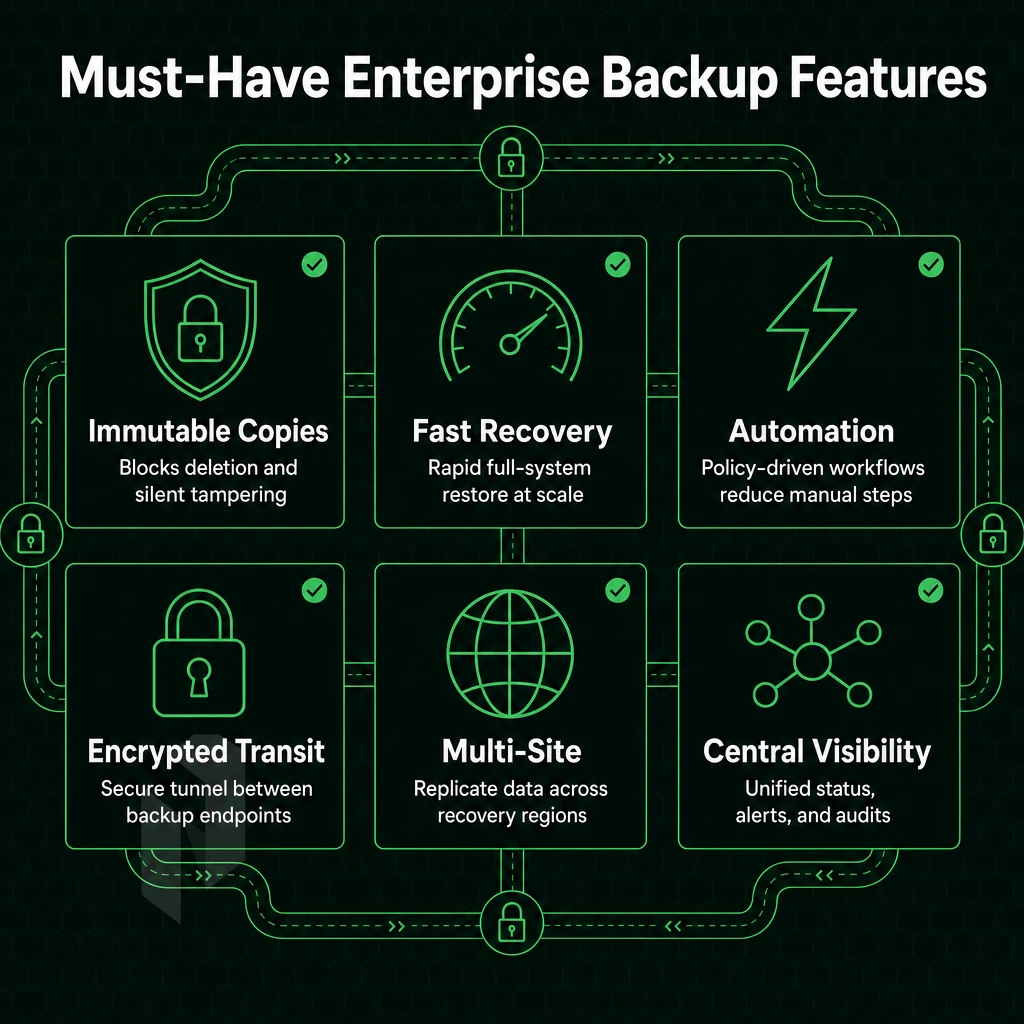
Basic restore capability is table stakes. The enterprise bare metal backup tools deliver value on top of that by providing advanced features to protect information against loss, scaled for large numbers of devices and real production environments.
Data Recovery and Protection Precision
By continuously protecting data, CDP enables near-zero RPOs by capturing changes as they occur rather than waiting for a set time period to pass. When combined with application-aware backups using VSS and/or database-consistent snapshots, organizations can establish a sufficient data backup posture to pass an audit. Granular restore allows individual files to be recovered from within a complete image backup without going through a full restore of the backup.
Storage Efficiency and Security
Good windows backup software reduces the storage needed to hold your backup chains (which can grow very large when storing weeks of incremental changes) for files of past versions through deduplication and compression. Controlling file history retention, i.e. how long the backup chain for a file will be kept. Encryption of data in transit and at rest for regulated data. Look for AES-256 encryption and make sure that the vendor does not lose control of your encryption keys.
Hybrid and Centralized Operations
Cloud failover provides a way to integrate cloud services into your failover or live failover configuration as a secondary target. Centralized management consoles for backup, scheduling and alerting provide visibility into the status of all servers in your environment 24/7. That visibility is critical when a disaster occurs at 2am.
For choosing the right comprehensive backup program for your job, first evaluate the tool's ability to perform a Consistent, Differential, Pixel-level backup (CDP) and open up the VSS writer and provider. After that, look at the tool’s deduplication ratio, and last but not least, does it support a hybrid cloud environment? Our bare metal infrastructure is spread across ten locations in Europe, North America and Asia.
The ideal metal backup tool will run smoothly on this low-latency, high-bandwidth platform. We guarantee 99.9% uptime for our bare metal servers and offer 10 Gbps unmetered connectivity for all metal servers. Selecting the right features for your metal backup is only half the deal. The other half is configuring the right backup strategy to make sure you actually use the right features for your backups.
How to Back Up Bare Metal Files and Build a 3-2-1 Backup Strategy
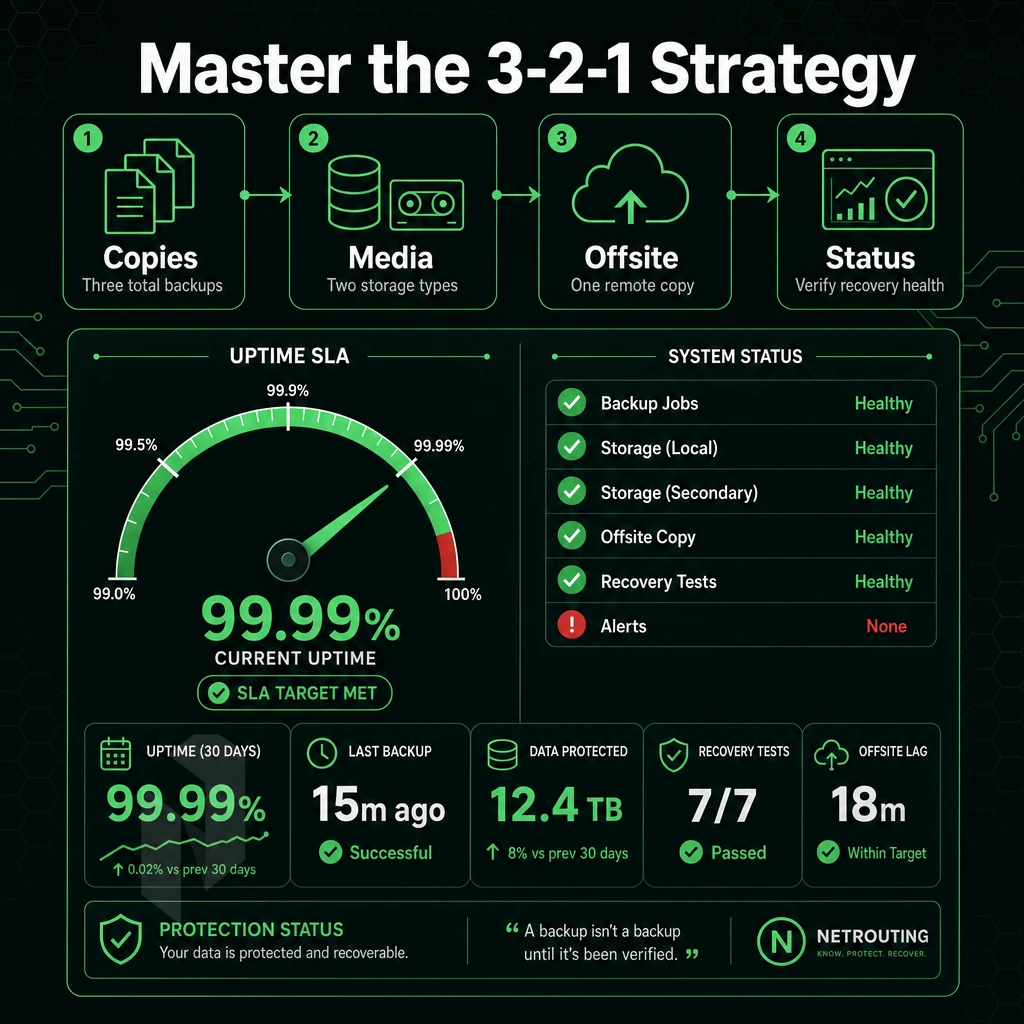
The 3-2-1 rule is the core of any reliable disaster recovery plan. This rule states that there should be three total copies of your backup files: two on different media within your location, and one offsite (such as on a cloud server). For physical servers, this would mean storing local backups as well as a secondary copy on-site, and storing a copy on a remote server or in the cloud.
Preparation: Map Your Backup Files, Solutions, and Cadence
- Identify what you need to protect. Audit the critical volumes for your system such as the root volume, application data and config directories. Protecting these in a full system backup will help avoid any gaps in your protection.
- Establish a retention policy for your backups. A good starting point for a retention policy is daily incremental backups to keep for 7 days, weekly full backups to keep for 4 weeks. You can then adjust to meet your recovery point objective.
- Schedule your backup tasks to run during off-peak hours to minimize I/O contention. Stagger full and incremental backups to ensure that no backup job runs during the same time.
Execution: Apply the 3-2-1 Layers
- Copy 1, local attached storage. Back up data directly to a dedicated local volume or RAID array. Fast for restores. Can fail with source hardware.
- Copy 2, secondary on-site media. This can be copied to a NAS, tape library or distributed to remote file servers based within the same physical site. This is your second media type and your first line of redundancy.
- Copy 3, offsite or cloud destination. In addition to the server backups, these should also be pushed to an offsite location, such as a cloud object storage or a colocation facility in a different region. Netrouting has multiple regions in Europe, North America and Asia. Thus it is easy to store a third copy of your data far away from your main location.
Verification: Test Before You Need to Restore Data
- Run restore drills quarterly. Test booting a recent full image from backup in a sterile environment. An untested backup is not a backup.
- Automatically validate your data integrity. Set up checksum verification for every job. Early detection of corruption will only cost a few minutes, but incident detection will cost hours.
Note: Never treat the local copy as sufficient on its own. A single-site failure, power, fire, or hardware, eliminates all three copies if they share the same physical location.
To implement a sound data protection strategy for running continuous backup jobs, the underlying infrastructure must have sufficient storage space and be able to handle the associated I/O load without any problems. As with any application, the underlying hardware is just as important as the software that runs on it.
Why Netrouting Bare Metal Servers Are Built for Reliable Backup Workloads
Backup workloads demand consistent I/O windows, high-throughput data transfer, and infrastructure that stays online when you need to restore. Netrouting bare metal servers deliver all three, dedicated physical hardware with no noisy-neighbor contention, unmetered 10 Gbps connectivity, and always-on DDoS protection across every deployment.
- Dedicated hardware with predictable performance is far more important than other virtual hosting features. We’ve built our backup system to run on schedule, big full backups and smaller incremental backups alike. They complete without contesting resources with other tenants.
- Our unmetered high bandwidth connectivity means you can transfer large amounts of data quickly. We also offer very fast full system restore and disaster recovery transfers with no egress surprises as all our locations are backed by a 2.4 Tbps+ network.
- Store your backup data offsite in 10 geographically distributed locations. Amsterdam, Frankfurt, The Hague, Stockholm, Bucharest, Rotterdam, Miami, New York, Hong Kong and Singapore. A true geographically redundant backup solution and not a single point of failure.
- BYOIP and BGP support. Continuity of operation during a disaster recovery scenario. Ability to reroute to an alternate site without having to readdress.
- Compliant: ISO 27001 & SOC 2. Built-in data protection for your backup data means no additional audit requirements to comply with your data protection compliance requirements.
- Bare metal provisioned in under 60 minutes. New server environments up and running in minutes in the event of hardware failure to ensure business continuity is measured in minutes and not days.
Our carrier-neutral data center facilities are purpose-built to support high demand server workloads. We'd be happy to discuss your backup target requirements with the sales team and contrast the merits of our comprehensive backup solution tools and platforms across our global data center locations. An important initial consideration for any infrastructure team.
Bare Metal Backup vs. File Backup: Choosing the Right Recovery Approach
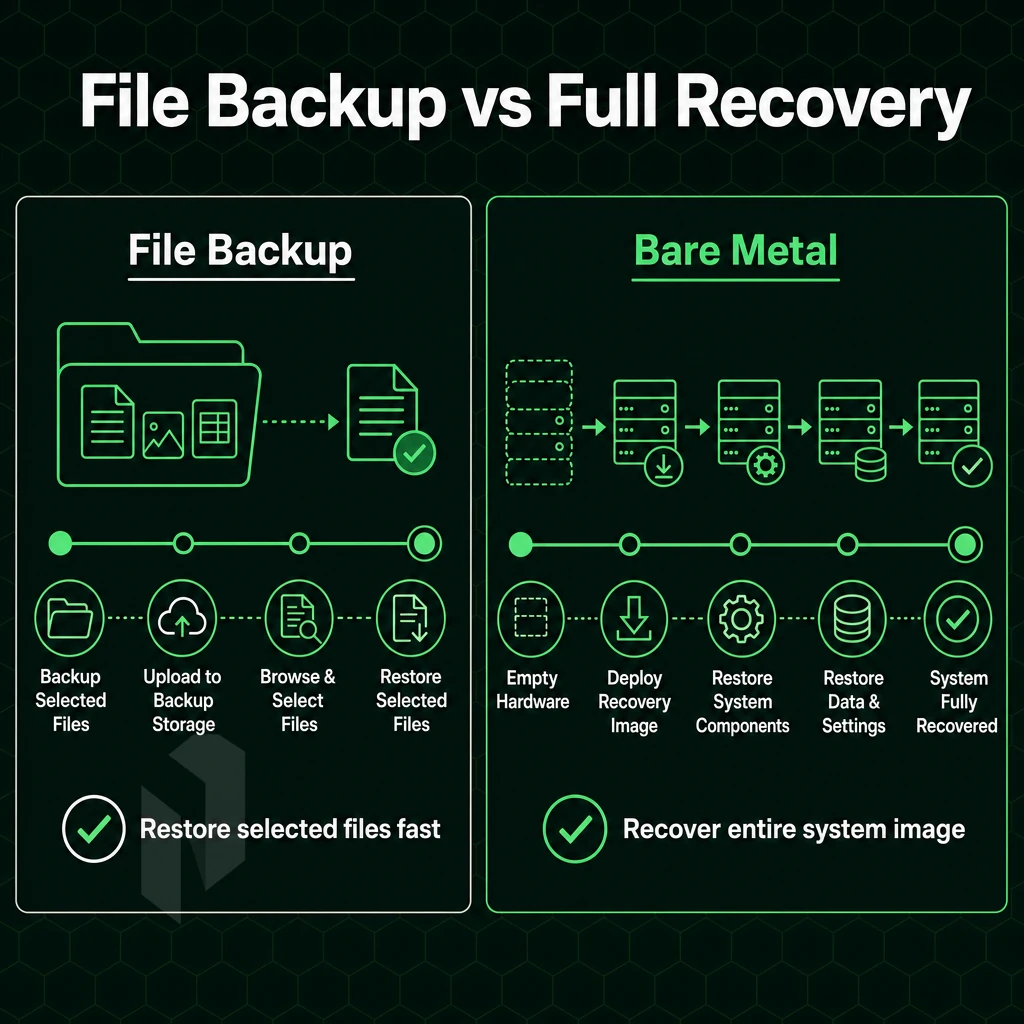
Bare metal backup and file backup solutions tackle different problems. Bare metal backups allow for full bare metal recovery of the entire system state, including all data, applications, configuration and operating systems, even on completely different hardware. In contrast, file and folder backups created with backup solutions are used to recover single files and folders. However, they cannot be used to restore a system that no longer boots.
Bare metal backup software should be chosen if the fastest complete recovery of systems is critical and does allow for minimum down time. File backups are appropriate to ensure that personal files and documents are protected.
For most server environments and business critical applications a layered backup strategy, which uses both bare metal and file backups, is the best way to ensure sufficient disaster recovery capabilities. Neither of the two methods is capable of handling all situations. We will elaborate on the additional capabilities required to set up such a layered backup strategy in this article.
The Key Advantages of the Best Bare Metal Backup Software
The best dedicated hardware backup solutions does more than simply making a file copy of your data. The complete disk image of a server is required for a proper complete system recovery after a hardware failure.
However, image-based backups often also include incremental and differential backups to keep storage utilization low while also maintaining fast recovery times. This type of software can also backup bare-metal servers as well as virtual environments, store data in cloud services. Additionally, Includes additional features such as continuous data protection as well as file-level restore of individual files.
Combining a full system capture with efficient change tracking and a wide range of recovery options is what distinguishes top tier bare metal backup software from simple backup tools. Matching up the features of a bare metal backup tool to your organization’s recovery time objectives will result in a solid backup and recovery strategy that holds up in a real emergency.
Bare metal backup software can be chosen on three key points: recovery speed, hardware support and where your restored files live. Even the best scheduled backups can generate a bit-perfect system image, but when restoring to misconfigured hardware or a too small network, a 15 minute recovery can end up taking hours.
Testing is also very important. Perform scheduled restore tests from isolated hardware to discover problems with your data that the backup logs never will. Get into the habit of testing early, before an emergency occurs.
If your system backup and recovery plan depends on reliable bare metal servers with rapid provisioning, unmetered 10 Gbps connectivity, and always-on DDoS protection, Netrouting's dedicated server infrastructure is built for exactly that workload. Deployments go live in under 60 minutes across locations in Europe, North America, and Asia. Explore Netrouting's dedicated servers and see which location fits your recovery architecture.