Picking the recommended cloud storage for cloud compute is harder than it looks. The vendors of cloud storage differ a lot in terms of performance, durability, regional availability and integration with compute. When evaluating cloud providers, consider not only their headline pricing but also how their storage tiers integrate with your compute workloads and data transfer costs. Understanding how cloud storage services handle data replication across availability zones can significantly impact both application resilience and monthly costs.
Can it survive a node failure without losing data?
We cover key storage technical specifications: IOPS, throughput, redundancy architecture, latency, etc.
Blog contents
The right storage decision for any of them starts here.
What Are Cloud Storage Services in the Cloud Compute Sector?
When we talk about cloud computing infrastructure, cloud storage refers to storage of data in servers that are accessed over a network. It is different from syncing files to a consumer app. For developers and IT professionals, cloud storage is the foundation upon which virtual machines, containers, and distributed workloads are created and persisted, and scaled as needed. For community perspectives, see What's the best cloud storage in terms of privacy and price?.
Cloud Storage Services and Data Storage Types in Infrastructure
There are three different ways to expose storage in a cloud environment to support different workload patterns.
- blob storage: Flat namespace for unstructured data such as backups, media, logs and static content that will be served at scale.
- Block storage, raw storage volumes attached to virtual machines and accessed as a local disk. Typically used for databases and high IOPS workloads.
- File storage, Shared file system storage using NFS or SMB. This can be used for multi-instance workloads where instances read and write to a shared directory.
NAS builds on the file-sharing model to provide storage on a LAN or private cloud, allowing multiple hosts to access the same volume of storage without a copy. This shared-access model is particularly valuable in collaborative workflows, allowing multiple users to edit and retrieve files simultaneously without version conflicts.
Teams can share files in real time across departments, reducing the need for duplicate copies and ensuring everyone works from the latest version. Organizations managing cloud files through NAS benefit from centralized permission management, enabling IT administrators to control who can read, write, or delete specific resources.
Block Storage and VM Integration
Detach from one instance and reattach to another (even on different hosts) and it will be available without loss of data.
Some managed platforms (such as ibm cloud file storage) expose shared volumes as a fully abstracted managed service.
Recommended Cloud Storage in Cloud Compute Sector Services
For a transactional database, the Block type is the right choice. Transactional workloads require low latency access to maintain consistent performance during high-frequency read and write operations.
Cloud compute instances at Netrouting work with fast block volumes.
The Four Main Types of Cloud Storage Services Explained
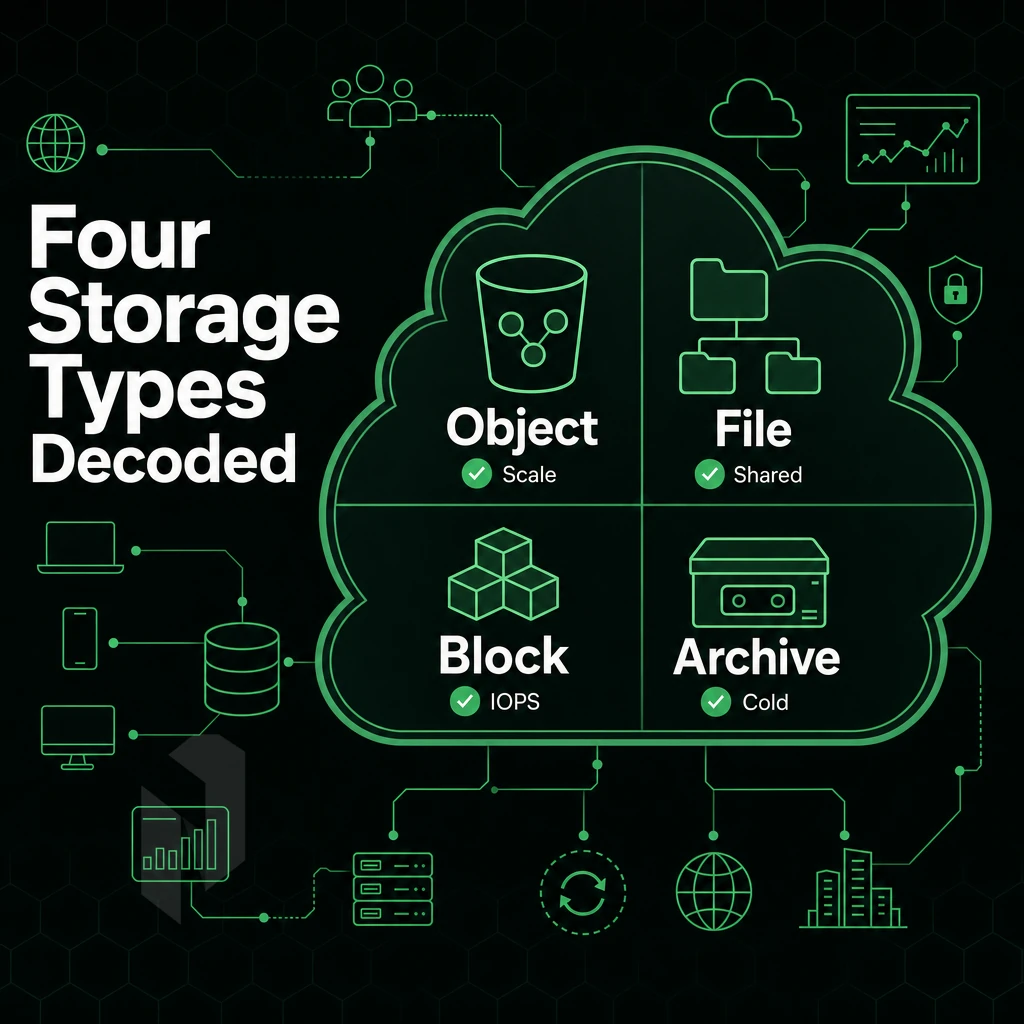
Cloud storage is not one technology but rather four different models of cloud storage. All four models are optimized for different workloads. Choosing the wrong storage model leads to poor performance and additional costs., we will compare all four cloud storage models.
Cloud Object Storage, Block, and File Sharing Storage
Cloud S3-compatible storage is used for unstructured data such as images, logs, backups and media that needs to be stored at large scales. Such storage uses flat namespaces and HTTP APIs and is therefore also very suitable for data lakes and for content distribution. While most S3-compatible providers impose per-file or per-account caps, some specialized services now offer unlimited storage tiers designed specifically for archival and compliance use cases.
Block storage is delivered as raw volumes attached directly to virtual machines. It provides low latency access (typically under 1ms) and consistent IOPS, which makes it well-suited for databases and other transactional applications.
The need to provide a shared filesystem for file storage across a network of computers is met by the use of so-called Network Attached Storage (NAS) protocols. Such as NFS and SMB, to support collaborative environments. For high-performance enterprise applications requiring the highest levels of throughput, the use of Storage Area Networks (SANs). This Are based on a block-level storage model and are accessed over a dedicated storage network fabric, is appropriate.
| Type | Latency | Best For | Scalability |
|---|---|---|---|
| Object | 50-150 ms | Data lakes, media, backups | Virtually unlimited |
| Block | <1 ms | Databases, VMs | Volume-bound |
| File (NAS/SAN) | 1-10 ms | Shared filesystems, enterprise apps | Moderate |
| Hybrid | Varies | Compliance, DR, burst workloads | High |
Hybrid Cloud Storage Services
Hybrid cloud storage is a form of storage that combines on-premise infrastructure with cloud-based capacity. It allows sensitive information to remain on premises while using the cloud for overflow or disaster recovery situations.
It supports business plans that require compliance with regulations but also flexibility. Organizations often maintain on premises storage for workloads with strict latency requirements or data sovereignty mandates that cannot be met by public cloud alone. Evaluating hybrid storage solutions requires careful analysis of data gravity, compliance requirements, and the total cost of ownership across both environments.
Choosing the Right Disaster Recovery Model
Choose the model that fits your access pattern.
Getting access to the chosen model, in practice, means that your team and applications will be able to actually reach the data (on various devices and locations). Proper authentication mechanisms and network configurations are essential for accessing data reliably across distributed teams and applications. Evaluating cloud storage services requires understanding how authentication protocols, API endpoints, and network policies interact to enable seamless access across your organization's infrastructure.
How to Access Files Across Multiple Devices and Locations
Cloud storage removes the barriers to sharing data. Modern platforms streamline file sharing by enabling real-time collaboration across distributed teams without complex VPN configurations or manual synchronization. Centralized cloud files also provide version control and audit trails to help teams track changes and maintain compliance.
Preparation: Set Up Your Access Points
- First, install the client application for each supported platform. Mobile apps, desktop apps, and even web browsers are typically available for cloud services. This will allow access to the cloud service and its files from any context: a desktop in the office, on a mobile phone, or even on a borrowed laptop in a meeting room.
- Multi-user permissions can be enabled. Roles can be assigned before content is shared. This allows for granular permissions, which will prevent accidental overwrites of content in the same folder that is being updated by multiple users.
Execution: Share and Collaborate
- Link-based secure file sharing: Instead of sending open URLs for secure file sharing, generate expiring, password-protected links. This way, you can set an expiry date for large files or very sensitive content to restrict downloads.
- Connect collaboration tools. Integrate storage with productivity suites. For example, Microsoft Office supports opening and saving of online documents directly, which reduces round-trip time greatly for distributed teams.
Note: Verify that data encryption is enabled both in transit and at rest before sharing any confidential files. Many platforms enable this by default, but confirm it in your storage settings.
Data Management and Continuity
- Organize your files using consistent folder structures to create a hierarchy that makes it easy to locate a file across devices and prevent duplicate uploads.
- Automate the backup of data on your local hard drives. They will be saved in a periodic backup or snapshot to prevent accidental deletion as well as business continuity in the case of local hardware failure.
Before you can deploy and manage access, you need to establish a secure foundation. Implementing multi-factor authentication and role-based permissions provides enhanced security that protects your storage environment from unauthorized access attempts.
Security and Compliance Features to Evaluate in Cloud Storage Services
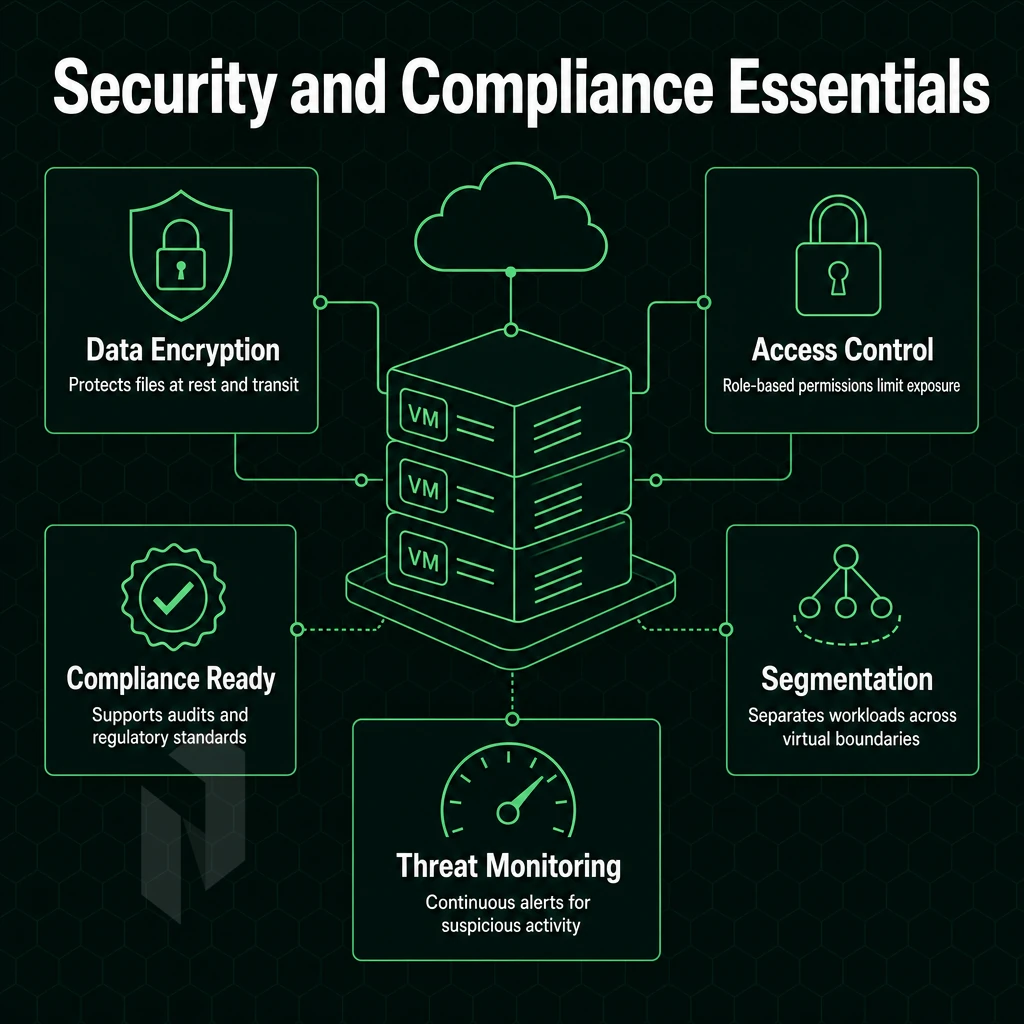
When choosing cloud storage services for business workloads, Security is the deciding factor. Below are the criteria that cut through marketing speak to actually expose mechanisms that can help reduce risk.
Encryption and Data Protection
Encryption is typically AES-256 for data at rest and in transit.
For sensitive data, end-to-end encryption is required.
Authentication and Access Management
Multi factor authentication (MFA) is a non-negotiable for any account that has the ability to write or delete data. This should be combined with robust access controls (e.g. using role-based access control, least privilege, time limited tokens instead of long lasting credentials).
Your access management should include detailed audit logs.
Compliance Frameworks and Private Cloud Storage Services
When evaluating cloud services, assess them against your industry's compliance frameworks, ISO 27001, SOC 2, and GDPR. Compliance certifications prove controls have been independently verified, rather than self-declared.
Public cloud infrastructure, no matter how scalable, often falls short of meeting individual compliance requirements. That is where private cloud storage comes in to remove the risk of shared tenancy altogether. Netrouting’s dedicated bare metal deployments offer the highest level of isolation for the compliance-driven team, all while maintaining the network performance of public cloud.
When comparing the options for cloud storage, the best do not just boast the biggest storage for the lowest price. Strong encryption, verified compliance and fine-grained access control are also key.
Below security, we look at the commercial layers: how much storage you can run, how deep you can integrate, and what running storage at business scale actually costs.
Choose where the workload runs.
Start virtual, take a whole machine, or go single-tenant. Pick the starting point that fits.
Start with a VM. Scale it when needed.
Use cloud compute for workloads that do not need a full machine. Compare vCPU, memory and storage per plan.
Start the conversation with
- Compute
- vCPU and memory
- Storage
- Disk size
- Location
- Preferred region
Compare configurations, not just rack space.
Start with a dedicated server when provider-owned hardware is the better fit. Compare CPU, memory, storage and network needs.
Start the conversation with
- Compute
- CPU and memory
- Storage
- Capacity and workload
- Network
- Port and traffic needs
Take the whole machine.
Choose bare metal when the workload needs a single-tenant server with full IPMI access and control over the operating system and stack.
Start the conversation with
- Workload
- CPU, memory and storage
- Stack
- Operating system
- Location
- Where your users are
Cloud Storage Solutions for Business: Key Evaluation Criteria
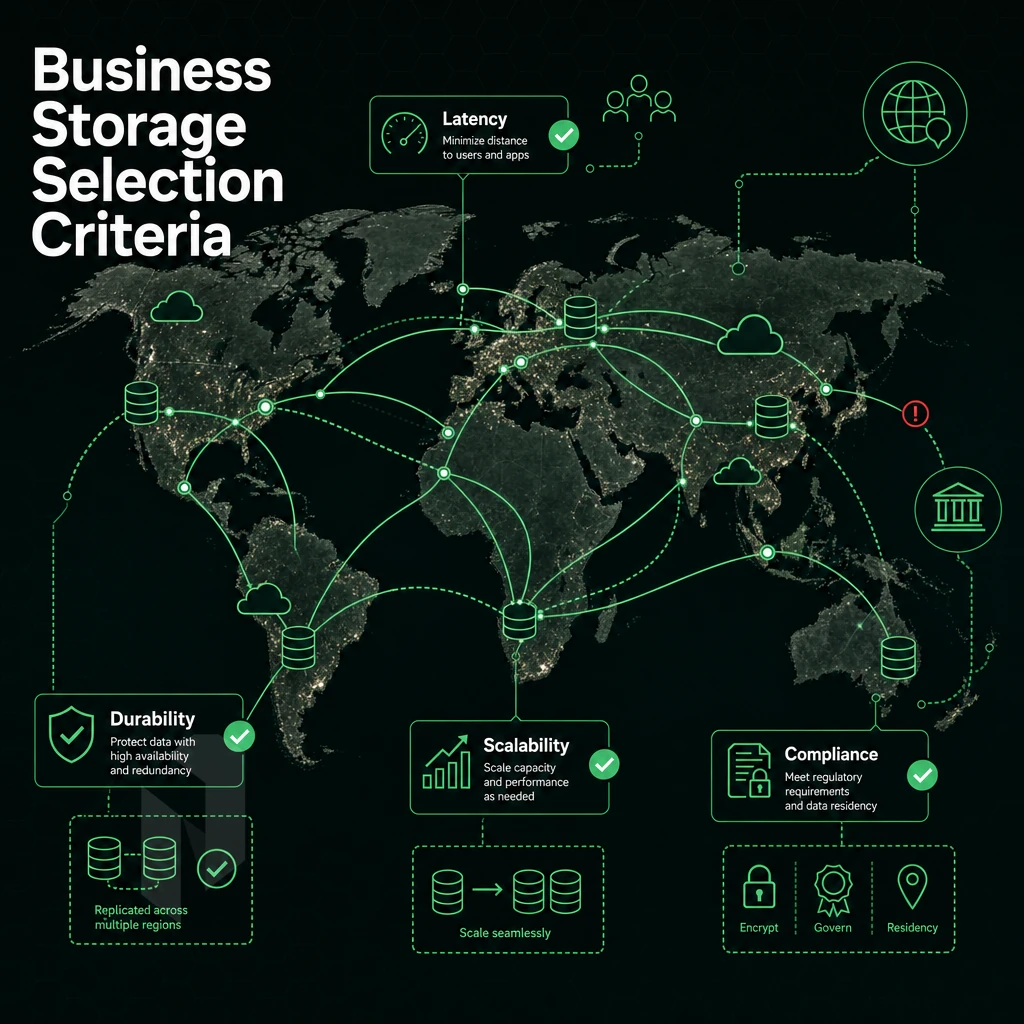
Choosing the right cloud storage requires more than just comparing capacity.
Storage Capacity, Limits, and Unlimited Storage Options
Start with the storage capacity you need today and project 12 months out, including expected peak working set size. Many business plans advertise unlimited storage, but read the fair-use clauses, they typically detail throttling and per file storage limits.
File size limits matter for media files, database dumps, and VM images. A 5 GB file size limit is fine for most platforms but would pose a problem for typical infrastructure backups. Verify both the file count and per-file size limit before signing a contract.
Cloud Storage Services Costs and Business Plans
Cloud storage costs scale quickly at enterprise volumes. Evaluate:
- Per-seat versus per-TB pricing models.
- Egress and retrieval fees on cold tiers.
- Overage charges when quotas are exceeded.
- Minimum-term commitments and cancellation terms.
Many business plans bundle collaboration tools, administration controls, and audit logging with unstructured data storage at a higher cost than plain flat-namespace storage. Check whether these extras will bring enough value.
Integration with Your Technology Stack
Seamless integration with your current technology stack. Large organizations using Google Workspace or Microsoft 365 / Microsoft Office get the most value from native connectors. Version history, co-authoring, and identity sync all work with native connectors without the need for custom middleware.
Integration into different platforms (Single Sign On, REST API, Webhooks) fits naturally into an existing technology stack, including Google Workspace and storage cloud environments, making it well-suited for CI/CD pipelines as well as IT Service Management (ITSM) processes. For disaster recovery and business continuity purposes, check whether your backup system and any cloud services it relies on support automated scheduling, offsite replication, and documented SLAs for data recovery.
Now that you have mapped out your commercial requirements, the architectural question, given the data access and integration capabilities you may need, becomes how you will design your storage solutions to run on public infrastructure, on your own private hardware, or some combination of the two?

Private Cloud Storage vs Public Cloud Storage: Which Fits Your Workload?
Choosing between private and public cloud storage greatly affects your organization’s compliance posture, latency, and long-term infrastructure costs. There are many variables, and no single answer is right for every workload. Most factors are based on the sensitiveness of the data, required performance, and the level of control the organization’s IT team requires over the underlying cloud storage infrastructure.
Private vs. Public: Core Trade-offs
Public cloud storage platforms use shared pools of storage that are then provisioned on demand. Provisioning of capacity is very fast. However, by virtue of the shared infrastructure of public cloud platforms, your corporate data, and the storage capacity holding it, will travel over third-party networks and therefore be a source of compliance risk to regulated industries.
Private cloud storage runs on dedicated hardware, typically located in your on premise data center or in a carrier-neutral data center. This type of storage has very low latency, sub-millisecond latency for data located within your local network, as opposed to 10-50 ms round-trip latency for data located in a public cloud. With private cloud storage, you have complete control over encryption keys, access rights, and audit logs.
| Dimension | Private Cloud | Public Cloud |
|---|---|---|
| Latency | <1 ms (local) | 10-50 ms |
| Compliance control | Full | Shared responsibility |
| Uptime SLA | 99.9%+ | Varies by provider |
| Scalability | Planned capacity | On-demand |
Hybrid Cloud Storage Services as the Middle Path
To achieve both flexibility and control, teams rely on cloud storage that is distributed via a so-called hybrid cloud model. While sensitive workloads are processed on company-owned hardware, cloud storage providers are used for archiving, development and testing, and burst-related requirements. This allows companies to optimize both costs and risk while at the same time ensure compliance for important data sets.
Best Cloud Storage Fit: Decision Guide
Netrouting offers bare metal and colocation services in 10 cities across Europe, North America, and Asia, providing proven footprints for private or hybrid deployments. Overflow to reputable cloud storage providers.
Half of the equation is the Architectural model.
Low Latency Access and Performance in Cloud Storage
The amount of time it takes to get low latency access to storage determines whether a cloud compute workload is going to have an instant experience or not.
Assess Your Workload and Location Requirements
- Map the different workloads to their corresponding latency sensitivity levels. The most sensitive workloads are live I/O workloads such as virtual machines, and real-time processing of streaming data. Less sensitive are batch analytics on data lakes. This affects all storage decisions.
- Choose a datacenter which is geographically close to your end users. The closer your users are to your datacenter the less round-trip time your users will experience. Netrouting operates multiple datacenters located throughout Europe, North America and Asia-Pacific. We recommend storing your users data within the same datacenter as your users compute. This ensures that all data transfers are within the same datacenter facility thereby avoiding cross-region hops.
- Audit tools and services that rely on fast storage, such as Microsoft 365 services, collaboration tools and corporate data repositories. These generate continuous read/write traffic, causing bottlenecks in storage that cannot be resolved by increasing CPU headroom.
Integrate Storage with Compute and Protect Your Data
- Co-locate storage with your compute instances. Instead of data having to travel over the public internet (with corresponding latency), it will travel across the private network of the compute instances. Netrouting provides a free private interconnect between customer resources.
- Enable cloud backup with versioning. While having secure cloud storage is great, it does you little good if you cannot recover from it. Therefore, enable scheduled backups with version history to quickly restore deleted files rather than starting from scratch.
Note: Skipping co-location and routing storage traffic over the public internet is the most common performance mistake. Always verify that your storage and compute resources share the same private network segment before going live.
Verify Performance After Deployment
- Immediately after provisioning, run baseline I/O benchmarks to measure read/write throughput and latency under realistic work load. Compare results to minimum requirements of your workload, not to peak levels of some fictitious maximum workload.
- Monitor and adjust as necessary. As the amount of data grows, latency can begin to degrade. Set up alerts for I/O wait time and review on a weekly basis for the first month after going into production.
At this point, the underlying compute platform becomes a critical variable.
How Netrouting Cloud Compute Supports Your Storage Infrastructure
Storage-intensive workloads demand more than raw capacity. They need low latency access, consistent throughput, and infrastructure you can trust with sensitive data. Netrouting's cloud compute platform is engineered for exactly that.
- Scalable virtual instances with flexible cloud compute (CPU, RAM, storage) that can scale as needed. Storage cloud can be provisioned and running in under 60 minutes, eliminating the time to procure hardware.
- For dedicated storage performance, Bare Metal dedicated servers are offered on Dell and Supermicro hardware, with hardware RAID, to deliver the raw throughput that volume storage and key-value storage workloads require. Then, Virtual Machines are not sufficient.
- Built-in hybrid cloud storage. Free private networking up to 40 Gbps and Ethernet services to connect your cloud and on-premises storage. Ideal for hybrid cloud and disaster recovery architectures.
- Ten data center locations in ten cities worldwide. Amsterdam, Frankfurt, The Hague, Rotterdam, Stockholm, Bucharest, Miami, New York, Hong Kong, and Singapore. Low latency access to your data management stack for locations in Europe, North America and Asia-Pacific.
- Security and compliance that can be documented by you. Always-on DDoS protection, ISO 27001 certification and SOC 2 compliance for your corporate data, whether at rest or in transit. Data sovereignty for sensitive data, subject to GDPR, is provided by EU locations.
Our cloud-based storage infrastructure supports workloads distributed across private and public cloud storage systems. We can help you extend existing technology stacks or build out data lakes anywhere in the world. Let's discuss which cloud storage solutions best suit your needs.
What we can expect from Netrouting is relevant but the general approach for choosing providers between the platforms remains the same.
Frequently Asked Questions
Which top 5 business cloud services for storing data offer extensive integration capabilities?
The leading business cloud storage platforms include RESTful storage, enterprise file sync-and-share services, dedicated backup solutions, private cloud deployments on bare metal, and hybrid setups combining on-premises and hosted storage.
For teams needing full control over data residency and performance, bare metal cloud computing with attached block or API-driven storage for storing data, such as what Netrouting provides across its European, North American, and Asian locations, delivers predictable throughput without hyperscaler variable costs.
What Are the Four Main Types of Cloud Services for Storing Data?
The four main types are binary large flat storage, persistent block volumes, shared file-based storage, and archive storage. cloud data storage handles unstructured data, images, backups, logs, at massive scale using flat namespaces and HTTP APIs.
raw volume storage presents raw volumes to virtual machines or bare metal servers, making it the right choice for databases and operating systems that need low-latency, consistent IOPS.
What is the best personal cloud storage service in 2026?
Consumer-grade sync services work well for everyday file access across devices.
However, privacy-conscious users and small teams increasingly utilize cloud storage on their own terms by self-hosting on a cloud compute instance or network attached storage setup, where deploying open-source storage software on a virtual machine gives you full ownership of your data, no per-seat fees, and the ability to choose your jurisdiction.
Which cloud storage services are the best for teams?
Teams need shared access, granular permissions, audit logging, and reliable uptime, not just raw capacity. Enterprise file sync-and-share platforms handle document collaboration well, but teams evaluating the best cloud storage services for compliance requirements or heavy data workloads benefit more from dedicated infrastructure: a bare metal or cloud compute node running self-hosted storage software gives IT full control over access policies and data location.
Netrouting's data storage infrastructure, certified to ISO 27001 and SOC 2, is purpose-built for exactly this use case, with a free private network between resources and a 99.9% uptime SLA across all locations.
What is the difference between object storage and block storage?
disk-based storage, a staple offering from any cloud computing provider, presents raw, fixed-size volumes directly to a server, the operating system formats and mounts them like a local disk, making them ideal for databases, virtual machine images, and any workload requiring low-latency random reads and writes.
massively scalable storage, by contrast, stores data as discrete objects with metadata and a unique identifier, accessed over HTTP APIs rather than a filesystem. object store scales to petabytes cheaply and suits backups, media files, and static assets. persistent volume storage wins on performance and flexibility; web-scale storage wins on scale and cost for unstructured data.
How does private cloud storage differ from public cloud storage?
Public cloud storage runs on shared infrastructure managed by a third-party provider, you consume capacity on demand but share physical resources with other tenants. Private cloud storage runs on dedicated hardware, either on-premises or hosted in a colocation or bare metal environment, giving you sole tenancy, predictable performance, and direct control over data residency and security policies.
Private cloud is the right choice when regulations mandate data sovereignty, when workloads demand consistent IOPS, or when total cost of ownership over a multi-year horizon is lower than paying hyperscaler egress fees and cloud storage solutions charges. Netrouting's dedicated servers and colocation facilities across The Hague, Frankfurt, Miami, and eight other locations make private storage cloud deployments straightforward without the capital expense of owning a data center.
What security features should I look for in a cloud storage provider?
Prioritize encryption of data storage at rest and in transit, granular identity and access management, audit logging with tamper-evident trails, and third-party compliance certifications such as ISO 27001 and SOC 2. Always-on DDoS protection matters too, volumetric attacks can make storage unavailable even if the data itself is intact.
Look for physical security controls (access-controlled facilities, 24/7 monitoring) alongside logical ones.
When it comes to the compute sector, cloud storage is not a one-size-fits-all solution.
The limits of network capacity, latency and geography of physical data centers increasingly determine performance and data sovereignty.
If you're evaluating cloud compute infrastructure to pair with your storage strategy, and want to reduce the risk of data breaches, explore Netrouting's cloud compute and bare metal options, available across ten locations in Europe and North America. Additionally, Asia-Pacific, backed by a 2.4 Tbps+ network and 24/7 support. Contact the team to discuss your requirements.
Start with cloud compute.
Share the workload and the region. We help you choose between a VM and a machine of your own.