Running a Valheim dedicated server on your own hardware means you have complete control over your world and can configure it as desired (number of players, mods, network settings etc.).
There are a few requirements for the hosted server process, such as a specific port and some rules regarding the firewall.
This guide walks through the full process of setting up a Valheim server , from provisioning a suitable machine and installing SteamCMD, to configuring start_server.sh, opening the right UDP ports, and keeping the process alive with systemd.
Blog contents
Whether you're self-hosting your Valheim server on bare metal or spinning up a cloud instance, the steps are the same, and the performance difference over consumer hosting options is immediate. Start with the fundamentals: what a dedicated server actually is and why it matters.
What Is a Valheim Server and Why Run a Dedicated One
A Valheim dedicated server is an independent process that runs your game world(s) for you 24/7. In contrast to Valheim’s default peer-to-peer hosting, where your Valheim world comes to a grinding halt as soon as the player hosting it logs off, a dedicated server keeps on ticking all the time.
Players can migrate their existing world save files to the dedicated server, ensuring continuity and preserving all progress made during local play sessions. When players create a new world on the dedicated server, it persists independently of any individual client session, allowing the community to explore and build collaboratively across multiple login cycles.
How a Dedicated Server Differs from a Game Client Session
Other players connect through the host, so latency is determined by the internet connection of the other players.
The dedicated server is running as a headless process, it does not use any rendering power. Players join a server by entering the servers IP address and the players password for that server. The servers world is always running, whether there is one player or ten players online.
Server administrators can whitelist specific players by adding their steam id to the adminlist.txt file, granting elevated permissions for world management. Each server name must be unique within your network to prevent conflicts when multiple worlds are hosted simultaneously on the same infrastructure.
Valheim Dedicated Server Setup: Can You Run One?
Yes. The dedicated server tool for Valheim can be downloaded for free from Steam’s “Tools” section. The dedicated server tool is compatible with Windows and Linux and the game allows for crossplay between PC and Xbox so a server can be hosted connected to a single persistent world for all players.
To access the tool, open your Steam library, select the dropdown menu at the top, and double click on Valheim Dedicated Server from the tools list to begin installation. Once installed, you can launch the server executable directly or configure startup parameters through the control panel interface provided by your hosting environment.
Two deployment paths exist:
- Self-hosted: Run the server on your own PC. Free, but your machine must stay online 24/7.
- Remote hosted: Deploy on a VPS or bare-metal server. The Valheim server runs independently of your home hardware.
Why a Remote Valheim Dedicated Setup Wins for Groups
Self-hosting a server for Valheim has the drawback of tying your game’s uptime to your home internet connection and power.
Hardware and System Requirements for a Valheim Dedicated Server
- CPU: 2+ cores (x86-64); Valheim is single-threaded for world simulation, clock speed matters more than core count.
- RAM: 4 GB minimum; 8 GB recommended for larger worlds and concurrent players.
- Storage: 2 GB for the server binary plus world saves; SSD preferred.
- Internet connection: 10 Mbps upload per 10 players; low-latency link reduces desync.
- OS: Linux (Ubuntu 22.04 LTS recommended) or Windows Server.
Architecture Overview With Port Forwarding
Valheim uses a listen-server model over UDP.
A virtual private server (VPS) with a public IPv4 address would be a clean setup. If you’re behind a NAT then you’ll just need to forward UDP 2456-2457 to the host. This setup is crossplay by default, so PC and console clients will connect to the same process and port.
Quick Self Hosting Setup
- Provision your host. Deploy a Linux instance. With full control over the OS you can tweak the kernel’s UDP buffers as needed, and handle the dependencies for SteamCMD cleanly.
- Install SteamCMD and pull the server binary. Run
steamcmd +login anonymous +app_update 896660 +quitto fetch the dedicated server app (Steam App ID 896660). - Configure start_server.sh. Set
-name,-world,-password, and-public 1(or0for unlisted). Passwords must be 5+ characters. - Open firewall rules. Allow UDP 2456-2457 inbound. Verify with
ss -ulnpafter launch. - Test the connection. Use direct connect in the Valheim client, enter
IP:2456, or search by name via the search bar in the server browser.
Performance Tip
The most common mistake is running the server on a shared CPU with others having I/O intensive workloads.
Choosing Where to Host: Own PC vs. Remote Dedicated Server
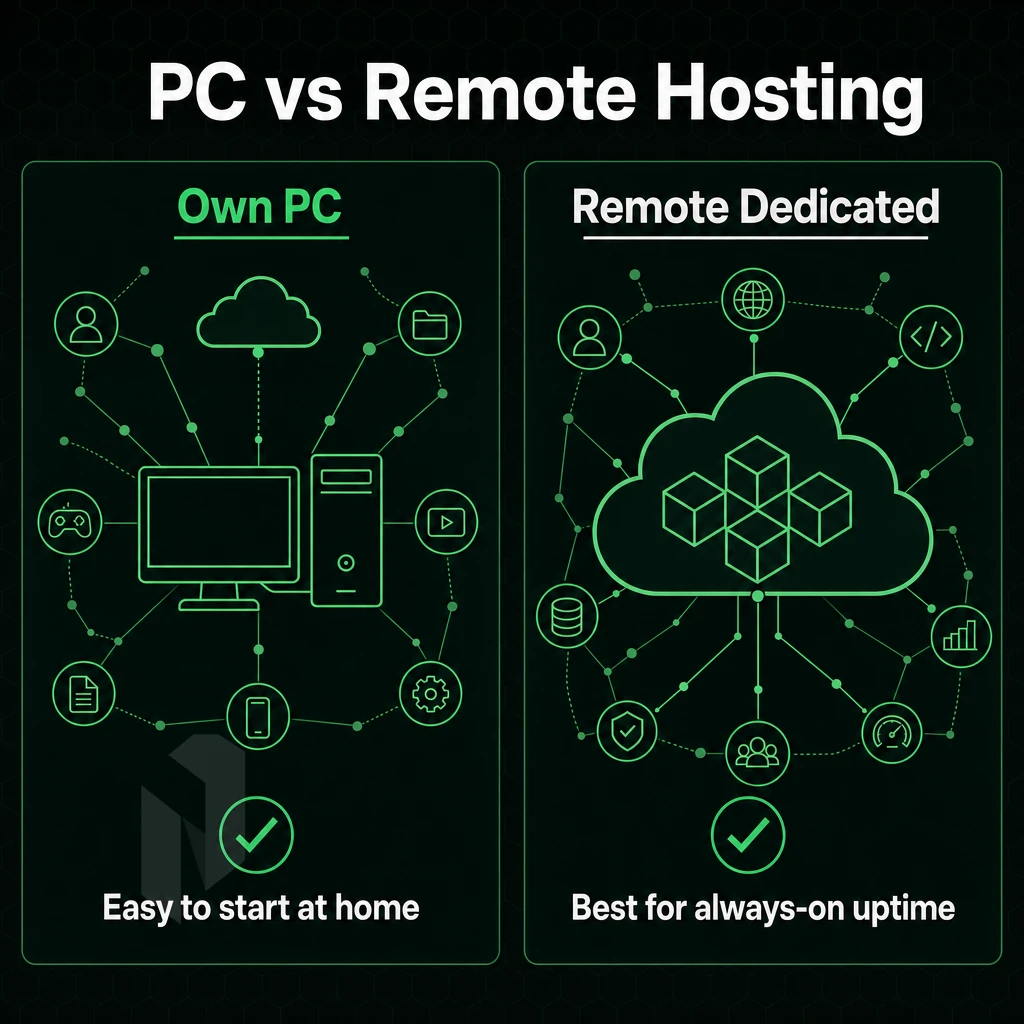
Yes it is possible to host a dedicated Valheim server .
Hosting on Your Own PC vs Managed Hosting
Running a server on your own PC is cheap but comes with real tradeoffs.
Your friends connect over your local network or through port-forwarding. If your router assigns a new address after a reboot, the server becomes unreachable. Note: An incompatible version between host and clients is a common connection failure, keep everyone on the same Valheim build. Verify that both the server and all connecting clients are running the same game version to prevent authentication errors.
Renting Your Own Server for Valheim
A remote dedicated server or cloud VPS solves this problem straight away. The external IP address is fixed and can be accessed from anywhere over the internet. You don't have to share your household's upload bandwidth, and the valheim server is always on regardless of whether your PC is switched on or not.
Providers offering managed hosting take care of updates, backups, and monitoring, removing the operational burden from server administrators. Many hosting providers include a web-based control panel that simplifies server restarts, world backups, and configuration edits without requiring command-line access.
For a Valheim server, a good starting point would be to focus on good single-thread CPU performance and low latency network performance. You don’t have to worry about unmetered bandwidth running up a huge bill as your world grows. Choosing a valheim server with NVMe storage further reduces world save times and improves chunk loading performance during exploration.
How Much RAM Does a Valheim Dedicated Server Need?
For a small group of 2-4 players, 4GB of RAM is sufficient. For larger sessions of 8+ players on an already generated map, 8GB of RAM is recommended. In addition to allocating RAM for the server process keeping all players in the same world, more RAM should be allocated if that process is also running other services.
The memory usage of the game increases as the map is generated. Larger player counts also increase CPU load during world events and when multiple biomes are active, which can affect combat difficulty scaling and entity processing.
Closing a startup command prompt usually is a result of low RAM or a faulty launch script. Our valheim dedicated server options on bare metal come with automatically generated private network interfaces and port forwarding support for isolated, low-latency connectivity right from the start. After setting up your hosting environment, you then need to copy the server files to that machine. If the process closes immediately after launch, open a command window as administrator and verify that the start script path and executable name are correct. To gracefully stop the running process without corrupting world data, access the server console and use server press ctrl c to initiate a clean shutdown sequence.
Once the executable and script are validated, you can start server operations by running the corrected launch command from the terminal or command prompt. On Windows installations, world saves are stored in the appdata locallow irongate valheim directory, which must be backed up separately from the executable folder. On Windows, locate the start_headless_server.bat file in your installation directory and double click it to launch the server process with default configuration parameters. Many hosting providers offer a web-based control panel that simplifies server management tasks such as restarts, configuration edits, and log monitoring without requiring command-line access.
Step 1: Download and Install Valheim Server Files
- CPU: 2+ cores (4 recommended for 10+ players).
- RAM: 4 GB minimum, 8 GB recommended.
- Storage: 2 GB for the server binary; world saves in
AppData/LocalLow/IronGate/Valheim. - Bandwidth: ~100 Kbps per player upstream.
Architecture Overview

Valheim has a headless dedicated server process, players connect directly to the server via UDP and there is no relay involved. The server binary for dedicated server is located in a separate server folder, outside of the Steam library client folder.
This architecture ensures that all game logic and world state management occur on the server side, reducing client-side processing overhead and preventing common desync issues. On Windows installations, world saves and character data are stored in the appdata locallow irongate valheim directory, which the server process reads during initialization.
Open ports 2456-2458 for both TCP and UDP on your router and firewall. Port 2456 is for the game traffic, and port 2457 is the query port for the server list. In order to connect to a server, players must be able to see the server in their browser first. So in order to connect to a server, ports 2456-2458 for both TCP and UDP must be open on your router and firewall.
Quick Setup
- Install via SteamCMD. Log in with your Steam account (anonymous works here), then run
app_update 896660 validateto pull the dedicated server into your chosen server folder. - Configure the start script. Edit
start_server.sh(Linux) orstart_server.bat(Windows). Set-name,-world,-password, and-port 2456from the command line arguments in that file. - Forward ports 2456-2458 for both TCP and UDP to the server’s LAN IP in your router.
- Start and verify. Launch the script. World data writes to
AppData/LocalLow/IronGate/Valheimon Windows or~/.config/unity3d/IronGate/Valheimon Linux. Confirm the process is listening withnetstat -an | grep 2456.
Performance Tip
Note: For your own protection, do not place your server directory inside your Steam library folder. A single SteamCMD update could potentially wipe out your start up script. Store the server folder on a completely different path, and make sure to backup any world files separately from the server install. Now that the binary is installed and up and running on your managed hosting setup, it is time to give your server an identity that players can find and join.
Measure the route. Not the distance on a map.
Use the Netrouting Looking Glass to run a ping, traceroute or BGP lookup from our network, AS6206. Test the real path to your users before you shortlist a site.
Step 2, Configure Valheim Server Name, World, and Password
- CPU: 2+ cores (4 recommended for 10+ players).
- RAM: 4 GB minimum, 8 GB recommended.
- Storage: 2 GB for the server binary plus world data.
- Bandwidth: ~100 Kbps per active player upstream.
Architecture Overview
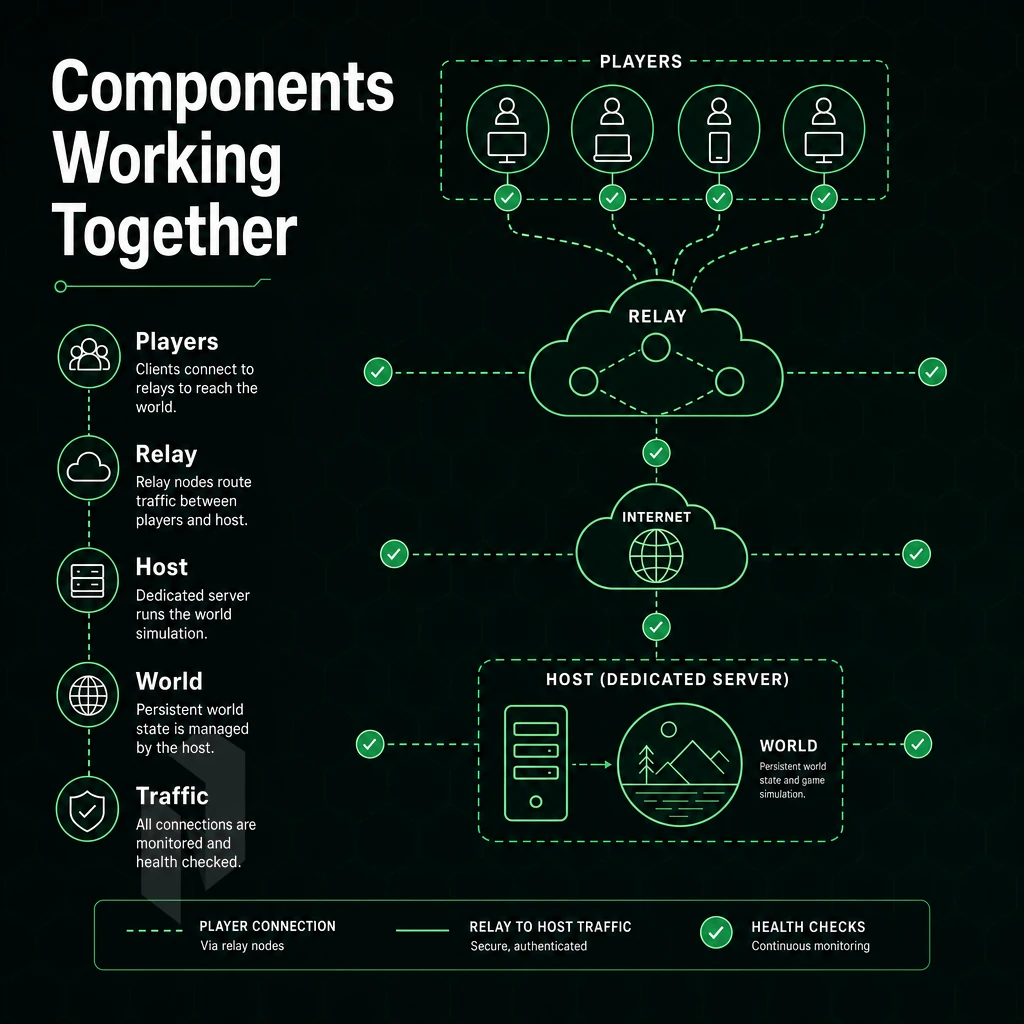
Valheim runs on a listen-server model and uses Steam relay servers where possible (by default). This means that server IP addresses do not have to be publicly exposed unless absolutely necessary due to high latency. To connect directly to a server, open up UDP ports 2456 and 2457 on the local firewall and router. The server’s console logs connections and saves the world that it is running in real time.
Quick Setup
- Install via SteamCMD. Run
app_update 896660 validateto pull the dedicated server files. - Edit the start script. This is typically a batch file on Windows or a shell script on Linux and here you can set the server name, server password and world name as launch arguments.
- Configure server settings. Set
-public 1to list in the in game server browser, or-public 0for invite-only play. - Open up the required firewall ports. Expose the two UDP ports (2456 & 2457) to inbound traffic. Verify the server IP can be reached from outside your local network prior to inviting players to test.
- Start and verify. Watch the server console for the "Game server connected" line, that confirms Steam registration is complete.
Performance Tip
The most common mistake: leaving the server password blank on a public listing. An empty password combined with -public 1 invites griefing and excess load. Always set a strong server password in the batch file, even for semi-private groups. For community perspectives, see How to make dedicated servers? : r/valheim.
Their bare metal servers have unmetered 10 Gbps uplinks and sub-40 ms latency nodes in Europe and North America. This means that there is no relay server bottleneck any more. After setting up a server (named and secured) you only have to make sure that the respective ports can be reached.
Step 3, Open Ports and Configure Firewall Rules
- CPU: 2+ cores (4 recommended for 10+ players).
- RAM: 4 GB minimum, 8 GB recommended.
- Storage: 2 GB for the server binary plus world save data.
- Bandwidth: ~50 Kbps per active player, unmetered 10 Gbps bare metal handles this comfortably.
Architecture Overview
A Valheim hosted server runs as a headless Linux process. Players connect directly over UDP, no relay or matchmaking middleman. Your server needs a reachable public IP address; players on the same computer as the server cannot connect via the loopback IP address (127.0.0.1) through the in-game browser. Use the external IP address instead, or connect via the direct-connect dialog.
The default ports for a dedicated server are UDP 2456 for game traffic and UDP 2457 for Steam Server Queries, both must be open inbound on your router or firewall.
Quick Setup
- Install SteamCMD, download the Valheim dedicated server app (App ID 896660) anonymously:
steamcmd +login anonymous +app_update 896660 +quit. - Configure the launch script, set
-name,-world,-password, and-public 1(or0for unlisted). - Open firewall rules, allow UDP 2456-2457 inbound; confirm with
nmap -sU -p 2456,2457. - Start the server. Run the script. Verify the Steam server query is responding. Connect to the server with a client from another location using the public IP address and port.
Performance Tip
Don't run the game client and the dedicated server on the same computer during production.
Step 4, Start the Game Server and Connect from the Client
With configuration complete, the time comes to start playing with your newly created server.
Valheim Crossplay Server Start
- Run the batch file (for Windows) by double-clicking on it. Run the start command in your terminal (for Linux). A console window opens and starts logging. Wait for the appropriate line in the console window output and then connect to the world that was just created.
- Make sure your firewall and router expose the correct port range (UDP 2456-2458) to the public internet. The server won’t be visible in any browser if these ports aren’t open.
Connecting the Game Client
- Open the Valheim client and join the game. In the server list tab, the server should show up within a minute after it has been added to the Steam query process.
- For a faster connection, use direct connect: enter the join IP and port (e.g.
203.0.113.10:2456) in the direct-connect field. No browsing required. - You can also share the numeric join code that the server console displays. Your friends can join your game by entering that code in the join game screen.
Note: An incompatible version error means the server and client are running different game builds. Update both through Steam to the same version to resolve it.
Server Options for Stopping the Valheim Server Cleanly
- You can shutdown a server by focusing the console window where the server was press ctrl c. This will cause the server to shut down gracefully and save the world first. If you simply cut power to a computer running a server, you risk corrupting save files.
The server is up and running with player connections.
Automating Valheim Server Backups, Updates, and Restarts
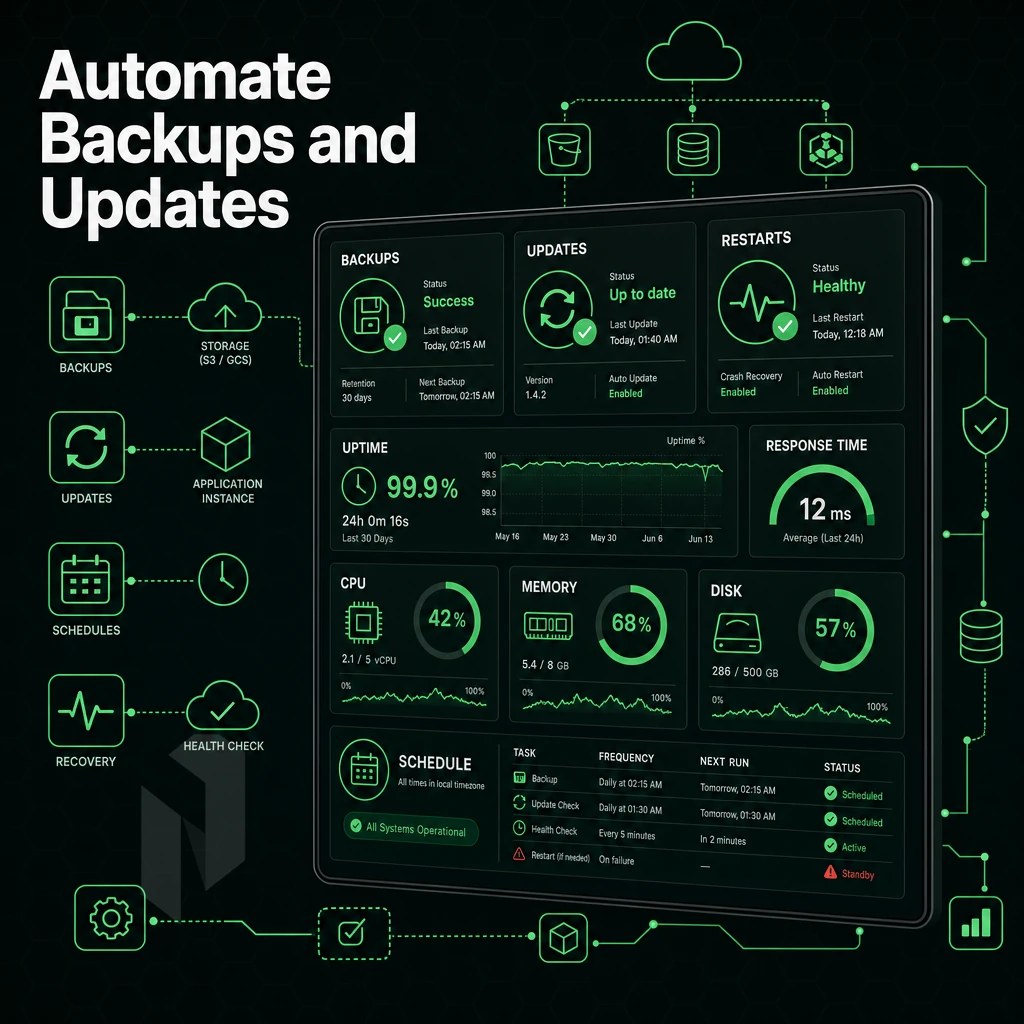
Keep a healthy Valheim server long-term by automating three things: backup world saves, updates, and crash recovery.
Scheduling Automatic Backups of Valheim Server Files
Valheim stores world data in ~/.config/unity3d/IronGate/Valheim/worlds/ on Linux, and under %APPDATA%\LocalLow\IronGate\Valheim\worlds\ on Windows.
The automatic backup of a Linux server is handled perfectly by a cron job. This line adds a snapshot of the world directory for your current server every 6 hours to your crontab.
0 */6 * * * tar -czf /backups/valheim-$(date +\%F-\%H).tar.gz ~/.config/unity3d/IronGate/Valheim/worlds/
Keep 48 hours of snapshots or more around. It’s way faster to restore a world from an archive that you know worked rather than rebuild from scratch.
SteamCMD Auto-Update Script
SteamCMD updates the server in a non-interactive mode. It can be updated by running a shell script before you start the server each time.
steamcmd +login anonymous +force_install_dir /opt/valheim +app_update 896660 validate +quit
On Windows, call the same command from a .bat file via command prompt or Task Scheduler. Validating on every launch catches partial downloads and prevents a new world from launching on corrupt binaries.
Auto-Restart and Mod Management
On Linux, a systemd unit with Restart=on-failure and RestartSec=10 will automatically relaunch the process after a crash, no manual intervention needed. Pair it with ExecStartPre to run the SteamCMD update before you start server each time.
On a Windows host machine, the Task Scheduler can be configured to trigger a restart script whenever the server process terminates abnormally.
For server-side mods, BepInEx is the standard framework. Install it into the server directory and drop plugin DLLs into BepInEx/plugins/. BepInEx initialises at the operating system level before the game runtime, hooking directly into the program files so mods load automatically on every restart without additional configuration. With automation handling the operational overhead, the remaining question is what hardware foundation gives your valheim server the best chance of staying online under real player load.
Why Run a Valheim Dedicated Server on Bare Metal
A persistent Valheim dedicated server requires a fixed amount of CPU cycles, RAM and a stable internet connection. Unlike a VPS, bare metal provides dedicated hardware to run your game server, without interference from other customers' servers (noisy neighbors). Additionally, without shared resources being used for other purposes (and thus "stealing" ticks from your world).
Netrouting’s bare metal dedicated servers are provisioned within 60 minutes. Our server details show a network spanning data centers in Amsterdam, Frankfurt, Miami, and New York, covering both the European and North American player base. Our IP routing logic, stored among the core program files at the operating system level, is handled in real time with very low latency via AMS-IX and DE-CIX peering in the respective locations.
- You get the full power of the machine that your Valheim server is running on. Dedicated CPU and RAM, no sharing with other servers, and therefore no performance drop during peak hours.
- Unmetered 10 Gbps bandwidth. No lag spikes in the middle of a raid. We can handle all your bandwidth hungry crossplay server traffic without throttling you.
- We provide 24/7 DDoS protection to our clients with L3/L4 mitigation included free of charge for all hosted servers. Public game servers are frequent targets for these types of attacks.
- 99.9% uptime SLA for your persistent world. 24/7 NOC with 1hr ticket response guarantee.
- Managed hosting options are available, with OS patching and monitoring of servers, should you prefer to play rather than administrate a server.
Get in touch with our team and we can discuss a dedicated server setup that suits your needs for a Valheim dedicated server.
A dedicated server for Valheim gives you full control of your server. Two of the biggest factors to take into account are your hardware and your hosting location. At server start, ensure your machine has sufficient power to handle your game and all connected players to avoid lag, regardless of your internet connection.
Additionally, whether your game server is hosted locally or remotely, it stays switched on 24/7 and remains always online even after you shut down your PC in the evening. Are two of the most important decisions you have to make.
The server configuration is quite simple and once you have uploaded all of the required server binaries to your webhost, you can change 3 basic settings (server name, world seed and password) and that’s it. As long as you get these 3 basic settings correct before searching for problems. Everything should work just fine and your server should appear in the server list and players will be able to connect to it.
If you want a valheim server that stays online without leaving your own machine running, Netrouting's dedicated servers give you the raw CPU performance and unmetered 10 Gbps connectivity Valheim needs, provisioned in under 60 minutes. Browse available configurations and get your world online today.
Host the game close to the players.
Share the player regions, the expected player count and the game. We help you pick the hardware and the location.