The choice of cloud compute platform affects every deployment decision. In terms of performance, scalability, support and cost of running infrastructure in cloud, there is huge variation between platforms. Choosing the wrong platform will mean migrating to another 6 months later under pressure. Choosing the right platform means your stack will just work, and your team can focus on delivering features at pace, rather than fighting with infrastructure.
Evaluating technical requirements, support quality, and pricing transparency early in the selection process helps teams identify the right provider for their specific infrastructure needs. For small businesses, selecting a provider that balances affordability with reliable uptime becomes especially critical when technical resources are limited. Many providers offer free credits to new users, allowing teams to test infrastructure performance and billing predictability before committing to long-term contracts.
A practical guide to help developers compare cloud compute in 2026. We present a clear comparison of cloud compute options by outlining the most important criteria at the decision point. We look at the key performance of compute, network, provisioning, SLA and support. We then compare cloud hosting options for three scenarios: for solo developers who need to set up test environments, for engineering teams that run production workloads, and for companies that require strict data-residency.
Blog contents
Netrouting has been running its own AS6206 backbone since 2009. On this we offer bare metal as well as cloud hosting from more then 10 locations all over the world: Europe, North and South America as well as Asia-Pacific. We have in-depth knowledge of our own infrastructure which we translate into this guide.
We describe all hosting platforms in their real specifications, not in marketing layers.
What Developers Actually Need from Cloud Hosting Providers
When evaluating cloud platforms, developers and small engineering teams have different requirements than enterprise IT procurement. The marketing from the hyperscalers focuses on most of these different requirements of developers and most get none of the requirements of small engineering teams correct. Here is a guide for small engineering teams. For more context, see Category:Cloud computing providers.
The Core Requirements Cloud Providers Must Deliver
Speed of provisioning is more important than almost anything else.
Root access is a must have for developers. They need full control of the OS, kernel parameters, networking stack and runtime. Locked down managed environments cause too much friction and slow down the iteration cycles.
Predictable billing is important too. The last thing you want is to be surprised by an unexpected egress fee that kills off your experimentation. Developers need to have a clear idea of what running their development environments across global infrastructure is going to cost on a monthly basis before they commit to the experiment, not after the first bill arrives. Before committing resources, developers should compare pricing models across providers to identify which platform offers the most transparent cost structure for their specific use case.
Transparent billing structures with upfront cost calculators provide the pricing clarity necessary to avoid budget overruns during rapid prototyping phases. Most providers charge based on a combination of compute hours, bandwidth usage, and storage allocation, so understanding these components helps teams forecast monthly expenses accurately. Many providers offer free credits to new users, allowing developers to test infrastructure configurations and benchmark workloads before making financial commitments.
- Rapid provisioning, create instances in under 60 minutes, not days.
- Root / admin access, full OS control, no walled gardens.
- Flexible compute resources. Scale as needed CPU, RAM, and storage.
- BGP and networking control. Bring your own IP and configure routing policy.
- Object storage. For providing easily accessible and cost-efficient storage for your assets and backups.
- Responsive support, Human assistance with your technical questions very quickly.
Developer Needs vs. Enterprise IT Needs
Enterprise systems are optimized for things like governance, compliance sign-offs between teams, and access controls for many teams. Developers on the other hand are optimized for speed of iteration, and for control over the technology stack.
Enterprise IT typically wants to run managed services that manage servers for them completely. Developers on the other hand typically want to have full access to hardware, to run custom kernel versions on their servers, and to avoid being locked into a cloud platform with layers of intermediaries getting in their way.
Windows Server support is important for enterprise users. For most developer workloads, Linux bare metal with full root is the default.
Where Netrouting Fits This Buyer Profile
I built the core of our infrastructure for that type of user. They want bare metal up quickly, large amounts of unmetered bandwidth, BGP and BYOIP for their IP space, 24/7 support with a 1 hour ticket response time. And no hyperscaler complexity or big egress charges. To understand why those very specific design choices were made it is helpful to first outline how one goes about computing in the cloud.
How Cloud Compute Works: Virtual Machines, Bare Metal, and Beyond
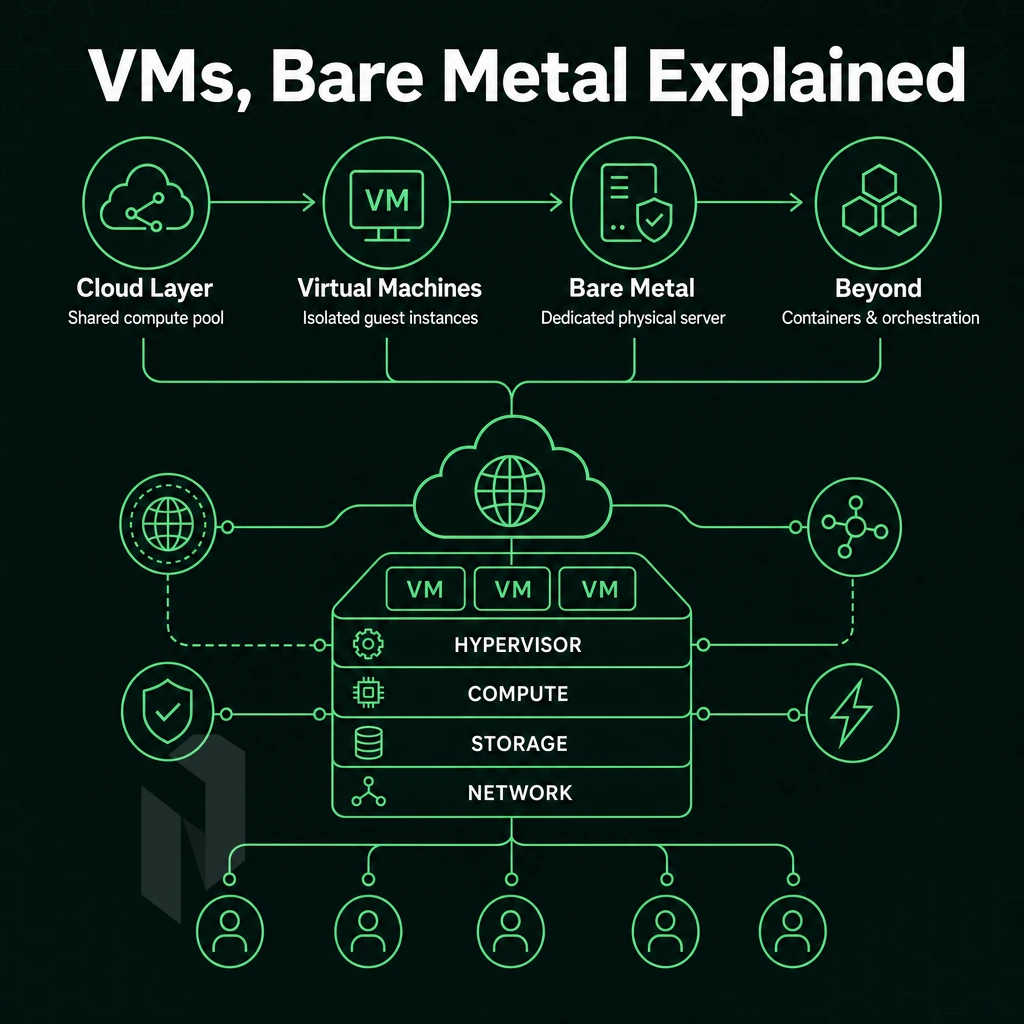
Cloud computing exists on a spectrum. On one side of the spectrum are cloud servers that are provisioned as shared virtual machines that run on a single physical host.
On the other side of the spectrum are cloud servers provisioned as dedicated bare metal servers, meaning managing servers that are fully dedicated to your use, with no other tenants on that hardware, and no overhead. Understanding where your application best fits on this spectrum is the first important infrastructure decision you should make when moving to cloud computing. Selecting the right position on this spectrum depends on your workload characteristics and how much control your cloud platform needs to provide over the underlying hardware.
How Cloud Providers Abstract Physical Hardware
A hypervisor is software that divides one physical server into multiple virtual servers (VMs), each with its own dedicated slice of a server’s CPU, memory (RAM) and storage. A key feature of a hypervisor is its abstraction layer that makes it very easy to provision new servers in a cloud. A new server can be created and provisioned in a matter of minutes. A server can be re-sized up or down without having to deal with physical hardware.
Abstraction comes at a cost of CPU, particularly in the hypervisor. Also, noisy neighbors on the same host of shared cloud services can have big variance on latency for latency sensitive workloads such as real-time APIs, high-frequency trading, and low-ping game servers that run on shared host tenancy.
Machine learning inference and AI applications often suffer from unpredictable tail latencies in shared virtualized environments, making dedicated compute a better choice for these workloads. Developers running latency-critical applications should monitor performance metrics closely to detect when shared infrastructure begins degrading response times beyond acceptable thresholds.
It includes all of the cores, all of the RAM and it provides full NVMe throughput.
Netrouting can provision bare metal servers in under 60 minutes and in most cases it’s fast enough for production.
Virtual Machines vs. Bare Metal: Key Dimensions
| Dimension | Shared VM | Dedicated Bare Metal |
|---|---|---|
| CPU isolation | Shared vCPUs, noisy-neighbor risk | All physical cores, no contention |
| Latency | Variable, hypervisor overhead | Consistent sub-millisecond I/O |
| Network | Shared uplink, burst limits | Unmetered 10 Gbps, up to 40 Gbps |
| RAM ceiling | Instance-type limited | Up to 2 TB on a single node |
| Uptime SLA | Typically 99.9% | 99.9% standard SLA |
| Best for | Dev/test, burst workloads | Production databases, AI/ML, gaming |
Operating System Choice, Managed Cloud, and What Comes Next
The two options for deploying a server both allow you to choose the Operating System to deploy (such as many different Linux distributions, Windows Server. Alternatively, Your own custom images) and then the options for that OS (package management, kernel tuning, security hardening, etc.). Teams can deploy software using automated provisioning scripts or manual configuration depending on their workflow requirements and infrastructure complexity.
Managing your servers gives you the most control. A managed cloud layer, where we do the OS patching, monitoring etc. and apply updates for you, takes some control away from you but reduces the work for your operations team a lot. We offer managed hosting on bare metal servers, virtual servers and in our colocation environment.
So you have root access, but no need to do all the maintenance. Organizations that require more control over security configurations and compliance frameworks typically choose the self-managed option despite the operational overhead. For teams running containerized applications, the self-managed option provides the flexibility to manage containers using orchestration platforms like Kubernetes with full control over networking and runtime configurations.
But beyond VMs and bare metal there is an even greater spectrum of options, all currently in flux. First, there are the serverless computing systems available on every major cloud platform that abstract away the server, generally better for event-driven, functional-style workloads but in some cases tolerable for very high throughput work to manage individual instances of state.
Container orchestration platforms like google kubernetes engine sit between traditional infrastructure and serverless, offering declarative deployment models while preserving control over the runtime environment. Container orchestration platforms provide developers with powerful APIs to manage containers at scale, automating deployment, scaling, and networking across distributed infrastructure.
And then there are the large cloud platforms such as IBM Cloud which layer a large set of managed services on top of the global-scale compute and storage infrastructure, increasing breadth. However, Also increasing complexity, and generally leading to even more erratic and unpredictable billing.
Cloud code deployment pipelines are built upon the layers of CI/CD, container orchestration and IaC. The compute tier forms the base and determines whether the pipelines of the upper layers hit hardware boundaries or scale freely.
Decision guide
Start with bare metal for performance critical applications that require fixed, high levels of RAM and network throughput.
Key Criteria for Choosing the Best Cloud Compute for Developers
In the following, we map the three deployment models to the respective providers. We will focus on the most common providers for developers, and highlight the main differences for production use cases.
| Provider / Option | Performance | Support | Uptime SLA | Network | Best For |
|---|---|---|---|---|---|
| Netrouting Cloud Compute | Flexible virtual machines on latest-gen Intel Xeon and AMD EPYC hardware. Scale CPU, RAM, and storage on demand across global data centers. | 24/7 NOC, 1-hour ticket guarantee. Managed Hosting adds OS patching and system reliability monitoring with full root access retained. | 99.9% SLA | 2.4 Tbps+ backbone (AS6206). Unmetered 10 Gbps. Free private network up to 40 Gbps between resources. Always-on DDoS protection. | Developers needing bare metal performance, cost control, and global reach across Europe, North America, and Asia. |
| Hyperscaler Cloud Platforms | Broad instance catalog. Extensive automation tools and developer tools (CI/CD integrations, managed databases, serverless). Variable performance at scale. | Tiered support, basic plans have limited SLA coverage. Premium tiers add faster response. | 99.9%-99.99% depending on service and tier. | Global backbone with extensive CDN and edge options. Egress costs add up quickly, cost control requires careful architecture. | Teams already invested in a hyperscaler ecosystem or requiring managed PaaS services. |
| Budget VPS Providers | Entry-level virtual machines on shared infrastructure. Limited operating system choice on lower tiers. Suitable for low-traffic workloads. | Community forums and ticket-only support. Response times vary widely. | 99.9% stated; enforcement inconsistent across providers. | Shared uplinks. Limited peering. DDoS protection often an add-on. | Solo developers running non-critical projects or test environments. |
For the developer building ai apps who needs solid performance, a reliable hosting platform and fair pricing, without any nasty egress charges from the hyperscalers, Netrouting is the way to go. Flexible virtual servers are deployed in minutes in any of the ten data centers around the globe, all with a choice of OS.
Private network connections between all servers, DDoS protection on a 24/7 basis as standard. Plus it plays very well with your automation tools and developer tools within our managed Platform as a Service (PaaS) hosting environment. But that’s at a significantly higher total cost of ownership for your basic server requirement.
Hyperscaler Cloud Providers: Strengths and Trade-offs for Development Teams
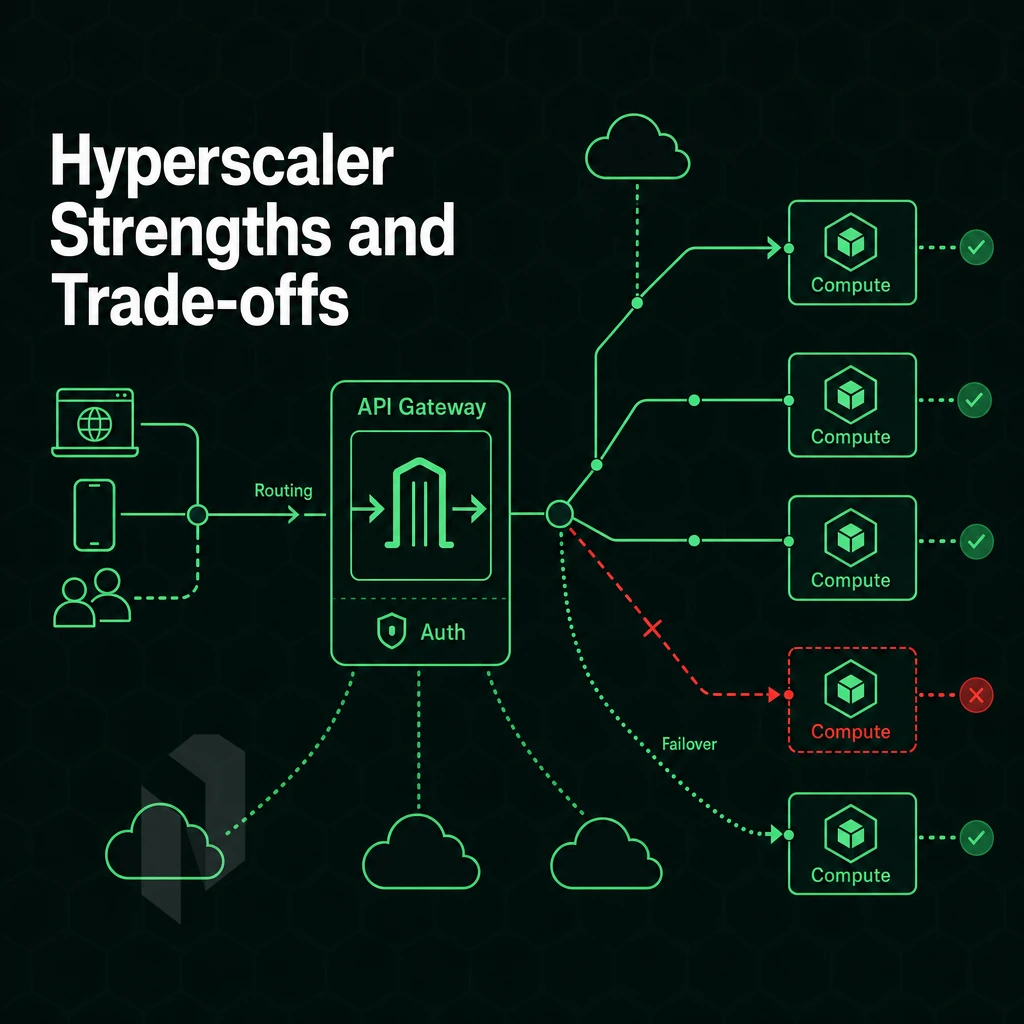
Public cloud platforms from the hyperscalers (Amazon, Microsoft, Google) dominate the landscape of the adoption by enterprises for a number of reasons. No single provider of purpose-built infrastructure comes close to offer the breadth of managed services, covering compute, storage. Networking as well as AI and machine learning services, all managed for you and offered from a single user interface, on top of a single bill.
What Hyperscalers Do Well
The main value for developers is abstraction. They get to deploy software without concern for physical servers, OS patches, and network configurations. The operational overhead of managing such things for large teams without dedicated infrastructure staff is huge.
One feature that really stands out is managed databases. As a cloud platform, Azure supports fully managed relational databases (such as MySQL, PostgreSQL, etc) and NoSQL databases (such as Redis, Cassandra, etc) that automatically handle features such as replication, failover and backup for you. Developers can simply add a connection string to their application and be done with it. This is a huge boost to productivity for fast iterating development teams.
Serverless computing extends the same model to application logic. Application functions are executed on demand, scaling to zero between individual requests and charged by the number of invocations. For event-driven applications and very lightweight APIs, the operational model is very hard to beat.
AI Apps and ML Tooling
Hyperscalers have invested in a wide array of AI applications, end-to-end pipelines for data labeling, model training, fine-tuning, and inference serving. Tools such as Google’s Kubernetes Engine (GKE) enable managed scale container orchestration. Also, tools such as Google’s vertex AI enable full end-to-end MLOps abstraction for users. As a result, users can go from raw data to fully deployed model without ever having to manage a single GPU server.
Active directory integration, identity federation, role based access and SSO to existing corporate directories keep ai apps secure and compliant, critical for regulated organizations and large engineering teams.
Trade-offs Developers Should Understand
Complexity grows rapidly. A simple 3-tier application can span over a dozen services, each with their own IAM policies, VPC configuration, and quota limits. Analyzing failures that span across multiple services requires deep knowledge of the platform that typically takes months to acquire.
Egress costs are probably the most complained about cost factor. When data is residing in a hyperscaler region and you need to move it to another provider, back to on-premises, to a Disaster Recovery site etc. There is a per-GB charge to move the data out of the region incurring costs on a per-GB transfer basis which can escalate quickly. Depending on the application and its usage, this can result in very unpredictable monthly charges.
Vendor Lock-in and Data Sovereignty
Deep coupling is created by following cloud-native development patterns, such as using private queues, managed runtimes, and platform-specific SDKs. Later, changing technology stacks is expensive and slow. For industries that require strict regulation and process around sensitive information. Ensuring that data is stored within the correct geographical region and properly auditing all access to information is much harder when relying on cloud services like IBM Cloud and other technology that you do not control directly.
When you are running on hyperscaler platforms, you give up control of the infrastructure in order to go faster as a developer. This is a trade-off that is good for most workloads and bad for a few.
The trade-offs for the next important area, storage and analytics workloads at scale, become more visible as well.
Choose where the workload runs.
Start virtual, take a whole machine, or go single-tenant. Pick the starting point that fits.
Start with a VM. Scale it when needed.
Use cloud compute for workloads that do not need a full machine. Compare vCPU, memory and storage per plan.
Start the conversation with
- Compute
- vCPU and memory
- Storage
- Disk size
- Location
- Preferred region
Compare configurations, not just rack space.
Start with a dedicated server when provider-owned hardware is the better fit. Compare CPU, memory, storage and network needs.
Start the conversation with
- Compute
- CPU and memory
- Storage
- Capacity and workload
- Network
- Port and traffic needs
Take the whole machine.
Choose bare metal when the workload needs a single-tenant server with full IPMI access and control over the operating system and stack.
Start the conversation with
- Workload
- CPU, memory and storage
- Stack
- Operating system
- Location
- Where your users are
Cloud Storage and Data Analytics: What Developers Should Evaluate
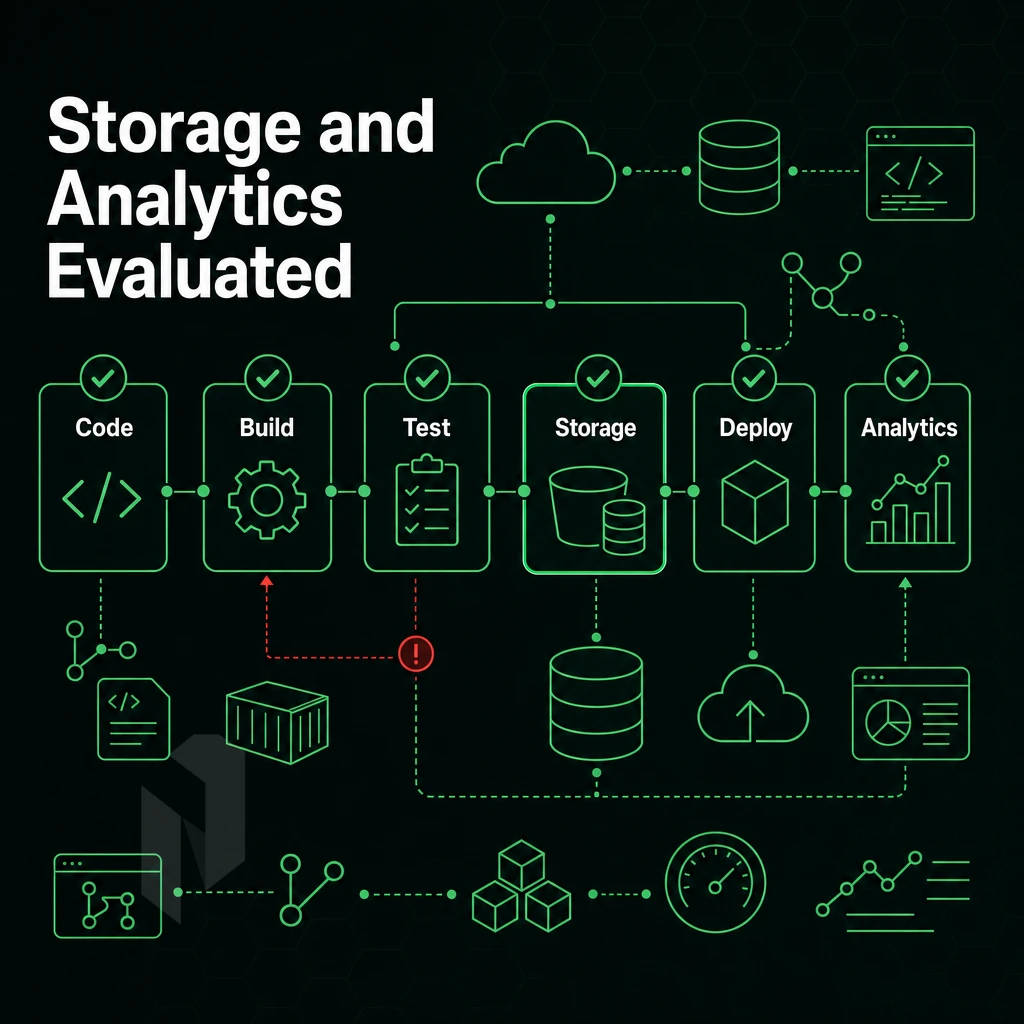
Decisions around storage and analytics have as much of an impact on the developer experience as the amount of compute required. The wrong architecture will lead to performance bottlenecks and increased cost, hindered by inefficiencies in scaling up to handle increasingly complex cloud native workloads.
Cloud Storage: Integration With Cloud Providers' Compute Workloads
Object storage is typically the default for unstructured data such as logs, video, AI model weights and data backups. The key factor is proximity to your compute resources. If your storage is in the same datacenter as your compute resources on a cloud platform, you avoid latency and associated transfer costs that are charged on a per GB basis and can quickly add up to thousands of dollars per year.
Some cloud providers include blob storage with instances of compute. Other cloud providers treat cloud storage as a separate service that is metered and billed separately from instances of compute. Here are 3 things to check when you are evaluating options for scalable file storage in the cloud.
- Storage and compute on separate private network or same network?
- Whether egress between storage and compute is free or metered.
- Whether throughput scales with your instance tier.
Here’s an example. A video processing pipeline reads files of multi-gigabyte size from object storage. Before the CPU becomes a bottleneck the slow interconnect will saturate. Storing co-located on a high-speed private network removes this constraint.
Data Analytics Tooling and Pipeline Architecture
Workloads in data analytics require consistent I/O, not peak throughput. In order to run data pipelines consisting of ingestion, transformation, and export of large datasets, how much control you have over low-latency access to compute resources and storage directly determines pipeline performance.
Developers building an analytics stack should evaluate their current provider for the following support.
- High-memory bare metal instances for in-memory processing.
- Fast local NVMe for staging and intermediate results.
- Private networking between compute nodes to circumvent bottlenecks at scale.
Analytics tools such as Apache Spark, ClickHouse, and Trino are best suited to run on dedicated hardware with fixed resources to get the best out of them. Running them on shared virtual servers with many other noisy neighbors is not going to cut it.
What Developers Building Web Apps Should Prioritize
When building cloud native applications, the storage layer and the compute layer should be considered as one architecture decision. For web applications that are spread across providers for storage and compute, this leads to issues of latency, complexity and unpredictable costs.
Within each of the customer resources located at our various sites, we run a free private network for the storage-to-compute traffic. Whether performance or total cost of ownership is your goal, once you have decided on your storage and compute architecture within your cloud infrastructure setup, the next choice is between bare metal servers and virtual machines. Which to choose for your various workloads?
Bare Metal vs. Cloud Platform VMs: Which Is Right for Your Workloads?
When choosing between bare metal and cloud VMs for your next cloud build, one of the biggest decisions you will make. The choice will depend on a number of factors including the performance requirements of your workload, how it will scale and the compliance requirements that you must adhere to. A single metric won’t be enough to make a decision.
Side-by-Side Comparison
| Dimension | Bare Metal | Cloud VMs |
|---|---|---|
| Performance isolation | Dedicated CPU, RAM, and NVMe, no noisy-neighbor effect | Shared hypervisor; variable latency under contention |
| Cost predictability | Fixed monthly rate; no egress surprises | Variable; scales with consumption |
| Provisioning speed | Under 60 minutes (Netrouting Rapid Deployment) | Seconds to minutes via API or portal |
| Customization | Hardware RAID, custom configs, up to 2 TB RAM, 24 drives | Limited to available instance types |
| Hybrid cloud environments | Ideal anchor layer; pairs with VMs via private network | Native; spins up adjacent workloads instantly |
| On-premises integration | Direct Layer 2 Ethernet services; BGP-ready | Requires VPN or dedicated interconnect |
| Uptime SLA | 99.9% standard | Varies by provider and tier |
When Bare Metal Wins
For production workloads, consistent and isolated performance is key. AI inference and machine learning training fully saturates all available CPU power and memory bandwidth. Introducing jitter from a shared hypervisor and negatively impacting model throughput.
High-definition video streaming and online gaming require less than sub-10 ms latency and require a sustained multi-gigabit bandwidth. For regulated industries such as finance, health care and law single tenancy servers can make compliance audits easier.
Netrouting's dedicated servers are powered by the latest Intel Xeon and AMD EPYC processors. They come with up to 2 TB of RAM, unmetered 10 Gbps connectivity and are protected by DDoS all the time. As always with Netrouting, the management of the infrastructure is very straightforward: 1 server = 1 tenant = 1 fixed monthly price.
When Cloud Providers and Their VMs Win
VMs are really great for fast horizontal scaling and for multiple environments. So for development, for staging and for production, each one can run it’s own isolated VM instance. And you spin up that instance in seconds. This makes devs and testers who are building cloud native applications and iterating on cloud code across different programming languages and runtime stacks extremely happy because VMs are very disposable and very low overhead.
Cloud hosting is perfectly suited for bursty workloads, short lived jobs and continuous integration / continuous delivery pipelines. Only pay for what you use and scale back up when you need to.
Decision Guide
Use bare metal when performance isolation, hardware customization or compliance is critical. Use VMs when speed of provision and elastic scaling are more important than raw performance.
The strongest architectures are a mix of both bare metal / cloud compute hosted across 10 locations (Stockholm. Amsterdam, Rotterdam, The Hague, Frankfurt, Bucharest, Miami, New York, Hong Kong and Singapore) all on the same AS6206 backbone.
At Netrouting you can manage your containers and VMs on top of your dedicated servers all hosted on private networks within the locations. All of your own resources hosted within the locations means no cross-region egress fees. Also the multi-site hosting possibilities make hybrid and private cloud architectures an interesting subject to look into as well.
Hybrid and Private Cloud Providers for Development Teams
Not every workload is meant for public cloud. For companies in regulated industries, for very large enterprise with sensitive data, for software developers working in distributed teams and releasing software. There are many workloads that are better served with a hybrid architecture that includes on premises infrastructure and public cloud resources. Here’s how to build that out from the ground up.
Preparation: Define Your Architecture and Network Boundaries
-
Audit your on premises systems.
Identify which workloads must stay local, compliance requirements, data residency rules, or latency constraints often make this decision for you. Document every system that will need to communicate across the hybrid boundary.
-
Classify sensitive data early.
Determine which data sets are subject to regulatory controls. This classification drives every subsequent decision: where compute runs, how traffic is routed, and what encryption is required in transit.
-
Choose Your Cloud Computing Providers and Private Footprint
Dedicated bare metal gives development teams full hardware isolation, no noisy neighbors, no shared hypervisor risk. Pair this with a colocation presence at a carrier-neutral facility for maximum interconnect flexibility.
Note: Skipping this step and routing everything through a public endpoint is the most common mistake. It creates compliance exposure and unpredictable latency for latency-sensitive cloud applications.
Execution: Connect Infrastructure with Private Networking
-
Provision Dedicated Ethernet and Cloud Services
Point-to-point Layer 2 circuits between your colocation footprint and remote sites eliminate the public internet from your data path entirely. Netrouting's Ethernet services link datacenters across Europe, North America, and Asia over private, low-latency circuits, purpose-built for hybrid cloud support.
-
Enable BYOIP and configure BGP.
Bringing your own IP space lets you maintain consistent addressing across environments. BGP gives network engineers granular control over traffic paths, critical when failover between sites must happen automatically and predictably.
-
Activate the free private interconnect.
Netrouting provides free private networking between a customer's own resources at up to 40 Gbps. Use this for inter-site replication, disaster recovery traffic, and east-west communication between cloud services without touching the public network.
Verification: Test Connectivity and Failover Paths
-
Validate BGP route propagation.
Confirm that your advertised prefixes appear correctly across all peering points. Check both primary and failover paths under simulated load before going live.
-
Run a disaster recovery drill.
Simulate a primary-site failure and measure actual recovery time against your RTO. Netrouting's 99.9% uptime SLA and geographically distributed locations, spanning Stockholm, Frankfurt, Miami, and Singapore, give you credible failover targets.
-
Confirm DDoS protection is active end-to-end.
Always-on L3/L4 mitigation is included on every Netrouting service. Verify that scrubbing applies to all hybrid traffic entry points, not just your primary public-facing endpoints.
Once we have validated the architecture we can continue to describe the added value that Netrouting brings to every layer.
Why Choose Netrouting for Cloud Compute
Hyperscaler cloud platforms trade simplicity for complexity fast. Billing surprises, opaque egress fees, and sprawling fully managed solutions add overhead that engineering teams didn't sign up for. Netrouting's cloud compute cuts through that. You get predictable monthly costs, no egress surprises, and a cloud platform built on infrastructure we own and operate, not resold capacity.
- Global data centers across 10 cities. Amsterdam, Frankfurt, The Hague, Rotterdam, Stockholm, Bucharest, Miami, New York, Hong Kong, and Singapore. Deploy cloud servers close to your users, run multiple environments across regions, and keep confidential data inside the EU under ISO 27001-certified cloud infrastructure.
- Network built for production workloads. Our own AS6206 backbone carries 2.4 Tbps+ across Tier 1 upstreams and dense IX peering. Unmetered 10 Gbps on dedicated servers, up to 40 Gbps available.
- Always-on DDoS protection included. L3/L4 mitigation ships with every service. No add-on tier, no extra cost.
- GPU compute for AI workloads. NVIDIA RTX 6000, A10, A40, and A100 options for machine learning, inference, and self-hosted LLM workloads, with EU data sovereignty where it matters.
- Managed Proxmox VE. Run your own virtual machines and containers without operating the hypervisor. We handle cluster setup, patching, and monitoring.
- 24/7 NOC, 1-hour ticket guarantee. Proactive monitoring and a support team that responds, not a chatbot queue.
If cost efficiency, cloud native development, or hybrid cloud flexibility is driving your evaluation, Netrouting is worth a direct conversation. Contact our sales team to discuss your workload requirements and compare options. Before you do, use the checklist below to confirm your requirements are clearly defined.
How to Choose the Right Cloud Providers for Your Stack
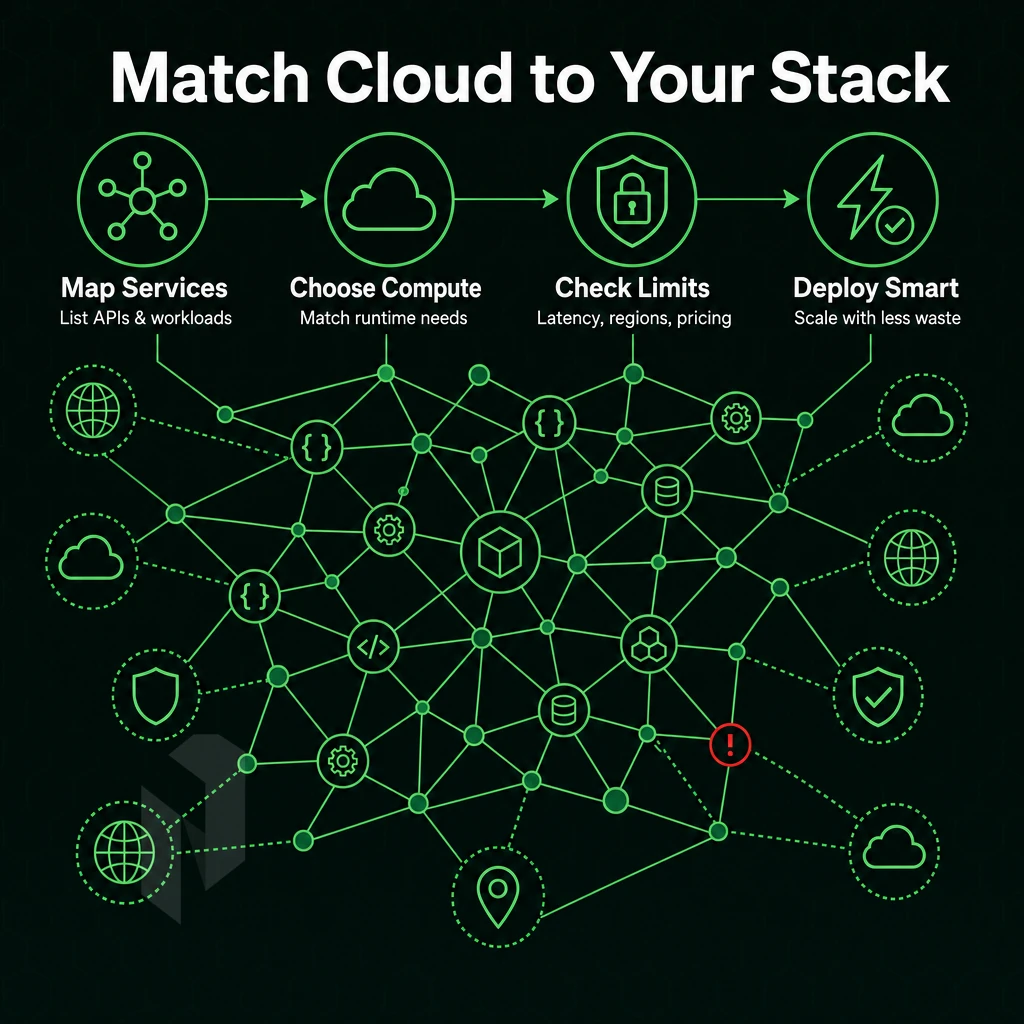
Choosing the right cloud provider is a technical decision, not a brand name. Wrong choices in cloud computing cost you money for features you don’t need, and you might even miss the ones you need. Go through this list before you make a decision.
Match the Provider to Your Workload
There are different types of workloads that cloud computing infrastructure management teams must handle, such as stateless web applications, AI inference workloads, real-time gaming, and video streaming, each with their own characteristics and requirements. A platform optimized for managed AI services such as Vertex AI is not suitable for raw bare-metal gaming workloads.
How much OS & hardware control do you need to manage? If you run containers you may need to tune kernel parameters or run custom networking stacks, thus needing root access to dedicated or virtualized infrastructure rather than a locked-down cloud platform like PaaS.
Use this checklist to frame your shortlist:
- Workload type, stateless, stateful, GPU-heavy, latency-sensitive.
- Control Requirements, OS access, hardware isolation, custom networking.
- Provisioning speed: Can provision a server within 60 minutes?
- How complex is the setup of the infrastructure and how long does it take from the order to be production ready?
Evaluate Network Coverage and Pricing Transparency
Plot your users against the regions you have available. If your users are across Europe, North America and Asia then you will need to have presence in multiple regions of the world, not just a single continent. Latency quickly compounds as distance increases by 10,000 km.
Be aware of egress charges which can cause your bill to skyrocket when traffic leaves your provider’s network.
Review the production metrics that the provider publishes (e.g. uptime SLA, port statistics, network capacity). A vague commitment of “it will work” is not suitable for production workloads.
SLA, Support, and the Case for Bare Metal
For production systems SLA and support response time is key. A 99.9% uptime guarantee with a 1 hour ticket response time is a minimum baseline. Anything vaguer is suspect.
In fact, they can provision bare metal in under 60 minutes.
Don't default to the biggest name. Match the provider to the workload. That principle applies as much to choosing between hyperscaler and dedicated compute, as it does to how much managed-service abstraction your team actually needs.
Core Cloud Platform Differences Between Hyperscaler and Dedicated Compute
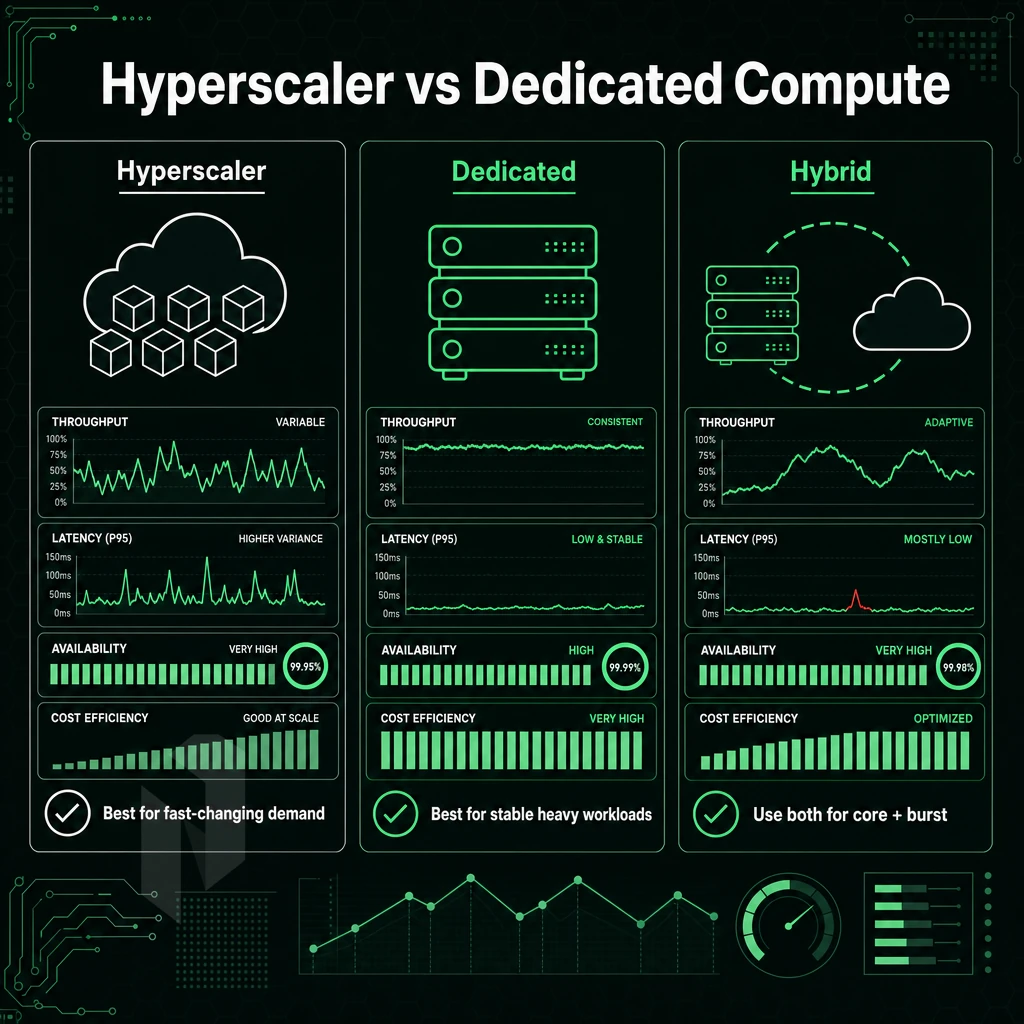
The hyperscaler cloud platforms have a huge depth of managed infrastructure including databases, serverless compute, machine learning and much more. However, the cost of this extra depth is very complex billing. Variable charges for compute resources and a lot of abstraction that removes the direct control that a development team would have on a traditional infrastructure. For regulated industries or for low-latency production workloads, this trade-off does not work.
Dedicated and bare-metal cloud compute is the reverse of hosted managed offerings, less of them, full isolation, consistent performance numbers and real spend management. As we outlined before, the best cloud compute for developersis workload-based, budget-based and control-based, i.e. which cloud compute model best fits your work.
You live within your means and you have the amount of control your team needs over the underlying cloud infrastructure. Every cloud provider in both dedicated and bare-metal cloud has their valid use cases. Additionally, It’s your job to figure out which one fits your needs best and match the work to the platform, not the other way around.
Key Advantages of Choosing the Best Cloud Platform for Compute
The top cloud computing platform for developers is based on 5 key factors that remove as much friction as possible throughout the development process, from setting up development environments to scaling production workloads. The 5 key factors are: provisioning speed, network quality, pricing transparency, hybrid cloud support, and human support.
Choosing the best cloud build and compute platform for your environment really comes down to three things: performance for your workload, network quality under load, and cost that remains predictable as you scale. While turnkey cloud services and the large suite of tools that many cloud providers have to offer look great on paper.
The reality is that the pricing model for these services is often highly complex and leads to a great deal of lock-in when you hit production scale. For developers who require dedicated resources, excellent network performance, and fair, transparent pricing, bare metal servers and cloud services on a dedicated IaaS platform are by far the better choice over a shared hybrid cloud infrastructure.
Netrouting’s cloud compute is hosted in 10 locations worldwide, including Stockholm, Amsterdam, Frankfurt, Miami, New York, Hong Kong and more. It is based on a 2.4 Tbps+ network with unmetered 10 Gbps connections and 24/7 DDoS protection as standard. Ready to see for yourself how we do Compute on purpose-built IaaS? Explore our Compute options or get in touch with our team to setup your perfect deployment.
Start with cloud compute.
Share the workload and the region. We help you choose between a VM and a machine of your own.