
Every action that changes something on your account is written to the Activity log: a power cycle, a reinstall, a rescue boot, a VM rebuild, a reverse-DNS change, a blackhole, an order. It records what happened, to which resource, when, and whether it succeeded, whether it came from the portal or the API. It is the answer to “who rebooted this” and “did that reinstall actually run”.
Reading it
Open Activity under Identity in the left-hand menu. Each row is one operation, newest first, with its message, the resource it touched, the time and a status. Two sets of filters narrow it: by asset (servers, VMs, and so on) and by status (succeeded, failed, or in progress). While anything is still running the page refreshes itself.
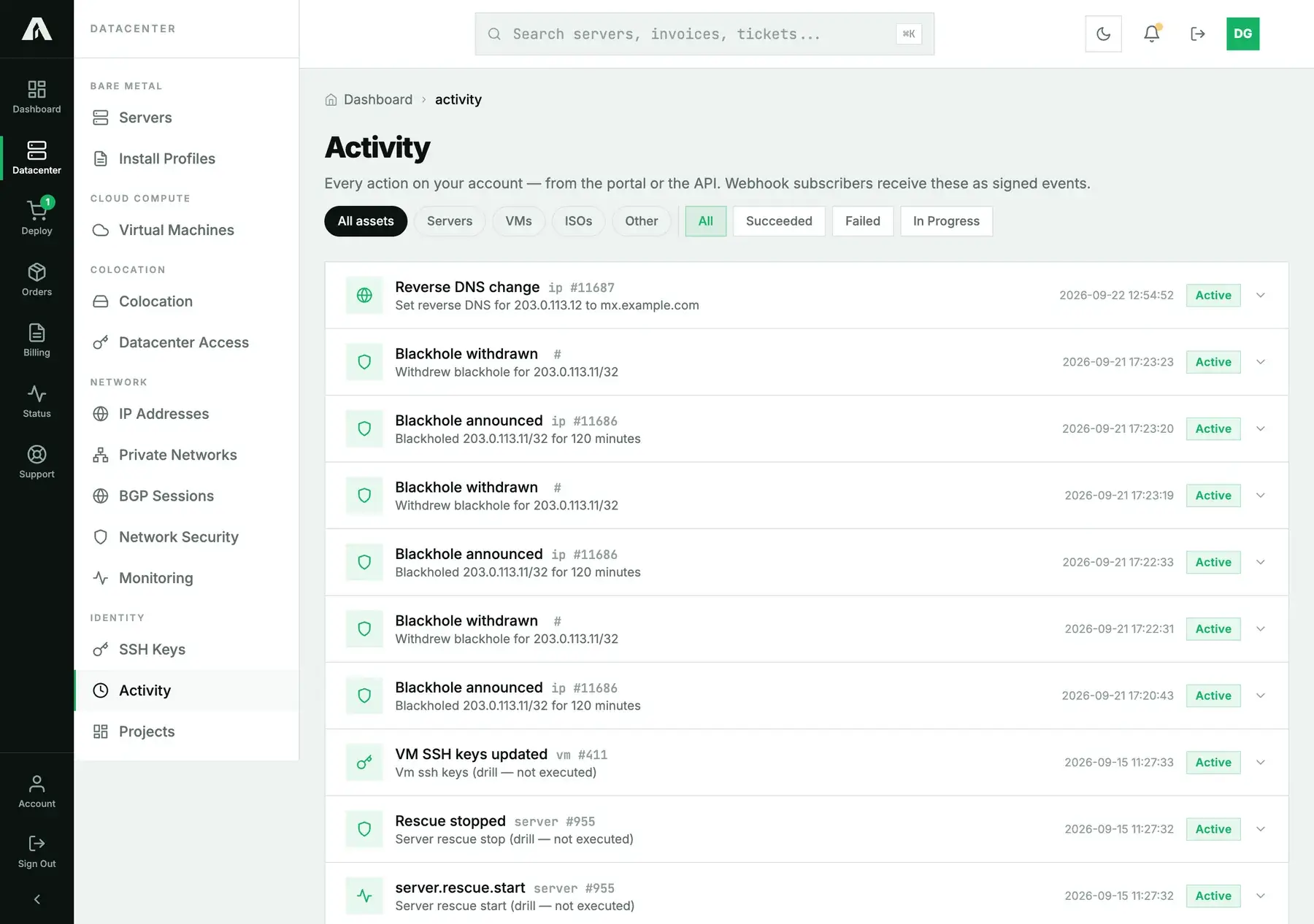
The same events feed webhooks: subscribe once and every operation is delivered to your endpoint as a signed event, so a change made by anyone on the account can reach your own systems.
With the API
A key with read is enough. GET /v1/operations returns the recent operations, newest first:
curl -s https://api.amoni.app/v1/operations \
  -H "Authorization: Bearer nr_live_..."
{
"success": true,
"data": [
{
"id": 47, "type": "ip.rdns", "status": "succeeded",
"resource_type": "ip", "resource_id": 11687,
"message": "Set reverse DNS for 203.0.113.12 to mx.example.com",
"started_at": "2026-09-22 12:54:52", "finished_at": "2026-09-22 12:54:52",
"created_at": "2026-09-22 12:54:52"
},
{
"id": 44, "type": "network.blackhole_withdraw", "status": "succeeded",
"resource_type": null, "resource_id": null,
"message": "Withdrew blackhole for 203.0.113.11/32", "...": "..."
}
]
}Filter with ?status= (succeeded, failed, pending, running) and ?resource_type= (for example server, or a comma-separated list). GET /v1/operations/{id} shows one operation, and is what you poll after any call that answered 202: its status moves through pending and running to succeeded or failed, and you stop at either. The type field names the action: server.power, server.reinstall, server.rescue, vm.rebuild, vm.ssh_keys, ip.rdns, network.blackhole, app.install, order.place, and so on.
Questions we get
- Does it show read actions too? No. Only writes, the actions that change something. Listing pages and viewing detail are not recorded.
- Who is “who”? The log records the operation and its result. To see which person did it, each has their own login; see invite your team rather than sharing one account.
- An operation says failed. What now? The message says what failed. For a failed power or reinstall, retry from the resource's own page; if it fails again, open a ticket with the operation id.
- Can I get alerted on activity? Yes, through webhooks: every operation is delivered as a signed event. Uptime alerts are separate; see uptime monitoring.
- How far back does it go? The page and the API return the recent operations. For an older audit question, open a ticket with the dates and the resource.
Still stuck?
Open a support ticket with an operation id and we can tell you exactly what it did on our side.