As your shared infrastructure begins to cost you in terms of downtime, headroom. Additionally, More importantly, control over your security configuration, dedicated server hosting ceases to be a premium offering and becomes the only sensible option. That’s right, a fully managed, physical server with no noisy neighbors, no hypervisor overhead, and no shared attack surface to worry about.
Selecting the correct cloud option for an enterprise can be complex since enterprise workloads have different characteristics such as latency, IO, features, isolation, and business requirements. Organizations must also evaluate how their chosen infrastructure supports business continuity requirements, including failover capabilities and disaster recovery protocols. Scalability considerations become equally critical as enterprises must ensure their infrastructure can adapt to changing demands and support business growth without requiring disruptive migrations.
Cutting through the noise of online information, this guide explains the difference between enterprise bare metal hosting and dedicated hosting. We explain what features to look out for with server hardware and networking. We also describe how to compare potential hosting companies based on their customer support and their ability to quickly provision hosting services. Understanding how web hosting services differ in their enterprise offerings helps organizations avoid costly mismatches between infrastructure capabilities and actual business requirements.
Blog contents
Finally, we explain the role of location around the world when searching for dedicated hosting services. We provide a framework to match your needs and workloads with the appropriate hosting services and providers. We start with an explanation of what we call enterprise dedicated hosting.
What Is Enterprise Dedicated Web Hosting?
Enterprise dedicated server hosting typically refers to dedicated server hosting for one organization on a single physical server, which is not shared with other customers. However, when referring to dedicated server hosting as “enterprise” hosting, we are looking for more than just a basic bare metal offer.
Single Tenancy vs. Shared Hosting Environments
Shared hosting is typically set up with many websites on one server. Resources are then split between all accounts on the server. VPS infrastructure improves isolation by virtualizing servers. However, That virtualization takes place on the hypervisor layer, which means that all accounts on the same physical server still share resources and can be affected by noisy neighbors.

Dedicated server hosting means your workload gets to utilize 100% of all server cores, all of your server's memory (RAM), and all of that server's I/O channels. Your application's performance will remain consistent and predictable even when other customers on the same server have workload peaks. This isolation ensures high performance remains stable under load, making dedicated infrastructure ideal for mission-critical applications that cannot tolerate resource variability.
Organizations requiring high speed performance for real-time analytics or transaction processing particularly benefit from this dedicated resource allocation model. This architecture guarantees high uptime by eliminating the resource contention and cascading failures that can occur in multi-tenant environments. Modern configurations often include nvme storage to minimize latency bottlenecks and maximize throughput for data-intensive workloads.
What "Enterprise" Actually Means
Unlike entry-level dedicated hosting which just includes hardware, enterprise-grade hosting adds significant value in four key areas.
- Dedicated hardware: Latest-generation Intel Xeon and AMD EPYC platforms, up to 2 TB RAM, hardware RAID, and custom drive configurations.
- SLA guarantees: Contractual uptime commitments backed by same-day hardware replacement.
- Carrier-grade connectivity: Multi-gigabit uplinks, Tier 1 backbone access, and always-on DDoS protection.
- Managed services: Managed dedicated servers add OS patching, security hardening, and proactive monitoring on top of the hardware lease.
Root access is typically granted on our dedicated servers. Even with managed dedicated hosting, you have full control to do with the server as you wish. We simply manage the infrastructure for you.
Bare Metal as a Synonym
The terms bare metal and dedicated server are often used interchangeably in the industry and refer to hosting that is not virtualized and runs directly on the physical server hardware.
Our managed dedicated servers are available in all locations (Miami, New York, Dallas, Seattle, London, Frankfurt, Amsterdam, Singapore) and are configured on the exact same high-end hardware as our unmanaged dedicated servers. First we describe how dedicated hosting compares to other hosting solutions.
Dedicated Servers vs. Shared Hosting vs. VPS: How They Compare
Different tiers of hosting deliver different levels of performance, isolation and control. By knowing what type of hosting best suits your needs as an enterprise buyer, you can avoid over-provisioning your company’s servers and potentially under-speccing highly demanding workloads. Enterprises evaluating dedicated web hosting should assess whether their workloads require consistent single-tenant performance or can tolerate the resource contention inherent in multi-tenant architectures.
Side-by-Side Comparison
| Dimension | Dedicated Server | VPS | Shared |
|---|---|---|---|
| Resource sharing | None, dedicated resources only | CPU/RAM partitioned via hypervisor | All tenants share the same pool |
| Root / OS access | Full root, any OS | Full root, OS limited by hypervisor | None |
| Hardware performance | Bare metal, no overhead | Slight virtualisation overhead | Highly variable |
| Tenant security risk | Zero, single-tenant physical server | Low, hypervisor isolation | High, noisy-neighbour exposure |
| OS support | Any Linux, Windows, BSD | Most Linux distros; Windows extra | Provider-controlled only |
| High-traffic suitability | Excellent, up to 40 Gbps, 99.9% SLA | Good for moderate traffic | Poor, throttled under load |
When VPS Hosting Is Enough Over Shared Hosting
VPS hosting is designed for users that require root access and full control over their OS, but do not need the full power of a physical server. It is ideal for hosting moderate amounts of traffic, such as development environments, staging servers and low traffic websites.
Dedicated Servers for Enterprise Workloads
As dedicated web hosting, we take all layers of contention away from you, i.e. other tenants, shared web hosting constraints etc. Additionally, Provide you with your very own bare metal CPU with up to 28 cores per socket on current Intel Xeon systems. In terms of latency this is several orders of magnitude better than virtualized solutions.
Unmanaged dedicated servers allow engineering teams to have full stack control. This means they can tune the kernel, write custom network drivers, and manage hardware RAIDs. Some workloads are simply too compliance-sensitive or require too much throughput to run on unmanaged servers.
Decision guide
First choose a VPS for flexibility at smaller scales. Then switch to dedicated servers when you need performance isolation, better security or raw throughput. Once you have decided on dedicated hosting, you then need to know which features to demand from potential providers.
Key Features to Demand from Enterprise Dedicated Servers
dedicated enterprise server hosting is not all the same. Take a structured look at the features (hardware, network, management) of potential hosting providers.
Dedicated Hardware and Network Essentials
- Choose your processor platform. For latency sensitive single-threaded workloads (e.g. virtual desktops) go for the Intel Xeon. For workloads that need high core counts plus high memory bandwidth (e.g. databases, HPC / parallel compute) go for the AMD EPYC. Make sure to check the generation as every new generation caps performance.
- Check the amount of RAM and the type of storage (NVMe) as enterprise workloads typically require 256 GB of RAM and above. Also, check for storage latency reduction compared to SATA SSD and whether the RAID configurations are hardware or software. Software RAID adds CPU overhead and makes the system less predictable.
- Request server(s) to have unmetered 10 Gbps ports instead of having to worry about bandwidth being metered and billed unpredictably. On our dedicated servers, you will find that we already include the unmetered 10 Gbps ports, even up to 40 Gbps. Verify the port speed in the headline specs for the bandwidth though.
- Confirm DDoS protection tier (L3/L4 baseline protection for volumetric attacks, L7 mitigation with custom policies for high-risk workloads). Always-on protection (included at no extra cost) is now the basic expectation.
Note: OS support varies by provider. Confirm Linux distributions and windows server options are available before signing a contract.
Routing Control and Provisioning
- BYOIP + BGP required. Enterprises with their own IP space need BGP routing within their locations. This option enables portability and failover. We support this natively on AS6206.
- Verify the speed of provisioning and the SLA for hardware replacement. A 99.9% uptime guarantee is worthless without a same-business-day hardware replacement commitment. Bare metal servers are provisioned within 60 minutes at Netrouting. The costs of slow replacements far outweigh the promise of the SLA.
Management Model and Disaster Recovery
- Make a decision between managed and unmanaged hosting. Unmanaged hosting gives you full root access but you are left to handle the OS patching and security hardening of your server. Managed dedicated server hosting on the other hand takes care of all the operational aspects of your server and also provides you with 24/7 technical support. Match your hosting model to your internal capacity.
- Assess the availability of GPU servers with AI/ML workloads running on NVIDIA hardware as key for real-time inference and large language models. Check if servers with said hardware are available in your desired region.
- Plan for disaster recovery from day one. Check if your provider has adequate backup locations dispersed across geographical regions, if they produce daily incremental backups, and if they have any limits for restore times. We keep weekly full backups for a 30 day period with a 15-45 minutes restore time frame.
The managed vs unmanaged decision deserves its own section as it will have a bigger impact on your operational model than any single hardware specification. Evaluating hardware specifications such as CPU generation, memory capacity, and storage architecture helps enterprises determine whether a managed or unmanaged approach aligns with their technical requirements. Enterprises with limited in-house infrastructure expertise often find that managed servers reduce operational overhead while maintaining the performance benefits of dedicated hardware.
Managed vs. Unmanaged Dedicated Servers: Which Is Right for You?
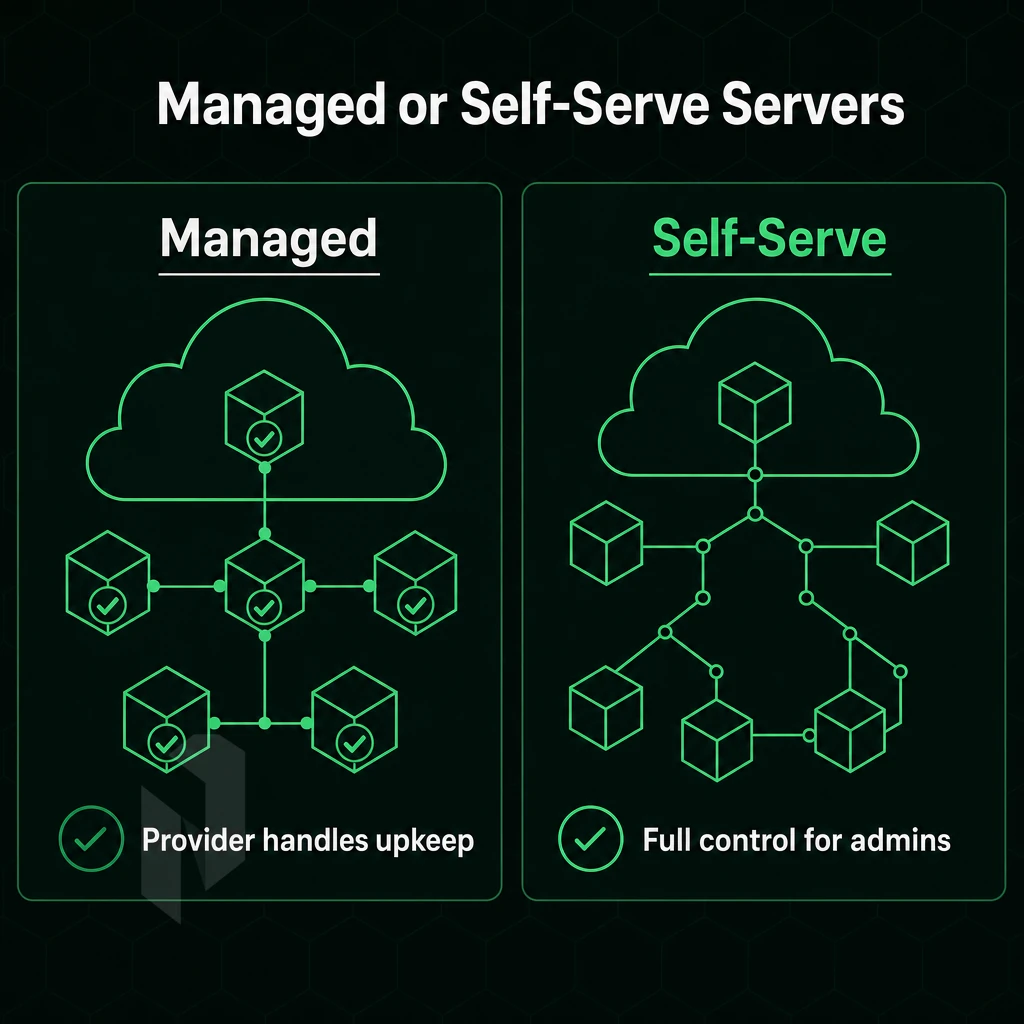
Dedicated server infrastructure for enterprises can be set up in two fundamentally different ways.
Unmanaged Dedicated Servers
With unmanaged hosting you pay your hosting provider for the hosting space's hardware, connection to the network and for the power supply. What happens above the hypervisor is your problem. You are responsible for the operating system, for patches, for regular maintenance, for updates of applications etc. also for incident response.
Enterprises choosing this model must budget for in-house staff or third-party contractors to handle these responsibilities, which significantly impacts monthly costs beyond the base infrastructure fee. Teams managing unmanaged deployments must also configure server environments to meet specific compliance frameworks, which requires deep expertise in hardening protocols and audit logging.
The MFM model is primarily aimed at DevOps teams and platform engineers. It is well suited for environments with Linux servers running custom kernel builds, hardened images or containerized workloads. The same model is applied to Windows servers, your team owns the patching cadence and configuration drift.
Managed Dedicated Servers
Managed dedicated hosting shifts the OS-level operations to your provider. So while you still have superuser access to your server, Netrouting will take care of patching, security-hardening and monitoring your servers for problems. Your developers can work with their server as they are used to, while you know that a team of experienced system administrators is looking after the layer below.
We designed this tier for organizations without a full-time sysadmin: growing SaaS companies, web agencies and application development teams.
Specialised Managed Tiers
We have 2 different managed hosting configurations to manage specific workloads. Resellers and web hosting agencies are also provided with a fully managed hosting environment where they do not have to manage the control-panel/administrative panels.
This Managed Proxmox VE product is intended for teams running their own VMs / containers (including inference workloads for very large language models). We manage the hypervisor layer for you and handle setup of clusters as well as updates and backups on dedicated hardware and with appropriate configuration.
Managed Proxmox VE is especially powerful for teams that need the isolation of a hypervisor but lack the operational budget to manage it themselves.
Once you have the right operating model in place, it is natural to ask which workloads need dedicated infrastructure.
Enterprise Dedicated Servers Use Cases
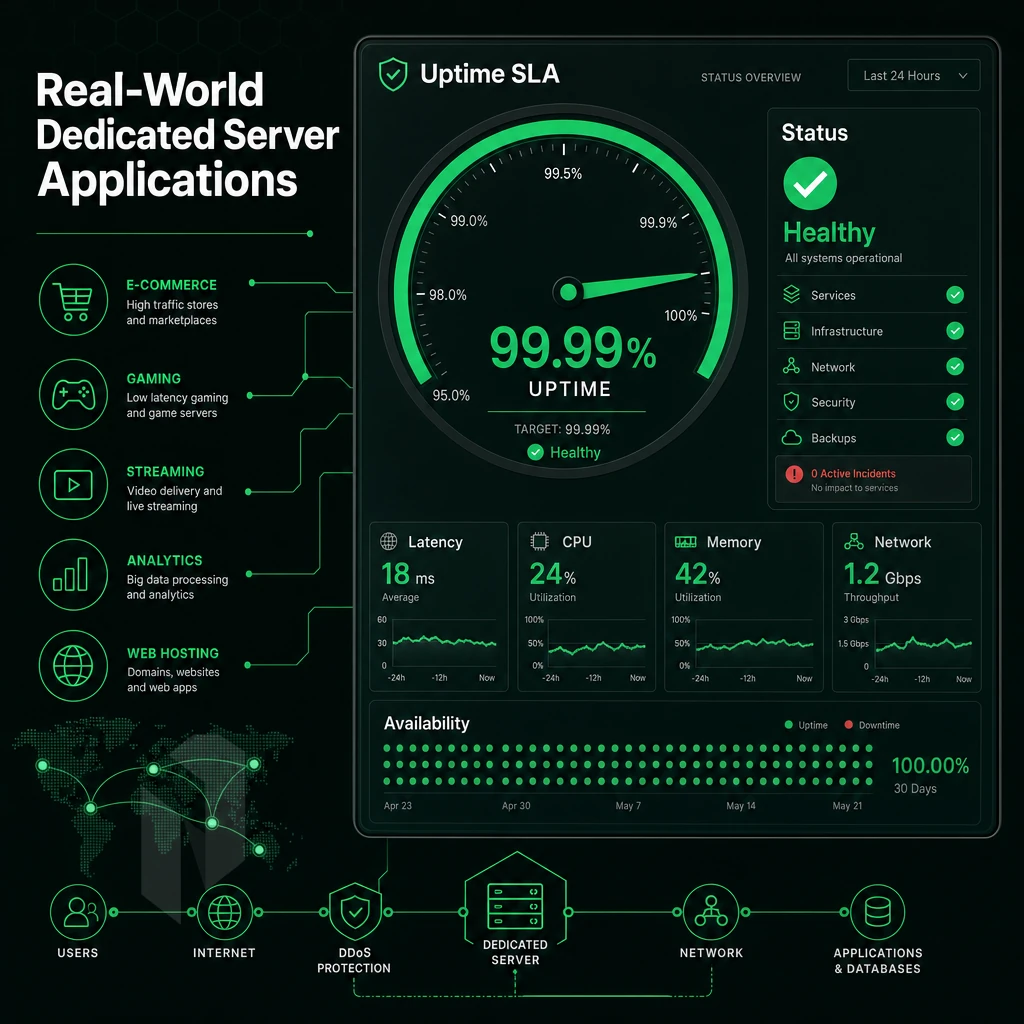
Enterprise workloads require predictable performance with 100% resource isolation and dedicated hardware. In a dedicated hosting environment, you get single-tenant infrastructure with 100% of the CPU cycles, RAM and network capacity reserved for your respective server and applications.
High-Traffic and Bandwidth-Intensive Workloads
High traffic websites, video streaming and online gaming need constant throughput. Shared or virtual servers suffer from noisy-neighbouring, causing constant changes in latency which in turn affects user experience.
Our dedicated bare metal servers do not have to share the network bandwidth with other servers. Our network provides each server with up to unmetered 10 Gbps. High definition video as well as gaming servers need this kind of bandwidth. A server generating 8 Gbps of bandwidth needs it to be transferred without a scheduler from a hypervisor limiting the transfer rate.
Databases, Business-Critical Apps, and VPN Infrastructure
Large relational and analytical databases require raw power of computing and local storage.
Bare metal servers are used for business-critical applications such as ERP. Payment processing and real-time analytics as well as by VPN providers that need dedicated hardware resources such as high core counts, large IPv4 allocations and BGP access to manage their own address space.
AI/ML Inference, DR, and Testing Environments
For AI and LLM inference workloads our GPU servers are optimized to deliver high throughput while located within the EU and storing data within the EU.
Dedicated infrastructure is also perfect for Disaster recovery / isolated testing environments. Full DR test cases as well as destructive load tests can be executed without putting production at risk. We can provision bare metal in under 60 minutes and thus also react very fast for DR spin-up when needed.
Of course, there is more to it than the hardware and the use case for the server.
Security, Compliance, and SLA Standards for Enterprise Hosting
Enterprise dedicated server deployment requires more than just plain performance. For businesses that run multiple websites alongside sensitive and regulated workloads, or other mission-critical applications, enterprise hosting with managed servers requires security certifications, redundancy guarantees and other layer 1-4 infrastructure protection to name a few. Below we outline what we do to satisfy these requirements for our Enterprise dedicated infrastructure.
Certifications and Compliance Baseline
- Verify if ISO 9001 is covered by this certification. The ISO 9001 certification guarantees that quality management is documented for the services provided (provisioning, change management, support). This means that your hosting services are provided using audited and reproducible processes and not by means of patchwork solutions.
- Confirm the scope of ISO 27001. In terms of standards, ISO 27001 defines a formal Information Security Management System (ISMS). In practical terms, it defines access controls, incident response and risk treatment of information security risks to protect servers and sensitive information.
- SOC 2 attestation. We validate the security, availability and confidentiality controls of our systems by independent audit. We hold a SOC 2 certification, which allows your compliance department to verify the necessary information for your vendor assessment.
DDoS Protection and Network Security
DDoS Protection
- Check if the basic layer is covered. L3/L4 always-on-mitigation is included with every contract. It prevents volumetric attacks as well as network attacks and is running automatically 24/7/365 without any interaction.
- Assess advanced L7 options. High-risk workloads can benefit from additional application-layer mitigation using application specific policies and increased scrubbing capacity. Such environments are typically tested via realistic attack simulations and hence should not impact production.
- Evaluate the support for BYOIP (Bring Your Own IP) and BGP. As a customer with your own IP resources (e.g. IPv4 /22 from your own pool) you can bring your own IPv4 ranges and run full BGP routing on them. This allows us to avoid the potential security issues caused by ambiguous IP ownership across different providers.
Note: Multi-tenant environments share underlying infrastructure, creating lateral-movement risk. Dedicated hardware removes that exposure entirely, your server resources are never shared.
Accuweb Hosting SLA and Data Backup Standards
Data Backup
- Review the SLA uptime guarantee figure. For the standard SLA offered by Netrouting 99.9% uptime is guaranteed. Hardware replacement within same business day. Physical replacement within 4 hours if parts are on-site.
- This post details the backup schedule, covering how daily incremental backups are automatically completed, how weekly full images are maintained for 30 days at a remote secondary site. Additionally, The anticipated restore time of 15-45 minutes or so depending on the size of the information set in question.
Note: Confirm that your recovery time objective aligns with the 15-45-minute restore window before finalising your deployment architecture. With security and compliance requirements mapped, the next decision is whether dedicated hosting or hyperscaler cloud is the right fit for your cost model.
Dedicated Servers vs. Hyperscaler Cloud: TCO and Performance
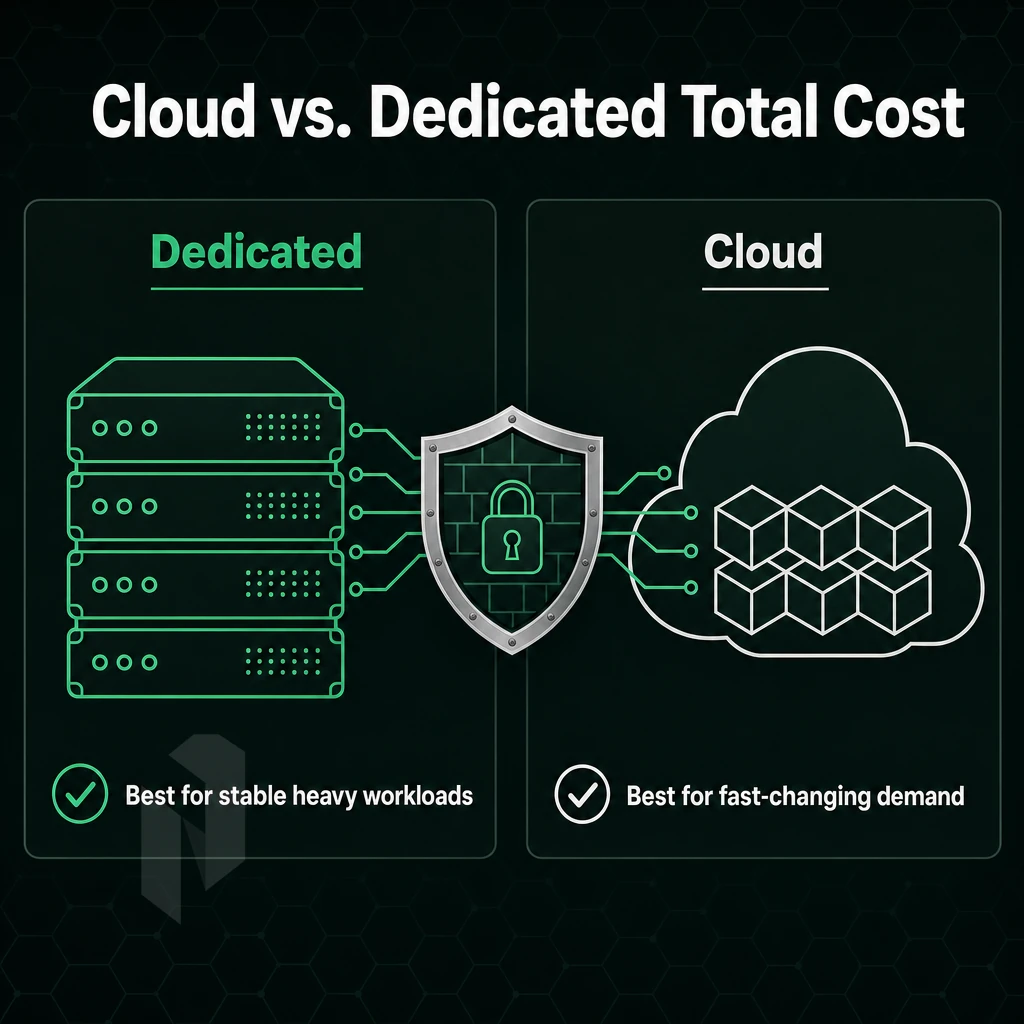
Dedicated hardware hosting for enterprise and cloud compute from hyperscalers solve different problems. Understanding where each succeeds best at cost, performance and control is key to making sound infrastructure decisions.
TCO: Where Hyperscaler Billing Surprises You
Hyperscaler cloud platforms charge for dozens of different services, including cloud compute, cloud storage I/Os, cloud storage snapshots, and egress.
A dedicated bare metal server is predictable: one monthly charge for the server, for bandwidth and for the network ports (and none for egress and for requests).
Business Critical Applications: Where Bare Metal Wins
High-CPU workloads, large databases and latency sensitive applications all suffer from the fundamental flaw of shared cloud infrastructure: noisy neighbors.
Dedicated hardware provides maximum performance as all CPU Cycles, Memory Channels and NVMe Queues are dedicated to a single Tenant. Even with huge traffic peaks the basic performance will not drop. Thus dedicated hardware is the only option for very high performance transactional systems and real-time systems.
EU data sovereignty adds another dimension to the factors that need to be taken into account. For example, for regulated high traffic workloads such as financial services, healthcare and public sector organisations, dedicated servers in specific facilities are not available in shared cloud environments.
Where Hyperscalers Still Win
Elastic burst scaling and managed-services breadth remain two key differentiators offered by the hyperscalers. Use cases that experience short, unpredictable bursts of traffic (or even short-lived batch processing workloads) are best-suited to an on-demand provisioning model. While the wider PaaS offering from the hyperscalers (managed-queues, serverless-functions, ML-pipelines etc), backed by dedicated technical support and abstracting away the underlying hardware resources, has no direct counterpart in the bare metal hosting market, it is an extremely powerful toolset.
Netrouting's strategy is very deliberate, lower TCO for core workloads than hyperscalers offer, very high speed on their own hardware, and no surprises on egress charges. For sustained loads of work, that are predictable in nature, dedicated hosting plans will generally deliver better value and higher throughput than their cloud-billed equivalents. The only question is who will deliver this better value.
How to Choose the Right Enterprise Dedicated Hosting Provider
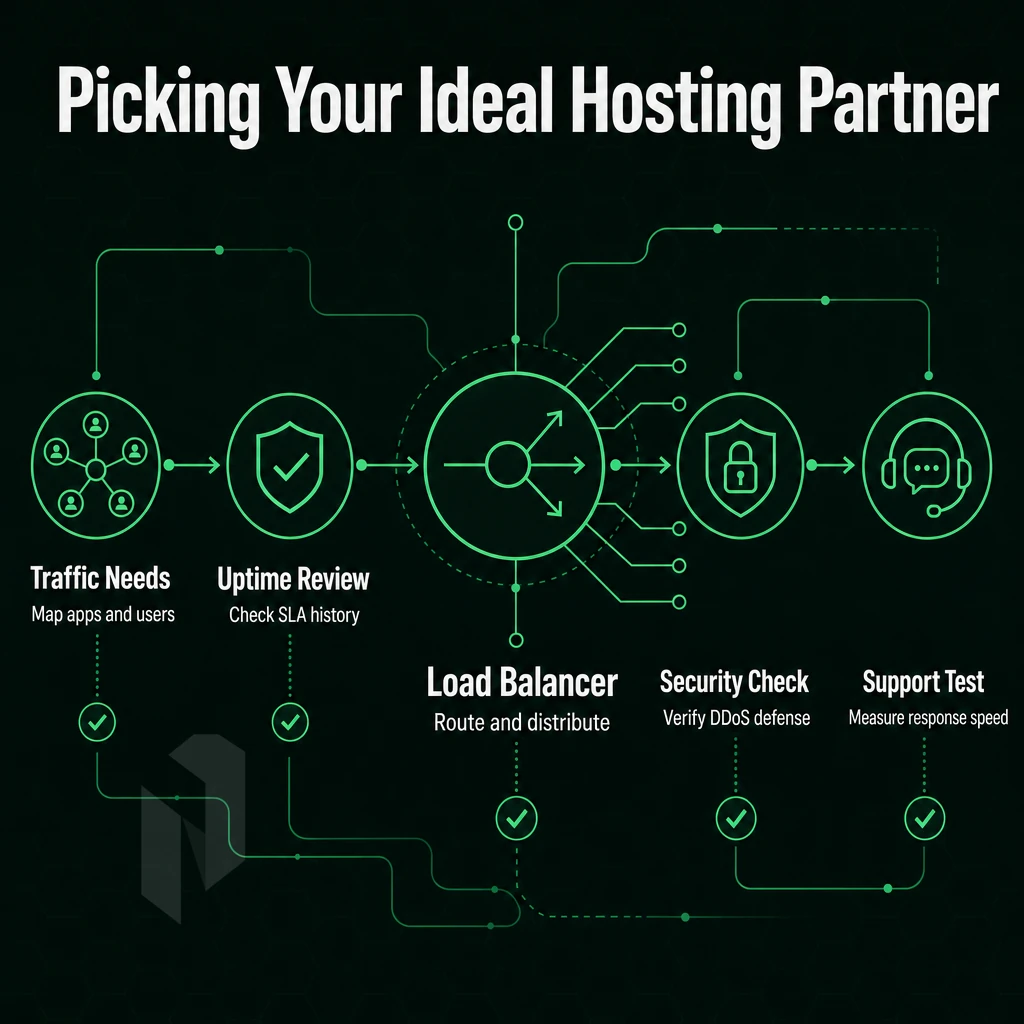
Note that not all enterprise dedicated server management providers are equal.
Hardware, Network, and Security Fundamentals
Begin by looking at the hardware. Servers on the latest Intel Xeon or AMD EPYC processors will give you significantly better performance per watt than older servers, and this performance gap will increase as you scale up.
In addition to the size of a network, its depth is also important. This means that a provider with its own backbone AS and a lot of IX peering has full control over the routing of its customers.
You can ask for the ASN of a provider and check the peering on the major Internet exchanges.
attack mitigation should always be on.
Support, Compliance, and Provisioning
For enterprise grade workloads, a 24/7 NOC with a formally documented ticket SLA is non-negotiable. We mean Expert support with a real response commitment, all tickets responded to within 1 hour.
We consider certifications as indicators of a company’s operational discipline.
A key practical advantage for us is the speed of provisioning bare metal, often deployed within 60 minutes. This enables a single customer to go from order to production within a few hours rather than waiting days.
Advanced Criteria: Location, BGP, and GPU Availability
When choosing a data center provider, match their geography to your user base.
For teams running their own IP space, support for BYOIP and BGP is important.
Availability of GPU servers as a relevant evaluation criterion for potential hosting options is no longer given. In order to handle AI / inferences loads efficiently, dedicated GPU compute is required. Bundling hosting packages for bare metal and GPU servers simplifies purchasing for projects that are processing mixed workloads. Netrouting’s NVIDIA GPU servers are a reliable option for EU-sovereign AI hosting. Here is how the full set of capabilities translates into a real hosting product.
Why Choose Netrouting for Enterprise Dedicated Server Hosting
Netrouting delivers enterprise dedicated server services built for IT teams that need bare metal performance, a carrier-grade network, and genuine managed options, without hyperscaler complexity or unpredictable billing. Every dedicated server runs on bare-metal infrastructure assigned to one customer, eliminating resource sharing and the security vulnerabilities that come with shared hosting environments.
- Provisioned in under 60 minutes. Powerful hardware, latest-gen Dell and Supermicro with Intel Xeon and AMD EPYC, ready fast. Linux servers and Windows server options both supported.
- Unmetered 10 Gbps network, up to 40 Gbps. Our own AS6206 backbone carries 2.4 Tbps+ capacity. Low latency across 10 locations: Amsterdam, Frankfurt, The Hague, Rotterdam, Stockholm, Bucharest, Miami, New York, Hong Kong, and Singapore.
- Always-on volumetric attack protection included. L3/L4 mitigation on every service. Advanced L7 coverage available for business-critical applications and high-traffic workloads.
- Managed dedicated servers or full administrative access. Choose managed dedicated hosting with OS patching, security patches, and 24/7 NOC support, or take unmanaged dedicated servers with complete control. BYOIP and BGP supported.
- ISO 9001, ISO 27001, and SOC 2 certified. Consistent uptime backed by a 99.9% SLA, free private networking up to 40 Gbps between your resources, and GPU servers for AI/ML and large language model inference.
Explore our dedicated hosting plans or contact our sales team to discuss hardware configurations, managed dedicated hosting options, and multi-site deployments. Still have questions? The section below addresses the most common ones.
Enterprise Dedicated Server Hosting: FAQ
Dedicated hosting services for enterprises: Common questions and more. We try to provide the most complete answers so you can make a better decision about your IT infrastructure.
What Is Enterprise Dedicated Servers Hosting?
Dedicated servers are single-tenant physical servers. They do not share CPU, RAM or storage. Dedicated servers provide isolation which translates to stable performance, root-level access and security required by most compliance frameworks.
Common Questions About Dedicated Servers
What is the difference between managed and unmanaged dedicated hosting?
By “unmanaged” we mean that you are responsible for the Operating System, patches etc. Managed dedicated server solutions is a form of dedicated hosting solutions where much of the operational burden of managing a server is shifted to your hosting provider. You have full system access to the server and the hosting provider manages updates, monitoring etc. This form of hosting is ideal for smaller companies without dedicated operations staff.
Do dedicated hosting services support both Linux and Windows?
Yes. Most Enterprise Hosters offer Linux Servers as well as Windows Servers. Linux Servers are used for most Web applications and databases, while Windows Servers are used for.NET applications, Active Directory and other Microsoft related Software applications and software licenses.
How Quickly Can Dedicated Servers Be Provisioned?
Our bare metal servers are provisioned in under 60 minutes.
What should dedicated hosting plans include at the enterprise level?
When shopping for colocation look for hardware RAID, redundant power, 99.9% SLA and 24/7 NOC with guaranteed response time to tickets. Unmetered 10 Gbps+ bandwidth is key for high volume workloads and can be a major differentiator among potential hosts.
Is dedicated server hosting services suitable for compliance workloads?
The minimum to consider for PCI DSS, HIPAA and ISO 27001 environments is single-tenant dedicated servers.
Choosing the Right Provider
How do I evaluate dedicated hosting for global deployments?
Map your user base to provider locations.
What is the biggest mistake teams make when selecting enterprise dedicated server hosting?
This is the part of the hosting package that you least inspect, besides compute resources: port speed and peering depth.
Note: Always confirm whether DDoS mitigation, private networking, and hardware replacement SLAs are included or billed separately. Hidden fees erode the cost advantage of moving off cloud platforms.
The Core Advantages of Enterprise Dedicated Servers
Our Enterprise dedicated server platform offers a physical server dedicated to your sole use. Unlike shared or virtual hosting services, no resources are shared with other noisy users and no unforeseen performance degradation will occur. Large databases and high traffic websites, as well as business critical applications, are best hosted on a dedicated server offering consistent uptime and complete control over the server’s operating system and hardware configurations.
Managed dedicated hosting takes that further. Your team keeps privileged access and computing power; a specialist hosting provider handles security patches, routine maintenance, and distributed denial-of-service mitigation. That combination makes a dedicated hosting solution the reliable choice for enterprises that cannot afford downtime. Managed dedicated hosting platform removes operational overhead without sacrificing the isolation and predictable performance that define dedicated hosting services.
Frequently Asked Questions
How Do managed dedicated servers In Enterprise Plans Differ From Shared Hosting Options?
Enterprise dedicated hosting means the entire physical server is yours, no shared resources, no noisy neighbours. Standard dedicated hosting covers the hardware itself. Enterprise tiers add managed services, proactive monitoring, hardware redundancy, stricter SLAs, and support structures built for production workloads. The distinction is operational: enterprise hosting treats the server as a managed business asset, not just a rented machine.
When should a business upgrade from VPS hosting to a dedicated server?
Upgrade when shared CPU and RAM limits are causing measurable performance degradation, slow response times, failed jobs, or throttled I/O under load.
What does managed dedicated server hosting include?
Managed dedicated hosting covers OS patching, security hardening, and proactive monitoring, while you retain full root access. Netrouting's managed tier extends to control-panel servers running cPanel/WHM or DirectAdmin, and fully managed Proxmox VE clusters for teams running their own VMs and containers. The goal is to remove the operational burden of the hypervisor and OS layer without removing your control over what runs on top.
How does DDoS protection work on a dedicated server?
Every Netrouting dedicated server includes always-on L3/L4 mitigation at no extra cost.
Can I use my own IP addresses (BYOIP) with a dedicated server?
Yes.
What operating systems are supported on enterprise dedicated servers?
Netrouting supports the major Linux distributions, including RHEL-family and Debian-family releases, as well as Windows Server.
How quickly can an enterprise dedicated server be provisioned?
Netrouting's Rapid Deployment programme provisions bare metal servers in under 60 minutes for in-stock configurations.
Dedicated server infrastructure for enterprises is the only option for demanding workloads, they guarantee resources, are physically isolated and have plenty of headroom on the network. Managed or unmanaged servers, the choice really depends on one question: where do you end and your IT infrastructure begin?
The service model is only as good as the underlying hardware platform. Look for a provider with dedicated plans that include carrier grade network infrastructure, same day hardware replacement and the ability to configure server environments to match a particular workload as opposed to servers being configured for a service model.
Netrouting operates bare metal infrastructure and dedicated server resources across ten locations in Europe, North America, and Asia, each backed by a 2.4 Tbps+ network, always-on traffic scrubbing, and a 24/7 NOC with a one-hour ticket guarantee, supporting any operating system your workload requires. Explore Netrouting's dedicated server configurations or contact sales to discuss a custom build.