
Anything that changes your account lands in the Activity log: a power cycle, a reinstall, a rescue boot, a VM rebuild, a reverse-DNS change, a blackhole, an order. Each entry says what happened, which resource it hit, when, and whether it worked, and it doesn't matter if the change came from the portal or the API. When someone asks “who rebooted this” or “did that reinstall actually run”, this is where you look.
Reading it
Open Activity under Identity in the left-hand menu. You get one row per operation, newest at the top, showing its message, the resource it touched, the time and a status. To narrow the list, filter by asset (servers, VMs, and so on) or by status (succeeded, failed, or in progress). If anything is still running, the page keeps refreshing on its own until it settles.
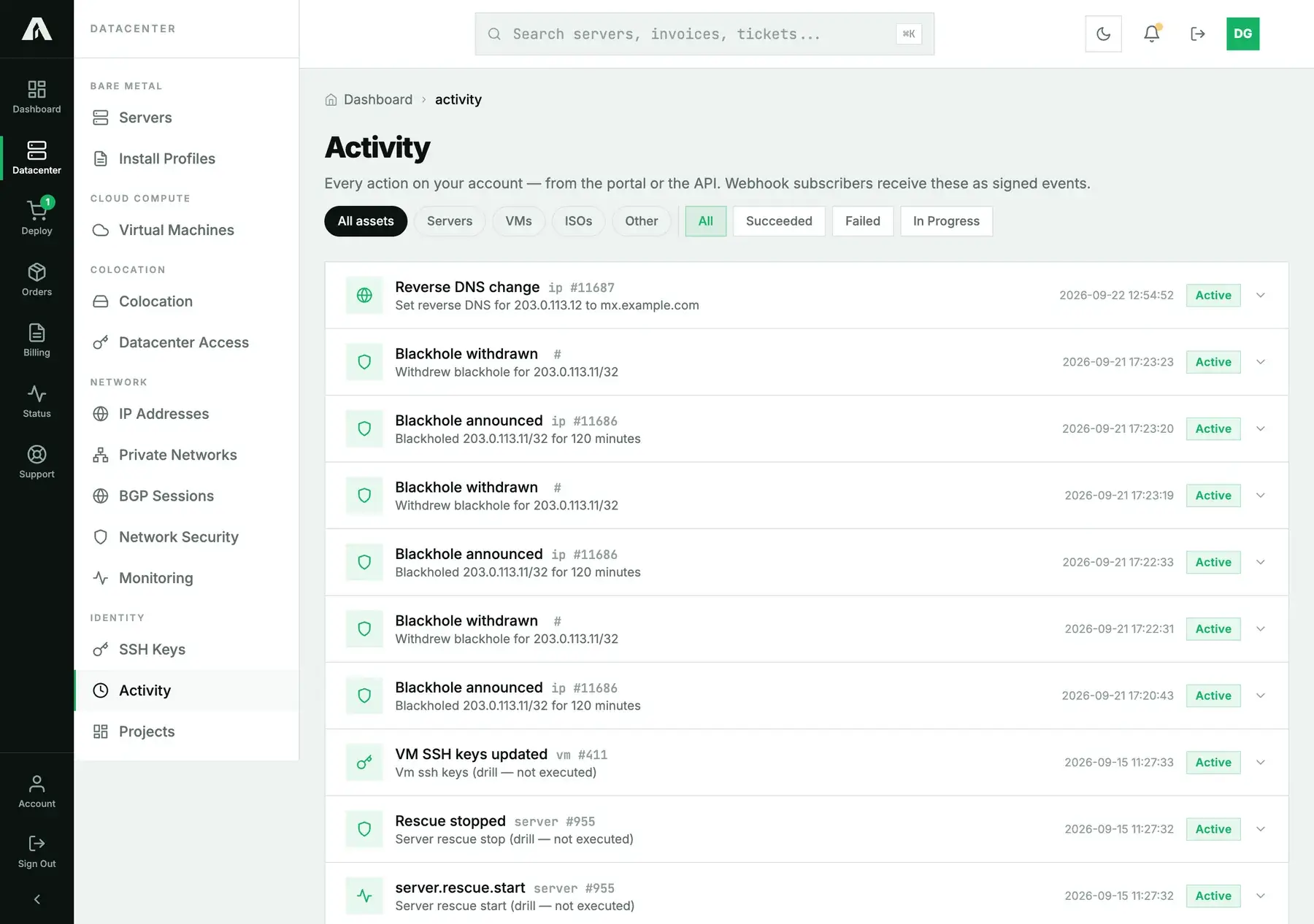
These events also drive webhooks. Subscribe once and each operation arrives at your endpoint as a signed event, which means a change made by anyone on the account shows up in your own systems too.
With the API
A key with read is all you need. GET /v1/operations gives you the recent operations, newest first:
curl -s https://api.amoni.app/v1/operations \
  -H "Authorization: Bearer nr_live_..."
{
"success": true,
"data": [
{
"id": 47, "type": "ip.rdns", "status": "succeeded",
"resource_type": "ip", "resource_id": 11687,
"message": "Set reverse DNS for 203.0.113.12 to mx.example.com",
"started_at": "2026-09-22 12:54:52", "finished_at": "2026-09-22 12:54:52",
"created_at": "2026-09-22 12:54:52"
},
{
"id": 44, "type": "network.blackhole_withdraw", "status": "succeeded",
"resource_type": null, "resource_id": null,
"message": "Withdrew blackhole for 203.0.113.11/32", "...": "..."
}
]
}Filter with ?status= (succeeded, failed, pending, running) and ?resource_type= (say server, or a comma-separated list). GET /v1/operations/{id} returns a single operation. It's the one to poll after any call that came back 202: its status goes through pending and running to succeeded or failed, and either of those means you can stop polling. The type field tells you which action it was: server.power, server.reinstall, server.rescue, vm.rebuild, vm.ssh_keys, ip.rdns, network.blackhole, app.install, order.place, and so on.
Questions we get
- Does it show read actions too? No, only writes (actions that change something). Opening a list or looking at a detail page isn't logged.
- Who is “who”? The log keeps the operation and how it ended. If you want to know which person did it, give everyone their own login; see invite your team instead of passing one account around.
- An operation says failed. What now? Read the message, it tells you what broke. For a failed power action or reinstall, try again from the resource's own page. If it fails a second time, open a ticket and include the operation id.
- Can I get alerted on activity? Yes, with webhooks, which deliver each operation as a signed event. Uptime alerts are a different thing; see uptime monitoring.
- How far back does it go? Both the page and the API show recent operations only. If your audit question reaches further back, open a ticket with the dates and the resource.
Still stuck?
Open a support ticket with an operation id, and we'll tell you exactly what it did on our side.