
With a webhook, Amóni stops being something you poll and starts calling you instead. Subscribe an HTTPS endpoint once and every operation on your account (a power cycle, a reinstall, a rebuild, a reverse-DNS change, a blackhole, an order) lands there as a signed HTTP POST the moment it finishes. That includes changes made by anyone on the account, in the portal or over the API, so your own systems hear about them without a script looping on “is it done yet”.
Subscribe
In the portal, go to Account, open the API Keys tab and scroll past your keys to Webhooks. Click Add Webhook, enter an HTTPS URL and pick the events you want. Tick none and you get every one of them.
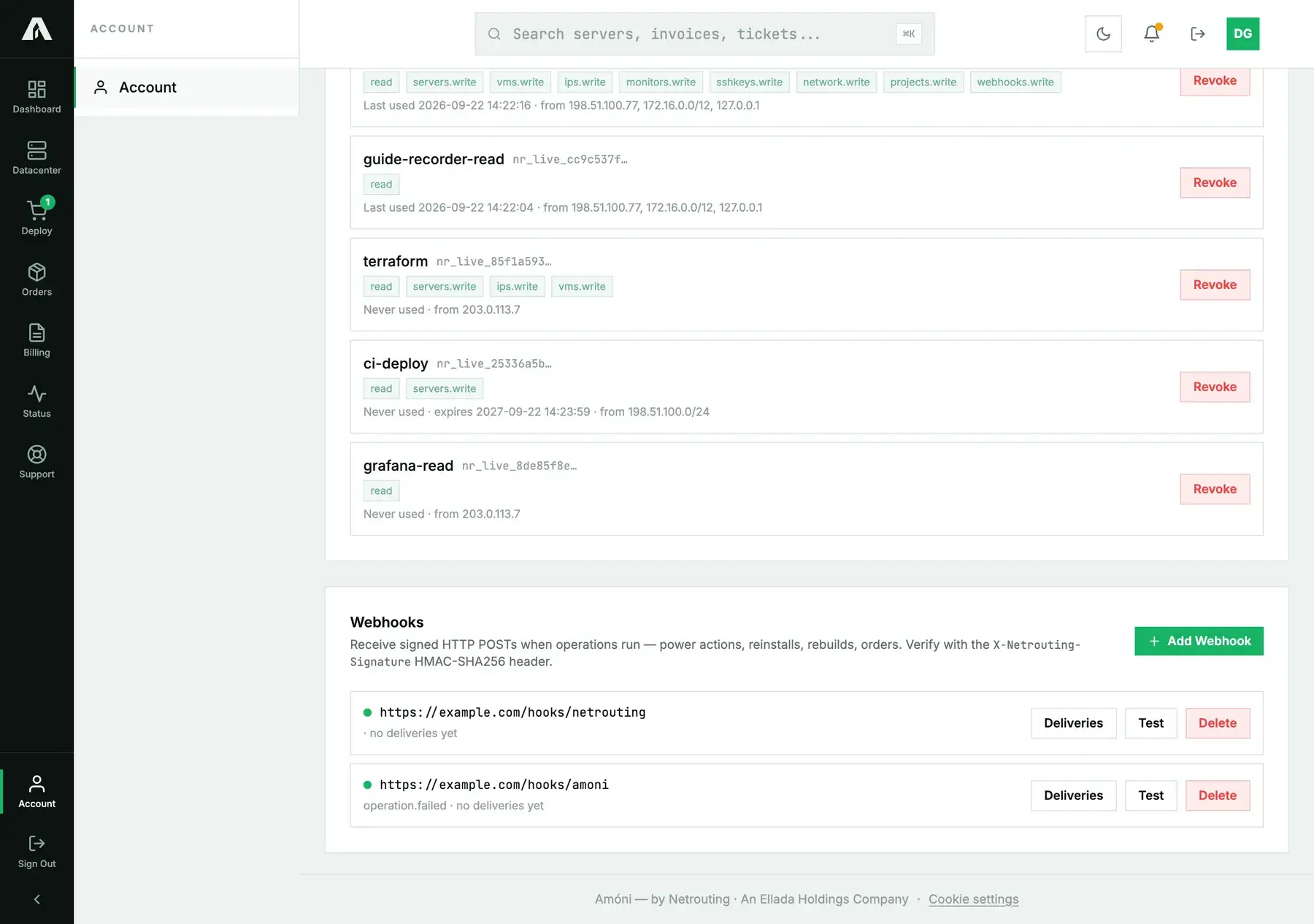
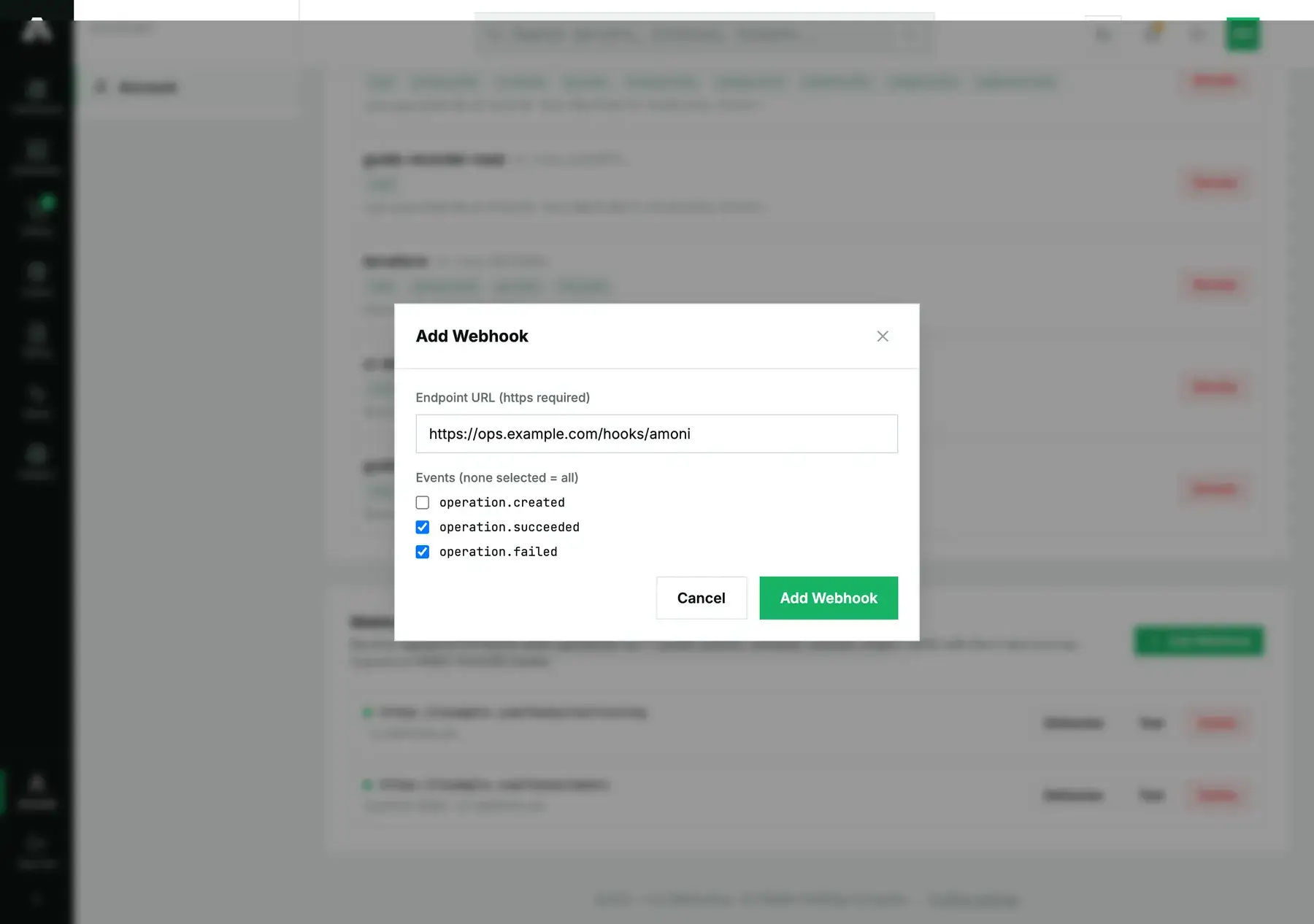
Saving shows you a signing secret, once. Put it in your endpoint's configuration straight away, because it's the only thing that proves a delivery really came from us. Two events get delivered, operation.succeeded and operation.failed: the first fires when any operation on your account finishes cleanly, the second when one fails.
Over the API, subscribing is a POST /v1/webhooks with a webhooks.write key. The URL has to be a public HTTPS address. Internal and loopback hosts are refused.
curl -s -X POST https://api.amoni.app/v1/webhooks \
  -H "Authorization: Bearer nr_live_..." -H "Content-Type: application/json" \
  -d '{"url": "https://ops.example.com/hooks/amoni", "events": ["operation.failed"]}'
{ "success": true, "data": { "id": 2, "secret": "VuBtPOMLGz...Waa5" } }You'll see the secret in this response and never again. Send an empty events array, or leave it out, to subscribe to every event.
What your endpoint receives
Every delivery is a POST carrying Content-Type: application/json plus a signature header. In the body you get the event and the operation behind it:
POST /hooks/amoni HTTP/1.1
Content-Type: application/json
X-Netrouting-Signature: sha256=9f8c1e...c4

{
  "event": "operation.succeeded",
  "created_at": "2026-09-22T13:07:41+00:00",
  "data": {
    "id": 51,
    "type": "server.reinstall",
    "resource_type": "server",
    "resource_id": 955,
    "status": "succeeded",
    "message": "Reinstall completed on web1.example.com"
  }
}
The data block is the operation itself: its id, its type (server.reinstall, server.power, vm.rebuild, ip.rdns, network.blackhole, order.place and so on), which resource it touched and how it ended. If you want the full record later, call GET /v1/operations/{id}.
Verify the signature
Your URL is public and anyone can POST to it, so check the signature before you trust what arrives. Take an HMAC-SHA256 of the raw request body using your signing secret, then compare it with the hex in the X-Netrouting-Signature header, the part after the sha256= prefix. Use a constant-time comparison and run it on the bytes exactly as they arrived. Once JSON parsing or re-encoding has touched them, they may not be the bytes we signed.
# Python / Flask
import hmac, hashlib
from flask import Flask, request, abort

SECRET = b"VuBtPOMLGz...Waa5"  # your signing secret
app = Flask(__name__)

@app.post("/hooks/amoni")
def hook():
    sent = request.headers.get("X-Netrouting-Signature", "")
    expected = "sha256=" + hmac.new(SECRET, request.get_data(), hashlib.sha256).hexdigest()
    if not hmac.compare_digest(sent, expected):
        abort(401)
    event = request.get_json()
    # act on event["event"] / event["data"]; return 2xx to acknowledge
    return "", 204
// Node / Express (raw body required for the HMAC)
const express = require("express"), crypto = require("crypto");
const SECRET = "VuBtPOMLGz...Waa5";
const app = express();
app.post("/hooks/amoni", express.raw({ type: "application/json" }), (req, res) => {
const expected = "sha256=" + crypto.createHmac("sha256", SECRET).update(req.body).digest("hex");
const sent = req.get("X-Netrouting-Signature") || "";
if (sent.length !== expected.length ||
!crypto.timingSafeEqual(Buffer.from(sent), Buffer.from(expected))) {
return res.sendStatus(401);
}
const event = JSON.parse(req.body.toString());
res.sendStatus(204);
});Acknowledge with any 2xx status. Any other code counts as a failure, and so does no response at all.
Testing, retries and failures
Test, next to each subscription, sends a sample operation.succeeded down the same path a real event takes. A green result tells you two things at once: the endpoint is reachable and your signature check works. Deliveries lists recent attempts with the status code each one got back, and over the API, GET /v1/webhooks/{id}/deliveries returns the same log.
When a delivery doesn't get a 2xx back, we retry it a few times and wait longer before each new attempt. Ten failures in a row and the endpoint is deactivated. The portal shows the failure count, so the reason isn't a mystery. This keeps a dead endpoint from collecting retry traffic forever; once it's fixed, add the subscription again.
Questions we get
- Which events exist?
operation.succeededandoperation.failed. Every write on the account counts as an operation, so those two cover power, reinstall, rescue, rebuild, reverse DNS, blackhole and orders. - Can I have more than one endpoint? Yes, as many as you need. Each one has its own secret and its own delivery log.
- I lost the signing secret. We only show it once, when the subscription is created. Delete the subscription and add it again, and you'll get a fresh secret.
- My endpoint went down and the subscription stopped. That's what ten consecutive failures do. Get the endpoint back up, then re-add the webhook.
- Do webhooks replace monitoring? No. Webhooks report operations that you or your tools started. If you want an alert when a service goes up or down, see uptime monitoring.
Still stuck?
Open a support ticket and include the endpoint URL plus the status code of a delivery from the log. From our side we can see exactly what we sent and what came back.