Selecting a suitable WordPress host is all about striking a balance between the host’s performance, reliability and support and your needs. If you fail to get this right you’ll likely be struggling with the impacts of slow loading times, unexpected down time and very long support queues. But get it right and your site will grow without any constraint.
This guide aims to cut through the mountains of comparison sites and help you make a more informed decision about hosting your sites. When choosing a web host, as a developer/owner of a site, you care about a number of things: the servers/hardware. The network/uptime, the degree to which the host manages server for you, how easily you can scale up. Evaluating hosting services also means understanding how each provider handles backups, security patches, and whether they impose restrictions on plugins or custom configurations.
Additionally, How good the support is. We’ve compared many hosts against these criteria. The hosting company Netrouting has been running production datacenter infrastructure in Europe, North America and Asia since 2007. Our in depth knowledge of what running such a production datacenter is like has gone into our evaluations. When evaluating hosting companies, it's essential to verify they maintain geographically distributed infrastructure and offer transparent SLAs that match your uptime requirements.
Blog contents
Whether you’re looking to move a high traffic publication, launch a WooCommerce store or manage multiple client sites on a single managed platform. The right host for you will depend on your specific tech stack and expected growth.
Below we’re going to walk through each of the key factors to consider in more detail to help you make an informed decision about your hosting needs. From simple blogs to complex enterprise portals, your website building requirements will dictate whether you need managed services, root access, or dedicated infrastructure.
What Makes the Best Website Hosting for WordPress Sites?
There are 4 crucial aspects to choosing the best web host for your WordPress website: site performance, support, uptime SLA and network. The table below describes the many types of hosting you can opt for when opening a new hosting account. Choose the right hosting type for your website workload.
| Provider / Option | Performance | Support | Uptime SLA | Network | Best For |
|---|---|---|---|---|---|
| Shared WordPress Hosting | Variable. Resources pooled across hundreds of tenants. Site speed degrades under traffic spikes. No dedicated CPU or RAM allocation. | Ticket and live chat. Response times vary; rarely under 1 hour during peak periods. | Typically 99.9% stated; enforcement inconsistent across providers. | Single datacenter, shared uplink. Limited geographic reach. No BGP or custom routing. | Personal blogs and low-traffic brochure sites on a tight budget. |
| Managed WordPress Hosting | Good out of the box. WordPress-tuned stacks with built-in caching layers improve site performance for typical CMS workloads. | WordPress-specialist support. Fast for CMS issues; limited for server-level or custom stack questions. | 99.9% to 99.99% depending on tier. Usually enforced with service credits. | CDN integration standard. Underlying network varies by provider; rarely carrier-neutral. | Content-heavy WordPress websites needing hands-off CMS management. |
| VPS Hosting | Consistent. Dedicated vCPU and RAM allocation eliminates noisy-neighbour impact on site speed. Scales vertically on demand. | Mixed. Self-managed VPS requires sysadmin skill. Managed VPS adds OS-level support at extra cost. | 99.9% standard across most providers. | 1 Gbps shared uplinks typical. Single region unless you provision multi-region manually. | Growing WordPress websites that have outgrown shared hosting but don't need a full server. |
| Cloud Compute (Hyperscaler) | Elastic and globally distributed. Site performance scales automatically. Latency depends on region selection and CDN configuration. | Extensive documentation. Enterprise support tiers available at significant cost uplift. Generalist, not WordPress-specific. | 99.9%-99.99% per service. Complex SLA structure across multiple components. | Global backbone with dozens of regions. Egress fees apply. Bandwidth costs can escalate unpredictably. | Enterprise WordPress deployments requiring global auto-scaling and deep cloud-native integration. |
| Netrouting, Bare Metal & Dedicated Hosting | Highest ceiling. Dell and Supermicro hardware on Intel Xeon and AMD EPYC. Up to 2 TB RAM, up to 24 drives. No hypervisor overhead. Full server resources dedicated to your WordPress website. Unmetered 10 Gbps standard; up to 40 Gbps available. Site speed limited only by your stack, not shared tenancy. | 24/7/365 helpdesk with a 1-hour ticket response guarantee. EU business-hours phone support. 24/7 NOC with proactive monitoring. Courtesy remote hands included. | 99.9% SLA with same-business-day hardware replacement. 4-hour physical swap target where parts are on-site. Daily incremental backups; weekly full images retained 30 days. | 2.4 Tbps+ backbone on AS6206. 10 locations: Stockholm, Amsterdam, Rotterdam, The Hague, Frankfurt, Bucharest, Miami, New York, Hong Kong, Singapore. Dense IX peering at AMS-IX, DE-CIX, FL-IX, and more. Always-on L3/L4 DDoS protection included. Free private network up to 40 Gbps between your resources. | High-traffic WordPress websites, WooCommerce stores, and hosting businesses needing maximum site performance, full resource isolation, and global network reach. |
While managed WordPress hosting or a VPS might suffice for a small/medium WordPress website owner looking to move out of shared hosting, high-traffic WooCommerce stores. Additionally, Larger WordPress multi-site hosting operations require the only type of hosting that eliminates resource contention entirely: bare-metal dedicated hosting.
Netrouting is the top web host for this segment of the WordPress hosting market as they offer a full range of dedicated servers in 10 datacenters around the globe. Complemented by a 2.4 Tbps+ carrier-neutral network. On top of that, their 1-hour guarantee makes for the perfect hosting infrastructure that scales with your demands instead of capping them. Netrouting backs every dedicated server with a 30 day money back guarantee, giving you ample time to test performance and confirm the infrastructure meets your WordPress requirements.

Types of Hosting for WordPress: Shared, VPS, Cloud, and Dedicated
You shouldn’t view all WordPress hosting as equal. The hosting tier you choose (e.g. shared hosting, VPS hosting, cloud hosting, dedicated hosting) affects how a website will perform under load, how much control you will have over your website. Additionally, More importantly, how quickly and efficiently you will be able to scale your website.
Shared, VPS, and Cloud: Entry to Mid-Tier Hosting for WordPress
Shared hosting puts your WordPress website on the same server as dozens to hundreds of other websites, all competing for the same resources of CPU power, RAM and I/O. Thus when your noisy neighbor gets a sudden surge of traffic your website slows down.
Typical shared hosting accounts have a limit of 256-512 MB of RAM per process and limit the number of PHP workers. Shared hosting is the easiest way to get started with a WordPress website but resource sharing is a fundamental constraint rather than an exception.
VPS hosting is carved out of a physical server as a fixed slice, using hypervisor isolation. For example, you get guaranteed CPU cores and RAM (e.g. 2-8 vCPUs and 4-16 GB RAM) without interference from other noisy neighbors on that slice of server resources.
With root access, you can tune your PHP-FPM pools, install an object caching layer, and set up all sorts of server-level tweaks and configuration options. It’s a very predictable performance profile, making VPS a great choice for WordPress sites that have outgrown the shared hosting environment but aren’t quite ready for dedicated hosting yet.
Developers with strong technical skills can leverage this control to optimize WordPress performance far beyond what typical managed solutions allow. Many developers prefer VPS environments when they install WordPress because root access enables them to configure custom PHP versions, optimize MySQL settings, and implement advanced caching strategies from the start.
Cloud hosting services completely virtualize the server, and therefore the only thing that scales with increased traffic to a cloud-hosted site is compute, RAM and storage, all of which scale horizontally. Importantly, latency to your origin server will remain low because you can locate instances close to end users. When evaluating cloud hosting services, consider whether the provider offers auto-scaling policies that trigger based on real-time metrics like CPU utilization or request queue depth.
However, performance may fluctuate when hypervisor density is high, and cost fluctuate with consumption. So cloud hosting is ideal for ‘elastic’ workloads, for example, a seasonal campaign, a one-off piece of viral content, event-driven traffic. Many cloud providers offer higher tier plans that include reserved capacity and priority scheduling to reduce performance variability during peak hypervisor load.
Dedicated Servers: Best WordPress Host for High-Traffic Deployments
Bare metal hosting is dedicated, virtualisation-free. The CPU cycles, RAM and I/O operations of your workloads are all 100% yours. A high spec, dual-socket server with 28 CPU cores, 512 GB of RAM and top performance NVMe storage can handle thousands of concurrent WordPress user sessions. SLAs for uptime are set at 99.9% and hardware replaced within 4 hours of failure.
Throughput at this tier matters. A 10 Gbps unmetered connection with burst capacity up to 40 Gbps ensures that a traffic surge will not be impeded by uplink saturation. An over-spec solution such as this dedicated infrastructure is specifically suited to e-commerce sites with WooCommerce stores, membership sites and news sites who cannot afford to slow down. Enterprises running multiple WordPress installations often consolidate them onto a single bare metal server, creating a private wordpress hosting environment that delivers both performance isolation and centralized management.
Netrouting's bare metal servers, which are ideal for hosting for WordPress and come with a free domain, are powered by latest generation Intel Xeon and AMD EPYC processors in 10 data centers: Stockholm, Amsterdam, Rotterdam, The Hague, Frankfurt, Bucharest, Miami, New York City, Hong Kong and Singapore. Our hosting is usually online within 60 minutes or less. All our servers are protected by always-on L3/L4 DDoS filtering.
Many of these bare metal configurations can be optimized further by pairing them with litespeed servers, which deliver exceptional PHP processing speeds for WordPress installations. Netrouting includes a free domain name with all bare metal hosting packages, reducing initial setup costs for new WordPress deployments. Netrouting's streamlined provisioning process means you can install WordPress on your bare metal server immediately after deployment, with full root access to configure your preferred stack.
Which Hosting Provider Does WordPress Recommend?
WordPress.org maintains a very short list of “recommended hosts” for performance, support, etc. The list of recommended hosts changes from time to time and tends to include companies that meet certain Service Level Targets for response times and uptime. Many hosting companies have partnered with WordPress.org over the years to earn a spot on this curated list, demonstrating their commitment to the platform through consistent infrastructure investments and community support.
While the list can serve as a good starting point for finding a web host that is friendly to WordPress. The plans typically offered under the “WordPress plans” tend to be managed shared or even entry-level managed services. Such configurations are typically not adequate for high-traffic or mission-critical WordPress sites that require a lot of customized infrastructure. Evaluating wordpress plans from multiple providers helps you compare feature sets, pricing tiers, and resource allocations to determine which offering aligns with your site's technical requirements.
Many providers position their entry-level WordPress plans at an affordable price to attract new customers, but these budget tiers often lack the performance headroom needed once traffic scales beyond a few thousand monthly visitors. Upgrading to higher tier plans unlocks additional CPU cores, memory allocation, and concurrent connection limits that become essential as your WordPress site attracts more visitors and processes more transactions.
Managed WordPress hosting is a service offering that sits on top of your existing infrastructure: shared hosting, VPS hosting, cloud hosting, or dedicated hosting. This managed service layer handles core updates, caching, and security for you, but your ceiling is determined by the underlying infrastructure. Most managed WordPress providers include an intuitive admin dashboard where you can monitor site performance metrics, manage staging environments, and configure automated backups with just a few clicks. Some managed providers also integrate ai tools to optimize image compression, suggest performance improvements, and detect security vulnerabilities before they impact your site.
Evaluating whether a managed provider delivers all the features you need, such as Git integration, WP-CLI access, and custom PHP versions, helps ensure the service aligns with your development workflow. The administrative overhead of managing WordPress core, plugins, and security patches is significantly reduced when you choose a managed provider that automates these routine maintenance tasks. WordPress sites often rely on numerous plugins to extend functionality, so a managed host that automatically tests plugin compatibility before updates can prevent conflicts and downtime. Robust security measures at the managed layer typically include malware scanning, firewall rules, and intrusion detection systems that protect your WordPress installation around the clock. The wordpress dashboard provided by managed hosts typically includes one-click staging tools, real-time uptime monitoring, and centralized plugin management across all your WordPress installations.
| Tier | Isolation | Typical RAM | Scalability | Best Fit |
|---|---|---|---|---|
| Shared hosting | None, pooled resources | 256-512 MB per process | None | Low-traffic brochure sites |
| VPS | Hypervisor-isolated slice | 4-16 GB guaranteed | Manual resize | Growing sites needing root access |
| Cloud compute | Virtual, multi-tenant | Elastic on demand | Horizontal auto-scale | Elastic or unpredictable traffic |
| Dedicated / bare metal | Full physical isolation | Up to 2 TB | Vertical + multi-server | High-traffic, mission-critical WordPress |
Choose the right hosting tier based on your current traffic load and avoid going over budget before you hit a ceiling and start to experience problems with your site. If your site can’t afford to go down or experience slower loading times then dedicated bare metal is the only way to go. Netrouting offers a 99.9% SLA and will have your new servers provisioned in under 60 minutes.
Netrouting's bare metal plans deliver enterprise-grade infrastructure at an affordable price, ensuring you don't sacrifice performance or reliability when scaling your WordPress operations. Every Netrouting bare metal plan is backed by a 30 day money back guarantee, giving you risk-free confidence to test performance at scale before committing long-term.
Managed vs. Self-Managed Hosting for WordPress: Which Is Right for You?
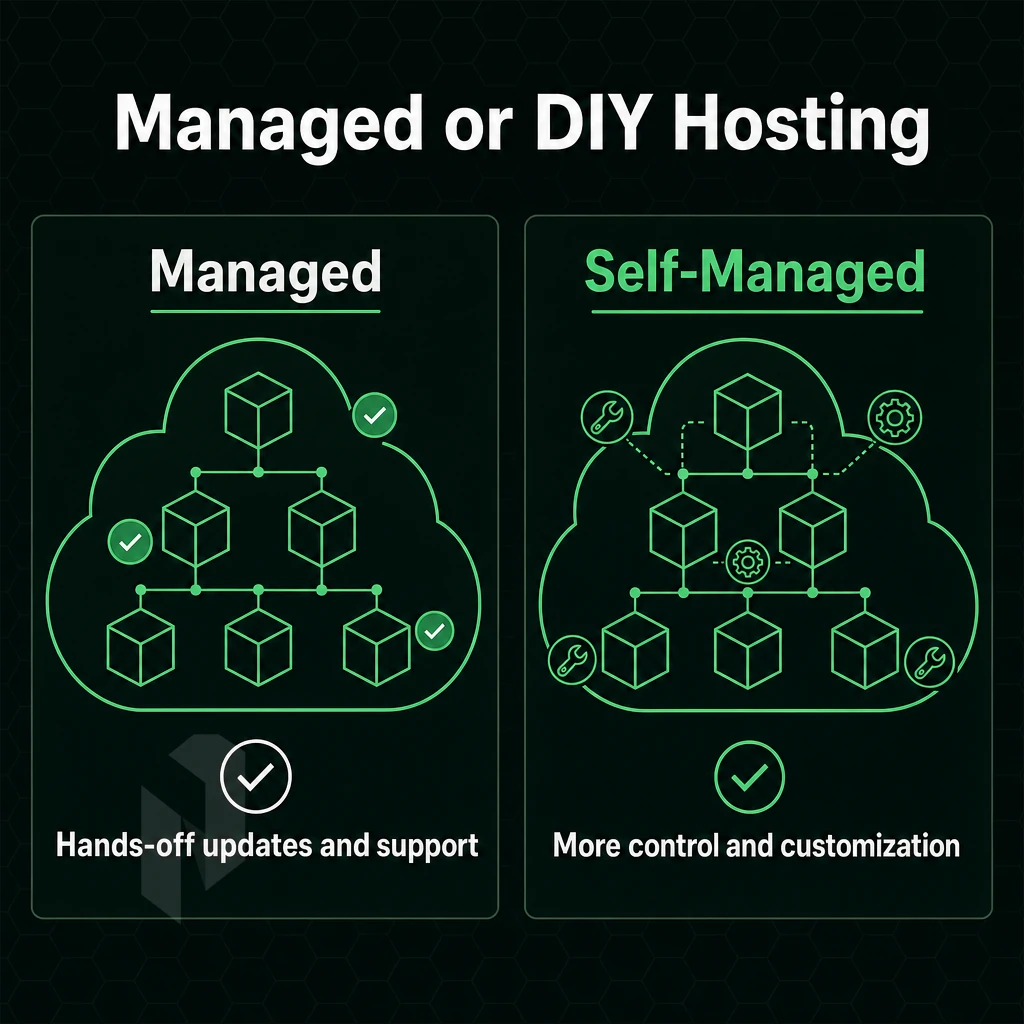
One of the biggest decisions you’ll make for your WordPress site is deciding between managed and self-managed hosting. The choice depends on several factors including the technical ability of your team and server, the scale of your content. Additionally, The level of control you need to manage the various layers of your site’s infrastructure.
Understanding What "Managed" Really Means
The term “managed” is generally misused. In terms of application layer management, the best WordPress hosting on a managed platform like WP Engine handles updates to the WordPress core, hundreds of plugins, caching, and creating a staging area for your WordPress application. All of this is done from within a beautiful web-based interface.
Note that our managed hosting is a completely different layer than managing a WordPress install. We take care of OS patches, security hardening, monitoring and configuring servers. But you have full root access to your servers, and manage the WordPress install (themes, plugins, content, WordPress admin).
These two terms are distinct and unless one understands the difference, one may end up purchasing the wrong product and discovering the gap at the worst time.
Managing WordPress Across Different Team Types
Managing WordPress at scale varies from person to person and case to case.
- Agencies running multiple client sites, An agency handling dozens of installs needs repeatable site management workflows: automated backups, consistent OS baselines, and fast provisioning. A managed bare metal environment with a control panel like DirectAdmin or cPanel gives teams a single interface for deploying new WordPress installs without rebuilding server config each time. Note: Application-layer tasks, plugin updates, WordPress core upgrades, still require a per-site process unless you layer in a WordPress-specific management tool on top.
- Developers who need root access to the server for performance or custom server stack optimization such as custom PHP versions, Redis or Nginx rewrites. For this type of optimization, a self-managed bare metal server or a managed server (where the provider takes care of the OS layer but leaves the application stack up to you) is ideal. A managed hosting service at the infrastructure level can provide all the maintenance work to be done for you but still provide complete flexibility for what you can deploy.
- A number of enterprises require custom configurations, such as high-traffic WordPress sites, media publishers, e-commerce sites and SaaS platforms built on WordPress. These sites cannot be supported by shared environments and require dedicated hardware with customized RAID configurations, private networks between application and database servers. Additionally, Website management via automated deployments, which can be managed on self-managed or fully managed bare metal environments.
Is Cheap Hosting for Multiple Websites Reliable Enough for Business?
Low-traffic personal sites might find a home on budget hosting, but for business sites the answer is almost always no. The reasons for this are structural, not surface level.
Sharing environments and resources means your site’s performance will suffer from neighboring sites’ traffic spikes. Because most hosts engage in overselling, long support queues and lack of automatic backups’ restore testing are typical.
For business websites, predictable performance under load, rapid hardware replacement and infrastructure that doesn’t tank when your neighbor is misbehaving are all important considerations that budget hosts are not designed to meet. While WP Engine and similar application-focused hosting services solve some of these problems for websites powered by WordPress, they present their own restrictions on server access and custom code config.
Netrouting’s infrastructure-managed servers can also be used by business teams. These servers are provided with dedicated hardware and the OS is managed by Netrouting. The automated backups can be restored from tested backup points and also other ai tools and monitoring integrations can be set up at server layer. This is different from the typical managed WordPress hosting offered by consumer-grade hosts, which often have lock-in and restrictions on application-layer services.
Note: If your team has no one comfortable at the command line, pure infrastructure management still requires someone to handle WordPress-layer tasks. Assess your internal capability honestly before choosing a tier.
Cheap WordPress Hosting: What You Get and What You Sacrifice
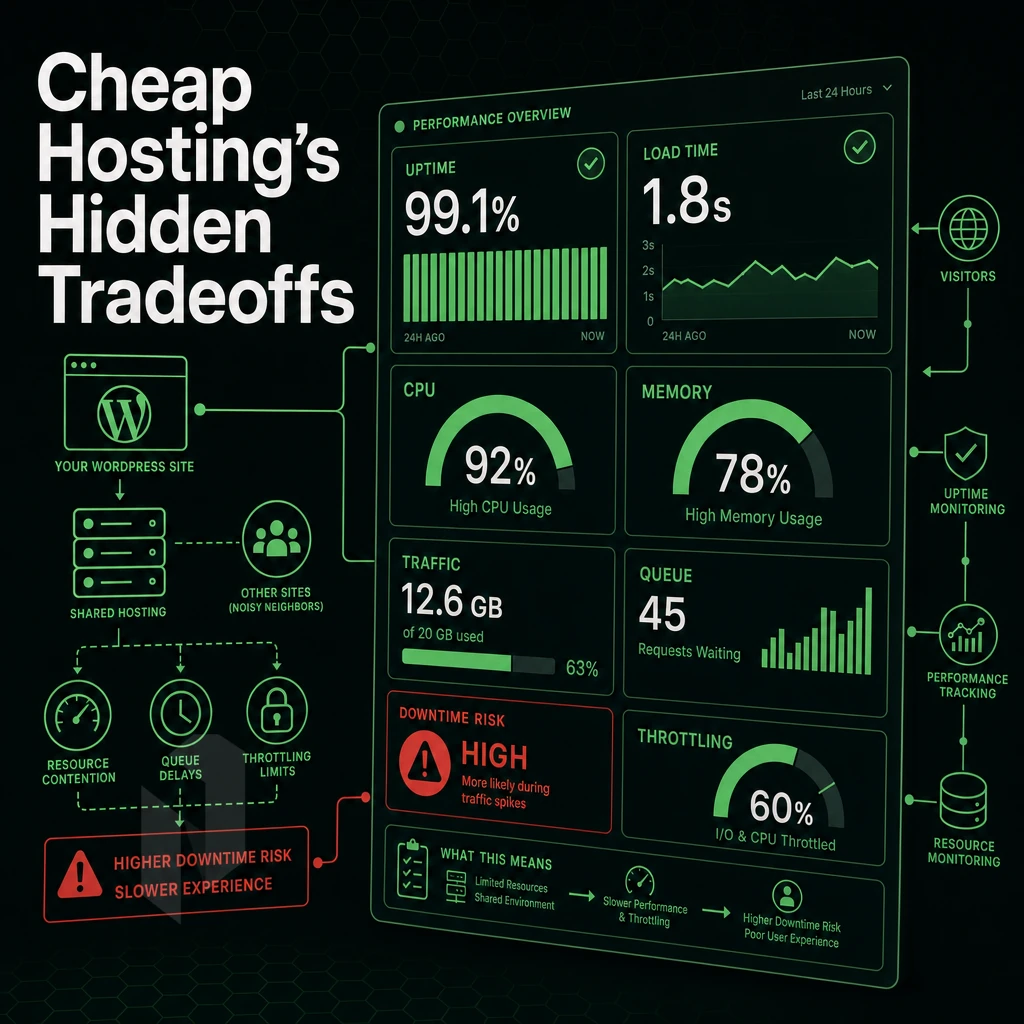
When looking for cheap WordPress hosting, budget hosting plans tend to dominate search results and the low entry point can be very tempting. However, there is a massive gap between what is advertised and what a growing site will actually experience, and these hidden costs are not always detailed on the pricing page.
What Cheap WordPress Web Hosting Actually Delivers
The economic model behind cheap WordPress hosting is simple: cram as many accounts as possible onto a single server and then attempt to divide the resources up between them. A shared node might host hundreds of individual WordPress installs on the very same CPU and RAM as all of the other accounts on the server. When one account has a sudden spike in traffic, the other accounts on the server will feel the effects as well.
The primary limitation with shared web hosting is the resource restriction. shared server hosting accounts are limited to a number of PHP worker processes, typically 2-4 per account. Under normal loads this is sufficient, however during peaks such as a product launch or viral post. The queue will fill, resulting in excessive TTFB (in excess of 2-3 seconds) and users abandoning the page before it loads.
The Free Domain Overselling Mechanism
Overselling works most of the time because websites are idle for most of the time. It’s a gamble that peak usage hours won’t see simultaneous spikes. When they do, the hosting provider's overselling fails at scale, automatically capping CPU and queuing MySQL connections until the site ultimately begins to degrade without any error messages in between.
The security posture on budget-priced multi-tenant hosting accounts is typically underfunded as well. In shared server hosting environment environments, neighboring accounts can easily compromise each other’s file systems, by way of example. Malware injection, password stealing, and SEO spam blasts are extremely common on accounts on over-crowded shared servers. Additionally, Typically, no support is provided to help clean up the mess, even at the low-end of the hosting price spectrum.
The Hidden Costs of an Affordable Price
Site speed is a direct ranking signal. Google measure Core Web Vitals (LCP, INP, CLS) in real-user measurements. This means that a server delivering a 2.8s LCP on shared server environment will likely perform worse than the identical content on faster hosting. With the SEO penalty worsening over time and rarely being traced back to the hosting decision.
Support hours can also be a hidden variable. While cheap web hosting services often advertise 24/7 support for their low-cost web hosting plans, many only offer support during business hours. In addition, many services use a tiered support model where you are forced into a ticket queue with a response time of many hours. For a business with an online store or news site, a 6 hour delay in support for an outage could be very costly.
Renewal Pricing, Lock-In, and Free Domain Costs
These introductory offers are typically 60-80% below the renew rate, so that cheap WordPress hosting that seemed so affordable at the time of sign-up is suddenly really expensive at the end of year one. Transferring from a communal hosting environment to another (especially with lots of media or a unique set of plugins) can also be quite technically complicated.
What Hosting Companies Don't Tell You About Shared vs. Dedicated Infrastructure
When affordable hosting is provided on dedicated infrastructure, a single-tenant bare metal server can provide a WordPress site with guaranteed CPU cores and dedicated RAM without the disruption caused by noisy neighbors. In terms of price-per-performance, for growing sites, dedicated hardware is often more cost effective than a premium shared hosting plan once a site has reached a certain level of traffic.
On dedicated infrastructure, you can configure PHP worker limits, MySQL connection pools and I/O throughput to match your workload rather than the number of other accounts on the node.
What Is the Difference Between Managed WordPress Hosting and Managed Server Hosting?
Managed WordPress hosting is application-layer management, meaning the hosting provider manages the application of WordPress to ensure the latest version of WordPress core. Plugin compatibility, various caching layers, as well as application-layer security rules are all in place. The underlying server may be shared in many cases.
Managed server hosting is typically managed only down to the server infrastructure level. So the provider will manage things like OS patches, security hardening, monitoring of the servers and attempting to keep them up and running. But everything above that (i.e. your application) is fully managed by you. You’ll have root access to configure as you see fit and there’s no restriction to how you choose to run your WordPress application on our managed servers.
For teams running many sites, custom plugins or non-standard PHP configurations, managed server hosting offers more control for the same price or even less than application-managed WordPress hosting.
Key Features to Demand from Any WordPress Hosting Plan
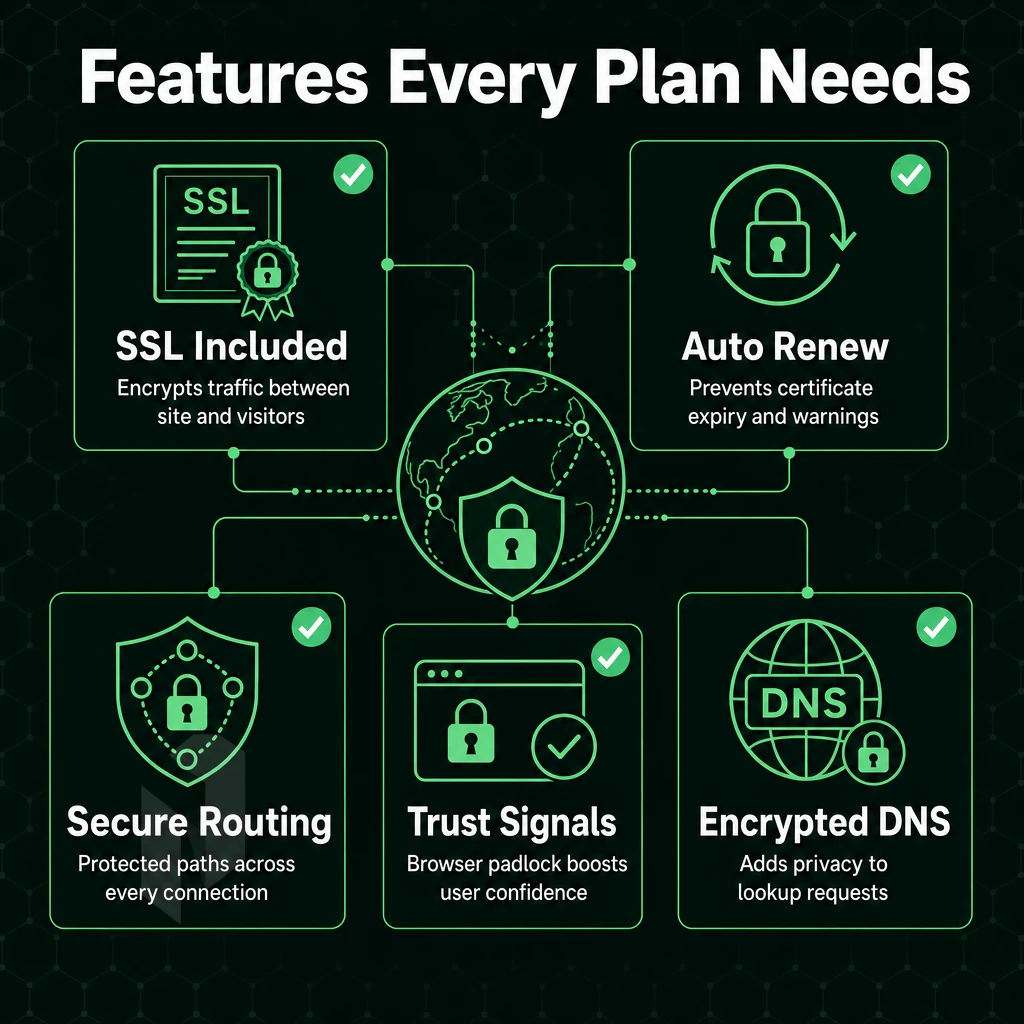
Not every hosting plan is created equal. What your WordPress site needs to run under load may not be covered by the features of your hosting plan. Be sure to check for these features before you sign up for a plan. The absence of one of them could cost you in terms of uptime, security or even time.
How to Install WordPress and Automate Core Site Functions
An initial clean installation of WordPress should take just a few minutes. Ideally, this is provided as a one-click or automated setup option from within your control panel, rather than a laborious FTP upload.
Daily backups are automated. The frequency of backups is less important than the fact that they are made in the first place and can be restored from backups. We configure the managed servers at Netrouting with daily incremental backups plus full backups on a weekly basis which are removed after 30 days. The time it takes to restore from a backup depends on the amount of data and is between 15 and 45 minutes.
Dedicated staging for your test site is as important as a good test site environment. This will allow you to test theme and plugin updates as well as upgrades to PHP versions on your development site before applying them to your live site. Any hosting plan without a good test site environment is a gamble on live.
Performance and Security Features Every Plan Must Include
Smart caching, whether that’s provided by your LiteSpeed servers, a reverse proxy layer or object caching within your environment, is the biggest single influencer of page speed for WordPress sites. Make sure it’s included in your offering and not an additional cost.
A free CDN or edge caching layer helps reduce latency for visitors from around the world. A simple example: every uncached request would have to travel to your origin server, regardless of geographical distance to the visitor.
SSL should be included and set to auto-renew. An expired certificate can kill your rankings in search engines instantly and alert browsers of a potential problem on your site.
DDoS protection is a basic security function and not a feature that has to be booked extra. Our network runs DDoS protection of L3/L4 level as a standard on all services and does not require any configuration. Additional protection of L7 level is available for special cases of high risk. It is part of the system and not an add-on.
Control Panel Access and Customer Support Standards
Real control panels are important for the day to day running of your sites and we offer support for both cPanel and DirectAdmin on our managed server tiers. This allows full control of files, databases, DNS and email without needing to contact support for standard tasks.
When evaluating hosts, the quality of their customer support can easily distinguish between good and great hosts. Look for a Service Level Agreement (SLA) that outlines specific parameters, rather than unsupportable claims to respond quickly. Our 24/7/365 NOC and 1-hour guarantee on tickets to knowledgeable support personnel assures prompt attention to issues at any time.
Bare metal servers are typically provisioned in under 60 minutes. You can get a site up and running in days, not weeks.
Is GoDaddy or WordPress.com Better for WordPress Web Hosting?
The two options serve different audiences. WordPress.com is a hosted version of WordPress, which manages the underlying infrastructure for you, limiting plugins, themes, and server changes on lower tier plans. It is ideal for non-technical people to create and publish content, whereas developers and applications with custom needs require WordPress.
A general-purpose shared web hosting plan provider offers more flexibility than a WP hosting provider. However, the most affordable WordPress hosting option is typically multi-tenant hosting tier, where server resources are contested by other users and customer service response times are unpredictable at best.
For performance critical WordPress sites (WooCommerce stores, membership sites, high-traffic blogs) you need a managed bare metal or cloud compute environment. That gives you dedicated resources, root access and a real money back guarantee, check that any of the WordPress plans you are considering includes a day money back guarantee before you migrate your production data.
It depends on a number of factors including your technical requirements, traffic volume and your level of discomfort with shared-resource contention.
WordPress Hosting Comparison Table: Infrastructure Tiers Side by Side
Not all WordPress hosting is created equal. The tier that you choose will impact your maximum resources, security and scale. The following table maps the various tiers to the key factors that matter to IT buyers and developers.
Infrastructure Tiers at a Glance
| Tier | Typical Use Case | Resource Limits | Managed vs. Self-Managed | Scalability | Security Features | Support Model | Relative Cost |
|---|---|---|---|---|---|---|---|
| Shared Hosting | Personal blogs, low-traffic sites | Shared CPU/RAM; typically 1-10 GB storage | Fully managed by provider | Very limited, shared resource pool | Basic firewall, shared SSL | Ticket/chat; slow response windows | Entry |
| Managed WordPress (Consumer) | SMB sites, agencies on basic plan tiers | Per-plan visit caps; limited PHP workers | Fully managed; WP-specific stack | Upgrade plans; no infrastructure control | Smart caching, WAF, auto-updates | Priority support; WP-focused | Entry-Mid |
| VPS | Growing sites, developers, staging environments | Dedicated vCPUs, 2-32 GB RAM typical | Self-managed or optional managed add-on | Vertical scaling; some providers allow live resize | Isolated environment, configurable firewall | Varies; often ticket-only | Mid |
| Cloud Compute | Variable-traffic sites, multi-region deployments | Flexible CPU/RAM; scale on demand | Self-managed; managed options available | Horizontal + vertical; rapid provisioning | Network-level DDoS protection, isolated tenancy | 24/7 NOC; 1-hour ticket guarantee (Netrouting) | Mid |
| Dedicated / Bare Metal | High-traffic business websites, WooCommerce at scale | Full server resources; up to 2 TB RAM, 24 drives | Self-managed or fully managed | Maximum headroom; no noisy neighbours | Always-on L3/L4 DDoS protection, hardware isolation | 24/7 NOC; 1-hour ticket guarantee (Netrouting) | Mid-Enterprise |
How Many WordPress Sites Can I Run on a Single Hosting Plan?
This depends entirely on the tier of your hosting, with shared server environment service accounts typically allowing one domain (and often a small number of sites) to be hosted. In contrast, Consumer managed WordPress hosting is charged per site, or by the number of monthly visits above a certain threshold, and costs can quickly add up.
You can host as many WordPress installations as you have RAM and storage on your VPS and cloud compute instances. There’s no limit to the number of sites you can host on the platform. With a well-configured 8GB cloud instance you can easily host 5 or more mid-traffic sites.
The ultimate approach would be bare metal, with a single dedicated server running Managed Proxmox VE providing hosting for WordPress and unlimited other websites, each with a free domain and running in full isolation across virtual machines. Each virtual machine can then run as many PHP workers as required, with a separate database and fully customizable resources. This is how web agencies and SaaS providers can host hundreds of websites without them ever crossing paths in terms of contamination between client environments.
Bare metal is limited by your own configuration and not some arbitrary ceiling in a plan. Running many WordPress sites at scale is a hardware /s architecture problem and not a billing tier problem.
Choosing the Right Tier for Your Workload
These are typically designed for low risk, low traffic sites. For anything that requires consistent sub-100ms responses, isolated servers, and the ability to scale quickly for unexpected traffic spikes without being throttled back, shared infrastructure from web hosting companies, whether free or paid, is not sufficient.
Cloud compute is a great intermediate step for teams looking for more flexibility without having to set up and maintain physical servers. Netrouting’s cloud servers are available in minutes and are offered from 10 locations across Europe, North America and Asia. All cloud servers come with always-on DDoS protection, with no extra complexity.
High-traffic WooCommerce stores, media-intensive websites, and other projects requiring guaranteed, 100% consistent performance require bare metal. Within 60 minutes, Netrouting can provision you a dedicated server with unmetered 10 Gbps connectivity, and a 99.9% uptime SLA. Ultimately, bare metal offers the most cost-effective long-term infrastructure for managing multiple WordPress installations across various isolated environments.
Performance Factors That Determine WordPress Site Speed
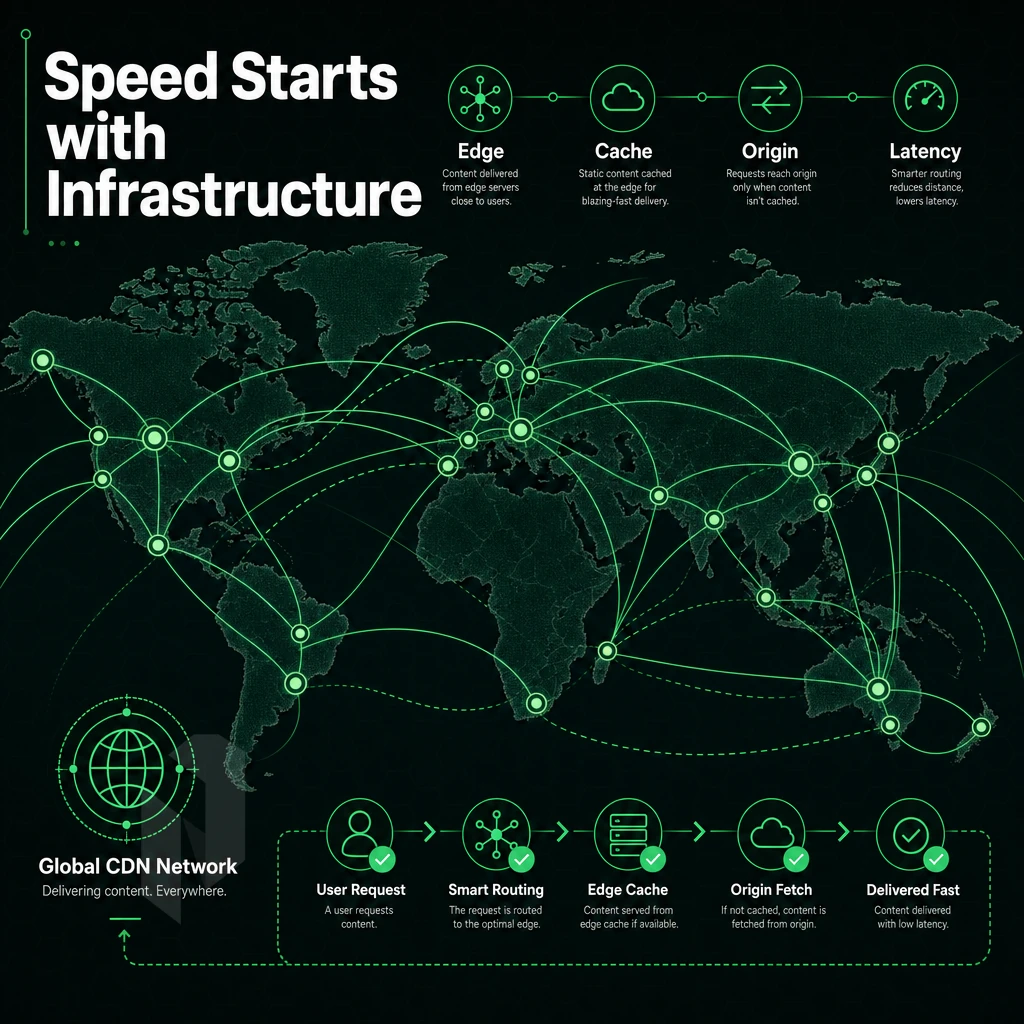
Your WordPress site speed is decided before anyone even visits your URL. The underlying infrastructure stack for your CMS (such as CPU, RAM, storage and network) creates a ceiling that all the plugins and themes in the world cannot surpass. Therefore, understanding the individual components that make up your website hosting for WordPress is crucial in determining the best website hosting for your site and avoiding potential roadblocks that even the most effective caching plugins cannot overcome.
Compute and Storage: The Foundation of Site Performance
-
Match CPU core count and clock speed to your workload.
WordPress executes PHP on every uncached request. A processor with higher single-thread clock speed handles synchronous PHP execution faster. High-traffic sites benefit from more cores to process concurrent requests without queuing.
Bare metal dedicated servers give you exclusive access to every core. Shared cloud VMs introduce hypervisor overhead, a thin but real tax on every CPU cycle your WordPress site consumes.
Note: A VM on a noisy-neighbor host can throttle your CPU mid-traffic spike. Dedicated hardware eliminates that risk entirely.
-
Allocate sufficient RAM for your database and PHP workers.
WordPress leans on MySQL or MariaDB heavily. Insufficient server resources force the database to swap queries to disk, spiking response times. Aim for enough RAM to keep your working dataset hot in memory.
Higher tier plans on shared or managed hosting often unlock more RAM. On bare metal, you configure the full allocation from day one, no artificial caps.
-
Choose NVMe storage over SATA for database I/O.
WordPress reads and writes to the database on every dynamic page load. NVMe drives deliver sequential read speeds several times faster than SATA SSDs. That gap is most visible under concurrent traffic, where I/O queues build quickly on slower storage.
Among CMS platforms, WordPress is particularly I/O-sensitive because of its default post-meta and options-table query patterns. NVMe flattens those latency spikes.
Network Variables That Govern Latency and Throughput
-
Prioritize geographic proximity to your audience.
Physical distance adds irreducible latency, roughly one millisecond per 100 km of fiber. Hosting your WordPress website in a location close to your primary audience cuts time-to-first-byte before any other optimization applies.
Netrouting operates across ten locations spanning Europe, North America, and Asia-Pacific. Placing a new wordpress website in the region where most visitors live is the single highest-leverage network decision you can make.
-
Evaluate IX peering quality, not just raw bandwidth.
A host advertising large headline capacity means little if traffic routes through congested transit paths. Dense Internet Exchange peering, at AMS-IX, DE-CIX, FL-IX, and equivalent hubs, keeps packets on short, low-latency paths to major ISPs.
Netrouting's 2.4 Tbps+ network runs at sub-40% port utilization. Connections are 100G or larger. That headroom prevents congestion during traffic spikes without requiring a free CDN to mask underlying network weakness.
Note: Port utilization above 70% causes micro-bursting and jitter. Always ask a host what their average utilization figure is, not just peak capacity.
-
Account for DDoS scrubbing latency overhead.
DDoS protection that routes all traffic through an off-path scrubbing center adds round-trip latency. Always-on inline mitigation, filtering malicious traffic at the edge without a detour, avoids that penalty.
Netrouting includes always-on L3/L4 DDoS mitigation on every service. Clean traffic reaches your server without the detour that out-of-band scrubbing architectures impose.
Does Netrouting Support WordPress Installations on Dedicated Servers?
Our dedicated servers support any Linux distribution. Linux servers with LAMP or LEMP stacks run WordPress installations identical to those on any other self-hosted server. With root access granted to you, you can modify PHP versions, the web server configuration and also the database as you see fit.
Building a website on bare metal servers means that you can set up the automated backup s as you like them, in contrast to platforms where you have to stick to a default setup. With our managed hosting add-on for Netrouting's bare metal servers, the OS of your server will be patched, the server will be security-hardened and monitored proactively. This means you only have to deal with the WordPress part, while we take care of the layer in between.
Hosting Multiple WordPress Sites: What Infrastructure Actually Scales
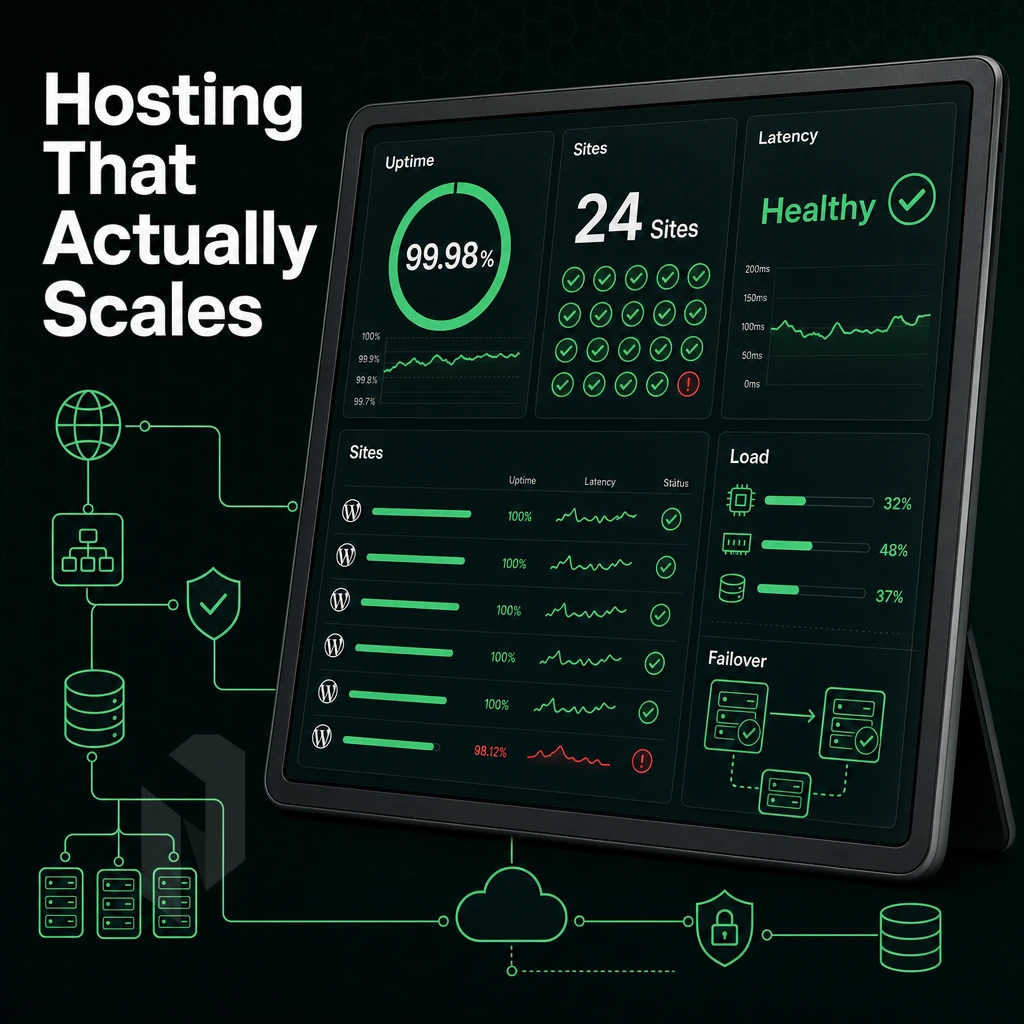
Managing one WordPress website versus twenty is a vastly different infrastructure challenge. Whether you’re an agency, freelancer or provider of a SaaS solution to manage websites for clients. You’ll soon realize that the hosting tier that worked for one website becomes a hindrance or even a danger to your online presence as you scale to manage twenty or more websites.
Where Shared Web Hosting Breaks Down
The shared environment uses all available CPU, RAM and I/O on a physical host. All tenants on that host are affected when one site experiences sudden traffic spikes. Note that there are no hard limits on resources for a site.
By virtue of the WordPress architecture being heavily PHP-based, installing WooCommerce, page builders. Additionally, Similar plugins can wreak havoc upon server resources, wreaking particularly hidden damage on shared servers where the additional burden is not immediately invisible. Until it affects your visitors with excessive load times and 503 errors.
What seems to be "unlimited sites" in a shared plan offer is in reality unlimited by a shared resource pool. Even Managed WordPress plans offered by mass market hosts often come with visitor caps per site or with PHP workers restricted to the plan level as a whole. As a result, adding a new WordPress powered site to an account inevitably degrades performance of all existing sites.
VPS and Cloud: Isolation Without Dedicated Iron
By allocating a fixed slice of the host to each tenant in VPS hosting, you get to guarantee fixed amounts of CPU, RAM and disk I/O for your users. A spike in traffic from another tenant does not affect you as VPS hosting isolates tenants from each other, which is the main advantage over entry-level hosting.
Cloud hosting extends the idea of on-demand resize up to vertical resize (with more RAM and vCPUs) without migrating servers. Additionally horizontal scaling (with more servers behind a load balancer) becomes easy when every WordPress installation is running in containers or even just behind a shared database tier.
Both VPS and cloud compute run on shared physical hardware behind the scenes, which means that even though they don’t share a server, they do share a building. This is generally fine for WordPress sites for clients, but high-traffic sites and those that demand extreme security need dedicated hardware that doesn’t pose the risk of a ‘noisy neighbor’.
Dedicated Bare Metal With a Control Panel
A dedicated server running cPanel/WHM or DirectAdmin gives a single operator full control of a physical server. WHM's account setup model is well-suited to a typical agency's client base, where each client can be given a fully isolated hosting account, complete with arbitrary resource limits, a free domain, email and DNS zone controls.
The DirectAdmin control panel has a much lighter footprint and therefore lower licensing costs. This allows the servers RAM to be allocated to PHP-FPM pools and MySQL, rather than running with the control panel daemon active all the time.
This is the key mechanism that PHP-FPM in per-account pool mode brings: each cPanel/DirectAdmin account runs in its own set of worker processes. Thus a misbehaving plugin on one of your client sites can’t consume all the PHP workers for all your other sites as well. This is what makes bare metal with a control panel better than basic web hosting for big operators with lots of sites.
Our Managed Control-Panel Servers operate without an OS and control-panel management layer. We handle patch management, security hardening and control-panel updates in addition to general monitoring and maintenance. You can still manage your servers with root access and have your client accounts set up as needed. Note that we manage the hypervisor, but you manage the software that runs on the servers within it.
For the agency or solo freelancer for whom building and managing WordPress sites is their core expertise, not administering a Linux server. This model removes the overhead of what typically would be an underpowered standard web hosting option versus hiring a full-time sysadmin.
Netrouting can deploy bare metal within 60 minutes at 10 locations spread across Europe, North America and Asia. Provisioning up this kind of hardware quickly is very important for us as a hosting provider, since a new client project typically starts on a Monday and needs to be online by Wednesday already.
Security and DDoS Protection for WordPress Deployments
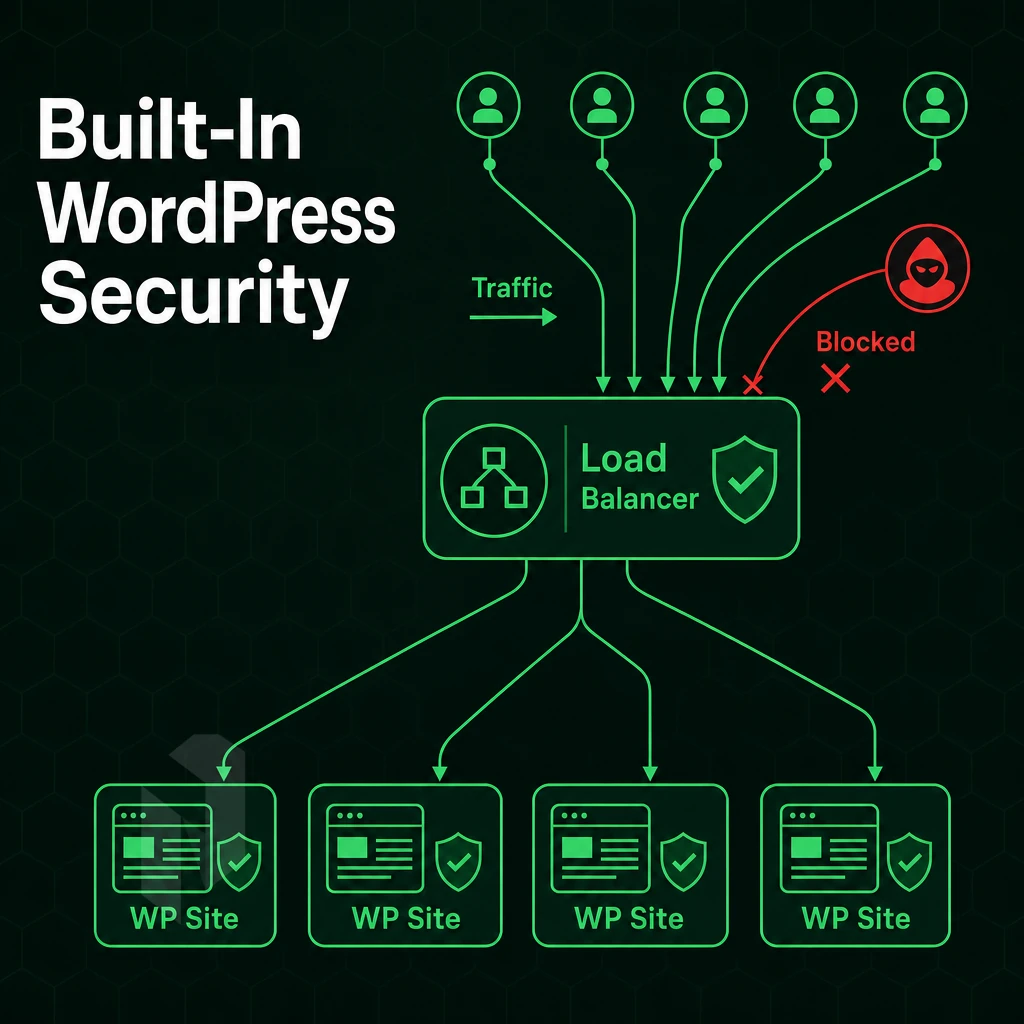
With millions of WordPress sites on the web, each running 24/7/365, every site is a high-value target for hackers. Brute-force login attempts, vulnerable plugins, volumetric attacks, and application-layer attacks are just a few of the types of attacks that are constantly thrown at live sites. This makes having a real security infrastructure at your host more important than just a list of features that support WordPress sites.
The WordPress Website Threat Landscape
Brute-force attacks hammer /wp-login.php with credential lists at thousands of requests per minute. Left unchecked, they exhaust server resources before a single password is cracked.
Plugin vulnerabilities are one of the most common attack vectors used to compromise WordPress sites. The vulnerabilities in outdated or poorly written plugins can reveal remote code execution and SQL injection vulnerabilities. The patching of a vulnerability must happen quickly, but patching in itself is not enough in the face of volumetric attacks that can bring down a site within seconds.
A volumetric DDoS attack on bandwidth is different from an application-layer (L7) attack. Application-layer attacks pretend to be normal HTTP traffic to attacked web sites, such as attacking checkout pages, login pages and search forms of websites written in PHP. They exhaust PHP workers and database connections.
Always-On DDoS Protection: What It Means in Practice
L3/L4 mitigation removes malicious traffic (spoofed packets, UDP floods, SYN floods) upstream of your server. It gets dropped by your network edge before it ever reaches your application stack.
Free baseline L3/L4 DDoS protection is included with every service. No setup required. Your WordPress site will continue to function during volumetric attacks as the attack is never allowed to reach your origin.
Advanced protection is activated for high-risk workloads (e.g. high-traffic WooCommerce shop, media company or previously targeted site) on top of the base protection with L7-mitigation.
- Application-layer inspection of HTTP/HTTPS requests.
- Granular custom policies per endpoint (e.g., rate-limit
/wp-login.phpindependently). - Higher scrubbing capacity for sustained, multi-vector campaigns.
Our network capacity exceeds 2.4 Tbps. With port utilization well below 40% average for clean traffic, there is ample headroom to handle traffic under attack while not impacting legitimate traffic.
Managed Web Hosting: OS Hardening and Automated Backups
Network-layer protection stops floods. It doesn't patch a misconfigured PHP handler or a world-readable wp-config.php. That's where managed hosting closes the gap.
Our managed hosting service includes OS patching, security hardening and proactive monitoring. As a customer you retain root access to your servers. We deal with the maintenance that gets left behind by development teams under pressure to deliver.
Hardening steps applied at the OS level include:
- Kernel and package patching on a defined schedule.
- Firewall rules scoped to your actual service ports.
- SSH hardening, key-based auth, non-standard ports, fail2ban-equivalent rules.
- Perform file permission audits to catch privilege escalation via web-writable directories.
Automatic Backups With a Free Domain
Take a daily full snapshot and incrementals in between. Keep full images for 30 days and send secondary copy off to geographically distant site. Restore time target is 15-45 minutes depending on amount of data.
If you’re looking for the best WordPress host for a production site, you need to look for the features listed above (DDoS scrubbing. OS hardening, patching, geo-redundant backups, etc.) as add-ons rather than as core features.
A free domain or free domain name on signup of a plan looks good on paper but doesn’t keep you up at 3 am during a flood. It’s the depth of the underlying infrastructure that matters. Netrouting is a host designed for serious operational use.
Why Choose Netrouting for WordPress Hosting Infrastructure
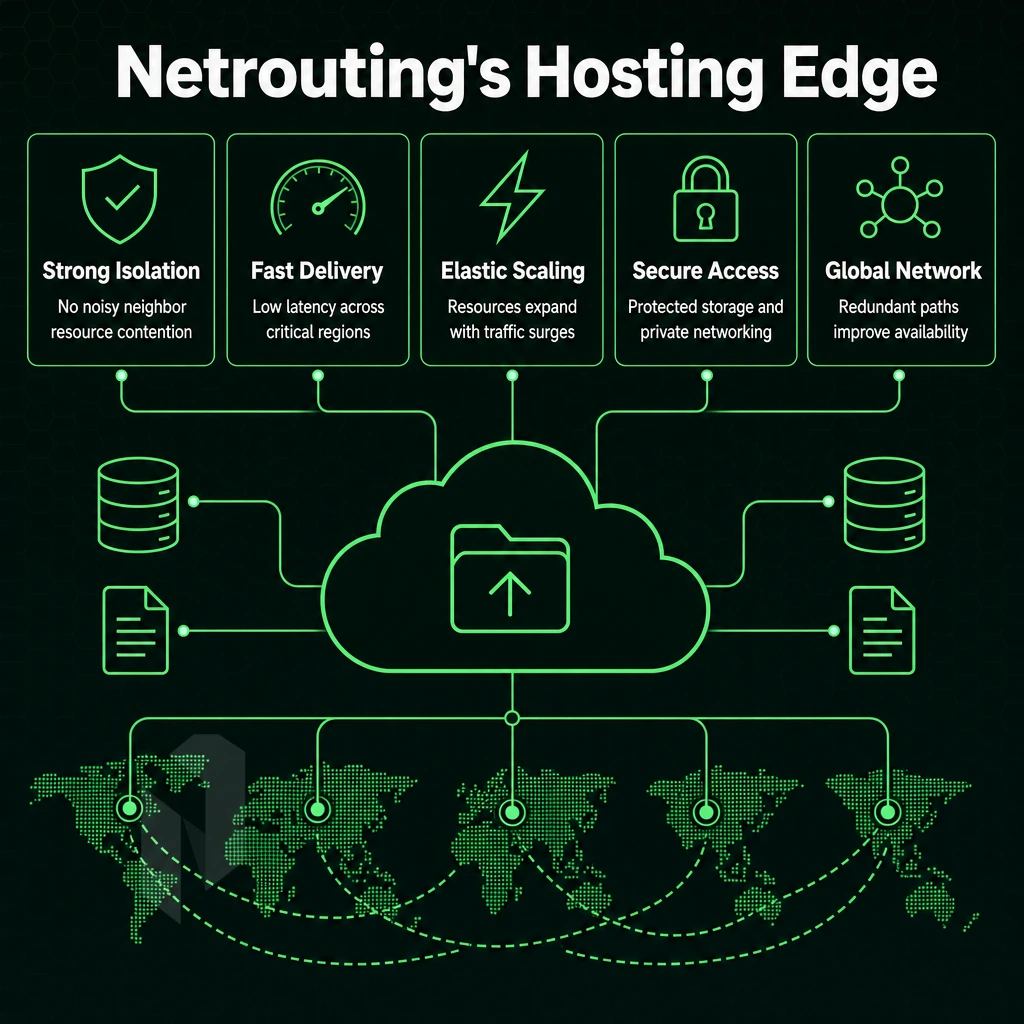
Most WordPress hosting conversations start and end at traditional shared server hosting plans or managed WordPress platforms. That's fine for low-traffic blogs. But when a WordPress site starts driving real revenue. Alternatively, When an agency needs to manage multiple WordPress sites across dozens of clients, the constraints of conventional entry-level hosting and entry-level managed WordPress plans become a hard ceiling. Netrouting is built for the step beyond that.
Our WordPress hosting services cover dedicated bare metal, cloud compute, and colocation across ten data center locations: Amsterdam, Rotterdam, The Hague, Frankfurt, Stockholm, Bucharest, Miami, New York, Hong Kong, and Singapore. Every server ships with unmetered 10 Gbps bandwidth on our own AS6206 backbone. Always-on L3/L4 DDoS protection is included on every service, no add-on, no upgrade required. Malicious traffic gets blocked before it touches your WordPress website.
Here's where Netrouting stands apart from budget hosts and consumer web hosting companies:
- Bare metal provisioned in under 60 minutes. A new WordPress website or a full migration lands on dedicated hardware fast. No queuing, no shared server resources with noisy neighbours.
- Managed Control-Panel Servers with cPanel/WHM or DirectAdmin. Agencies managing multiple sites get a familiar control panel, full root access, and our team handling OS patching, security hardening, and automated backups. WordPress installation, plugin management, and site management stay in your hands.
- Managed Proxmox VE for VM-level isolation. Operators running multiple WordPress sites on dedicated hardware can spin isolated VMs per client. We configure, patch, and monitor the hypervisor layer, you focus on managing WordPress, not the infrastructure beneath it.
- 2.4 Tbps+ network with dense IX peering. AMS-IX, DE-CIX, FL-IX, and more. Site speed is a direct WordPress ranking factor. Our network is engineered for premium performance, not shared resource hosting economics.
- ISO 27001, ISO 9001, and SOC 2 certified. Security features and compliance matter for business websites and business sites handling customer data. Our certifications back that up.
- 24/7 NOC with a 1-hour ticket guarantee. Expert support around the clock, not a chatbot, not a community forum. Real engineers with infrastructure context.
Netrouting isn't a managed WordPress host in the consumer sense. We're the infrastructure layer for teams that have outgrown that model and need a hosting provider with real network, real hardware, and real support. If you're evaluating hosting for WordPress at scale, whether bare metal, managed hosting, or colocation, speak with our sales team to compare configurations for your workload.
Cheap Hosting vs. Enterprise Infrastructure: The Real Cost Comparison
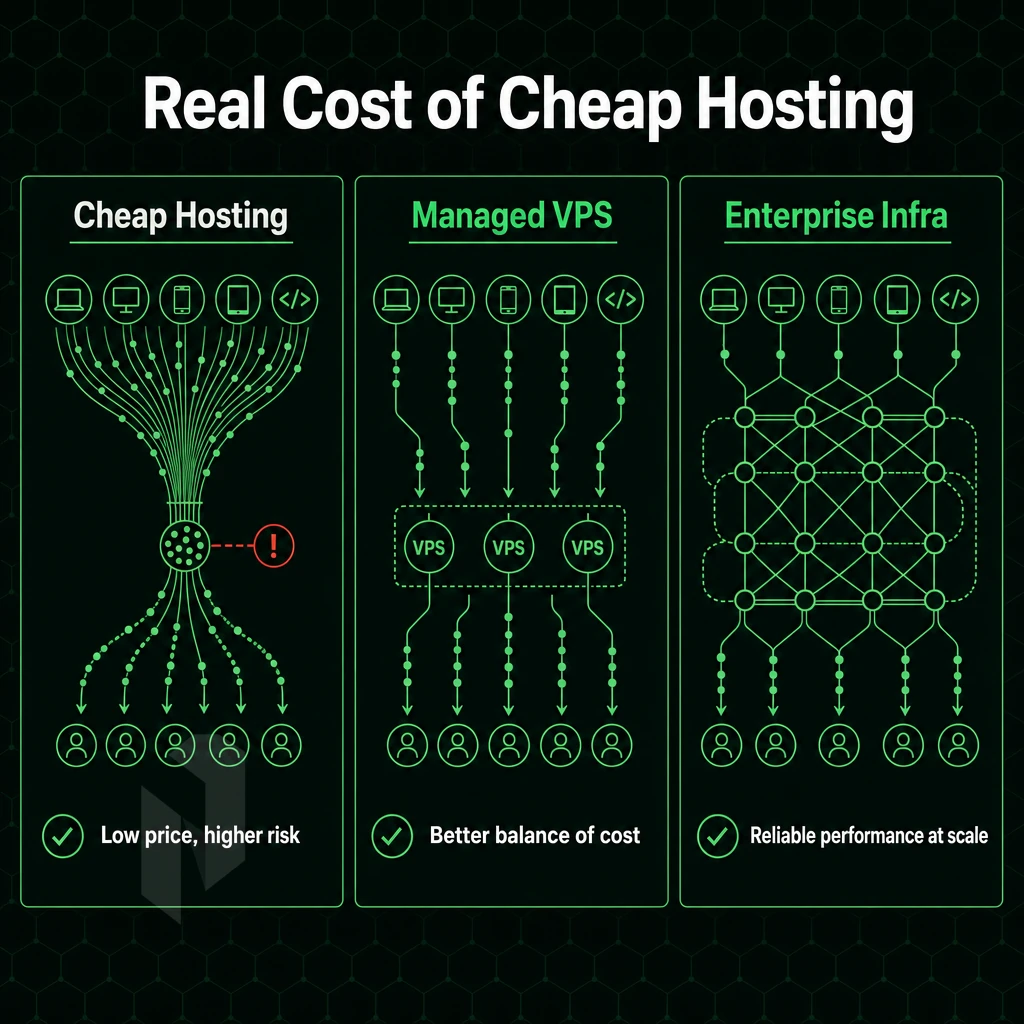
Paying only for the low price of cheap hosting gets you little else. Budget web hosting services often end up overloading a shared server with too many accounts and ensuing slow site load times, with occasional down time.
Migrating to a new, affordable web hosting service in an emergency can cost a lot of time and effort as well. Also, don’t forget the potential security incidents caused by a cheap web hosting service that has not been investing in security and latest versions of software. Affordable hosting only remains affordable when no problems occur.
Instead of flipping that math and paying for dedicated bare metal, you get to pay a flat monthly rate for all the compute power, bandwidth (unmetered), and even DDoS protection you need. Storage, egress, and API calls all get billed differently by the major cloud platforms, often stacking up in the most insidious of ways.
By the time the bill arrives, you’re shocked. The TCO for serious WordPress hosting (multiple WordPress sites, high traffic business sites) will always be cheaper in the long run with dedicated infrastructure rather than cheap hosting.
Choosing the Right Server Location for WordPress Performance
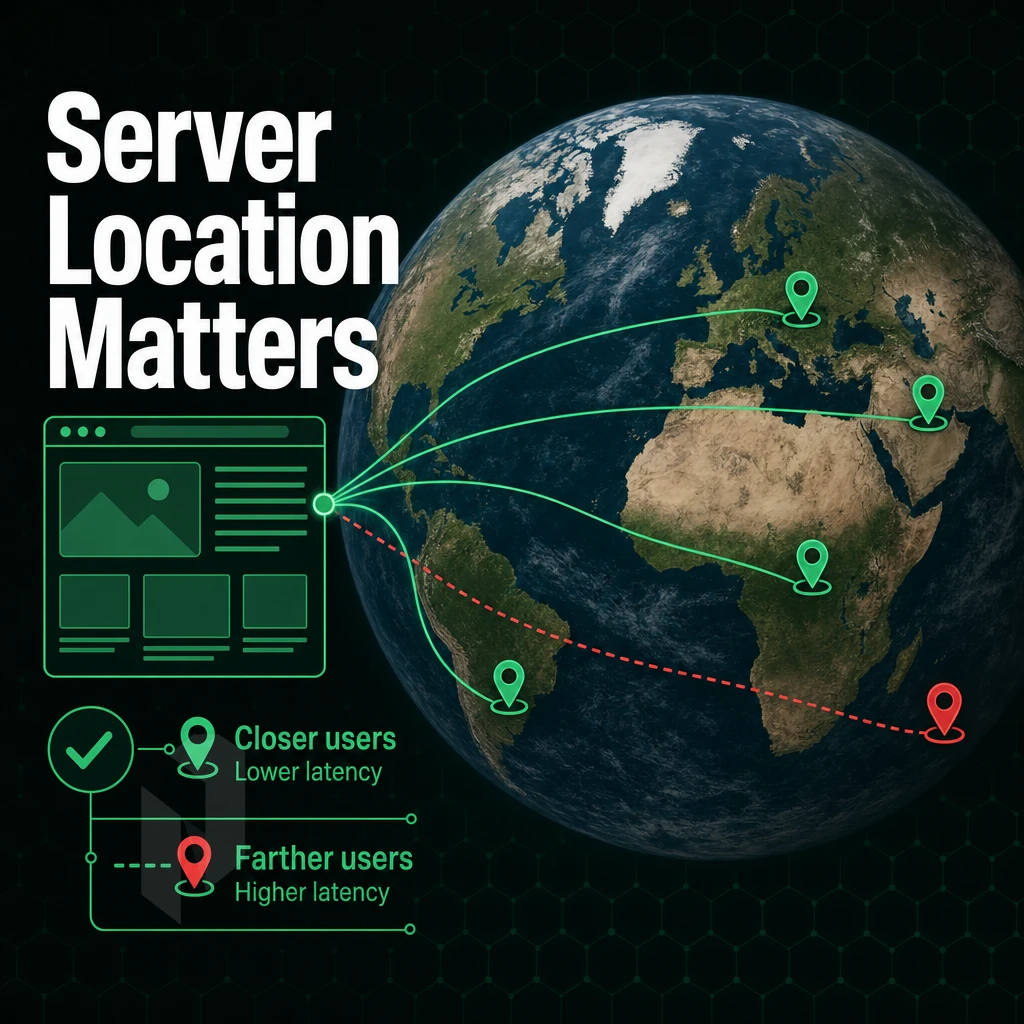
Server location greatly affects the loading time of your WordPress website for visitors. Latency, or time it takes for information to travel between your server and your website visitors, is crucial. This means that a server located in Amsterdam for example will load significantly slower for visitors from Singapore than a server that is physically located much closer to that audience.
This difference is NOT small. While latency across continents can vary from 150ms to 300ms round trip on average per single request, many assets are loaded with each page visit on your WordPress website.
For regional audiences, it is often sufficient to place servers at locations close to the target audience. Hence, a company targeting customers in Germany might choose to place servers in Germany or in a neighboring country with a good interconnect. With bare metal servers in carrier neutral facilities, you choose the location, not some provider’s closest available location.
While a Content Delivery Network (CDN) can help to cache static assets, it does not cache dynamic WordPress content. PHP execution, database queries and other aspects of page generation that are not uncached by the CDN still run from the origin server. Heavy WooCommerce stores, membership sites and news sites with frequent updates to large amounts of content cannot rely on CDN caching to hide a poorly located origin server.
If your organization already runs physical servers, then colocating those servers under a hosting plan, ideally one backed by a money back guarantee, with direct peering to the major Internet exchanges in European and North American cities (such as Frankfurt, Amsterdam and London) means that your WordPress origin will be served on some of the fastest backhaul connectivity in the world. Colocation facilities in these cities are located at Internet exchange points and typically offer latency of sub-10ms to users based in Western Europe.
The ultimate setup for operators who manage multiple sites across regions with separate bare metal servers and replicated databases is to place one origin server per region and use geographic DNS-routing to send visitors to the closest server. This setup is optimal for high-traffic global WordPress sites where a single datacenter would provide a significant latency disadvantage to more than 50% of your visitors.
Choosing the Right WordPress Hosting Plan: A Quick Decision Guide
Three things determine your ideal hosting plan: the amount of traffic your sites receive, how many sites you have, and how much you want to be able to control. A beginner with a low traffic WordPress site will typically do well on a shared or entry-level cloud hosting plan. An agency with multiple WordPress sites will typically need the isolation and control of a managed control-panel server or a scalable cloud compute platform.
A high-traffic business site where downtime will cost you money to repair needs dedicated bare metal hosting with a managed hosting layer to handle patching, monitoring and security. If you need to ensure that your WordPress hosting services are within the EU and that data is kept within European jurisdiction then look for WordPress hosting anchored in Amsterdam, Frankfurt or The Hague.
The best WordPress hosting isn't a single product, it's the right tier matched to your workload. Netrouting's WordPress plans span every level, shared-style cloud entry points with a free domain, fully managed control-panel servers, and enterprise bare metal, all on a 2.4 Tbps+ network with always-on DDoS protection and a 24/7 NOC.
Whatever stage your business sites are at, there's a path that scales without forcing a platform migration later. Explore Netrouting's website hosting options and find the configuration that fits your workload today, and tomorrow.
There are three key decisions when choosing a WordPress host: the infrastructure to grow with, whether to have control or to have managed for you. Additionally, What you cannot live with in terms of guarantees, network and support. Cheap hosting packages will sacrifice performance and reliability against the price of a hosting package. While cheap may be attractive at first, once you start to get some traffic or generate some revenue, the sacrifice is not worth it.
For teams that have outgrown pooled hosting for WordPress, where a free domain and basic resources are the norm, and now need dedicated resources, a reliable backbone, and infrastructure that scales without surprises, a bare metal or cloud compute deployment is the logical next step.
Netrouting runs WordPress workloads across multiple sites spanning ten locations in Europe, North America, and Asia, with always-on DDoS protection, a 99.9% uptime SLA, a money back guarantee, and 24/7 support backed by a one-hour ticket response. Talk to the team to find the right configuration for your site.