
Reverse DNS (an rDNS or PTR record) maps an IP address back to a hostname: normal “forward” DNS, run in reverse. Most people need it so that outbound email is accepted. Mail providers reject mail, or file it as spam, when the sending IP has no PTR or one that doesn't match the sending hostname.
You set reverse DNS yourself: every IPv4 address on every server and cloud instance on your account, plus any address inside a block delegated to one of your servers. There's no ticket and no waiting, because the change goes to our authoritative nameservers the moment you save. For what each server includes, and how to get a block or IPv6, see IP addresses on Netrouting servers.
Before you start: forward-confirm first
Point the PTR at a hostname that already resolves forward to the same IP (an A record that points back at it). That pairing is called forward-confirmed reverse DNS (FCrDNS), and it's the thing mail providers really check.
Example: say you want to give 203.0.113.10 the PTR mail.example.com:
- Start in your own domain's DNS and create the A record
mail.example.com → 203.0.113.10. - Only then set the PTR here:
203.0.113.10 → mail.example.com.
If the hostname in the PTR doesn't resolve back to the IP, the record counts as misconfigured and your mail can still be rejected.
Method 1: In the portal
Open the IP Addresses page in the left-hand menu. It lists every address on your account, grouped under the server or cloud instance that holds it. The groups start collapsed: click a server name to open one, or use Expand all at the top right. The search box filters as you type, on IP, hostname or current rDNS, and the IPv4 / IPv6 pills narrow it further.
A listed address
- Find the row and hover over the rDNS / PTR cell. A pencil icon appears; click it.
- Type the hostname (for example
mail.example.com) and press Enter or click the green tick. Esc backs out without saving. - A green rDNS updated confirmation pops up, and the row now shows the new value.
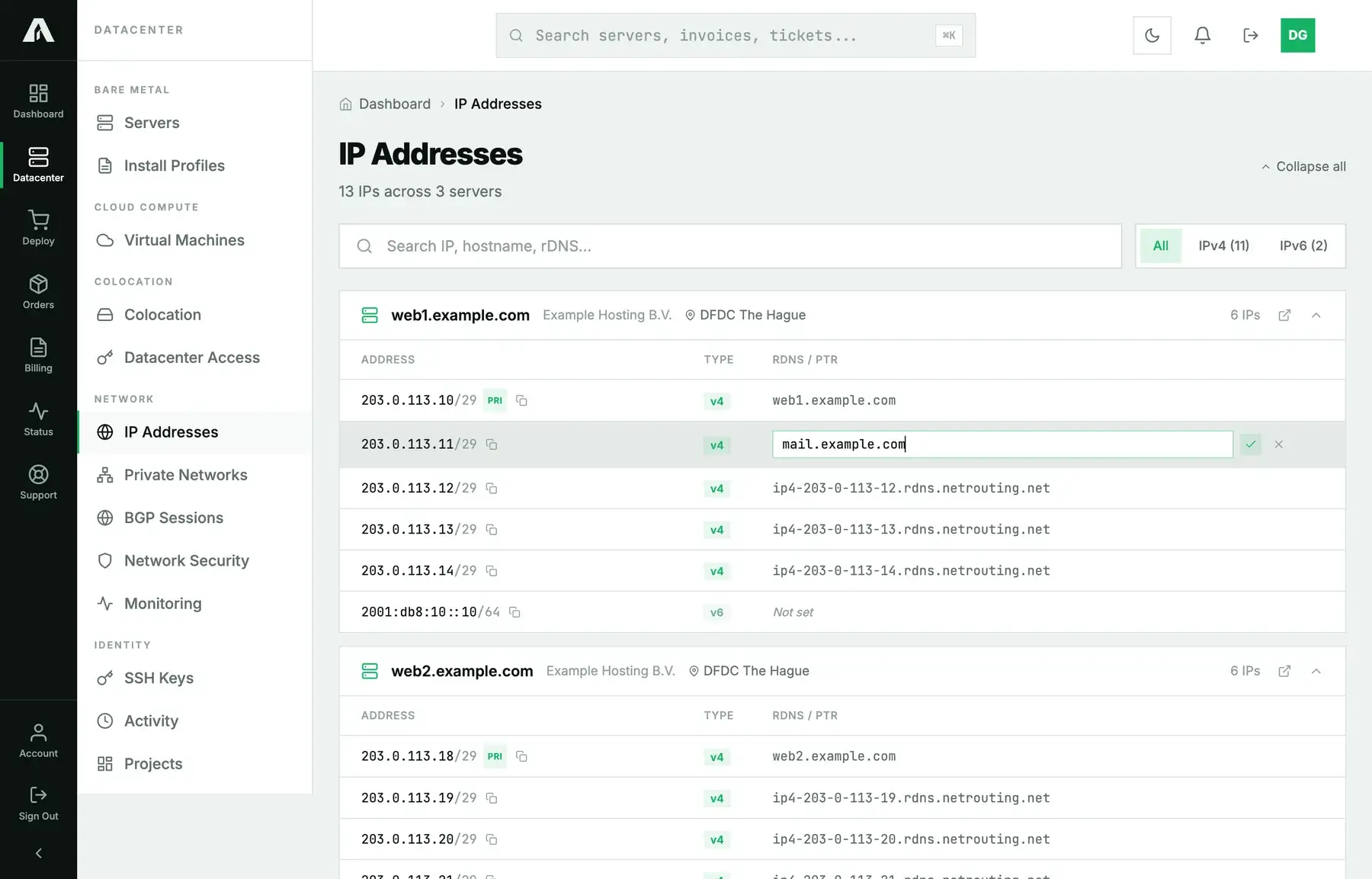
To clear a PTR, open the editor, empty the field and save. A new address may come with a default PTR such as ip4-203-0-113-10.rdns.netrouting.net. Swap it for your own whenever you like.
Any address in a delegated block
When a whole block is delegated to your server (anything from a /29 up to a /23, or an IPv6 /64), every address in it is yours, but only the ones somebody has already named show up as rows. The others aren't listed, and they don't have to be. You can name any of them directly.
- Expand the server. Under Delegated blocks you'll find each block, with its CIDR and usable range.
- On that block, click Set rDNS on an address….
- Enter the address (any usable one from the range) plus the hostname, then save.
- The address shows up as a row with its PTR. It's recorded on our side the first time you name it. The block's network, gateway and broadcast addresses are refused.
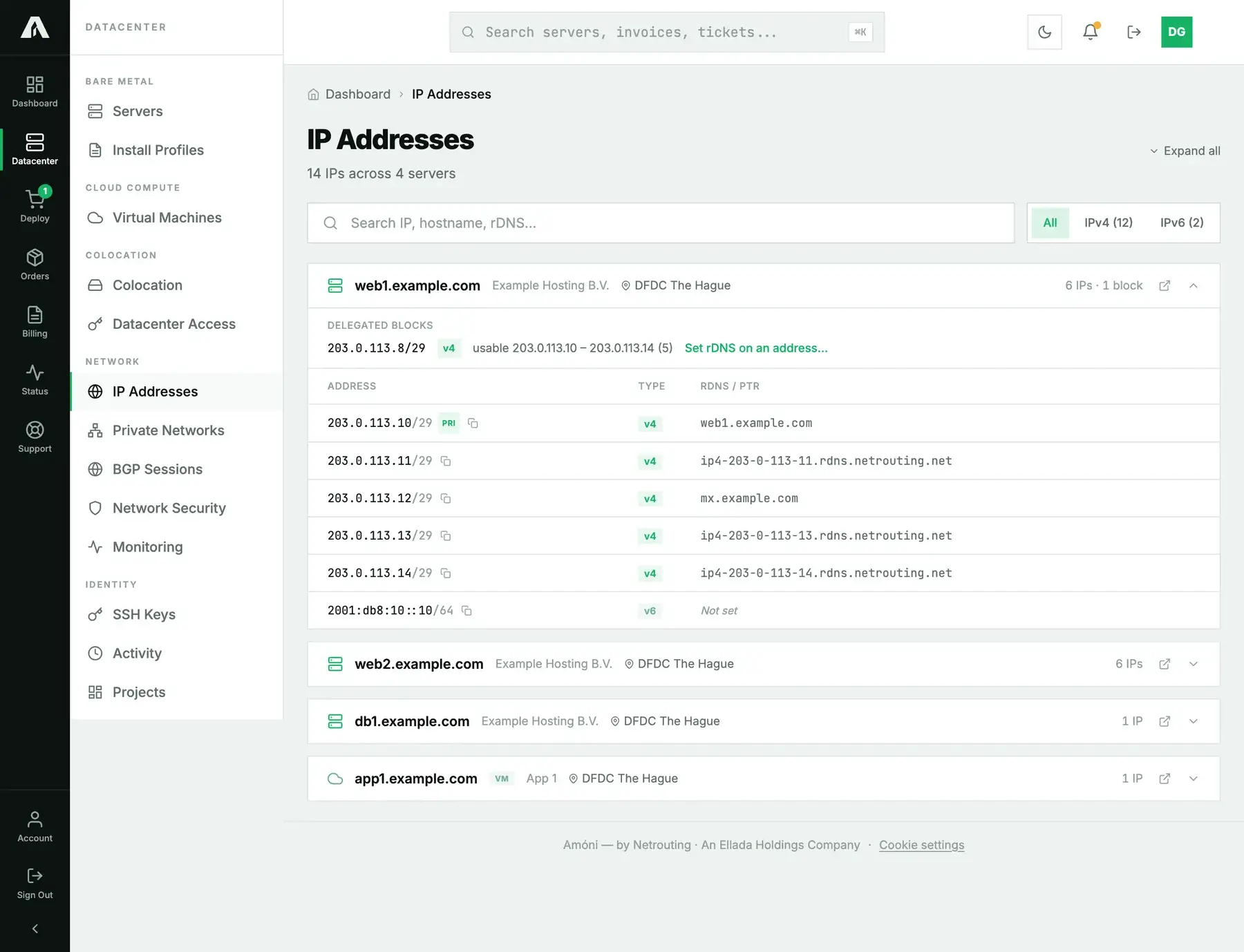
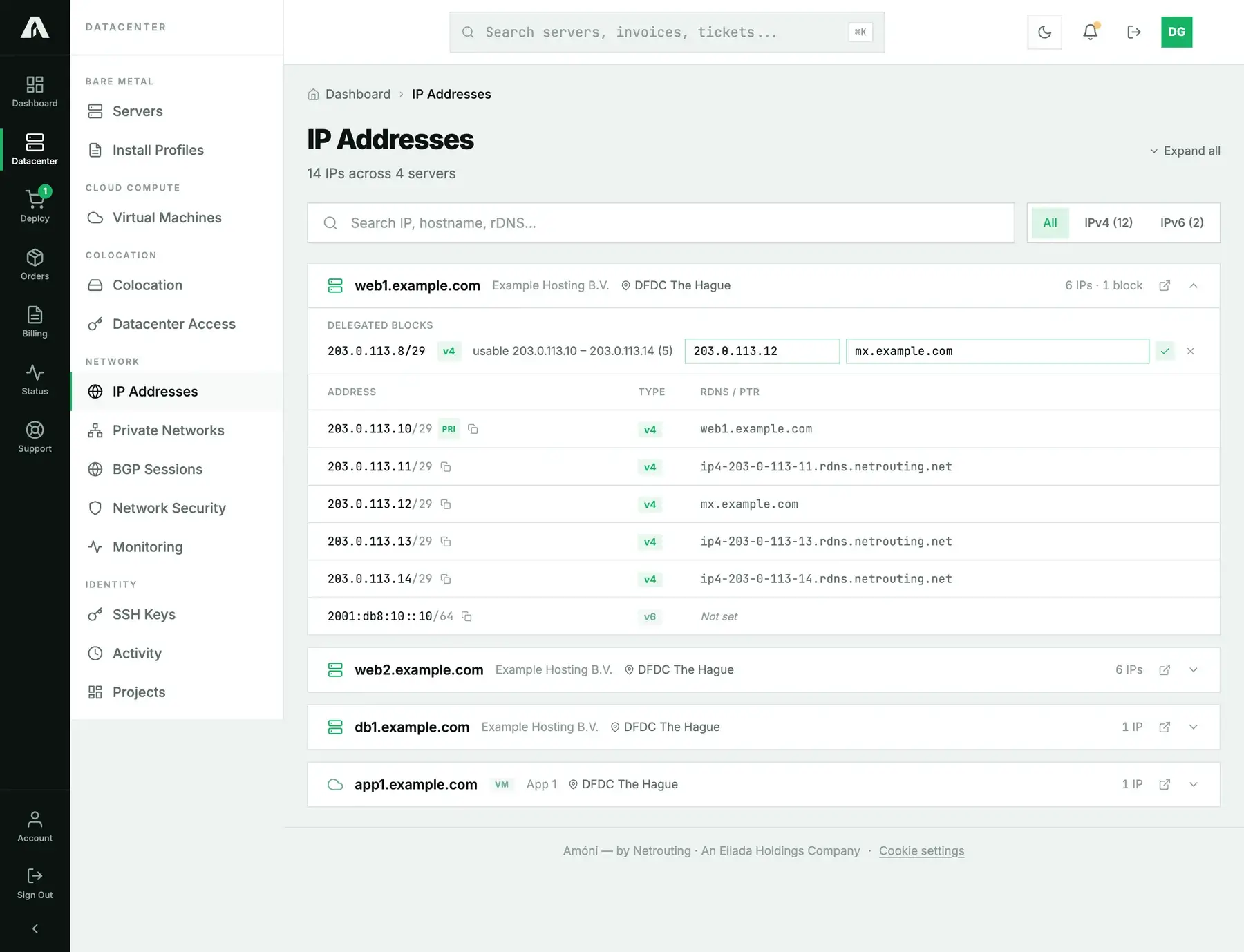
The same form handles reverse DNS for IPv6. A /64 is never enumerated, so you won't find its addresses in rows: you name them through the block form (or the API).
Each change lands on the Activity page as “Set reverse DNS for 203.0.113.10 to mail.example.com”, along with who made it and when.
Method 2: With the API
You need a key with the IPs scope (ips.write). Create one under Account → API Keys, tick IPs, then copy the key as soon as it appears, because it's only shown once. Full reference: api.amoni.app/v1/docs.
You can write a PTR two ways. By address is the one you'll usually want: it works for any address you own, listed yet or not, and it's the only way to name an address inside a large or IPv6 block. Writing by row id still works for addresses that are already listed.
1. List your addresses and blocks
curl -s https://api.amoni.app/v1/ips \
  -H "Authorization: Bearer nr_live_..."
Addresses come back grouped by the resource that holds them, and each server group also lists its delegated blocks under prefixes, usable range included:
{
  "success": true,
  "data": {
    "servers": [
      {
        "id": "srv-1042",
        "type": "server",
        "name": "web1.example.com",
        "location": "Amsterdam",
        "ips": [
          {
            "id": 4821,
            "address": "203.0.113.10",
            "ip_version": 4,
            "dns_name": "ip4-203-0-113-10.rdns.netrouting.net",
            "is_primary": true,
            "prefix_length": 29
          }
        ],
        "prefixes": [
          {
            "id": 524,
            "prefix": "203.0.113.8/29",
            "ip_version": 4,
            "usable_from": "203.0.113.10",
            "usable_to": "203.0.113.14",
            "usable": 5
          }
        ]
      }
    ],
    "total_ips": 1,
    "total_prefixes": 1,
    "total_servers": 1
  }
}
usable holds a count for IPv4 and null for IPv6, since those blocks are too large to count. The listed ips are only the addresses someone has already named. Any other address between usable_from and usable_to is yours to name.
2. Set the PTR by address
Send the address itself plus the hostname, with no id. It works the same for a listed address, an unlisted one inside one of your blocks, and IPv6.
curl -s -X PUT https://api.amoni.app/v1/ips/rdns \
  -H "Authorization: Bearer nr_live_..." \
  -H "Content-Type: application/json" \
  -d '{"address": "203.0.113.12", "dns_name": "mx.example.com"}'
{
"success": true,
"data": {
"id": 11687,
"address": "203.0.113.12",
"dns_name": "mx.example.com",
"created": false,
"message": "Reverse DNS updated."
}
}The response carries the address's id, which you can then pass to PUT /v1/ips/{id}/rdns and GET /v1/ips/{id}. created comes back as true the first time you name an address that wasn't listed yet. To clear a PTR, send an empty string: {"address": "203.0.113.12", "dns_name": ""}.
3. Or set it by id
If the address is already listed under ips, writing by its id works too:
curl -s -X PUT https://api.amoni.app/v1/ips/4821/rdns \
  -H "Authorization: Bearer nr_live_..." \
  -H "Content-Type: application/json" \
  -d '{"dns_name": "mail.example.com"}'
GET /v1/ips/{id} returns just that address with its recorded dns_name. That's the value we hold, not a live lookup.
What the API will tell you
| Status | code |
Meaning |
|---|---|---|
| 200 | none | PTR set or cleared. |
| 401 | invalid_api_key |
The key is wrong, has expired or was revoked. |
| 403 | insufficient_scope |
The key doesn't have ips.write, and required_scope in the body names it. |
| 404 | none | The address isn't yours, or the id isn't on your account. Body: {"success": false, "error": "Not found"}. |
| 422 | address_reserved |
You picked a block's network, gateway or broadcast address: “203.0.113.8 is the network or broadcast address of 203.0.113.8/29 and cannot carry a PTR.” |
| 422 | none | dns_name isn't a valid hostname (letters, digits, dots and hyphens only, 253 characters at most): {"message": "The dns name field format is invalid.", "errors": {"dns_name": ["…"]}}. |
| 429 | none | You hit the rate limit of 120 requests a minute per key. Honor Retry-After. |
Have your code branch on the HTTP status and on code. The error text is meant for people and can be reworded. When a field fails basic validation, the answer comes in the framework's own shape, {"message": "…", "errors": {"field": ["…"]}}, without success or code, so for those, branch on the status alone.
Bulk example: name a whole delegation, no ids
Writing by address turns a whole delegation into a loop over its usable range. With a file ptrs.txt holding one address hostname pair per line:
#!/usr/bin/env bash
KEY="nr_live_..."
while read -r addr name; do
  curl -s -X PUT "https://api.amoni.app/v1/ips/rdns" \
    -H "Authorization: Bearer $KEY" -H "Content-Type: application/json" \
    -d "{\"address\": \"$addr\", \"dns_name\": \"$name\"}" \
    | jq -r --arg a "$addr" '"\($a): \(.data.message // .error)"'
done < ptrs.txt
To build ptrs.txt from the block itself, read prefixes[].usable_from and usable_to from GET /v1/ips and expand the range with your own tooling. Nothing needs to be listed beforehand; naming an address is what puts it on the list.
Verify it
Our nameservers serve the new value right away. Other resolvers may hold on to the old answer until their cached TTL runs out, which means a mail provider checking your PTR can still see the old value for a few minutes. To check from any terminal:
dig -x 203.0.113.12 +short
# or
host 203.0.113.12
The hostname you set should come back. Then make sure the forward side matches:
dig +short mx.example.comTroubleshooting
- No pencil icon on the row. The address is IPv6, and only IPv4 rows can be edited in place. For an IPv6 PTR, use the Delegated blocks form on the server or the API's set-by-address call. Both take IPv6.
- The address I want is not in the list. It doesn't have to be, as long as it sits inside a block delegated to your server. Use Set rDNS on an address… on the block or the API's set-by-address call, and naming it adds it to the list.
- “cannot carry a PTR” on a block address. That's one of the block's structural addresses (network, gateway or broadcast). Choose one from the usable range shown on the block instead.
- “Failed to update reverse DNS. Please try again later.” Our nameserver didn't accept the write, and nothing changed on your side. Try again in a minute, and open a ticket if it keeps happening.
- Mail is still rejected after setting the PTR. Look at the forward record first:
dig +short mail.example.comhas to return the same IP. After that, check that your mail server's HELO/EHLO name is that same hostname. - The API answers 404 for an address you can see in the portal. The key was created on a different account from the one that holds the address, and a key only acts for the account that created it.
- You lease a whole subnet and run your own nameservers. In that case, ask us to delegate the reverse zone to you. Open a ticket with the subnet and the names of your nameservers.
Still stuck?
Open a support ticket from the portal with the IP address and the hostname you want, and choose the server in the “related server” field so whoever picks it up has the context straight away.