
A reinstall does not have to mean the platform's default partitioning and a blank machine. Install profiles are two things you save once and then pick on any server's Reinstall form: a disk layout that says how the disks are partitioned, and a post-install script that runs once the OS has landed. They belong to your account, so any of your servers can use any of them.
The two kinds
- Disk layouts control partitioning: software RAID, LVM, ZFS, partition sizes, a separate
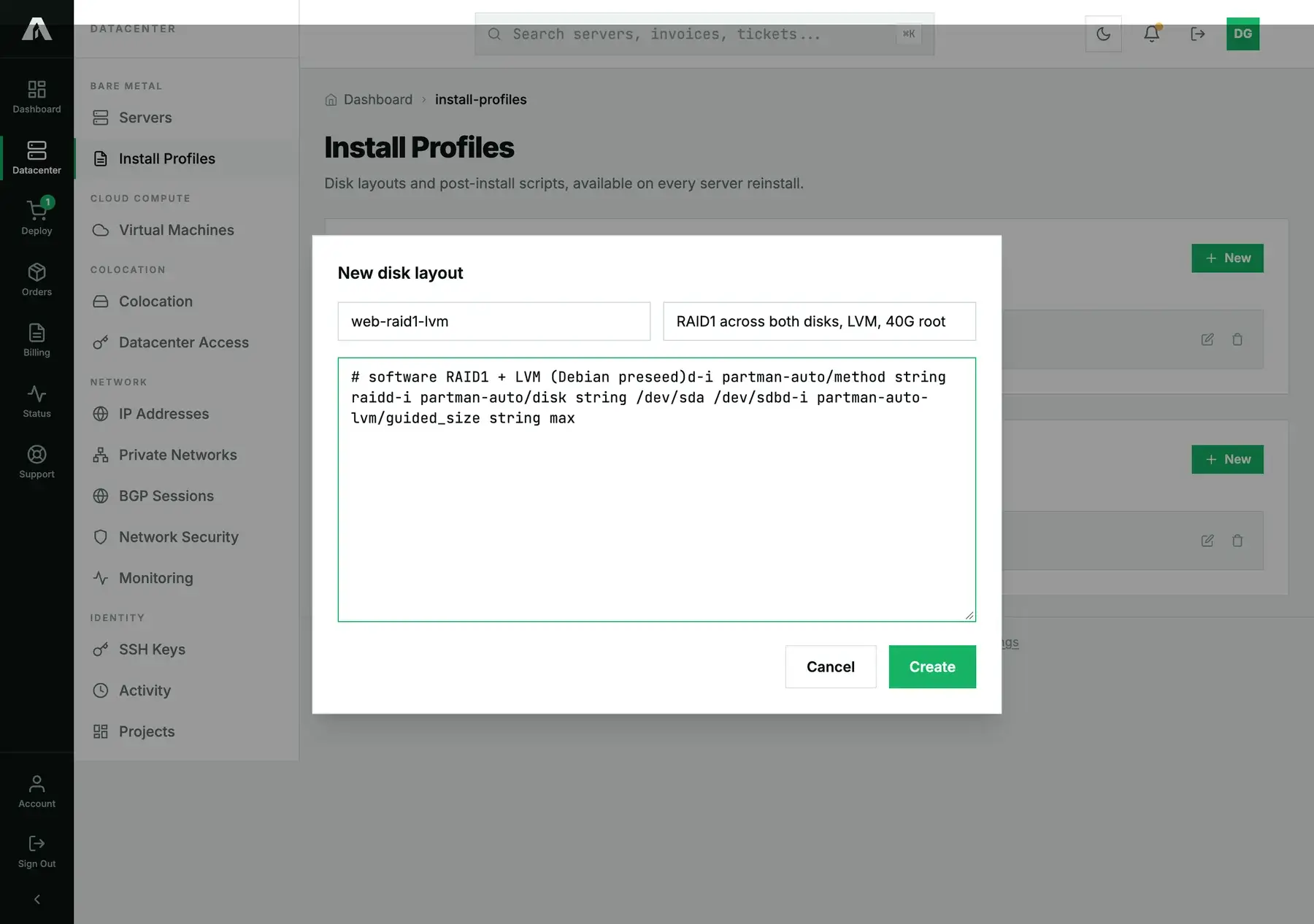
/varor/data. You write them in the installer's own language (a Debian/Ubuntu preseed or autoinstall, a Red Hat kickstart), which is what the installer applies during a reinstall. - Post-install scripts run after the operating system is installed and before the machine is handed back: create a deploy user, disable password logins, open a firewall, pull your configuration management and let it take over.
Alongside your own, the Reinstall form also offers our standard layouts (RAID 0/1/5/10, single disk, ZFS). Those are ready to pick but not readable or editable; this page is where your own layouts and scripts are created and kept.
Create one
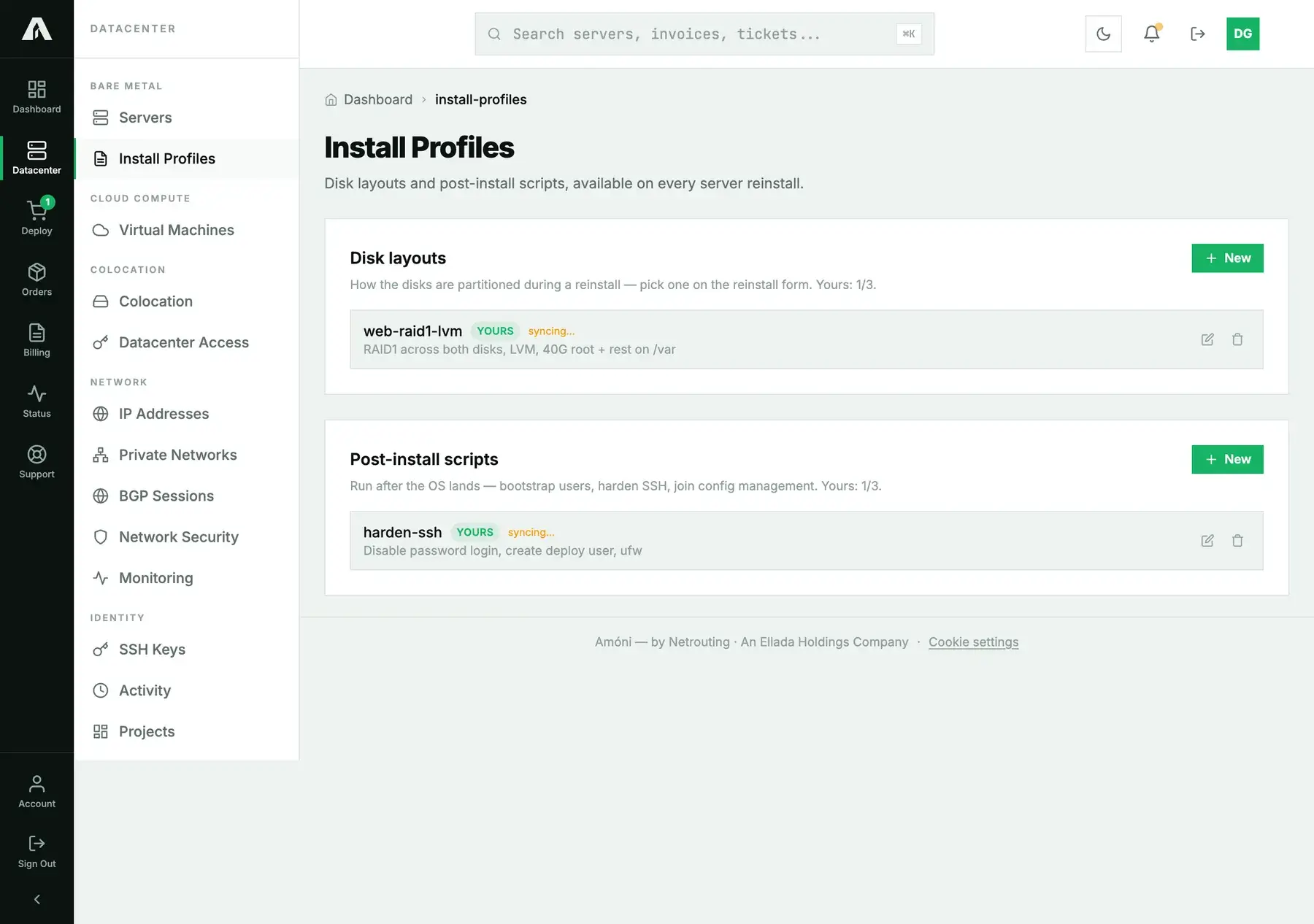
- Open Install Profiles under Bare Metal in the left-hand menu.
- Click New on Disk layouts or Post-install scripts.
- Give it a name and an optional description, paste the content, and save. You can store three of each; the header shows how many you have used.
A new one needs activating first
When you save a custom layout or script it is stored but not yet live: the page marks it syncing, and it will not run on a reinstall until we have added it to the provisioning platform. This is a safety step, so that a layout that would brick a machine is looked at once before any server can boot it. It is usually quick; if a profile stays in syncing for more than a business day, open a ticket. Reinstalls that already used a profile are unaffected by later edits.
Use it on a reinstall
On a server's Reinstall tab, the Disk Layout select has your active layouts under Your layouts (below the standard ones), and your active scripts appear under Post-install scripts as tick boxes. Pick a layout, tick any scripts, and reinstall as usual. Leaving the layout blank uses the image's own default partitioning.
With the API
A key with read lists them; the writes need no special scope beyond a session or a key your account owns. GET /v1/install-profiles returns both kinds in one response:
{
  "success": true,
  "data": {
    "quota": 3,
    "disk_layouts": [
      {
        "id": 1, "name": "web-raid1-lvm",
        "description": "RAID1 across both disks, LVM, 40G root + rest on /var",
        "scope": "client", "mine": true, "editable": true, "active": false,
        "content": "# software RAID1 + LVM\nd-i partman-auto/method string raid\n..."
      }
    ],
    "scripts": [ { "id": 1, "name": "harden-ssh", "active": false, "...": "..." } ],
    "disk_layouts_used": 1,
    "scripts_used": 1
  }
}
Our standard layouts appear with scope: "global" and no content (they are selectable, not readable). Create, edit and delete with POST /v1/install-profiles/disk-layouts, PATCH …/disk-layouts/{id}, DELETE …/disk-layouts/{id}, and the matching /scripts routes. A create answers with the row and a reminder that it is not active yet:
{ "success": true, "data": { "id": 1, "active": false,
  "message": "Saved, but it is not active yet — support has been notified. It will not run on a reinstall until it is." } }
Questions we get
- Can I use one layout on several servers? Yes. Profiles belong to the account, not to a machine.
- What language does a disk layout use? The installer's own: a preseed or autoinstall for Debian and Ubuntu, a kickstart for AlmaLinux, Rocky and the other enterprise Linux images.
- My script did not run. Check it is active (not still syncing) and that you ticked it on the reinstall form. Scripts run once, after the OS install; a failure in the script does not roll back the install.
- Can I store more than three? Three disk layouts and three scripts. Delete one you no longer use, or open a ticket if you genuinely need more.
- Do these work on cloud instances? No; they are for bare-metal reinstalls. Cloud instances use rebuild and cloud-init.
Still stuck?
Open a support ticket with the profile name; we can see why one is not activating, or help with the preseed or kickstart syntax.