
We don't keep your passwords. After an install, a rebuild or a password reset, you see the generated password once, and it's held for 48 hours in case you need to come back for it. Then we delete our copy. That gives “I lost the root password” three possible answers, depending on the kind of machine and how long ago the password was issued:
| Situation | What to do |
|---|---|
| Issued under 48 hours ago (install, rebuild or reset) | Read it back from the machine's Access card or through the API. |
| Cloud instance, issued longer ago | Reset it. You get a new one, and on most instances it works right away. |
| Bare-metal server, issued longer ago | The fastest route is to boot into single-user mode from the console and set a new one. If the system won't start, boot rescue mode instead, or reinstall. |
Deployed SSH keys to the machine? Then root can't log in over SSH with a password, and that's on purpose. You still need the password for the remote console, and it's how you get back in after losing a key.
Method 1: In the portal
Read back a recently issued password
- Log in at amoni.app and go to the server (Servers) or instance (Virtual Machines).
- On the Overview tab, the Access card shows Root password (issued at reinstall) or (issued at reset) as long as we still hold one. It comes with Show and Copy, plus how much longer it stays available.
When the card just says the password isn't stored, either it was issued more than 48 hours ago or you set your own and nothing was generated. Go ahead with a reset.
Cloud instances: reset the password
- Go to the instance's Overview tab, find the Access card and click reset password there. (You'll find the same button on the Settings tab, under Root Password.)
- Confirm. The machine's administrative user gets a new, strong password:
rooton Linux,Administratoron Windows. The dialog tells you which user it set. - Copy it from the New password dialog. This is the only time it's displayed, though it stays under Access for 48 hours. Then click I have saved it.
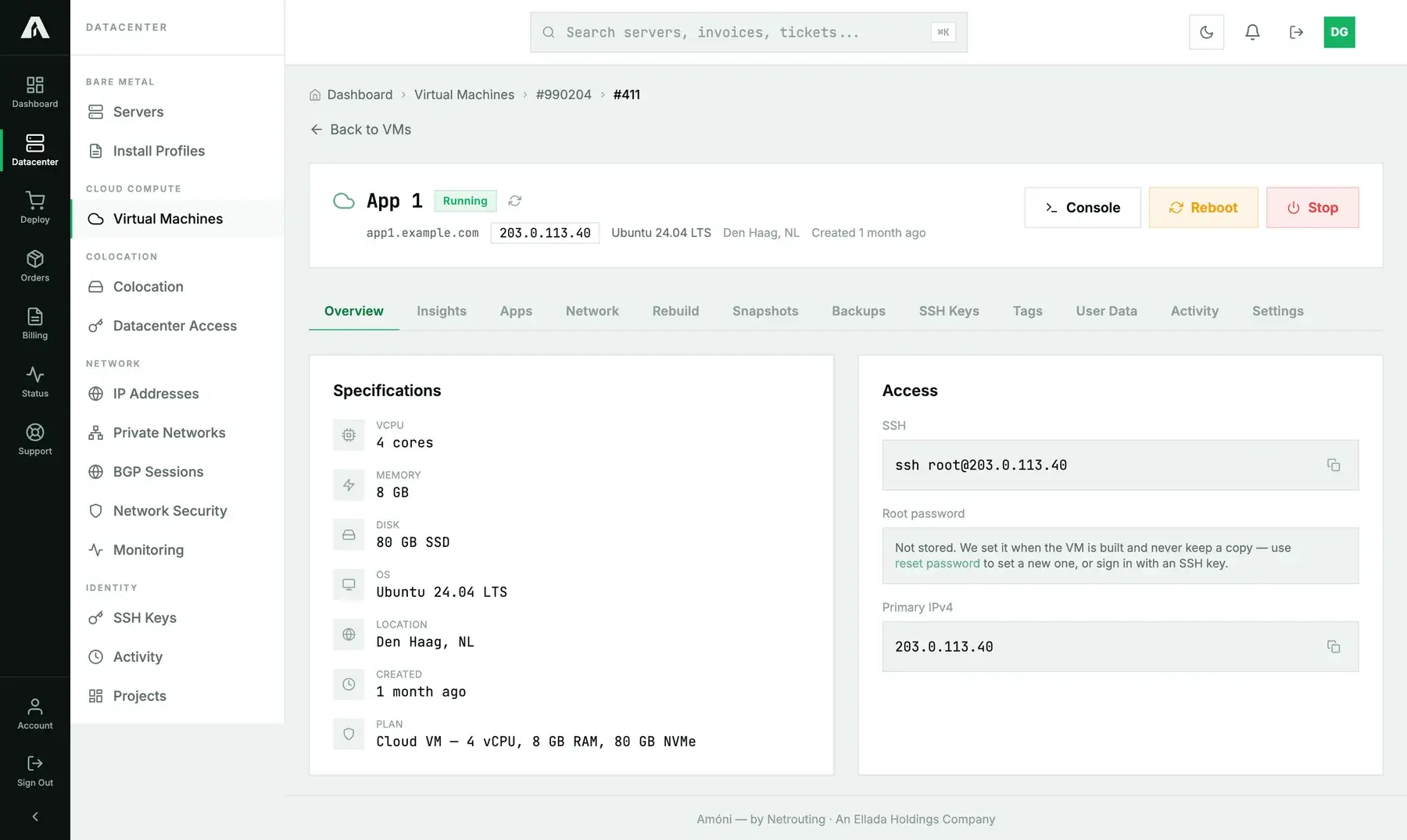
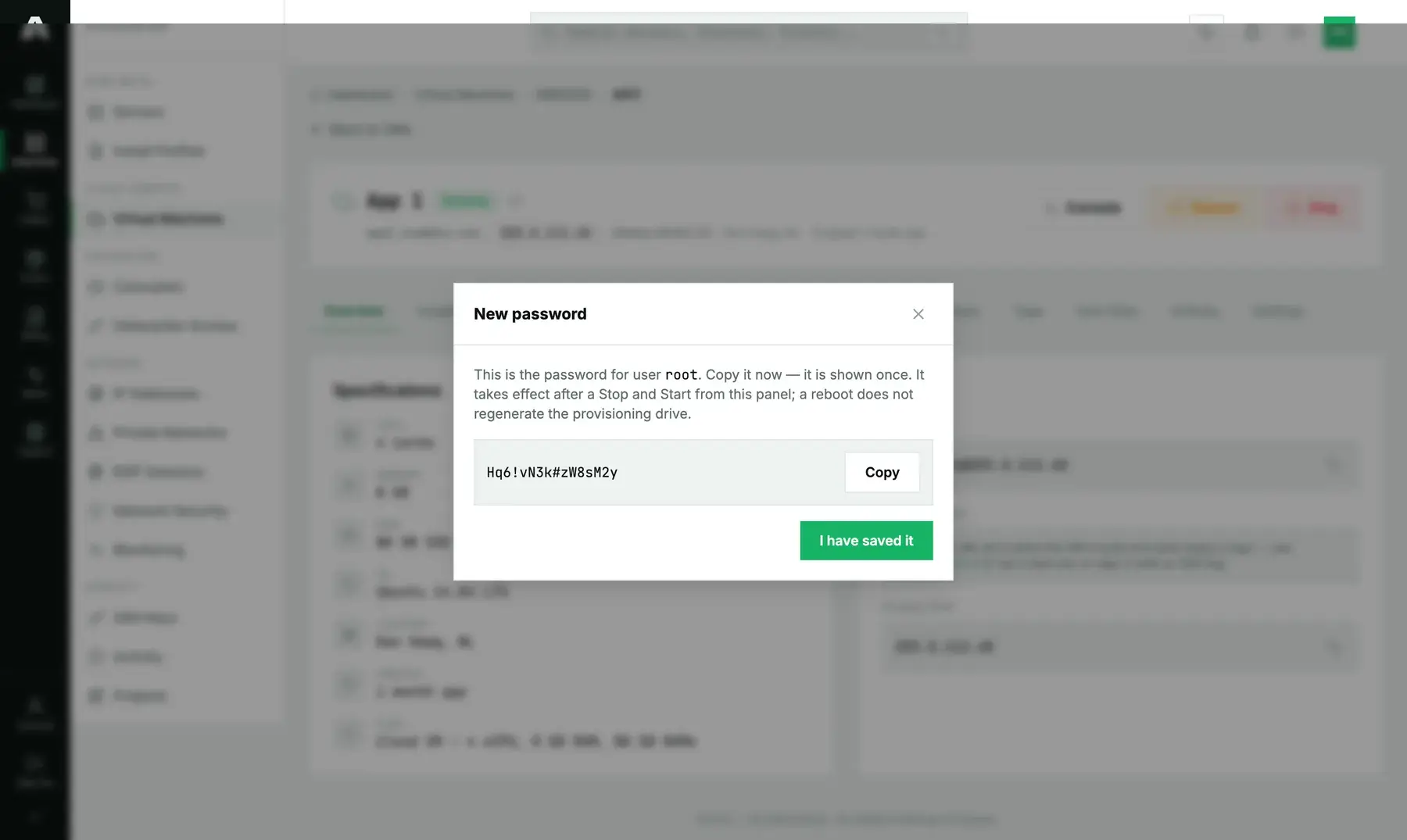
When it takes effect varies by instance. Read the confirmation message, because it tells you which of two things happened:
- It says “active now”: the running system took it through its guest agent. You can log in right away without a reboot.
- It says the password is stored but “NOT active yet”: no guest agent answered on this instance. We've saved the password for the next rebuild, and rebooting won't apply it. To get in now, open the remote console and change the password from inside the system, or boot a rescue image.
Bare-metal servers: set a new password from rescue mode
Bare metal has no reset button. Nothing on our side can reach into your installed system and change a password, so you do it yourself:
- Boot the server into rescue mode and SSH in with the rescue password.
- Mount your installed system and chroot into it:
mount /dev/sda2 /mnt # your root filesystem; check with lsblk -f mount --bind /dev /mnt/dev; mount --bind /proc /mnt/proc; mount --bind /sys /mnt/sys chroot /mnt /bin/bash passwd root exit umount -R /mnt - Reboot from the server header. Your installed system boots with the new password in place.
On Windows, use the Windows recovery template in rescue mode instead. If you can afford to lose the data, a reinstall works too.
Method 2: With the API
Password endpoints need a write scope (servers.write or vms.write), even for a read. The scope follows how sensitive the value is, not which HTTP verb you use. Reference: api.amoni.app/v1/docs.
Read back a held password
curl -s https://api.amoni.app/v1/servers/955/root-password \
  -H "Authorization: Bearer nr_live_..."
# or, for an instance:
curl -s https://api.amoni.app/v1/vms/990204/411/root-password \
  -H "Authorization: Bearer nr_live_..."
{ "success": true, "data": { "password": "Vq7#kL2m!pX9rT4w", "expires_in": 158400 } }404 with code: root_password_unavailable means it either expired or was never generated. You can't tell which, and that's intentional. Once you've saved it yourself, drop our copy early with DELETE on the same path.
Cloud instances: reset
An empty body gets you a generated password. To set your own, send password (12 to 128 characters). We never echo a password you supply, and we never store it.
curl -s -X PUT https://api.amoni.app/v1/vms/990204/411/password \
  -H "Authorization: Bearer nr_live_..." \
  -H "Content-Type: application/json" \
  -d '{}'
{
"success": true,
"data": {
"password": "Hq6!vN3k#zW8sM2y",
"generated": true,
"username": "root",
"applied": "agent",
"message": "Password updated for user \"root\" and active now — no reboot needed."
}
}Branch on applied: agent means the running guest is already using it. pending_rebuild means it's stored for the next rebuild, and until then the console is your way in.
What the API will tell you
| Status | Meaning |
|---|---|
| 200 | The password was read back, or the reset was accepted. |
| 401 / 403 | The key is bad, or it lacks servers.write / vms.write. |
| 404 | Your account has no such machine ({"success": false, "error": "Not found"}), or code: root_password_unavailable when we aren't holding a password. |
| 422 | The password you chose is under 12 characters (framework shape: {"message": "…", "errors": {"password": ["…"]}}). |
| 500 | This instance doesn't support automated configuration. Open a ticket. |
Troubleshooting
- The new password is refused over SSH. There are two likely causes. SSH keys may be deployed, which turns off password login for root (use the key or the console). Or the reset landed as pending rebuild on an instance with no guest agent. The confirmation message and the API's
appliedfield tell you which. - The Access card has no password and it has been more than two days. That's normal. Reset it on a cloud instance, or use rescue mode on bare metal.
- I set my own password during reinstall and forgot it. We never had it. Recover the same way, with a reset or rescue mode.
- Windows: which user?
Administrator. Both the reset dialog and the API'susernamefield name the account the password is for. - I want to stop you holding the password.
DELETEthe root-password endpoint. Or change the password on the machine yourself, which leaves our copy stale and useless to anyone.
Still stuck?
Open a support ticket and select the machine in the “related server” field. We can't give you a password we don't have, but we can get you onto a console and a rescue system fast.