
Each bare-metal server and cloud instance on your account comes with its own power controls. You can reboot, shut down, hard-stop and start a machine yourself, day or night, with no ticket involved. On bare metal the commands go through the server's management controller, and on a cloud instance through the hypervisor. Either way it takes seconds.
Pick the right control before you click, because they don't all treat your data the same way:
| Control | What happens | Use it when |
|---|---|---|
| Shutdown (bare metal) | Asks the operating system to stop, like pressing the power button on a desktop. Filesystems get flushed. A hung OS may ignore it. | You want the machine off, cleanly. |
| Stop | Cuts the power without asking the operating system first. Whatever hasn't reached the disk yet is gone. | The OS is hung and Shutdown had no effect. |
| Reboot | Bare metal: a power cycle (off, then on again) that doesn't consult the OS. Cloud: a reset, which is the same thing done at the hypervisor. | The machine has stopped answering over the network. |
| Start | Turns a stopped machine back on. | Once a Stop or Shutdown has finished. |
| Status (bare metal) | Asks the management controller for the live power state. It changes nothing. | The badge says Unknown, or you want proof an action went through. |
Want a clean restart of a machine that still responds? Log in over SSH and run reboot yourself. The portal's Reboot is the blunt instrument on purpose. It's there for when SSH has stopped working.
Method 1: In the portal
Bare-metal servers
- Log in at amoni.app and open Servers in the left-hand menu.
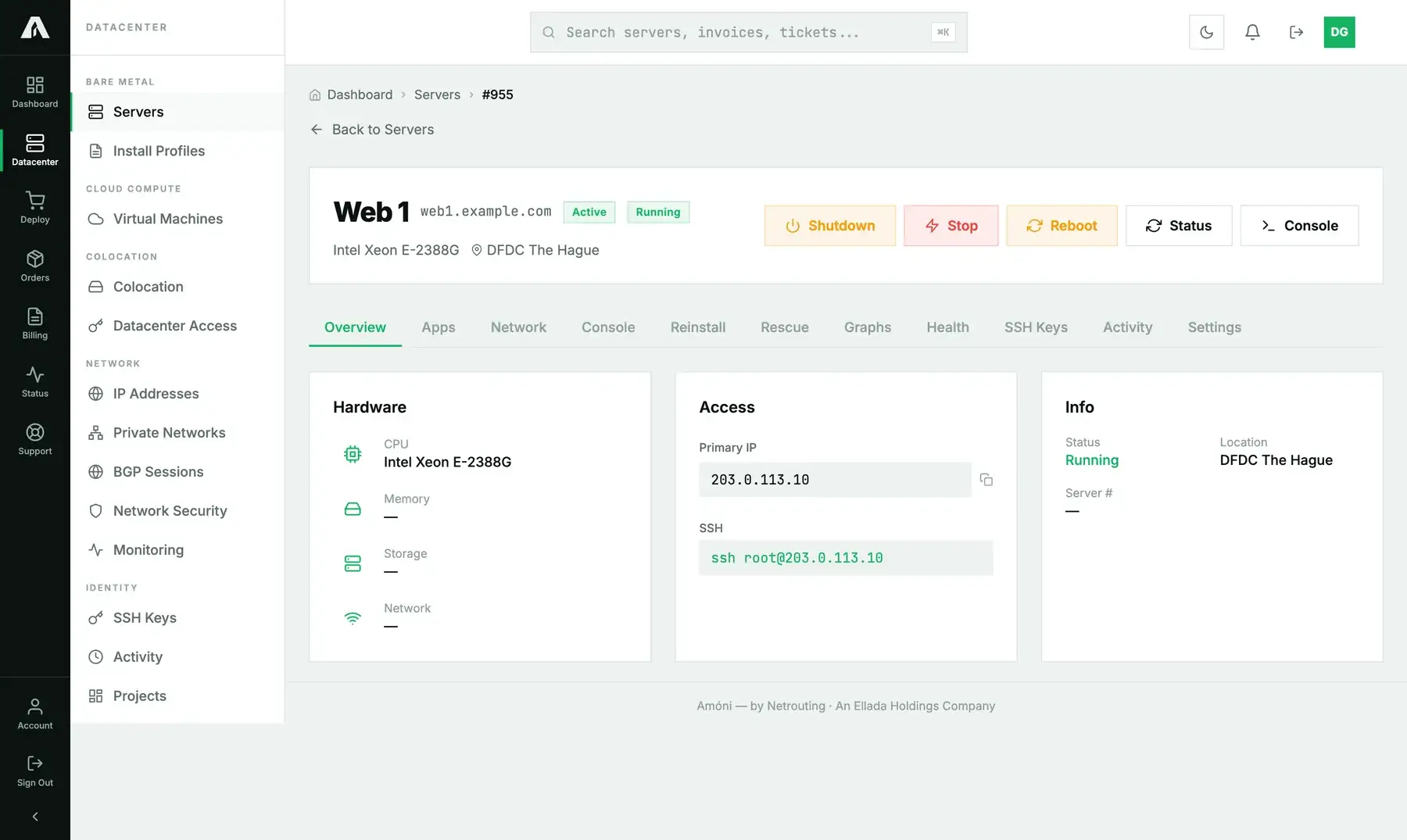
- Click the server. You'll find the power controls at the top right, beside the Running / Stopped badge. As the page loads, the portal fetches the live state from the management controller, so the badge reads checking for a moment first.
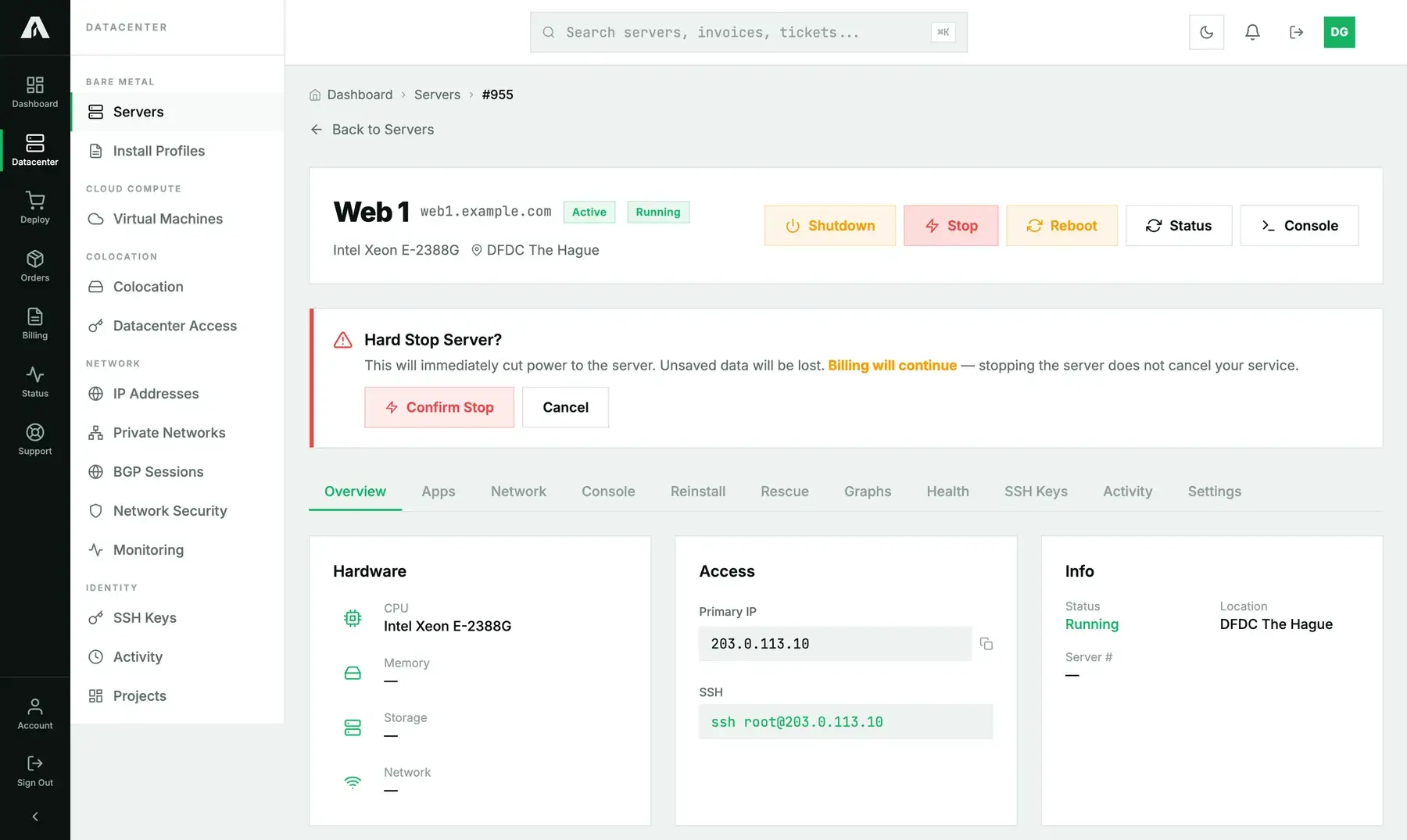
- Pick a control from the table above:
- Shutdown and Reboot run the moment you click.
- Stop wants a confirmation first, since it throws away unsaved data. The same card reminds you that a stopped server is still billed.
- If the server is already stopped, you'll see Start in that row instead.
- Give it a few seconds, then click Status for the new state. A reboot lasts as long as the machine's own POST and boot, which on bare metal is usually one to three minutes.
Cloud instances
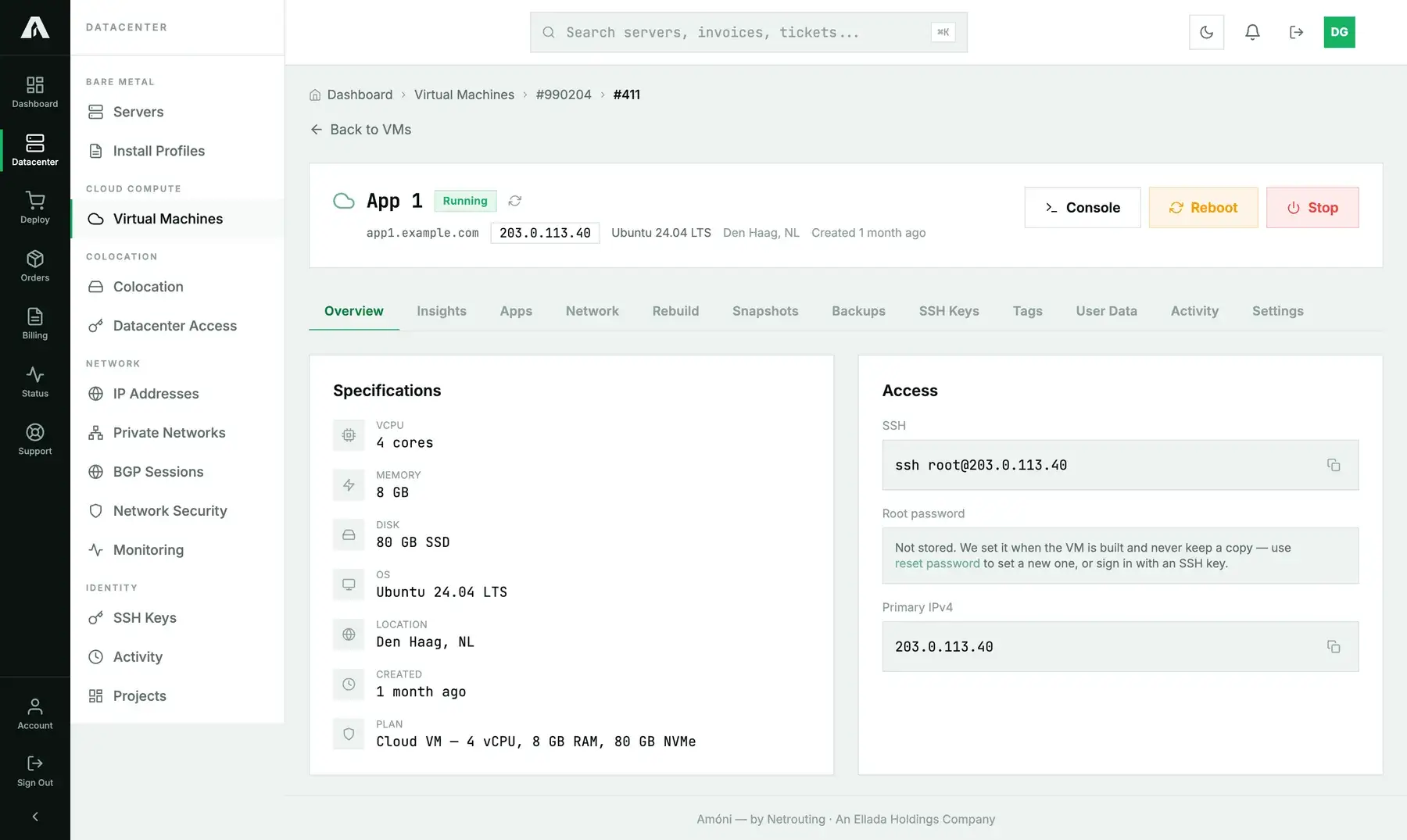
- Open Virtual Machines in the left-hand menu and click the instance.
- The header shows the live state. A running VM gets Console, Reboot and Stop; a stopped one gets Start. To re-read the state from the hypervisor, click the small refresh icon beside the badge.
- Click the action. A confirmation shows up at the top of the page and the badge tracks the machine from there. A stop can take up to half a minute, because the hypervisor waits for the guest. A reboot goes through Stopped on its way back up.
Each power action lands on the Activity page, along with who clicked it and when.
Method 2: With the API
You need an API key with the Servers scope (servers.write) for bare metal, or the VMs scope (vms.write) for cloud instances. Create it under Account → API Keys and copy it right away, because it's only shown once. Full reference: api.amoni.app/v1/docs.
Bare metal
Look up the server id in GET /v1/servers and post the action to it. There are four actions: status, start, shutdown and powercycle.
curl -s -X POST https://api.amoni.app/v1/servers/955/power \
  -H "Authorization: Bearer nr_live_..." \
  -H "Content-Type: application/json" \
  -d '{"action": "powercycle"}'
{ "success": true, "data": { "state": "executed", "status": null } }A start, shutdown or powercycle always answers "state": "executed" with status set to null, on every server. It means the command was accepted. The machine hasn't changed state yet, so there is nothing to report. To read the actual power state, send status, which changes nothing:
curl -s -X POST https://api.amoni.app/v1/servers/955/power \
  -H "Authorization: Bearer nr_live_..." \
  -H "Content-Type: application/json" \
  -d '{"action": "status"}'
{ "success": true, "data": { "state": "Chassis Power is on", "status": "on" } }Here status is normalized to on, off or null (the management controller didn't answer), while state keeps the controller's own wording.
A powercycle returns the moment the controller accepts it, not once the machine is back up. If your script has to wait, poll status:
#!/usr/bin/env bash
KEY="nr_live_..."; ID=955
post() { curl -s -X POST "https://api.amoni.app/v1/servers/$ID/power" \
  -H "Authorization: Bearer $KEY" -H "Content-Type: application/json" -d "{\"action\": \"$1\"}"; }

post powercycle | jq -r '.data.state'
for i in $(seq 1 30); do
  sleep 10
  if nc -z -w 3 203.0.113.10 22; then echo "SSH is back"; break; fi
done
Cloud instances
You address a VM by its billing account id plus its VM id. GET /v1/vms gives you both:
curl -s https://api.amoni.app/v1/vms -H "Authorization: Bearer nr_live_..." \
  | jq '.data.accounts[] | {account_id, vms: [.vms[] | {id, hostname, status}]}'
{ "account_id": 990204, "vms": [ { "id": 411, "hostname": "app1.example.com", "status": "running" } ] }Next, post start, stop or reset. Be aware that stop is not a graceful shutdown.
curl -s -X POST https://api.amoni.app/v1/vms/990204/411/power \
  -H "Authorization: Bearer nr_live_..." \
  -H "Content-Type: application/json" \
  -d '{"action": "reset"}'
For the live state, straight from the hypervisor instead of our cached inventory:
curl -s https://api.amoni.app/v1/vms/990204/411/status \
  -H "Authorization: Bearer nr_live_..."
{ "success": true, "data": { "status": "running", "live": true } }live: false means the hypervisor didn't respond, so what you see is the last state we recorded.
What the API will tell you
| Status | code |
Meaning |
|---|---|---|
| 200 | none | The action was accepted by the controller or hypervisor. |
| 401 | invalid_api_key |
The key is wrong, has expired, or was revoked. |
| 403 | insufficient_scope |
The key is missing servers.write or vms.write. The required_scope field tells you which. |
| 404 | none | Your account has no server or VM with that id. Body: {"success": false, "error": "Not found"}. |
| 422 | none | action isn't one of the allowed values: {"message": "The selected action is invalid.", "errors": {"action": ["…"]}}. |
| 429 | none | Rate limit: 120 requests a minute per key. Wait as long as Retry-After says. |
| 500 | none / power_failed |
Bare metal: we couldn't reach the controller (“The action could not be completed right now. Please try again shortly or contact support.”). Cloud: code: power_failed, “Power action failed. Please try again or contact support.” Try once more, and if that fails, open a ticket. |
About 422s: when the endpoint checks a rule itself (a weak password, a duplicate key, a layout you may not use), the answer comes in the usual envelope. A field that fails basic validation still answers in the framework's own shape for now, {"message": "…", "errors": {"field": ["…"]}}, with no success or code. For those, branch on the HTTP status. We're extending the envelope to cover them.
Troubleshooting
- The badge says Unknown. The management controller didn't reply within the time the page allows. Click Status. If it's still unknown, the controller itself may be unreachable. Power actions can still work in that state, and a ticket gets someone to look at it.
- Shutdown did nothing. A hung operating system will ignore the request. Use Stop or Reboot instead, since neither one needs the OS to cooperate.
- It rebooted but does not come back. Open the remote console and watch where the boot stops. When the disk or boot loader is at fault, rescue mode is how you fix it.
- "Power action failed." The controller either refused or couldn't be reached. Wait a minute and try one more time. If it fails again, open a ticket and include the time of the attempt, so we can find it in the controller's log.
- The cloud VM still shows Running after Stop. The hypervisor waits for the guest to acknowledge, and the portal only keeps watching for about thirty seconds. Click the refresh icon beside the badge, or read
/statusfrom the API. - Reboot on a bare-metal server is a power cycle. If there's a large write cache or a database in the middle of a transaction, you can lose data. As long as SSH works, running
rebootinside the OS is the safer way to restart. - Billing continues while a machine is stopped. A stop changes the power state. It doesn't cancel anything. To end a service, go to the Orders or Billing pages.
Still stuck?
Open a support ticket from the portal, choose the server in the “related server” field, and tell us which control you used and when. The action shows up in your Activity log and in ours, so we can find it fast.