
Every server and cloud instance at Netrouting sits behind our DDoS protection. Attack traffic is detected and filtered at the network edge before it reaches your port; there is nothing to install and nothing to configure. This page explains what that protection covers, and then the one control you have on top of it: blackholing an address of yours so that an attack on it cannot affect the rest of what you run.
What is included
- Always on. Volumetric attacks on any address you hold are mitigated automatically, on bare metal and cloud alike. Your server sees the clean traffic.
- Two tiers. Bare-metal servers include protection up to 20 Gbps. A 50 Gbps premium tier can be chosen per server at checkout, or added later through a ticket.
- Not billed. Attack traffic dropped by the protection does not count towards a metered allowance.
- Application-layer attacks are yours. The protection works on the network layer. A flood of legitimate-looking HTTP requests, a brute force on SSH or RDP, or a slow-loris is something to handle on the server (a firewall rule, a rate limit, fail2ban). For RDP guessing in particular see Windows account locked out.
When to blackhole an address
A blackhole (remotely triggered blackhole, RTBH) tells our upstreams to drop all traffic to one address of yours before it enters our network. The address goes dark for everyone, including you. That sounds like giving the attacker what they want, and sometimes it is exactly right:
- The attack is on one service (a game server, a mail relay, a customer's address) and you would rather lose that one than have the whole server or the neighbouring addresses degraded while it lasts.
- The attack saturates the port before the filtering has fully engaged, and you need the machine back for everything else it does.
- You are a reseller and one customer's address is drawing fire at the expense of the others.
Two rules make it safe to use. A blackhole is temporary: you choose how long, from 15 minutes to 24 hours, and it lifts itself when the time runs out, so a forgotten blackhole cannot become a permanent outage. And it is per address: a single IP, never a range, so you cannot take out more than you meant to. Blackholing the primary address of a server makes the machine unreachable including for you; the portal and the API both ask you to confirm that on purpose.
Method 1: In the portal
- Log in at amoni.app and open Network Security under Network in the left-hand menu.
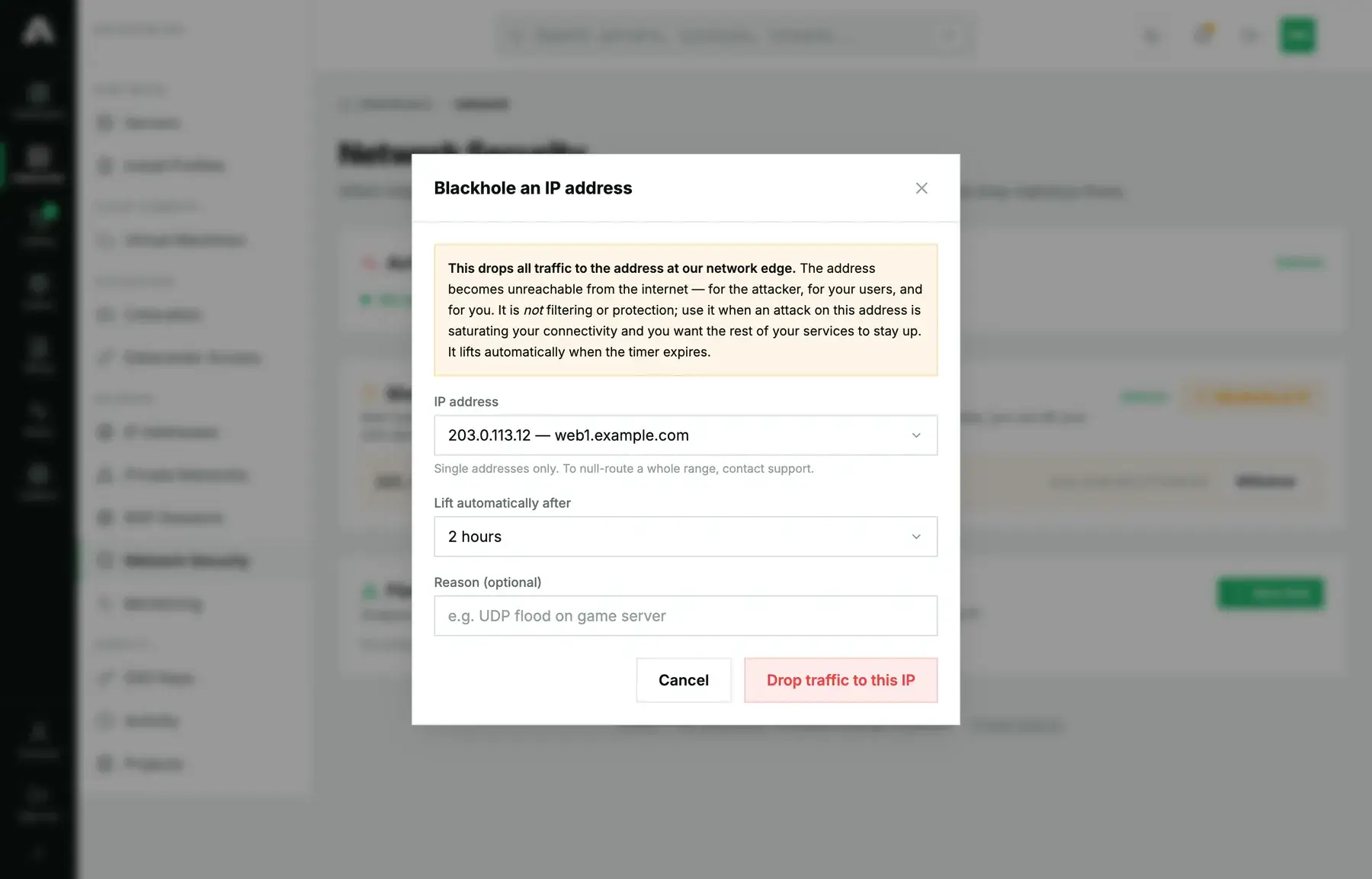
- In the Blackhole (RTBH) card, click Blackhole an IP.
- Pick the IP address. The list holds every IPv4 address on your account, with the server it belongs to.
- Choose Lift automatically after: 1, 2, 4, 8 or 24 hours. Pick the shortest time you can live with; you can always announce it again.
- Add a reason if you like. It shows in the list and in the activity log, which helps when someone else on the account wonders why an address is dark.
- Click Drop traffic to this IP. The route is announced within a minute and the card shows the address as active with the time it was announced.
To lift it early, click Withdraw on the row. Traffic resumes within a minute. Blackholes you did not announce yourself (ones our network operations team placed) show without a Withdraw button; open a ticket if you think one should be lifted.

Method 2: With the API
This is the one to script. The moment you need a blackhole is not the moment to be looking for a login form; a monitoring alert can call this for you. You need a key with the Network scope (network.write). Reference: api.amoni.app/v1/docs.
1. See what is active.
curl -s https://api.amoni.app/v1/blackhole \
  -H "Authorization: Bearer nr_live_..."
{ "success": true, "data": [] }2. Announce. ip is required; duration_minutes is 15 to 1440 and defaults to a safe value if omitted; reason is free text up to 200 characters.
curl -s -X POST https://api.amoni.app/v1/blackhole \
  -H "Authorization: Bearer nr_live_..." \
  -H "Content-Type: application/json" \
  -d '{"ip": "203.0.113.11", "duration_minutes": 120, "reason": "volumetric attack on mail relay"}'
{
"success": true,
"data": {
"prefix": "203.0.113.11/32",
"expires_in_minutes": 120,
"message": "Traffic to 203.0.113.11/32 is now dropped at our network edge. The blackhole lifts automatically in 120 minutes."
}
}Listing again shows the entry with its id, which you need to withdraw it:
{
  "success": true,
  "data": [
    {
      "id": "a3f03ba393954d78a1aa5bc40b505068",
      "prefix": "203.0.113.11/32",
      "status": "active",
      "since": "2026-09-21T17:23:20Z",
      "action": "discard",
      "withdrawable": true
    }
  ]
}
3. Withdraw early.
curl -s -X DELETE https://api.amoni.app/v1/blackhole/a3f03ba393954d78a1aa5bc40b505068 \
  -H "Authorization: Bearer nr_live_..."
{ "success": true, "data": { "message": "The blackhole for 203.0.113.11/32 has been withdrawn. Traffic resumes within a minute." } }To blackhole a server's primary address from the API, add "confirm_primary": true to the request; without it the call is refused with the explanation below, so a script cannot take a machine offline by accident.
What the API will tell you
| Status | code |
Meaning |
|---|---|---|
| 201 | none | Announced. expires_in_minutes says when it lifts. |
| 403 | not_your_address |
The address is not on your account. |
| 403 | insufficient_scope |
The key lacks network.write; required_scope names it. |
| 409 | already_blackholed |
That address is already dark. Withdraw first if you want a new timer. |
| 422 | confirm_primary |
The address is a server's primary address. Repeat with confirm_primary: true. |
| 422 | single_address_only |
You sent a prefix. One address per call; for a range, contact support. |
| 422 | too_many_active |
Ten blackholes are already active. Withdraw one, or contact support. |
| 422 | none | duration_minutes outside 15 to 1440. Framework shape: {"message": "The duration minutes field must be at least 15.", "errors": {…}}. |
| 404 | not_found |
No blackhole with that id on your account (on withdraw). |
| 429 | rate_limited |
Too many announcements this hour. Under a sustained attack, contact support rather than retrying. |
| 503 | unavailable |
The mitigation platform did not answer. Retry once, then open a ticket marked urgent. |
While it is active
The address answers nothing, from anywhere. Services bound to other addresses on the same server keep working, and the server itself is reachable over its other addresses and over the remote console. The Graphs tab of the server shows the traffic drop off the moment the route is accepted. When the timer expires, or you withdraw, traffic resumes within a minute; if the attack is still running, our protection is still in front of it.
Questions we get
- Should I blackhole at the first sign of an attack? No. The protection handles most attacks on its own. Blackhole when a single address is drawing enough fire to hurt the rest, or when you would rather sacrifice that service than degrade the others.
- Does a blackhole stop the attack being billed? Dropped attack traffic is not billed either way.
- Can I blackhole an IPv6 address? Not yet from the portal or the API. Open a ticket.
- Can I blackhole a whole /29? Not self-service; single addresses only. For a range, open a ticket and say why.
- I want to filter a port, not the whole address. Do that on the server: the VM firewall on cloud instances, the operating system's firewall on bare metal.
- How do I know an attack is happening at all? The Graphs tab shows inbound traffic that does not match your outbound; the status page shows network-wide events; and an uptime monitor (see uptime monitoring) tells you when a service stops answering.
Still stuck?
Open a support ticket and mark it Urgent if the attack is ongoing; say which address, since when, and what you have already blackholed. Our network operations engineers see the attack telemetry and can filter more precisely than a blackhole.